Forum Discussion

TheDub
Jul 10, 2024Iron Contributor
Another Issue with previous row/column references
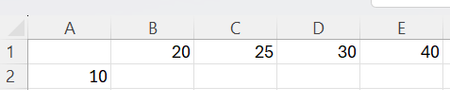
This is a (simpler, I believe) variant of referring to PREVIOUS rows/columns issue but I still can't get my head around it: Given this: I want to insert in B2 a dynamic function which will sh...
- Jul 10, 2024
TheDub For a single row of data, the SCAN function can be used with cell A2 as the initial_value and range B1:E1 as the array:
=SCAN(A2, B1:E1, LAMBDA(a,v, v-a))This can be copied down in column B as needed, to apply the function to multiple rows. However, if you want a single dynamic array formula to cascade downwards, spilling an array of arrays, it gets a bit more complicated. One possible solution is to use TEXTJOIN to store the results of each row, then TEXTSPLIT to access the data from the previous row:
=LET(
    results, SCAN(TEXTJOIN("|",, B1:E1), A2:A5, LAMBDA(a,v, TEXTJOIN("|",, SCAN(v, TEXTSPLIT(a, "|"), LAMBDA(p,c, c-p))))),
    --TEXTBEFORE(TEXTAFTER("|" & results & "|", "|", SEQUENCE(, COLUMNS(B1:E1))), "|")
)
The results of the double-SCAN will return a single column of delimited text strings...
Delimited Results
...which are then split into the final 2D array using TEXTBEFORE and TEXTAFTER.
Final Results


Harun24HR
Jul 10, 2024Silver Contributor