Forum Discussion

lhb09876
May 24, 2023Copper Contributor
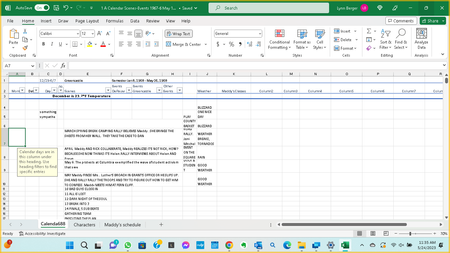
An orange description box pops

HansVogelaar
May 24, 2023MVP
It's the Input Message of a Data Validation rule.
Data Validation can be found in the Data Tools group of the Data tab of the ribbon.

lhb09876
May 24, 2023Copper Contributor
I don't know what that means or where to look. Please help me.
- HansVogelaarMay 25, 2023MVP
Select the cell that causes the popup.
Activate the Data tab of the ribbon:
In the Data Tools group, click Data Validation:
If you want to remove the popup, click Clear All:
If you want to view or edit the message, activate the Input Message tab:
- lhb09876May 28, 2023Copper ContributorThanks, I’ll try that.
I have another problem in excel that tech support couldn’t solve. When I open excel I can scroll but within 10 minutes scrolling stops working: the screen won’t move up/down, side to side.- HansVogelaarMay 28, 2023MVP
Does that happen in other applications, for example in Word?