Forum Discussion

lhb09876
May 24, 2023Copper Contributor
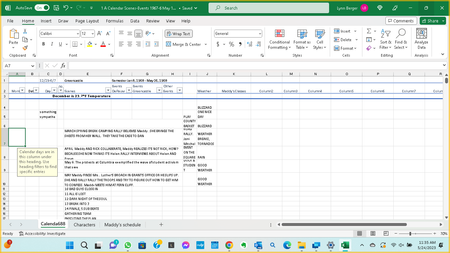
An orange description box pops

HansVogelaar
May 24, 2023MVP
It's the Input Message of a Data Validation rule.
Data Validation can be found in the Data Tools group of the Data tab of the ribbon.
 lhb09876May 30, 2023Copper ContributorThere’s a more important issue:
Scrolling stops in excel after using the app for 5-10 minutes. I’ve had a reinstall and it didn’t work. Can anyone help?- lhb09876May 30, 2023Copper ContributorNo, I haven’t gotten resolution on my problem with Excel. Very frustrated by being told, “I don’t know how to solve it.”
Isn’t the Microsoft I’ve known since Windows began. That long. Very unhappy and may tell the story about being blown-off. - lhb09876May 24, 2023Copper ContributorI don't know what that means or where to look. Please help me.
- HansVogelaarMay 25, 2023MVP
Select the cell that causes the popup.
Activate the Data tab of the ribbon:
In the Data Tools group, click Data Validation:
If you want to remove the popup, click Clear All:
If you want to view or edit the message, activate the Input Message tab:
- lhb09876May 28, 2023Copper ContributorThanks, I’ll try that.
I have another problem in excel that tech support couldn’t solve. When I open excel I can scroll but within 10 minutes scrolling stops working: the screen won’t move up/down, side to side.