Forum Discussion

Shawn French
Sep 13, 2018Tin Contributor
Advanced Conditional Hyperlink Help!
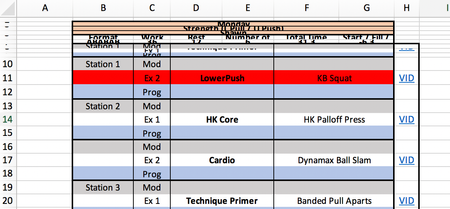
In the above format, I need the hyperlink in cell H11 to reference cell F11 and locate it in sheet 'LowerPush' as seen below. I currently have created the hyperlink so it references cell A1 in ...

JKPieterse
Sep 13, 2018Silver Contributor
Change your formula to:
=HYPERLINK(CONCATENATE("#'", D11, "'!A1"), "VID")

Shawn French
Sep 14, 2018Tin Contributor
Hi Jan- Thank you for the response.
When I make the above change adding the apostrophe's, it still refers to !A1, not the cell containing the text from F in the original sheet.
Do you have another idea? Thank you!
- SergeiBaklanSep 14, 2018Diamond Contributor
Perhaps
=HYPERLINK("#'" & D11 & "'!A" & MATCH(F11,INDIRECT("'" & D11 & "'!A:A"),0),"VID")- Shawn FrenchSep 14, 2018Tin Contributor
IT WORKED! First, I am very surprised I typed it correctly on the first try. Second, this is awesome! Thank you!
- SergeiBaklanSep 14, 2018Diamond Contributor
You are welcome
