Forum Discussion

MARK3
Oct 30, 2025Copper Contributor
Adding to a formula
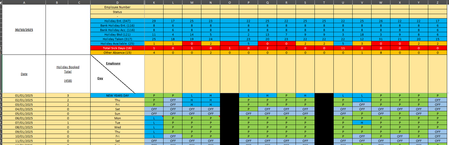
Hello, I need to add more to the formula we currently have, but not sure how to add it in. how can i add the value of L & PH so it takes 1 away for the value of L and 0.5 away for PH. (Holiday b...

Riny_van_Eekelen
Oct 31, 2025Platinum Contributor
You need to add a COUNTIFS( ) for each of code. So, in your first formula the first COUNTIFS [if_true] would become three COUNTIFS like this:
    COUNTIFS(
        $A$13:$A$377, ">=" & $A$1 + 1,
        $A$13:$A$377, "<=" & $A$377,
        Q13:Q377, "H"
    ) -
    COUNTIFS(
        $A$13:$A$377, ">=" & $A$1 + 1,
        $A$13:$A$377, "<=" & $A$377,
        Q13:Q377, "L"
    ) -
    COUNTIFS(
        $A$13:$A$377, ">=" & $A$1 + 1,
        $A$13:$A$377, "<=" & $A$377,
        Q13:Q377, "PH"
    ) * 0.5
You need to do that also for the [if_false] argument. And similar for the 2nd formula.
- Kidd_IpOct 31, 2025MVP
How about this:
Holiday Booked Cell
=IF('SetUp Tab'!$E$6="No",
    COUNTIFS($A$13:$A$377,">="&$A$1+1,$A$13:$A$377,"<="&$A$377,Q13:Q377,"H")
    - COUNTIFS($A$13:$A$377,">="&$A$1+1,$A$13:$A$377,"<="&$A$377,Q13:Q377,"L")
    - 0.5 * COUNTIFS($A$13:$A$377,">="&$A$1+1,$A$13:$A$377,"<="&$A$377,Q13:Q377,"PH"),
    COUNTIFS($A$13:$A$378,">="&$A$1+1,$A$13:$A$378,"<="&$A$378,Q13:Q378,"H")
    - COUNTIFS($A$13:$A$378,">="&$A$1+1,$A$13:$A$378,"<="&$A$378,Q13:Q378,"L")
    - 0.5 * COUNTIFS($A$13:$A$378,">="&$A$1+1,$A$13:$A$378,"<="&$A$378,Q13:Q378,"PH")
)
Holiday Taken Cell
=IF('SetUp Tab'!$E$6="No", COUNTIFS($A$13:$A$377,">="&$A$13,$A$13:$A$377,"<="&$A$1,Q13:Q377,"H") - COUNTIFS($A$13:$A$377,">="&$A$13,$A$13:$A$377,"<="&$A$1,Q13:Q377,"L") - 0.5 * COUNTIFS($A$13:$A$377,">="&$A$13,$A$13:$A$377,"<="&$A$1,Q13:Q377,"PH"), COUNTIFS($A$13:$A$378,">="&$A$13,$A$13:$A$378,"<="&$A$1,Q13:Q378,"H") - COUNTIFS($A$13:$A$378,">="&$A$13,$A$13:$A$378,"<="&$A$1,Q13:Q378,"L") - 0.5 * COUNTIFS($A$13:$A$378,">="&$A$13,$A$13:$A$378,"<="&$A$1,Q13:Q378,"PH") )- Riny_van_EekelenNov 01, 2025Platinum Contributor
Kidd_Ip How about what? Wasn't that what I wrote earlier. You merely completed the formula as I suggested.
?????
