Forum Discussion

JHALECHEMLAB
Sep 07, 2023Copper Contributor
Adding auto-change date cell with data cell
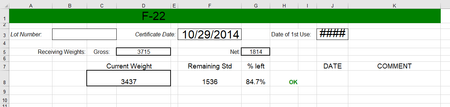
In this spreadsheet I am wanting to have cell 8J update to the current date anytime the data in cell 8C is changed. Is there a simple formula for this without doing VBA codes?

JHALECHEMLAB
Sep 07, 2023Copper Contributor
Thanks for the quick response. I found another thread discussing something similar and tried to copy the VBA code that was given in that thread & substitute my desired cells but it did not work for me. If you have suggestions on a VBA code that would work for this function I'm trying to achieve that would be much appreciated and I will give that another try.

HansVogelaar
Sep 07, 2023MVP
Right-click the sheet tab.
Select 'View Code' from the context menu.
Copy the following code into the worksheet module:
Private Sub Worksheet_Change(ByVal Target As Range)
    ' Add or remove cells as needed, separated by commas, for example "C8,C15,C22"
    Const Cells2Watch = "C8"
    Dim Rng As Range
    If Not Intersect(Range(Cells2Watch), Target) Is Nothing Then
        Application.ScreenUpdating = False
        Application.EnableEvents = False
        For Each Rng In Intersect(Range(Cells2Watch), Target)
            If Rng.Value = "" Then
                Range("J" & Rng.Row).ClearContents
            Else
                Range("J" & Rng.Row).Value = Date
            End If
        Next Rng
        Application.EnableEvents = True
        Application.ScreenUpdating = True
    End If
End Sub
Switch back to Excel.
Save the workbook as a macro-enabled workbook (*.xlsm).
Make sure that you allow macros when you open the workbook.
- JHALECHEMLABSep 07, 2023Copper ContributorThis worked, thank you so much!!