Forum Discussion

JHALECHEMLAB
Sep 07, 2023Copper Contributor
Adding auto-change date cell with data cell
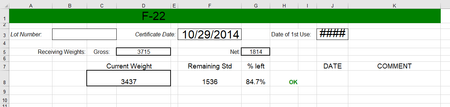
In this spreadsheet I am wanting to have cell 8J update to the current date anytime the data in cell 8C is changed. Is there a simple formula for this without doing VBA codes?

HansVogelaar
Sep 07, 2023MVP
If you want to enter the current date (or date and time) in J8 the first time C8 is filled, you can use a formula.
If you want J8 to change each time C8 is changed, you'd need VBA code.
 JHALECHEMLABSep 07, 2023Copper ContributorThanks for the quick response. I found another thread discussing something similar and tried to copy the VBA code that was given in that thread & substitute my desired cells but it did not work for me. If you have suggestions on a VBA code that would work for this function I'm trying to achieve that would be much appreciated and I will give that another try.
- HansVogelaarSep 07, 2023MVP
Right-click the sheet tab.
Select 'View Code' from the context menu.
Copy the following code into the worksheet module:
Private Sub Worksheet_Change(ByVal Target As Range)
    ' Add or remove cells as needed, separated by commas, for example "C8,C15,C22"
    Const Cells2Watch = "C8"
    Dim Rng As Range
    If Not Intersect(Range(Cells2Watch), Target) Is Nothing Then
        Application.ScreenUpdating = False
        Application.EnableEvents = False
        For Each Rng In Intersect(Range(Cells2Watch), Target)
            If Rng.Value = "" Then
                Range("J" & Rng.Row).ClearContents
            Else
                Range("J" & Rng.Row).Value = Date
            End If
        Next Rng
        Application.EnableEvents = True
        Application.ScreenUpdating = True
    End If
End Sub
Switch back to Excel.
Save the workbook as a macro-enabled workbook (*.xlsm).
Make sure that you allow macros when you open the workbook.
- JHALECHEMLABSep 07, 2023Copper ContributorThis worked, thank you so much!!