Forum Discussion

Adding a unique customer # after every 5th row
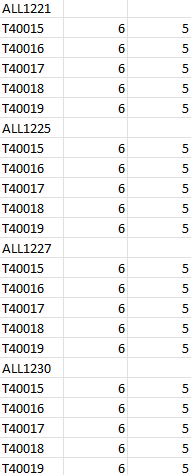
 Apr 01, 2024
Sub items() Dim i, j As Long Range("A:C").Clear j = 1 For i = 1 To 1200 If i Mod 6 = 1 Then Cells(i, 1).Value = Cells(j, 11).Value j = j + 1 Else Select Case i Mod 6 Case Is = 2 Cells(i, 1).Value = "T40015" Case Is = 3 Cells(i, 1).Value = "T40016" Case Is = 4 Cells(i, 1).Value = "T40017" Case Is = 5 Cells(i, 1).Value = "T40018" Case Is = 0 Cells(i, 1).Value = "T40019" End Select Cells(i, 2).Value = 6 Cells(i, 3).Value = 5 End If Next i End SubIn the attached file you can click the button in cell E2 to run the macro which enters the unique customer id's from range K1:K200 in column A.
Sub items()

Dim i, j As Long

Range("A:C").Clear

j = 1
For i = 1 To 1200

If i Mod 6 = 1 Then
Cells(i, 1).Value = Cells(j, 11).Value
j = j + 1
Else

Select Case i Mod 6

Case Is = 2
Cells(i, 1).Value = "T40015"
Case Is = 3
Cells(i, 1).Value = "T40016"
Case Is = 4
Cells(i, 1).Value = "T40017"
Case Is = 5
Cells(i, 1).Value = "T40018"
Case Is = 0
Cells(i, 1).Value = "T40019"


End Select

Cells(i, 2).Value = 6
Cells(i, 3).Value = 5


End If

Next i

End Sub
In the attached file you can click the button in cell E2 to run the macro which enters the unique customer id's from range K1:K200 in column A.
 Gurpreet20Apr 30, 2024Copper Contributor
Hi Oliver. Hope you're doing well.
The code you'd created has been working well and I've been using pretty much every day. However, I was hoping if you can adjust the code to reflect the following changes in the attached spreadsheet.
- The stores will now have a classification code - A,B,C,D (mentioned in column J) and based on this classification they will receive different items and quantities at different costs which all I've mentioned in other sheets named storeA, storeB etc.
Is it possible for the code to look in those sheets and automatically update quantities and cost in the main sheet "Tabelle1"?
- Right now there are 200 stores in column K of the sheet Tabelle1. Let's say I only want to do orders for 50 stores (combined A,B,C,D).
Could the values be automatically be updated in columns A through D when I enter 50 stores numbers in column K and their corresponding store classification in column J?
Lastly, column D with "HEADER" rows requires last 4 digits of the store # which can be grabbed from either column C or column K plus add this default value of "KRU".
Variable values for the following columns but only for rows with "HEADER" text. If the code can grab the values from "Values" sheet that would be great.
Column E = Order date
Column F = Ship date
Column H = Comment
Column I = Comment1Thanks.
- OliverScheurichApr 30, 2024Gold Contributor
Hi Gurpreet, i hope you're doing well too.
In your last message you wrote:
Could the values be automatically be updated in columns A through D when I enter 50 stores numbers in column K and their corresponding store classification in column J?
Does this mean that you want to enter store numbers in column K and the classification in column J and have the results updated without running the macro by clicking the button which is now in cell W4? This could be possible with a worksheet change event. Does the code return the intended result if you run it by clicking cell W4? If so i could try to write the code for the worksheet change event.
In sheets StoreA, StoreB, StoreC and StoreD i've removed the headers which simplifies the code considerably. I hope this is ok with you.
- Gurpreet20May 02, 2024Copper Contributor
Hi Oliver,
Yes, the macro in cell W4 is returning the intended result. No changes required. I ran a couple of tests and everything is working as it should. This is no short of "WOW"
 A big thanks to you for this code
I'm a newbie to VBA, and would like to learn and get better at (at least basic) coding. Any resources you'd recommend?
- Gurpreet20Apr 02, 2024Copper Contributor
OliverScheurichThank you so very much. This is so helpful
It would usually take me over an hour to do this whereas now I can do this in seconds. Amazing!!I wanted to ask if each item has different cost and quantity, how would I go about updating in the code?
Also, is it possible to make the following changes to the code/file when I run macro?
- Insert a new column to the left where word "HEADER" is assigned to each customer # and word "LINE" is assigned to each item #. This will be column A
- Move all customer #s to column C just above the first quantity for each item
- Add word "NEXT" for each customer # in column B which would be adjacent to customer # and the header column A.
The website is not letting me attach the file so, I've copied the screenshot of changes (highlighted in yellow) that I'd like to see in the file. Thanks again

- OliverScheurichApr 02, 2024Gold Contributor
Sub items()

Dim i, j, k As Long

Range("A:D").Clear

j = 1
k = 0
For i = 1 To 1200

If i Mod 6 = 1 Then

k = k + 1

Cells(i, 1).Value = "HEADER"
Cells(i, 2).Value = "NEXT"
Cells(i, 3).Value = Cells(j, 11).Value
j = j + 1

Else

Cells(i, 1).Value = "LINE"

Select Case i Mod 6

Case Is = 2
Cells(i, 2).Value = "T40015"
Cells(i, 3).Value = Cells(k, 12).Value
Cells(i, 4).Value = Cells(k, 13).Value

Case Is = 3
Cells(i, 2).Value = "T40016"
Cells(i, 3).Value = Cells(k, 14).Value
Cells(i, 4).Value = Cells(k, 15).Value

Case Is = 4
Cells(i, 2).Value = "T40017"
Cells(i, 3).Value = Cells(k, 16).Value
Cells(i, 4).Value = Cells(k, 17).Value

Case Is = 5
Cells(i, 2).Value = "T40018"
Cells(i, 3).Value = Cells(k, 18).Value
Cells(i, 4).Value = Cells(k, 19).Value

Case Is = 0
Cells(i, 2).Value = "T40019"
Cells(i, 3).Value = Cells(k, 20).Value
Cells(i, 4).Value = Cells(k, 21).Value

End Select

End If


Next i

End Sub
You are welcome. I'm glad you found my suggestion helpful.
You can run the adjusted macro in the attached file by clicking the button in cell F2. In this example the different cost and quantity for an item are in the adjacent columns to the customer # in column K. For example for the customer in K1 the cost and quantity for item T40015 are in cells L1 and M1 and the cost and quantity for item T40016 are in cells N1 and O1 and so on.
- Gurpreet20Apr 08, 2024Copper Contributor