Forum Discussion

action based on cell selection
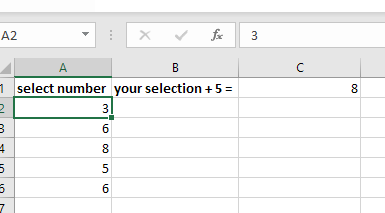
- Apr 19, 2022
To achieve that, place the following codes on Sheet Module and to do that follow these steps...
1. Right click on Sheet Tab Name and choose View Code.
2. Paste the codes given below into the opened code window.
3. Save your file as Macro-Enabled Workbook.
Sheet Module Codes:
Private Sub Worksheet_SelectionChange(ByVal Target As Range)
If Target.CountLarge > 1 Then Exit Sub
Dim NumToSum    As Long
If Target.Column = 1 And Target.Row > 1 Then
    Range("C1").ClearContents
    If Target <> "" And IsNumeric(Target.Value) Then
        NumToSum = getNumber(Range("B1").Value)
        If NumToSum <> 0 Then
            Range("C1").Value = NumToSum + Target.Value
        End If
    End If
End If
End Sub

Function getNumber(ByVal str As String) As Long
Dim Matches As Object

With CreateObject("VBScript.RegExp")
    .Global = False
    .Pattern = "\d+"
    If .test(str) Then
        Set Matches = .Execute(str)
        getNumber = Matches(0)
    End If
End With
End Function
Please find the attached with codes in place.


You're welcome drdree73!
- drdree73Aug 08, 2023Brass Contributor
Hi Subodh,
A question on related. For each Stock, date range is fixed by Cells Z2 and Z3 (see screenshot).
What if I want to have the range set per Stock, as indicated by Buy and Sell column.So,
if i navigate to APPLE, date range shows Closing price from 1/9/2021 (Cell G3) to 6/7/2023 (Cell H3)
Subsequently,
if i navigate to TESLA, date range shows Closing price from 6/5/2022 (Cell G5) to 8/8/2023 (Cell H5)How would Sheet Module Code need to look (if at all possible 😲)
Thank you!- Subodh_Tiwari_sktneerAug 12, 2023Silver Contributor
- drdree73Aug 13, 2023Brass Contributoryes great! i'll try to add some graphs now!
Thank you!