Forum Discussion

Access Analytic Power Query challenge: Ticket list
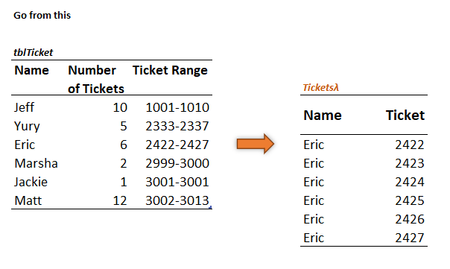

This is my second attempt and I think a bit more refined than the first attempt.
'TixStack' - I've used MAP with two arrays (Number, Range). I've extracted the starting ticket # from 'range' and with the help of SEQUENCE and 'number', I generate the series of tickets. String 'em up when done and then split into rows.
=LET(m,MAP(number,range,LAMBDA(e,f,TEXTJOIN(",",,SEQUENCE(e,,TEXTBEFORE(f,"-"))))),joined,TEXTJOIN(",",,m),1*TEXTSPLIT(joined,,","))
NameStack - Repeat each person's name as indicated by 'number'. Join them with commas, split into rows while ignoring blanks from extra commas.
=LET(RepNames,REPT(name&",",number),joined,TEXTJOIN(",",,RepNames),TEXTSPLIT(joined,,",",1))
Roll the above along with a header into 'BigTicket'
=LAMBDA(stack1,stack2,VSTACK({"Name","Ticket"},HSTACK(stack1,stack2)))
Call at the sheet level:
=BigTicket(NameStack,TixStack)
I shall now take a step back and review your solution. Thanks for providing this challenge!

I have now run through your solution.
Your use of delimited strings has eliminated some of the nested array issues and is pretty straightforward to read. We have noticeably different programming styles with me using many more local variables with longer names and over multiple rows. You use greater levels of nesting but far more concise overall.
Something that would help me immensely is a development environment in which I could step through a calculation, probably just returning the values of LET variables to the active cell.
- Patrick2788Nov 23, 2022Silver Contributor
The new AFE is a step in the right direction. Admittedly, I wasn't taken by the previous release, but I may get in the habit of using AFE more and you may start to see more line breaks in my formulas!
Something that may be useful in a development environment would be simplicity with the flexibility of an engine like PowerQuery. I probably don't use PQ as much as I should because I prefer worksheet functions, but I do appreciate the ease of un-doing steps. I get to play with the data in PQ and not break anything, if that makes sense.