Forum Discussion

Access Analytic Power Query challenge: Ticket list
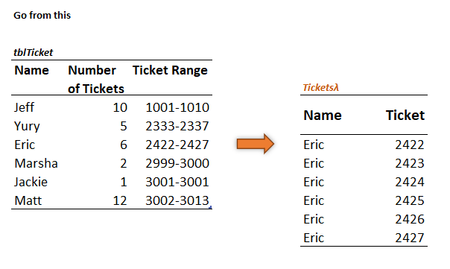

This is my second attempt and I think a bit more refined than the first attempt.
'TixStack' - I've used MAP with two arrays (Number, Range). I've extracted the starting ticket # from 'range' and with the help of SEQUENCE and 'number', I generate the series of tickets. String 'em up when done and then split into rows.
=LET(m,MAP(number,range,LAMBDA(e,f,TEXTJOIN(",",,SEQUENCE(e,,TEXTBEFORE(f,"-"))))),joined,TEXTJOIN(",",,m),1*TEXTSPLIT(joined,,","))
NameStack - Repeat each person's name as indicated by 'number'. Join them with commas, split into rows while ignoring blanks from extra commas.
=LET(RepNames,REPT(name&",",number),joined,TEXTJOIN(",",,RepNames),TEXTSPLIT(joined,,",",1))
Roll the above along with a header into 'BigTicket'
=LAMBDA(stack1,stack2,VSTACK({"Name","Ticket"},HSTACK(stack1,stack2)))
Call at the sheet level:
=BigTicket(NameStack,TixStack)
I shall now take a step back and review your solution. Thanks for providing this challenge!
- PeterBartholomew1Nov 23, 2022Silver Contributor
I have now run through your solution.
Your use of delimited strings has eliminated some of the nested array issues and is pretty straightforward to read. We have noticeably different programming styles with me using many more local variables with longer names and over multiple rows. You use greater levels of nesting but far more concise overall.
Something that would help me immensely is a development environment in which I could step through a calculation, probably just returning the values of LET variables to the active cell.
- Patrick2788Nov 23, 2022Silver Contributor
The new AFE is a step in the right direction. Admittedly, I wasn't taken by the previous release, but I may get in the habit of using AFE more and you may start to see more line breaks in my formulas!
Something that may be useful in a development environment would be simplicity with the flexibility of an engine like PowerQuery. I probably don't use PQ as much as I should because I prefer worksheet functions, but I do appreciate the ease of un-doing steps. I get to play with the data in PQ and not break anything, if that makes sense.
- PeterBartholomew1Nov 23, 2022Silver Contributor
I have every sympathy with your approach. It is not the answer that is interesting, it is the challenge and the process of reaching a solution. Only then do alternative approaches become interesting, especially so if they add to one's own skillset for future deployment.
I will post again on this thread because I went on to address another PQ/BI challenge on Wyn Hopkins site to see whether standard Excel formulas. I got a somewhat messy solution to a somewhat messy problem - par for the course. Then I realised that my 'scan over records' Lambda function was equally applicable to the new problem. In each case the problem-specific part was processing a single record. The calling Lambda helper function will simply stack the output from each record.
- PeterBartholomew1Nov 24, 2022Silver Contributor
I have tracked back to the earlier PQ Challenge!
Power Query Cost Allocation Challenge - YouTube
I first tried to solve it as a 'one off'. Then I decided to change track and reuse the 'Scan Table' helper function as part of the solution. It didn't make the solution any shorter but, by working record by record, I was able to include the sequence letters "A","B","C" that I had ignored before.
- Patrick2788Nov 25, 2022Silver Contributor
I think there may be some similarities (The second solution in the sheet) in our approach to 'unpivoting' the data but we differ in creating the array for 'row labels' (To use a PivotTable term).
'ReShape
=LAMBDA(header,range,LET(
    n, MAX(COUNTIF(TAKE(range, , 1), UNIQUE(TAKE(range, , 1)))),
    team, TAKE(range, , 2),
    StackA, CHOOSEROWS(team, INT(SEQUENCE(ROWS(team) * n, , 1, 1 / n))),
    StackB, WRAPROWS(TOCOL(DROP(range, , 2)), 2),
    matrix, HSTACK(StackA, StackB),
    filtered, FILTER(matrix, TAKE(StackB, , 1) <> 0),
    VSTACK(header, filtered))
On a side note, I did fiddle around with recursive stacking earlier (Ticket challenge) but at this point I don't see a benefit in using recursion with LAMBDA 'support' functions available. My perception of recursion at the moment is that it was a solution at a time when LAMBDA had been unveiled but the 'support' and shaping functions were not yet available. I don't see it as the best option (nor the most efficient), but I don't mind being proven wrong if someone can convince me!
- Patrick2788Nov 23, 2022Silver Contributor
One thing I'm learning from your solution and running several timings (Your solution is a bit quicker than mine), is the fact SCAN (and REDUCE, for that matter) are quicker than MAP. I've ran SCAN/REDUCE/MAP on arrays with 10,000 elements and MAP was 'slowest'.
I thought it might have been map with 2 arrays that did it. Here's the basic example I tested:
=MAP(arrD,arrE,LAMBDA(d,e,IF(d>e,"yes","no")))The MAP calc times with 1 array were nearly identical.
By the way, the timer I'm using, MicroTimer() is from:
Excel performance - Improving calculation performance | Microsoft Learn
If there's a better timer available, I'm open to suggestions.
- PeterBartholomew1Nov 23, 2022Silver Contributor
That is a surprise! I would have backed MAP as being the faster.
As for the timing routine, I think we are using the same code. Mine is part of Charles Williams's FastExcel but the article looked very familiar in style and content. It turned out that Charles is the lead author.
As an aside, I was the warm-up act for Charles at the 2019 EuSpRIG conference. I gave a half hour presentation showing dynamic arrays at a time when they still had shock value. Charles then gave a half-day training session explaining the intracacies of pair-wise lifting etc.
