Forum Discussion

>= TODAY function returning the wrong values
- Aug 02, 2024
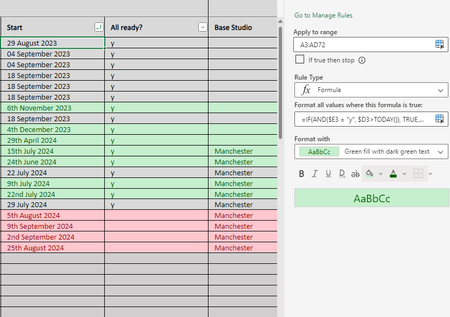
The rows marked with green are texts. Date are in fact numbers . You can check the true nature of a value in a cell with ISNUMBER or ISTEXT. Thus, remove the "th" and "nd" bits in the dates and it will work. And perhaps you will have "st" and "rd" somewhere else as well.
Since texts are always greater than a number the check $D3>=TODAY() will always return TRUE.
By the way, you don't need the IF when you set the conditional formatting rule. So, use your first formula.

The rows marked with green are texts. Date are in fact numbers . You can check the true nature of a value in a cell with ISNUMBER or ISTEXT. Thus, remove the "th" and "nd" bits in the dates and it will work. And perhaps you will have "st" and "rd" somewhere else as well.
Since texts are always greater than a number the check $D3>=TODAY() will always return TRUE.
By the way, you don't need the IF when you set the conditional formatting rule. So, use your first formula.
 dwinter860Aug 02, 2024Copper ContributorTHANK YOU that was exactly it! such a silly oversight haha 🙂