Forum Discussion

** HELP ** Need to Join Text but also have superscript
- May 15, 2024
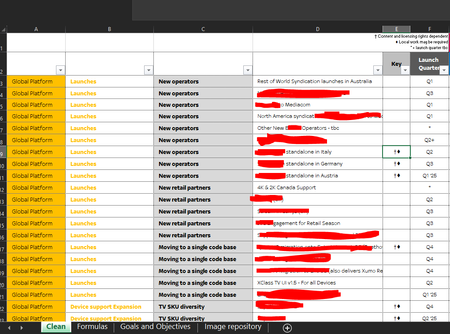
Let's say you enter a value for columns A, B and C in A2, B2 and C2 on the Formulas sheet.
To return the matching values from D, F and E:
=FILTER(Clean!$D$2:$D$1000&" "&Clean!$F$2:$F$1000&" "&Clean!$E$2:$E$1000, (Clean!$A$2:$A$1000=A2)*(Clean!$B$2:$B$1000=B2)*(Clean!$C$2:$C$1000=C2), "")

HansVogelaar
Thanks for the speedy response Hans, understood about the superscript. Was worth an ask. Would you be able to help with joining the Columns D, F & E based on the values of A, B & C to create a filter/search?

Let's say you enter a value for columns A, B and C in A2, B2 and C2 on the Formulas sheet.
To return the matching values from D, F and E:
=FILTER(Clean!$D$2:$D$1000&" "&Clean!$F$2:$F$1000&" "&Clean!$E$2:$E$1000, (Clean!$A$2:$A$1000=A2)*(Clean!$B$2:$B$1000=B2)*(Clean!$C$2:$C$1000=C2), "")
- sbruk89May 15, 2024Copper Contributor
HansVogelaar
Awesome thank you Hans. Just one final thing/question.
Similar request to before, can you help be write an expression that looks in Column A of "Sheet1" and then pulls through the values for each subsequent column that falls within lets say "launches" so i want New operators to be filled and then New Retail Partners etc
Again pulling Columns D, F & E from Tab "Clean"