Forum Discussion

** HELP ** Need to Join Text but also have superscript
- May 15, 2024
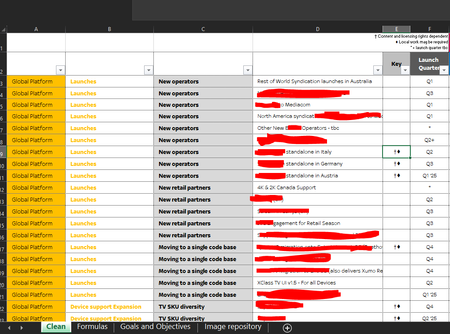
Let's say you enter a value for columns A, B and C in A2, B2 and C2 on the Formulas sheet.
To return the matching values from D, F and E:
=FILTER(Clean!$D$2:$D$1000&" "&Clean!$F$2:$F$1000&" "&Clean!$E$2:$E$1000, (Clean!$A$2:$A$1000=A2)*(Clean!$B$2:$B$1000=B2)*(Clean!$C$2:$C$1000=C2), "")

That would be very complicated. Formulas cannot preserve the format of the cells they refer to, so superscript formatting will be lost.

HansVogelaar
Thanks for the speedy response Hans, understood about the superscript. Was worth an ask. Would you be able to help with joining the Columns D, F & E based on the values of A, B & C to create a filter/search?
- HansVogelaarMay 15, 2024MVP
Let's say you enter a value for columns A, B and C in A2, B2 and C2 on the Formulas sheet.
To return the matching values from D, F and E:
=FILTER(Clean!$D$2:$D$1000&" "&Clean!$F$2:$F$1000&" "&Clean!$E$2:$E$1000, (Clean!$A$2:$A$1000=A2)*(Clean!$B$2:$B$1000=B2)*(Clean!$C$2:$C$1000=C2), "")
- sbruk89May 15, 2024Copper Contributor
HansVogelaar
Awesome thank you Hans. Just one final thing/question.
Similar request to before, can you help be write an expression that looks in Column A of "Sheet1" and then pulls through the values for each subsequent column that falls within lets say "launches" so i want New operators to be filled and then New Retail Partners etc
Again pulling Columns D, F & E from Tab "Clean"