Forum Discussion

 Microsoft
You don't have access to talk to this bot, contact the owner. copilot studio
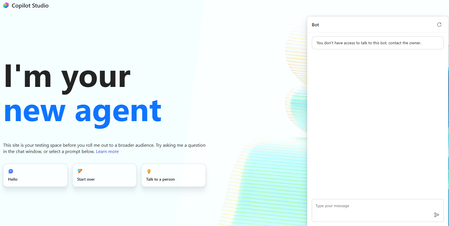

This error can occur even when you are the agent owner, because ownership and runtime access are separate checks.
I would suggest checking these points:
1. Authentication settings: In Copilot Studio, open Settings > Security > Authentication and verify the configured authentication method. Make sure it matches how the agent is embedded in your code app.
2. Publish the latest configuration: If you recently changed authentication or access settings, save and publish the agent again, then retest it.
3. Verify the signed-in identity: Confirm that the Microsoft account used in the embedded app belongs to the same tenant as the agent. If the app uses a different tenant, cross-tenant access restrictions may cause this error.
4. Check the embedding method: If you are embedding the agent using the Direct Line API or a custom web client, verify that the authentication and channel configuration are appropriate for that integration. Being signed in to the website does not automatically authenticate the user to the agent.
5. Review agent sharing and tenant policies: Ask your administrator to confirm that the agent is published, available through the intended channel, and permitted by your organization's authentication and data policies.
Official Microsoft documentation:
Configure user authentication in Copilot Studio:
https://learn.microsoft.com/en-us/microsoft-copilot-studio/configuration-end-user-authentication
Configure authentication for agents:
https://learn.microsoft.com/en-us/microsoft-copilot-studio/agents-experience/settings-overview
One question: How are you embedding the agent in your code app: using the Copilot Studio embed code, the Direct Line API, or a custom web client? The exact integration method will help narrow down the fix.
If this helps, please like the response.