Forum Discussion

TechUser2026
Apr 21, 2026Copper Contributor
How to run Copilot Studio bot (not working)
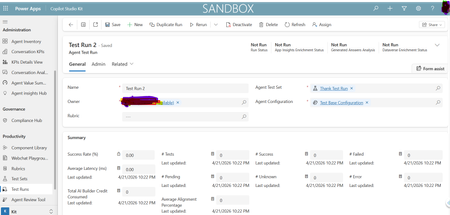
Hi, I’m trying to run my Copilot Studio agent but I’m not sure how to execute/test it. I’ve attached a screenshot for reference. Can someone guide me?

Apr 30, 2026
Hello,
If your Test Run is failing, here are the things to check depending on what you're seeing.
Cloud flow error? Open the Test Run record and look at the Error Details section — there's a direct link to the failed cloud flow run in Power Automate. That's usually the fastest way to understand what went wrong.
Data policy error (AppForbidden)? Your DLP policy is probably blocking one of the connectors the Kit needs. Make sure these are all allowed:
- Microsoft Dataverse (and the Legacy one)
- Direct Line channels in Copilot Studio
- SharePoint, Office 365 Outlook, Microsoft Entra ID, Power Platform for Admins, Power Apps for Makers
Authentication error? This one is a bit more involved. A few quick things to verify:
- The Kit and your agent are on the same tenant
- Your KitAuthApp (used in Copilot Studio Kit agent configurations) has the right Dataverse redirect URI and a valid client secret configured in the Agent Configuration
- Your CopilotStudioAuthApp (used in Copilot Studio, linked to KitAuthApp) has the two Bot Framework redirect URIs, implicit grant enabled, and the custom scope exposed and authorized
- The agent in Copilot Studio is published with the auth config applied
- Try also with and without the Send startConversation event option (in the Advanced tab of the test)
- Check that your browser allows third-party cookies
For additional information refer to : Troubleshoot errors in Copilot Studio Kit - Microsoft Copilot Studio | Microsoft Learn