Forum Discussion

Licensing question - D365 Sales

Hi AdamPL
Thank you for posting on the BizApps community
The snapshots that you've provided are for two different functions.
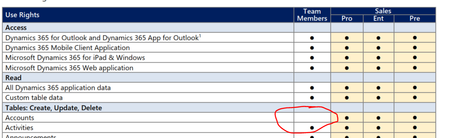
Your first snapshot is for Customer Service use rights to create, update, and delete a table for an account. The second snapshot is for Sales to remove a connection for an account.
The connection is used to integrate between Dynamics NAV and Microsoft Dynamics 365 for Sales. That is not the same function as creating, updating, or deleting a table for an account.
When you review the full list of use rights, you'll find that both Sales & Customer Service read the same for use rights to create, update, and delete a table for an account:
Customer Service:
Sales:
If this reply answers your question, please Accept as the solution to help the other members find it more quickly. Otherwise, please let me know if you need further assistance on this topic.
Regards,
Microsoft CSP Licensing Concierge

Thank you a lot, you have clarified the difference between this two positions in the licensing guide!
But I do not have a clear answer to my question - are they eligible to make meeting, tasks, notes and other type of activities in connection with Account, based on Team Members license?
- LicensingConcierge1Jul 27, 2023Former Employee
.
If this reply answers your question, please Accept as the solution to help the other members find it more quickly. Otherwise, please let me know if you need further assistance on this topic.
Regards,Microsoft CSP Licensing Concierge
- AdamPLAug 09, 2023Tin Contributor
LicensingConcierge1once more asking for reply
- LicensingConcierge1Aug 10, 2023Former Employee
I'm sorry that the customer is frustrated and that you have not received a response from the support ticket that you mentioned in your original post.
As you're aware, the use rights overview can be found in the D365 LG on pages 49 - 50. If an action/activity is not listed, then it's not a use right of the Team Members license.
Additionally, you can review the Team Member conformance report, available for download in the Microsoft Power Platform admin center. Go to the Common Data Service area in the Analytics section, and then select Download to access the report. Use the Change filters link to filter the report by Environment and Date. This report is meant only to be used for general guidance and captures a daily overview of entities and operations that are considered to be non-conformant, based on Team Member use rights. Dynamics 365 Team Members license overview and FAQ | Microsoft Learn
If you require additional assistance in determining the specific license requirements for your scenario, you may contact your Microsoft account team (or your Dynamics Certified Partner. If you're a Reseller, please contact your Indirect Provider), or use one of the following links
I do not have further information to provide for this post.
Thank you and have a wonderful day.
Regards,Microsoft CSP Licensing Concierge
- AdamPLAug 03, 2023Tin ContributorHi,
Can you please reply to my direct question? Or send an information to whom can I ask this question so I will receive direct answer? Our customer is very frustrated, because since 2 months he can not receive an answer what licenses should he use. - AdamPLAug 02, 2023Tin ContributorHi!
Once more asking for reply.
Customer has to renew licenses ASAP and we are still awaiting response.