Forum Widgets
Latest Discussions

CI/CD for On-Premises SQL Server using GitHub Actions
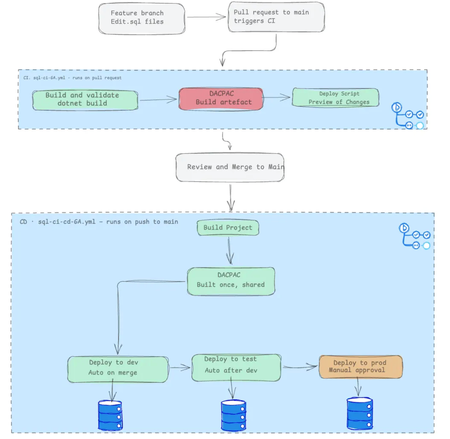
Unlike cloud-managed databases, implementing CI/CD for on-premises SQL Server is notoriously tricky, and there are few tutorials that provide an end-to-end guide. I recently built a complete three-environment pipeline (dev → test → prod) using GitHub Actions, DACPACs, and self-hosted runners, and I've documented the entire journey. The Core Challenge: Manual deployments are error-prone. Wrong connection strings, stale artifacts, skipped validation, or deploying to the wrong environment. Every step is a failure point. The Solution: A declarative SQL database project model where every table, view, and stored procedure lives in version-controlled .sql files. The tooling calculates what's changed and generates a DACPAC—a compiled schema artifact that's built once and deployed identically across all environments. The Pipeline: CI (Pull Request): Build validates syntax and references and generates a deployment script for human review so you have an understanding of what has changed. CD (Merge to Main): Build the DACPAC once, then deploy automatically through dev and test, with a manual approval gate protecting the production environment. The article walks through every step from manual deployment to a fully automated pipeline so you understand not just the what, but the why. Read the full story here51Views0likes0Comments
Complete rewrite of the SQL Server R2DBC driver – seeking collaboration
I’ve completed a full rewrite of the R2DBC driver for SQL Server, focused on resolving performance, stability, and feature gaps in the current driver. I’m looking to connect with people who can help move this work forward — whether through feedback, collaboration, or introductions within the R2DBC and SQL Server engineering communities. Would you be open to a brief conversation or pointing me toward the right people? Thank you.kbnicholasAug 24, 2026Copper Contributor95Views0likes0Comments
SQL Server FCI CSV storage flips multiple times into Online (No Access) state and eventually fails
Dear Team, I'm encountering an issue with our SQL Server multi‑instance failover cluster after applying the OS security patches and restarting the second node. Once the second node comes back online, the Cluster Shared Volume (CSV) briefly flips multiple times into Online (No Access) state and eventually fails.(we can make it online manually, but again flips and failed after sometime). To make the SQL cluster available, we either need to shut down the VM or revert the patch. Before the patching, all cluster roles and SQL instances were moved off the node, and the cluster appeared healthy. The issue only occurs after the reboot of the second node. (first node patched and restarted and everything working fine) OS : Windows Server 2025 Standard Patch tried: KB5075899 (February,2026 ) KB5078740 (March,2026) KB5082063 (April 2026 ) KB5087539 (May 2026) Could you please advise if there are any specific checks or steps we should follow during OS patching to prevent CSV access loss? Is it an issue with the patch or something else? Any insights or recommended actions would be really helpful to perform the security OS patch in the server Thanks you!jobymathew10Jun 05, 2026Copper Contributor108Views0likes0Comments
Best Practices for Connecting Internal SQL Server Financial Systems to Online Payment Platforms
I currently have an internal enterprise system used for purchasing, payments, and finance operations. The system runs on an on-premises database using Microsoft SQL Server and stores all financial transactions and internal workflow data. We now have a new requirement to enable online payment services for customers. These services will be exposed externally (likely in the cloud) and must interact with the same financial system so that transactions are reflected in our internal database. My main concerns are related to architecture, security, and data synchronization. Key points about the current setup: The core system and database are hosted internally (on-premises). The database contains sensitive finance and payment data. Internal processes depend on the current database structure and workflows. The new requirements: Develop an online payment service accessible over the internet. Ensure transactions from the online service update the internal system. Maintain data integrity and security. Avoid performance issues for the internal system. I’m evaluating a few possible approaches but I’m unsure which is best practice: Allow the cloud payment service to connect directly to the internal SQL Server database through secure networking. Maintain a replicated or read/write copy of the database in the cloud. Use SQL Server replication (transactional or snapshot) between on-prem and cloud. Introduce an API or middleware layer that handles all transactions and updates the internal database. Maintain separate databases and synchronize transactions asynchronously. My main questions: Is it recommended to expose the internal SQL Server database directly to cloud services? Should I use replication, a secondary database, or a service/API layer? What architecture pattern is commonly used for integrating on-prem financial systems with online payment platforms? How can we ensure consistency between internal transactions and online payments? Are there recommended SQL Server features or patterns for this scenario (replication, service broker, CDC, etc.)? Any advice on best practices, architecture patterns, or real-world implementations would be greatly appreciated.ShuraCouncilSeniorDevMar 14, 2026Copper Contributor117Views0likes0CommentsBest architecture to integrate internal SQL Server system with cloud-based online payment services
I currently have an internal enterprise ERP system also need to be integrated with online payments, and finance operations. The system runs on an on-premises database using Microsoft SQL Server 2022 and stores all financial transactions and internal workflow data. We now have a new requirement to enable online payment services for customers. These services will be exposed externally (likely in the cloud) and must interact with the same financial system so that transactions are reflected in our internal database. My main concerns are related to architecture, security, and data synchronization. Key points about the current setup: The core system and database are hosted internally (on-premises). The database contains sensitive finance and payment data. Internal processes depend on the current database structure and workflows. The new requirements: Develop an online payment service accessible over the internet. Ensure transactions from the online service update the internal system. Maintain data integrity and security. Avoid performance issues for the internal system. I’m evaluating a few possible approaches but I’m unsure which is best practice: Allow the cloud payment service to connect directly to the internal SQL Server database through secure networking. Maintain a replicated or read/write copy of the database in the cloud. Use SQL Server replication (transactional or snapshot) between on-prem and cloud. Introduce an API or middleware layer that handles all transactions and updates the internal database. Maintain separate databases and synchronize transactions asynchronously. My main questions: Is it recommended to expose the internal SQL Server database directly to cloud services? Should I use replication, a secondary database, or a service/API layer? What architecture pattern is commonly used for integrating on-prem financial systems with online payment platforms? How can we ensure consistency between internal transactions and online payments? Are there recommended SQL Server features or patterns for this scenario (replication, service broker, CDC, etc.)? Any advice on best practices, architecture patterns, or real-world implementations would be greatly appreciated.qasiliaMar 14, 2026Copper Contributor57Views0likes0Comments
SQL Server issue but don't know what - please help!
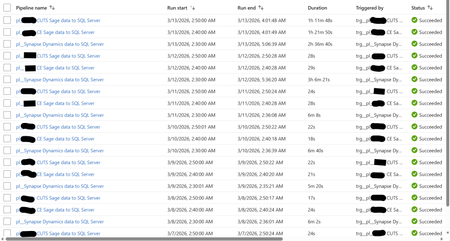
Hi, I'm facing a SQL Server focused issue that I don't understand why it's occurring and would like your help to identify and resolve, please. I will provide an in-depth breakdown of the scenario. Two years ago, I created a Azure Data Factory (ADF) Pipeline to take data from Azure Synapse to Azure SQL Server, and two other Pipelines to take data from an On-Premises Sage server to the same Azure SQL Server. These Pipelines were working perfectly up until two days ago (11/03/26) when the Pipelines still always complete successfully but the duration have increased greatly. The below screenshot shows the log of these three Pipeline for the past week. Note how prior to the 12/03/26 the Synapse Pipeline took about 6 minutes to complete and the two Sage Pipelines took around 25 seconds. Also note how on the 12/03/26 the Synapse Pipeline took over 3 hours but the two Sage Pipelines continued with their normal 25 seconds. Notice today (13/03/26) the Synapse Pipeline was still slow but now the two Sage Pipelines are taking over an hour. I'll note here that the Pipelines still complete successfully (so the config must be correct as it has been for two years). Each Pipeline contains a single (for Sage) or several (for Synapse) 'Copy data' objects. The objects have their source configuration to simply extract from the source (so either Synapse or Sage) and then the sink configuration has a 'Pre-Copy script' which simply Truncates the target SQL Server table, before loading to the SQL Server table. The screenshot below is one example - each Pre-Copy script is populated the same but just with the tables being different. When I look at the log for the Pipelines, I see a common theme for each and that is the 'Pre-Copy script' (the Truncate) is consuming 99% of the time. The screenshot below shows this common theme. So at this point, I ask the question why, after two years of all working well and completing very quickly, are the Pipelines taking so long to complete? This also seems to be an intermittent problem as I have performed several manual executions which will take a long while, then revert back to the quick several minutes again (so good), then revert once more to taking a long while again. It is intermittent. See the screenshot below. Notice how the same Pipeline have different durations. It's intermittent. The reason why I think it is a SQL Server focused issue for the following reasons: 1) Synapse - Performing simple commands (Select Top) returns data within seconds. 2) SQL Server - Performing simple commands (Select Top) usually takes seconds but during the past two days is often taking half hour. 3) SQL Server - When amending a SQL View it would take a split second to complete. During the past two days, it goes over ten minutes and still doesn't complete (I was amending the View for testing purposes). 4) SQL Server - When looking at the Views node under a database, during the past two days, it intermittently doesn't show the View. Sometimes, it will work if I log out and then back into SQL Server. 5) Power BI - Refreshing a Power BI report, whether from the Power BI Service or Desktop, call SQL Server Views. These SQL Server Views read from several SQL Server tables. These report refreshes are failing due to an IDbCommand interface error. These Power BI report data refreshes simply read from a SQL Server table via a SQL View. They don't reference or consider at all the any ADF Pipelines. The Pipelines execute between 2am and 3am each morning. The Power BI report refresh their data around 12pm to 5pm. As SQL Server seems to be problematic at the point of the 'Pre-Copy script', which is one of the end to end process, and then problematic at the very other end where Power BI reports consumes SQL Views - leads me to believe the issue is with SQL Server. I am a report developer and not an ADF expert. I've built the ADF process on the side. I haven't changed any development/configuration/etc... between this all working and failing. Our I.T. department have advised they have made no changes to contribute to this issue. Please can someone advise on what's happening here and why this issue has arose when for two years all was fine? Thanks.AzureNewbie11Mar 13, 2026Copper Contributor111Views0likes0Comments
How to read queries messages from a SSMS extension?
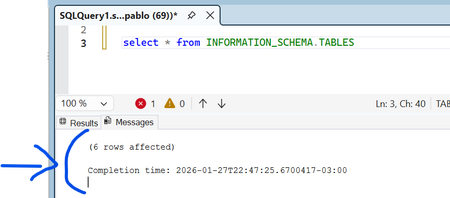
Hello, everyone. I am playing around learning how to build SSMS extensions. Is there a way to get an extensions to read the text in the Messages window after a query executes? Can extensions access those messages?pablolernerJan 27, 2026Copper Contributor47Views1like0CommentsPolybase - Enforce TCP/IP Protocol
Hello, We know Polybase service in SQL server by default makes use of shared memory protocol to connect SQL server (local). I would like to know if there is any way we can change or force the connections to make use of TCP / IP protocol. Any help would be appreciated.72Views0likes0Comments
Service Broker on Ubuntu 20.04 (Docker) cryptography error
Hi, Has anyone successfully created a multi‑instance / multi‑host SQL Server Service Broker implementation on Linux, specifically on distributions using OpenSSL 3? I have a fully working Service Broker environment on SQL Server 2017, running in Docker on Ubuntu 18.04 (OpenSSL 1.1.1). My environment has 6 containers, arranged to simulate two datacenters: DC1: Primary AG replica + synchronous replica + async replica DC2: Same setup 7 databases in the Availability Group Service Broker dialogs between databases on the same SQL instance work perfectly. This confirms: Database‑level dialog security works Certificate‑based authentication between database principals is correct DMKs are auto-opened and protected by SMK All dialogs use BEGIN DIALOG with certificates valid and present Cross-instance messages work correctly. I have: Broker endpoints using certificate‑based endpoint authentication Proper certificate exchange (private key on owning instance, public key on the peer) Routes defined correctly Remote Service Bindings used to force dialog security Certificates created dynamically with correct validity date ranges DMKs created, opened, and re-encrypted with SMK at runtime Scripts that fully automate certificate creation, export, import, user creation, RSB creation, etc. Everything here works fine as long as I stay on Ubuntu 18.04 (OpenSSL 1.1.1). The problem: If I switch only the base Linux image—to Ubuntu 20.04, Ubuntu 22.04, or RHEL 8—and change nothing else, then all cross‑instance Service Broker dialogs fail with: An exception occurred while enqueueing a message in the target queue. Error: 9641, State: 122. A cryptographic operation failed. This error indicates a serious problem with SQL Server. This happens on SQL Server 2019 and 2022, both CU up-to-date, both using OpenSSL 3. Key points: Intra‑instance dialog security still works Endpoint transport security still works (i.e., endpoints authenticate and connect) The failure occurs only when creating session keys for cross‑instance dialog security The failure happens even when using: encryption = off fresh DMKs fresh certificates certificates stored in master or user DB key length 2048 or 3072 different validity periods So far I have: Confirmed DMKs exist on both instances Confirmed DMKs are encrypted by SMK Confirmed DMKs auto-open (is_master_key_encrypted_by_server = 1) Manually opened DMKs before creating certificates Recreated SMK/DMK on clean containers Everything behaves as expected. Repeatedly rebuilt all of the following: Endpoint authentication certificates Dialog security certificates Remote Service Bindings Database principals Routes Service Broker services, queues, and message types I’ve verified: All certificate subjects match All public keys export/import correctly Private keys exist where they should exist Thumbprints match across both sides No old certificates remain in master or user DBs Modified the OpenSSL behaviour to legacy (1.1.1) behaviour, e.g. [openssl_init] providers = provider_sect ssl_conf = ssl_sect alg_section = evp_properties [evp_properties] rh-allow-sha1-signatures = yes fips_mode = no [provider_sect] default = default_sect legacy = legacy_sect [default_sect] activate = 1 [legacy_sect] activate = 1 [ssl_sect] system_default = system_default_sect [all_policy] rsa_pkcs1_padding_check = 0 [system_default_sect] # Lowest policy to allow legacy algorithms (including SHA-1, 1024-bit RSA) CipherString = DEFAULT:@SECLEVEL=0 To rule out network/transport issues, I validated: Endpoints authenticate each other Connections appear in sys.dm_broker_connections STATE = OPEN Transport security appears to be working on OpenSSL 3. I confirmed: Messages flow when RSB is removed and encryption=off is used Messages fail only when RSB is enabled, which requires certificate‑based dialog security The target instance claims “private key missing” even though it is present and readable Has anyone successfully created a multi‑instance / multi‑host SQL Server Service Broker implementation on Linux, specifically on distributions using OpenSSL 3? If so, any guidance on how to resolve the issues i am facing? Many thanks, Andrewadb2303Jan 21, 2026Copper Contributor56Views0likes0CommentsCompat level 90: XML string-to-datetime UDF
Hello, I’m testing a behavior described in SQL Server documentation for **database compatibility level 90**. The docs state that a user-defined function that converts an XML constant string value to a SQL Server date/time type is marked as **deterministic**. On **SQL Server 2005**, I’m seeing the opposite: the function is marked as **non-deterministic** (`IsDeterministic = 0`). I’m trying to understand whether I’m missing a requirement/constraint or whether this is a doc mismatch / version-specific behavior. ### Environment - Product: **Microsoft SQL Server 2005** - Database compatibility level: **90** --- ## ✅ Repro script ```sql IF OBJECT_ID('dbo.fn_ParamXmlToDatetime', 'FN') IS NOT NULL DROP FUNCTION dbo.fn_ParamXmlToDatetime; GO CREATE FUNCTION dbo.fn_ParamXmlToDatetime (@xml XML) RETURNS DATETIME WITH SCHEMABINDING AS BEGIN DECLARE @y DATETIME; -- Convert an XML value to DATETIME SET @y = CONVERT(DATETIME, @xml.value('(/r)[1]', 'datetime')); RETURN @y; END GO SELECT OBJECTPROPERTY(OBJECT_ID('dbo.fn_ParamXmlToDatetime'), 'IsDeterministic') AS IsDeterministic, OBJECTPROPERTY(OBJECT_ID('dbo.fn_ParamXmlToDatetime'), 'IsPrecise') AS IsPrecise; GO ``` ### Actual result `IsDeterministic = 0` (non-deterministic) ### Expected result (based on docs) `IsDeterministic = 1` (deterministic) for this pattern under compat level 90. --- ## Questions 1. Are there additional conditions required for SQL Server to mark this UDF as deterministic (for example, specific XQuery usage, avoiding `CONVERT`, using `CAST`, using `datetime2` doesn’t exist in 2005, etc.)? 2. Does the determinism rule apply only when converting from an **XML literal constant** inside the function, rather than an XML parameter value? 3. Is this behavior different for **typed XML** (XML schema collections) vs **untyped XML**? 4. Is this a known difference/bug in SQL Server 2005 where the UDF is functionally deterministic but still reported as non-deterministic by `OBJECTPROPERTY`? Thank you for any clarification. ---ezpz97Jan 12, 2026Copper Contributor81Views0likes0Comments
Tags
- sql server82 Topics
- Data Warehouse73 Topics
- Integration Services66 Topics
- sql61 Topics
- Reporting Services47 Topics
- Business Intelligence42 Topics
- Analysis Services33 Topics
- analytics25 Topics
- ssms23 Topics
- Business Apps22 Topics