Forum Widgets
Latest Discussions

SQL Server 2022 (Compatibility Level 160): GetSchemaTable() returns null
We have encountered a reproducible metadata derivation issue on some customer installations after moving databases to SQL Server 2022 compatibility level 160. The issue occurs during ADO.NET schema discovery when DbCommandBuilder attempts to derive base-table and key information in order to automatically generate INSERT/UPDATE/DELETE commands. Environment SQL Server 2022 (different releases) Database compatibility level 160 Microsoft.Data.SqlClient (different versions) as well as System.Data.SqlClient ADO.NET DbCommandBuilder Parameterized SELECT statements Identical database schema across customers Symptoms For some customers (7 so far, since 2023) for certain tables and columns, DbDataReader.GetSchemaTable() returns null. As a consequence, automatic command generation fails with errors similar to: Dynamic SQL generation is not supported against a SelectCommand that does not return any base table information. The underlying SELECT statement itself works correctly and returns rows when executed normally. The issue only occurs during metadata derivation. Example The following pattern triggers the problem: SELECT * FROM SomeTable WHERE SomePrimaryKeyColumn = @Parameter GetSchemaTable() returns null. However, if we use a constant value instead of a parameter or cast the value of the column explicitly, GetSchemaTable() returns valid metadata. SELECT * FROM SomeTable WHERE SomePrimaryKeyColumn = 0 or SELECT * FROM SomeTable WHERE CAST(SomePrimaryKeyColumn AS int) = @Parameter Characteristics of the issue The behavior is deterministic. It always affects the same primary key column(s) of a composite primary key. It is independent of the SELECT list. It depends on the presence of a parameterized predicate. The actual parameter value does not matter. NULL, DBNull.Value and non-null integer values all show the same behavior. The parameter type is always int. The issue currently affects only few tables. Different tables for different customers. Other columns in the same tables may work correctly. Metadata retrieval mode The issue only occurs when the command is executed using: CommandBehavior.SchemaOnly | CommandBehavior.KeyInfo which is the mode internally used by DbCommandBuilder to derive schema and key information If SchemaOnly is removed, metadata retrieval succeeds. Observed behavior: SchemaOnly | KeyInfo -> GetSchemaTable() returns null KeyInfo only -> Metadata returned correctly Normal execution -> Query executes and returns metadata correctly Therefore the problem appears to be specific to SQL Server's metadata-only derivation path rather than normal query execution. Things we verified Database schema The database schema is identical across customer installations. The issue cannot be correlated with schema differences. Query text / Select list The issue is independent of the projection. For example: SELECT * and SELECT ColumnA show the same behavior. Only the predicate appears to matter. Execution vs metadata retrieval The query executes successfully. Only metadata discovery fails. Plan cache The behavior does not appear to be related to plan cache reuse. The same affected predicate consistently fails during schema discovery. SQL Profiler observations During schema derivation we observed the following with SQL Profiler (re-worked to an example and reformatted to make it more easily readable for a human being): exec sp_executesql N'SET FMTONLY OFF; SET NO_BROWSETABLE ON; SET FMTONLY ON; SELECT SomeColumn FROM SomeTable WHERE PrimaryKeyColumn1 = @PrimaryKeyColumn1 AND PrimaryKeyColumn2 = @PrimaryKeyColumn2 AND PrimaryKeyColumn3 = @PrimaryKeyColumn3 AND PrimaryKeyColumn4 = @PrimaryKeyColumn4 ' ,N'@PrimaryKeyColumn1 int,@PrimaryKeyColumn2 int,@PrimaryKeyColumn3 int,@PrimaryKeyColumn4 int' ,@PrimaryKeyColumn1=NULL,@PrimaryKeyColumn2=NULL,@PrimaryKeyColumn3=NULL,@PrimaryKeyColumn4=NULL The issue occurs only in the metadata-only path used by SchemaOnly | KeyInfo. When the same query is actually executed, metadata and result data are returned correctly. Compatibility level observations The issue is reproducible at: COMPATIBILITY_LEVEL = 160 only. It disappears when the database compatibility level is lowered to: COMPATIBILITY_LEVEL = 150 or smaller. More interestingly, the database can remain at compatibility level 160 while the problem disappears if the query is compiled using compatibility level 150 (or smaller) optimizer behavior: OPTION (USE HINT('QUERY_OPTIMIZER_COMPATIBILITY_LEVEL_150')) With this hint, GetSchemaTable() successfully returns metadata. Additional observations The following query hints also make schema derivation succeed: OPTION (RECOMPILE) and OPTION (OPTIMIZE FOR UNKNOWN) This suggests that the metadata derivation path is sensitive to optimizer behavior, despite the fact that the query is not actually executed. Question Has anyone encountered a SQL Server 2022 / Compatibility Level 160 issue where: GetSchemaTable() returns null the command is executed with SchemaOnly | KeyInfo the underlying query executes normally the problem only occurs for specific parameterized predicates compatibility level 150 or smaller works QUERY_OPTIMIZER_COMPATIBILITY_LEVEL_150 also works while the database remains at level 160 If so, do you have any idea on how to solve this?SolvedAnna_HeinemannAug 06, 2026Tin Contributor202Views0likes7Comments
Can anyone explain this error and maybe even suggest how to avoid it?
I came across a very strange and unexpected error today, and while I managed to make it "go away" I cannot for the life of me understand why it happened in the first place. And I would like to invite a discussion on what could have caused it, whether it's possible to recognise the situation if it occurs again, and how to prevent it happening in future. I cannot use proprietary data so I can only describe the problem in generic terms I am transferring data between two Azure databases. To do this, I use an external data source. The "from" and "to" tables have the exact same layout, so: Step 1, I create a "work" table by doing a SELECT INTO SELECT TOP 0 [Column1], [Column2], [Column3] INTO [KII].[KIIWorkTable] FROM [dbo].[maintable] Step 2, I add the [$ShardName] column ALTER TABLE [KII].[KIIWorkTable] ADD [$ShardName] NVARCHAR(128) NOT NULL Step 3, read the data from the external data source which also has the maintable with an identical definition INSERT INTO [KII].[KIIWorkTable] EXEC sp_execute_remote [externaldatasource], N'SELECT [Column1], [Column2], [Column3] FROM [dbo].[maintable] Step 4, remove the shard name. I don't need it anymore ALTER TABLE [KII].[KIIWorkTable] DROP COLUMN [$ShardName] So far everything worked perfectly, but now something really bizarre happens Step 5, insert the additional rows: INSERT INTO [dbo].[maintable] ([Column1], [Column2], [Column3]) SELECT [KID].[Column1], [KID].[Column2], [KID].[Column3] FROM [KII].[KIIWorkTable] [KID] And SQL complains that the columns in the insert do not match the columns in the select. Of course in my real world scenario the tables have a lot more columns and the situation is much more complex, but I eventually narrow it down by starting with just one column and slowly trying it again and again, adding more columns as I go on INSERT INTO [dbo].[maintable] ([Column1]) SELECT [KID].[Column1] ..... Works perfectly I keep going until I hit [Column2] and the problem resurfaces I skip [Column2] INSERT INTO [dbo].[maintable] ([Column1], [Column3]) SELECT [KID].[Column1], [KID].[Column3] ...... It works perfectly. It doesn't work if I keep [Column2] between the first and last column, but INSERT INTO [dbo].[maintable] ([Column1], [Column3], [Column2]) SELECT [KID].[Column1], [KID].[Column3], [KID].[Column2] ...... What the..... NOW it works!?!! So obviously there is something not quite right with [Column2]. I look at the table and I see [Column2] is nullable and it contains NULLs in some rows. And I happen to know that it's an integer, and the database design is not ideal, but for our business logic NULL and 0 are interchangeable so I run an update UPDATE [dbo].[maintable] SET [Column2] = 0 WHERE [Column2] IS NULL And now the original statement works as expected. While doing this fixed the problem, I know NULL values aren't the problem. I have done the same thing for several other tables and even this table has other columns that are nullable and that contain nulls, and the same thing doesn't happen for those. I can keep the columns in the order they are defined in the DB schema and the inserts just work, nulls or no nulls. So I'm just wondering what the underlying reason for this could be. Is there anything I can run in t-sql to recognise the scenario if it occurs so I can fix it BEFORE it causes an issue?SolvedrozeboosjeagainJul 31, 2026Copper Contributor131Views0likes2Comments
SQL Server 2025 Express - service starts with delay of some hours after restart of computer
Dear Community, we started using SQL Server 2025 Express but experienced problems with the start of service at startup. When the computer is restarted, the service is not started. I observed this on nearly all installations and in one case it took kinda exactly 2 hours to start the service (or it was somehow delayed but without any trace in settings or windows logs). When we start the service manually or by batch script it is starting properly at startup ... What exactly causes this? We only have this issue with 2025 Express and i have not yet found similar cases in the internet. Thank you, kind regardsSolvedmniedererMay 21, 2026Copper Contributor360Views1like3Comments
SQL Server 2025 VECTOR functions accepting JSON array strings
Hello! Playing with new VECTOR type and functions, I can read following https://learn.microsoft.com/en-us/sql/t-sql/functions/vector-distance-transact-sql?view=sql-server-ver17 for vector parameters: An expression that evaluates to vector data type. To me this means that any expression (including character strings as JSON-arrays) can be used as parameter. Since INSERT statement accepts to convert a JSON-array string to a VECTOR, I would expect that these function also accept this conversion. However, it appears that we are forced to cast the JSON-array to VECTOR. Any chance to improve this? Here some T-SQL example: declare v1 as VECTOR(3) = '[-1,1,0]' declare S1 as VARCHAR(50) = '[-1,1,0]' drop table tab1; create table tab1 (pkey int not null primary key, emb vector(3)); insert into tab1 values ( 101, v1 ); insert into tab1 values ( 102, S1 ); select * from tab1 order by pkey; select vector_distance('cosine',emb,@v1) from tab1; select vector_distance('cosine',emb,@s1) from tab1; -- fails SebSolvedsebflaesch67Jan 07, 2026Copper Contributor163Views0likes1Comment
Error Locating Server/Instance Specified - Tried everything I can find
Hello SQL experts, I am sort of at my wits end at this point and was hoping someone from the community could help me, I have referenced several discussions on this community and still have not found a solution that worked for my situation. I am trying to set up a automatic backup solution for a SQL Express Server so I can't use the SQL Agent to schedule a backup. Below is a batch script for sqlcmd I am trying to use to create the backup and as soon as I have it working, I plan on scheduling it as a task that will be executed weekly. I have also included the SQL query that works just fine when run from inside SSMS and creates the backup as expected. Batch file script: Echo off REM ================================================================ REM BackupDatabase.bat REM ================================================================ REM --- Configuration --- SET SERVER_NAME=.\FTVIEWX64_SRSS SET USER_NAME=xxxxxx SET PASSWORD=xxxxxx SET SQL_SCRIPT=C:\Users\Public\Documents\xxxx_BackupDatabase.sql REM --- display timestamp --- echo [%date% %time%] Starting database backup... REM --- Run SQLCMD --- sqlcmd -S %SERVER_NAME% -U %USER_NAME% -P %PASSWORD% -i "%SQL_SCRIPT%" IF %ERRORLEVEL% EQU 0 ( echo [%date% %time%] Backup completed successfully. ) ELSE ( echo [%date% %time%] Backup FAILED! Error code: %ERRORLEVEL% ) pause SQL Query being used: -- BackupDatabase.sql DECLARE @BackupFileName NVARCHAR(255); SET @BackupFileName = N'D:\SQLdbBackup\XXXX_' + CONVERT(VARCHAR(8), GETDATE(), 112) + N'.bak'; BACKUP DATABASE XXXX TO DISK = @BackupFileName WITH NOFORMAT, NOINIT, NAME = N'Full Backup of XXXX', SKIP, NOREWIND, NOUNLOAD, STATS = 10; GO When I run the batch file I get this in the sqlcmd window as an error code: The necessary services all seem to be running fine as you can see below: The sqlcmd version is as follows: SQL server version is as follows: Connections for the server are configured as follows: Any and all help would be greatly appreciated so I can resolve the issue and get regular backups scheduled for this server. Thanks and Kind Regards, DanSolvedSkanUSAutomationNov 14, 2025Copper Contributor392Views0likes2Comments
“8152 String or binary data would be truncated” error while running select query on a view
I have a complex view (it’s organisational so i cannot paste it here) that joins multiple tables, uses CTEs, performs logical calculations and then provides for multiple columns over which we can select. This view is based on top of multiple master tables and a transactional table. It was performing fine until today morning. But then it started throwing 8152 error. I’m assuming it’s started happening only after certain values got written to the transactional table. The funny thing is, that the view is still executing fine if I remove just one column from the select query. If i include that one column in the select query, it throws 8152 error. I spent my entire day trying to troubleshoot, but couldn’t. Unable to understand how the view is running fine but the including a column in the select query causes it to malfunction. Any insights would be much appreciated.SolvedSwaTHasSasINNov 12, 2025Copper Contributor324Views0likes1CommentWhy is SQL Server only storing 4000 characters in an NVARCHAR(MAX) column?
Hi Guys, I'm trying to insert a string with 10,000 plain characters (just repeated 'A's) into a column defined as NVARCHAR(MAX) in SQL Server. But LEN(Content) always returns 4000, not 10,000. I’ve verified that the column is NVARCHAR(MAX) and used the N prefix for Unicode. Still, the data seems to be truncated. What could be causing this? Is there something I'm missing in how SQL Server handles large strings? Tried this: CREATE TABLE LargeTextExample ( Id INT PRIMARY KEY IDENTITY(1,1), Content NVARCHAR(MAX) ); DECLARE @LongText NVARCHAR(MAX); SET @LongText = REPLICATE(N'A', 10000); INSERT INTO LargeTextExample (Content) VALUES (@LongText); SELECT LEN(Content) AS CharacterCount FROM LargeTextExample; Thanks, TusharSolvedtuspatilOct 08, 2025Copper Contributor391Views0likes2Comments
Can a T-SQL procedure copy content of an Excel sheet to another Excel-файл?
Is it possible to create a T-SQL procedure that would do the following: Open an input Excel-файл; locate a specific sheet there; Open an output Excel-файл; locate a specific sheet there; Copy the whole content of the input file sheet into the output file sheetю ?SolvedVictor_SotnikovAug 18, 2025Copper Contributor107Views0likes1CommentTrigger is hanging up the database
Hi, I need to send a database email when the status field of a newly inserted field is <> '0'. I have a trigger that works fine at another location but will cause the database to not populate when enabled at this location. I have tested the database email and successfully sent and received an email from a query using EXEC msdb.dbo.sp-send-dbmail and the lines to follow as seen below in the code. If I just run the query the email goes out, but when I use it as a trigger just enabling it causes the database to hang up. USE [AK_Mid_TV] GO SET ANSI_NULLS ON GO SET QUOTED_IDENTIFIER ON GO ALTER TRIGGER [dbo].[TV Front Image Alarm Alerts] ON [AK_Mid_TV].[dbo].[TV Data] FOR INSERT AS SET NOCOUNT ON; DECLARE @tableHTML NVARCHAR(MAX); SET @tableHTML = N'<h1>TORPEDO VISION FRONT ALARM ALERT</H1>' + N'<table border = "1">' + N'<tr><th>Car ID</th><th>Image Time</th>' + N'<th>Front Alarm Level</th><th>Front Alarm Temp</th><th>Direction</th>' + CAST ( ( SELECT td = dbo.[TV Data].[Car ID], ' ', td = dbo.[TV Data].[Image Time], ' ', [td/@align] = 'center', td = dbo.[TV Data].[Front Image Alarm Status], ' ', [td/@align] = 'center', td = format(dbo.[TV Data].[Front Temp F], '#,#'), ' ', [td/@align] = 'center', td = dbo.[TV Data].[Direction Label] FROM dbo.[TV Data] where [Image Time] in (SELECT MAX([Image Time]) from dbo.[TV Data]) and [Front Image Alarm Status] <> '0' FOR XML PATH ('tr'), TYPE ) AS NVARCHAR(MAX) ) + N'</table>'; If @tableHTML <> ' ' EXEC msdb.dbo.sp_send_dbmail @profile_name = 'Alarm emails', @recipients ='email address removed for privacy reasons' @copy_recipients = 'email address removed for privacy reasons', @subject = 'TV Alarm Alert', @body = @tableHtml, @body_format = 'HTML';SolvedBMichelleJul 03, 2025Copper Contributor320Views0likes5Comments
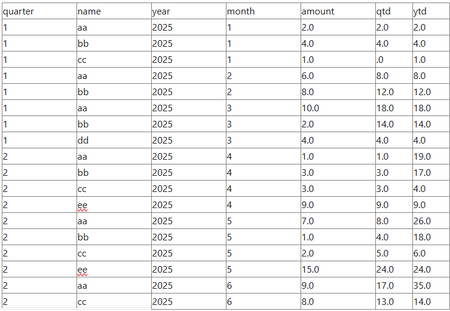
Sql to calculate quarterly/annual aggregation aside of monthly numbers
Hi, I am struggling to calculate amounts based on mtd amounts w/o using a cursor. Any idea? create table #raw(quarter int, name varchar(10), year int, month int, amount decimal(19,2)) insert #raw(quarter, name, year, month, amount) values(1, 'aa', 2025,1,2.0),(1, 'bb', 2025,1,4.0),(1, 'cc', 2025,1,1.0), (1, 'aa', 2025,2,6.0),(1, 'bb', 2025,2,8.0), (1, 'aa', 2025,3,10.0),(1, 'bb', 2025,3,2.0),(1, 'dd', 2025,3,4.0), (2, 'ee', 2025,4,9.0),(2, 'bb', 2025,4,3.0),(2, 'cc', 2025,4,3.0),(2, 'aa', 2025,4,1.0), (2, 'ee', 2025,5,15.0),(2, 'bb', 2025,5,1.0),(2, 'cc', 2025,5,2.0),(2, 'aa', 2025,5,7.0), (2, 'cc', 2025,6,8.0),(2, 'aa', 2025,6,9.0) Annual calc is easy, but not sure how to add quarterly number aside: select mtd.quarter, mtd.name, mtd.year, mtd.month, mtd.amount, sum(ytd.amount) as ytd from #raw mtd join #raw ytd on mtd.name = ytd.name and mtd.year = ytd.year and mtd.month >= ytd.month and mtd.quarter >= ytd.quarter group by mtd.quarter, mtd.name, mtd.year, mtd.month, mtd.amount order by 1,3,4,2 Goal is to get a report like this:SolvedEdSpa290Jun 19, 2025Tin Contributor156Views0likes2Comments

Tags
- sql server81 Topics
- Data Warehouse73 Topics
- Integration Services66 Topics
- sql61 Topics
- Reporting Services47 Topics
- Business Intelligence42 Topics
- Analysis Services33 Topics
- analytics25 Topics
- ssms23 Topics
- Business Apps22 Topics