Recent Discussions

Dynamic Code Setting in Version 139 Causing Printing Issues
Microsoft Edge security baseline version 139 via Intune sets the Dynamic Code value to 'Prevent the browser process from creating dynamic code'. The setting causes Microsoft Edge to close down / crash when trying to print. Reverting the setting value back to version 128 'Default dynamic code settings' resolves Microsoft Edge not closing down when trying to print.129Views0likes0Comments
Start strong with MCSB v2
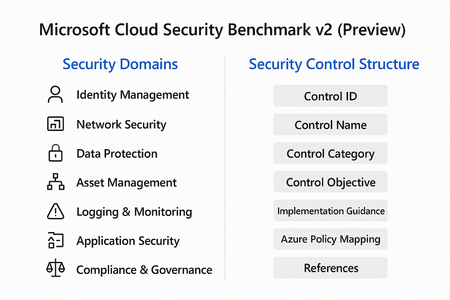
Cloud adoption is accelerating, but so are threats. Organizations often rush to deploy workloads without a clear security baseline, leaving critical gaps that attackers can exploit. Enter Microsoft Cloud Security Benchmark (MCSB) v2, now in public preview, designed to help you start well-protected and evolve securely. What Is Microsoft Cloud Security Benchmark v2? MCSB v2 is a comprehensive set of best practices and controls for securing cloud resources across Azure and hybrid environments. It aligns with: Industry standards: NIST, CIS, ISO Microsoft Secure Future Initiative (SFI) Zero Trust principles This benchmark provides prescriptive guidance for identity, network, data, and workload security helping organizations establish a strong foundation before customizing for their unique needs. Security Domains in MCSB v2 The benchmark organizes guidance into security domains, each representing a critical area of cloud security: Identity Management MFA enforcement, Conditional Access, privileged identity management. Network Security Segmentation, firewall rules, private endpoints. Data Protection Encryption at rest and in transit, key management. Asset Management Resource inventory, tagging, and governance. Logging & Monitoring Centralized logging, alerting, and SIEM integration. Incident Response Playbooks, automation, and escalation workflows. Application Security Secure coding practices, vulnerability scanning. Compliance & Governance Policy enforcement, regulatory alignment. Security Control Structure Each control in MCSB v2 follows a structured format for clarity and implementation: Control ID: Unique identifier for tracking. Control Name: Descriptive title (e.g., “Enable MFA for all users”). Control Category: Maps to a security domain. Control Objective: What the control aims to achieve. Implementation Guidance: Detailed steps for configuration. Azure Policy Mapping: Built-in policy definitions for automation. References: Links to Microsoft Learn and industry standards. This structure ensures consistency, traceability and ease of adoption across large environments. Integration with Azure Policy & Defender for Cloud One of the most powerful aspects of MCSB v2 is its native integration with Azure governance and security tools: Azure Policy Pre-built policy initiatives mapped to MCSB controls. Enables policy-as-code for automated enforcement across subscriptions. Supports compliance dashboards for visibility and reporting. Microsoft Defender for Cloud Monitors compliance against MCSB controls in real time. Provides secure score and recommendations for remediation. Integrates with workflows for alerting and automation. How to Get Started Review the Benchmark Explore the full guidance here: https://learn.microsoft.com/en-us/security/benchmark/azure/overview Apply Built-In Policies Use Azure Policy initiatives mapped to MCSB controls for quick enforcement. Monitor Compliance Leverage Microsoft Defender for Cloud to track adherence and remediate gaps. Tune for Your Needs Start with the baseline, then customize based on workload sensitivity and business requirements. Best Practices for Organizations Enable MFA and Conditional Access for all identities. Segment networks and enforce least privilege. Encrypt data at rest and in transit using Azure-native capabilities. Enable Defender for Cloud for continuous posture management. Automate compliance with policy-as-code. Cloud security isn’t static. Threats evolve, and so should your defenses. MCSB v2 gives you a future-ready foundation that scales with your business and integrates with Microsoft’s security ecosystem.390Views2likes0Comments
DSC SecurityPolicyDsc: "Could not infer CimType from the provided .NET object"
Hello Everyone, I'm encountering a persistent issue while applying security baseline settings using the SecurityPolicyDsc module on Windows Server 2022. Despite providing valid settings (like Accounts_Limit_local_account_use_of_blank_passwords_to_console_logon_only = 'Enabled'), the DSC execution fails with the following error: Could not infer CimType from the provided .NET object. The PowerShell DSC resource '[SecurityOption]LimitBlankPasswords' with SourceInfo '<file path>::SecurityOption' threw one or more non-terminating errors while running the Test-TargetResource functionality. What I've done so far: Verified the syntax and parameters using only one setting at a time Downgraded SecurityPolicyDsc to 2.9.0.0 (as 2.10.0.0 has known CimType issues) Confirmed MSFT_SecurityOption.schema.mof exists in the module directory Ensured no null or invalid values are passed Used explicit paths in Start-DscConfiguration Ran under PowerShell 5.1 on Windows Server 2022 (Azure VM, domain-joined) Despite all this, the error persists — even for a minimal configuration like: Configuration SecurityTest { Import-DscResource -ModuleName 'SecurityPolicyDsc' Node 'localhost' { SecurityOption LimitBlankPasswords { Name = 'LimitBlankPasswords' Accounts_Limit_local_account_use_of_blank_passwords_to_console_logon_only = 'Enabled' } } } SecurityTest -OutputPath "C:\Temp\SecurityTest" Start-DscConfiguration -Path "C:\Temp\SecurityTest" -Wait -Verbose -Force Any guidance or workarounds would be greatly appreciated. If there’s a known fix or update planned for SecurityPolicyDsc, I’d be happy to test that as well. Thanks in advance!138Views0likes0Comments
Edge Security Baseline v128 - Dynamic Code Setting
Cross-posted this in the annoucement for v128 and the review of v134... Enabling the Dynamic Code Settings "Enabled:Prevent the browser process from creating dynamic code" breaks printing to network printers in Active Directory. Edge tries to generate the print preview page, and hangs.484Views0likes0Comments
Edge security baseline for MS Edge management service
Hello, Do you plan and when to release directly the security baseline for Edge as a configuration profile to be imported into Microsoft Edge management service ? Thanks and regards119Views0likes0Comments
DSC Error for 2022 Security Baseline
Hello Everyone, I am trying to find out more about this error but no luck....... I have converted the GPOs to DSC for Windows Server 2022 - Member Server using Windows Server-2022-Security-Baseline-FINAL and have applied it to a test VM which is currently domain joined, initially I was getting too many dsc errors so I tried to narrow down and do a small batch of configurations and I still get the same error with the following message DSC Error : Could not infer CimType from the provided .NET object. The PowerShell DSC resource '[SecurityOption]SecuritySetting(INF): LSAAnonymousNameLookup' with SourceInfo 'C:\onedsc\PasswordComplexityConfig.ps1::33::9::SecurityOption' threw one or more non-terminating errors while running the Test-TargetResource functionality. These errors are logged to the ETW channel called Microsoft-Windows-DSC/Operational. Refer to this channel for more details. Could not infer CimType from the provided .NET object. Does anyone have any insight what could be wrong here?and how do I go about correcting it Thanks166Views0likes0Comments
Security Baseline for M365 Apps for enterprise May 2023 version
Is there any known issue with the Security Baseline for M365 Apps not applying? I have a customer who said it worked for a while and then stopped working. They had to do everything via configuration profiles. Apparently they also heard from other companies that this baseline stopped working suddenly.887Views0likes0Comments
Exploit Prevention Blocking EXE files
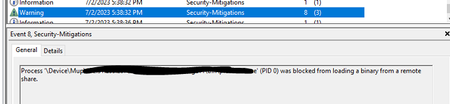
My environment is having an issue where exe files are being blocked when executed via a remote share. It appears Exploit Prevention is blocking but it does not happen for every user. I have placed an exclusion using Set-ProcessMitigation -Name filename.exe -Disable BlockRemoteImageLoads and the issues still persist. We do not use Defender for Endpoint as a solution and are not managing Exploit Guard policy via GPO, SCCM, or InTune. Also I have verified the process mitigation is disabled using PowerShell. ImageLoad: BlockRemoteImageLoads : OFF AuditRemoteImageLoads : NOTSET Override BlockRemoteImages : False BlockLowLabelImageLoads : OFF AuditLowLabelImageLoads : NOTSET Override BlockLowLabel : False PreferSystem32 : NOTSET AuditPreferSystem32 : NOTSET Override PreferSystem32 : False This randomly started a few days ago and I'm at a loss for how to move forward and why this occured all the sudden.1.2KViews0likes0Comments
collecting activity logs via API for security
Hello Everyone! We are planning to collect MCAS activity event logs for security monitoring via API for applications we connected (O365, Azure, Workday, Salesforce, Service Now, Docusign). Can you please sare information about best practises, playbooks or guides regarding this scenario? Or if you have experience in similiar cases, I'll be thankful for information 🙂1.1KViews0likes0Comments
MSCT script domain-joined doesnt create registry
I have a scenario where I run the NonDomainJoined script and it changes the records and creates the ones that are not there, and verifying it with a vulnerability tool, I see >95% compliance. When this same machine I add it to the domain and run the DomainJoined script and checking it again with the tool I have a 25%< compliance, using the PolicyAnalyzer I notice that the records are not being generated, only the ones that are already there are being modified. Do you know how I could verify if any security policy is affecting me? I am not the domain administrator and I would like to understand how a security policy could affect me and identify which one it could be. I did the test of creating a domain and putting a computer in it, to verify that some of the default policies could affect the operation, but not. Regards831Views0likes0Comments
Secure Environment (PAW) for IaC Coders or Azure Management with minimum compromise on security
Hi All, I followed the Guidelines from Microsoft on how to create a PAW with Intune for extremely exposed Accounts e.g., working on Tier 0 etc. Talking Hybrid now. Issues we currently see are in the following Areas: PAW itself is very locked down, using the Privilege Scripts and Profiles for Intune provided by Microsoft on Github (2020) which is by design. No Admin rights mean even if you deploy for e.g., VS Code via Intune as System installer (could not deploy user installer successfully via Company Portal) no one using it can actually run Program Updates etc. Also installing add-ins e.g., Bicep will be an issue. Same goes for PowerShell if you need additional Modules to install. In addition, App Locker and Controlled Folder Access makes it near impossible to use PowerShell efficiently. Now my Questions: 1. What is a good Option for Admins that need to manage System and Services with PowerShell and IaC ? do we need to deploy Enterprise or Specialized hardenings and forget about delivering them Physical PAWs hardened like MS does? Is LAPS an option to overcome the no-admin gap for the Issues mentioned above? Would you suggest using the Locked Down PAW only as Jump host not working on it at all? if so, how can you secure the Jump Server as much to keep the End-to-end security high for T0? I think if somebody can change and update code for a whole Landing Zone in Azure this should be categorized as T0 don't you think? I verified a lot of Community Projects and MVP Blogs but the Topics above i feel lack a bit of explanation. Would be great if somebody could give me some Ideas about how to do this for the necessary Admin Profiles to have some form of productivity experience while keep a highest security baseline as possible. BR Ueli1.5KViews0likes0Commentscan lgpo harden audit, permissions and more
Hi, Can Lgpo.exe implement the whole windows baseline ?(not only the gpo demands, but registry, audit and more) what are the different gpos folders mentioned in the gpo folder of lgpo? thank you1.1KViews0likes0CommentsCommand prompt password showing and correct
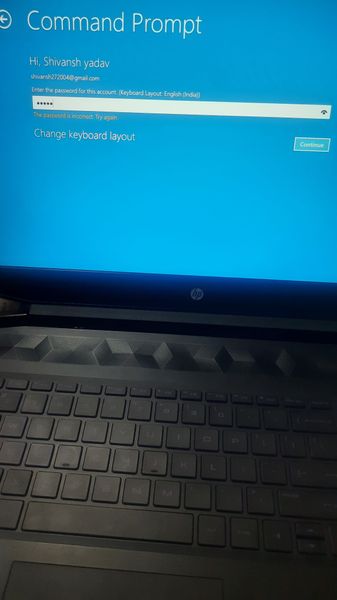
The lock screen on my PC is showing your pin is no longer available due to a change to the security settings on this device click to set up your pin again and when I am clicking on set up your pin I am again redirected to the lock screen and nothing happens and when I tried using advance option to troubleshoot the problem the command prompt was asking for a password for which I entered passwords this word showing in correct and I had enter all password that I could recall so what to do now please help me1.1KViews0likes0CommentsDashboards for SCT
Hello and greetings from Portugal! I'm trying to find some kind of free tool that allows me to had MSFT Security Baseline files, run it against a machine and get some kind of dashboard about the differences between them. Does anyone knows something similar? Best regards, Diogo Sousa891Views1like0Comments
Intent behind configuring Network Protection but not enabling it in Windows Server Baselines
What is the intent behind the following two settings in the Windows Server 2019/2022 Baseline: Windows Components\Microsoft Defender Antivirus\Microsoft Defender Exploit Guard\Network Protection Prevent users and apps from accessing dangerous websites Block Windows Components\Microsoft Defender Antivirus\Microsoft Defender Exploit Guard\Network Protection This settings controls whether Network Protection is allowed to be configured into block or audit mode on Windows Server. In Windows Server Network Protection is not enabled by default, so when the 2nd setting is left to unconfigured the first setting cannot and does not work. Why configure it then?921Views0likes0CommentsSecurity Baselines in Intune - how to monitor?
Hello and greetings from Portugal! I'm starting to take a look at Security Baselines in MEM. I've already created a profile, and started testing configuration, but...what I wanted to know if there's anyway to create a profile, assign that profile and that, instead of changing settings, just get a report about what my machine has configured and what's the correct config for the security baseline. Is that possible? Best regards, Diogo Sousa925Views1like0CommentsUnable to parse policies with RTLO characters (U+202e)
If I try to parse a policy from registry.pol with a RTLO character (U+202e), in my case, from an AppLocker rule, to screen its breaks. Also happens if I redirect to a text file.887Views0likes0CommentsUnable to Create Import Configuration Data - SCCM DCM (.CAB) Files
Respected, Unable to Create "Import Configuration Data" - SCCM DCM (.CAB) File for SCCM. Like to import CIS baseline of Windows 2016 in SCCM under Configuration Baselines\Configuration Items using an option called "Import Configuration Data" Unable to find a matching tool like SCM, where I can import GPO and export as SCCM DCM (CAB) File. the same file can be imported in SCCM under Configuration Items/Configuration Baselines. Can use them for bulk deployment & Run compliance scans. My requirement is: CIS Baselines need to import into SCCM & Run detailed Baseline reports.1.1KViews0likes0Comments


Events
Recent Blogs
- We are pleased to announce the enterprise-ready release of the security baseline for Microsoft Edge version 151! We have reviewed the settings in Microsoft Edge version 151 and updated our guid...Aug 25, 202681Views0likes0Comments
- We have reviewed the new settings in Microsoft Edge version 150 and determined that there are no additional security settings that require enforcement. The Microsoft Edge version 139 security baselin...Aug 13, 2026415Views0likes0Comments