Recent Discussions

Dynamic Code Setting in Version 139 Causing Printing Issues
Microsoft Edge security baseline version 139 via Intune sets the Dynamic Code value to 'Prevent the browser process from creating dynamic code'. The setting causes Microsoft Edge to close down / crash when trying to print. Reverting the setting value back to version 128 'Default dynamic code settings' resolves Microsoft Edge not closing down when trying to print.130Views0likes0Comments
RestrictedTrafficInstall.ps1 Fails on Windows 10 IoT Enterprise LTSC 2021 with SKU Detection Error
I am encountering an issue while deploying the Restricted Traffic Limited Functionality Baseline on a Windows 10 IoT Enterprise LTSC 2021 device and would like to confirm whether this OS edition is supported or if this is a known issue with the baseline script. Operating System: Windows 10 IoT Enterprise LTSC 2021 EditionID: IoTEnterpriseS DisplayVersion: 21H2 : ...\RestrictedTrafficInstall.ps1 : Could not get SKU of current running OS. CategoryInfo : NotSpecified: (:) [Write-Error], WriteErrorException FullyQualifiedErrorId : Microsoft.PowerShell.Commands.WriteErrorException,RestrictedTrafficInstall.ps154Views0likes1CommentWindows 11 24H2 Sec Baseline → Broken SSO to on‑prem (Root cause: PKINIT SHA‑1 baseline)
Hi all, I ran into an issue with Entra-joined devices using Windows Hello for Business (Cloud Kerberos Trust) that might help others working with Windows 11 24H2 security baselines. Scenario Windows 11 25H2 devices Entra-joined (not hybrid) Intune-managed Windows Hello for Business (WHfB) enabled Cloud Kerberos Trust configured On-prem AD (Windows Server 2019/2022 DCs) Access to SMB shares / on-prem applications Symptoms SSO to on-prem resources fails Users get credential/PIN prompt instead of SSO Error message: “The system cannot contact a domain controller to service the authentication request” Client-side observations: klist → no tickets (initially) After enabling Cloud Kerberos Trust: klist get krbtgt → works klist get cifs/server.domain → fails Error: 0xc000a100 / 0x3bc4 Hash generation for the specified version and hash type is not enabled on server Root Cause The issue was caused by a Windows 11 24H2 security baseline setting related to Kerberos/PKINIT. The 24H2 baseline introduces a policy for configuring hash algorithms for certificate-based Kerberos authentication (PKINIT). This setting allows environments to disable SHA-1 and require SHA-2 algorithms. [applepie.se] Important detail: This configuration only works if the domain controllers fully support PKINIT with SHA-2, which effectively requires Windows Server 2025 domain controllers across the environment. If SHA-1 is disabled while running: Windows Server 2019 or 2022 DCs Mixed environments then PKINIT authentication fails, which directly impacts: Windows Hello for Business Cloud Kerberos Trust Any passwordless Kerberos-based authentication Why this is difficult to troubleshoot Cloud Kerberos Trust appears correctly configured AzureADKerberos object exists PRT is valid Network connectivity is fine However: Kerberos tickets are not issued correctly Service tickets (CIFS, HTTP, etc.) fail Errors are misleading and point to KDC/hash issues No explicit warning is provided in baseline guidance that mixed environments will break Resolution Revert the baseline change and allow SHA-1 for PKINIT again. Policy location: Computer Configuration → System → Kerberos / KDC → Configure hash algorithms for certificate logon Ensure: SHA-1 is set to Allowed/Default After reverting: Kerberos ticket issuance works SSO to on-prem resources is restored Recommendation Do not disable SHA-1 for PKINIT unless: All domain controllers are Windows Server 2025, and PKINIT SHA-2 support has been fully validated Treat this setting as future hardening, not production-safe for mixed environments today. Takeaway If you experience: WHfB + Cloud Kerberos Trust SSO failures klist get errors with hash generation issues Missing or failing Kerberos service tickets check the PKINIT hash configuration from the 24H2 security baseline first.708Views1like4Comments
TLS 1.1 is set as a recommended value in the latest security baseline
In the latest security baseline for Windows 11 24H2, the following item is set to "Use TLS 1.1 and TLS 1.2," but could you please explain the reason for this? Download Microsoft Security Compliance Toolkit 1.0 from Official Microsoft Download Center Windows Components\Internet Explorer\Internet Control Panel\Advanced Page Turn off encryption support Enabled: Use TLS 1.1 and TLS 1.2 Generally, I believe TLS 1.1 should no longer be used, and that using "TLS 1.2 and TLS 1.3" would be better from a security standpoint.569Views3likes2CommentsStart strong with MCSB v2
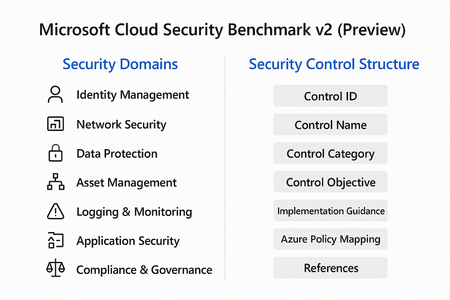
Cloud adoption is accelerating, but so are threats. Organizations often rush to deploy workloads without a clear security baseline, leaving critical gaps that attackers can exploit. Enter Microsoft Cloud Security Benchmark (MCSB) v2, now in public preview, designed to help you start well-protected and evolve securely. What Is Microsoft Cloud Security Benchmark v2? MCSB v2 is a comprehensive set of best practices and controls for securing cloud resources across Azure and hybrid environments. It aligns with: Industry standards: NIST, CIS, ISO Microsoft Secure Future Initiative (SFI) Zero Trust principles This benchmark provides prescriptive guidance for identity, network, data, and workload security helping organizations establish a strong foundation before customizing for their unique needs. Security Domains in MCSB v2 The benchmark organizes guidance into security domains, each representing a critical area of cloud security: Identity Management MFA enforcement, Conditional Access, privileged identity management. Network Security Segmentation, firewall rules, private endpoints. Data Protection Encryption at rest and in transit, key management. Asset Management Resource inventory, tagging, and governance. Logging & Monitoring Centralized logging, alerting, and SIEM integration. Incident Response Playbooks, automation, and escalation workflows. Application Security Secure coding practices, vulnerability scanning. Compliance & Governance Policy enforcement, regulatory alignment. Security Control Structure Each control in MCSB v2 follows a structured format for clarity and implementation: Control ID: Unique identifier for tracking. Control Name: Descriptive title (e.g., “Enable MFA for all users”). Control Category: Maps to a security domain. Control Objective: What the control aims to achieve. Implementation Guidance: Detailed steps for configuration. Azure Policy Mapping: Built-in policy definitions for automation. References: Links to Microsoft Learn and industry standards. This structure ensures consistency, traceability and ease of adoption across large environments. Integration with Azure Policy & Defender for Cloud One of the most powerful aspects of MCSB v2 is its native integration with Azure governance and security tools: Azure Policy Pre-built policy initiatives mapped to MCSB controls. Enables policy-as-code for automated enforcement across subscriptions. Supports compliance dashboards for visibility and reporting. Microsoft Defender for Cloud Monitors compliance against MCSB controls in real time. Provides secure score and recommendations for remediation. Integrates with workflows for alerting and automation. How to Get Started Review the Benchmark Explore the full guidance here: https://learn.microsoft.com/en-us/security/benchmark/azure/overview Apply Built-In Policies Use Azure Policy initiatives mapped to MCSB controls for quick enforcement. Monitor Compliance Leverage Microsoft Defender for Cloud to track adherence and remediate gaps. Tune for Your Needs Start with the baseline, then customize based on workload sensitivity and business requirements. Best Practices for Organizations Enable MFA and Conditional Access for all identities. Segment networks and enforce least privilege. Encrypt data at rest and in transit using Azure-native capabilities. Enable Defender for Cloud for continuous posture management. Automate compliance with policy-as-code. Cloud security isn’t static. Threats evolve, and so should your defenses. MCSB v2 gives you a future-ready foundation that scales with your business and integrates with Microsoft’s security ecosystem.391Views2likes0CommentsMicrosoft Zero Trust Assessment v2: Operationalizing Security with Precision
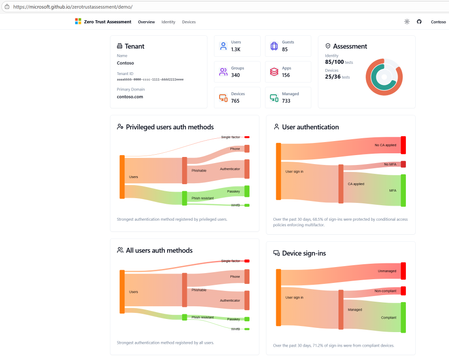
In an era where cyber threats evolve faster than ever, organizations can’t afford blind spots. Zero Trust is no longer optional it’s the foundation of modern security. With the release of the Microsoft Zero Trust Assessment v2, enterprises now have a powerful tool to measure, prioritize, and remediate security gaps with actionable intelligence. What Is Zero Trust Assessment v2? The Zero Trust Assessment is a security posture evaluation tool designed to help organizations operationalize Zero Trust principles. It automates checks across hundreds of configuration items aligned with: Secure Future Initiative (SFI) Zero Trust pillars: Identity, Devices, Applications, Data, Infrastructure and Networks Industry standards: NIST, CISA, CIS Microsoft’s internal security baselines Insights from thousands of real-world customer implementations How Does It Work? The assessment follows a structured, automated workflow: 1. Data Collection & Configuration Analysis Scans your Microsoft 365 environment and connected workloads. Evaluates identity configurations (e.g., MFA enforcement, conditional access policies). Reviews device compliance (e.g., Intune policies, OS hardening). Pulls telemetry from Azure AD, Microsoft Defender, and other integrated services. 2. Automated Testing Against Standards Runs hundreds of tests mapped to Zero Trust principles. Benchmarks your settings against: NIST Cybersecurity Framework CISA Zero Trust Maturity Model Microsoft security baselines Flags misconfigurations and policy gaps. 3. Risk Scoring & Prioritization Assigns risk levels based on: Impact (how critical the gap is) Effort (complexity of remediation) Provides a prioritized list of actions so you can focus on what matters most. 4. Actionable Recommendations Generates clear remediation steps not vague advice. Links to Microsoft Learn and security documentation for quick implementation. Suggests policy templates and automation scripts where applicable. 5. Comprehensive Reporting Delivers a detailed report with: Trends over time Risk heatmaps Compliance scores Enables executive dashboards for leadership visibility. Integration with Microsoft Security Tools Zero Trust Assessment v2 doesn’t operate in isolation it integrates seamlessly with Microsoft’s security ecosystem: Microsoft Defender for Endpoint Detects device vulnerabilities and feeds compliance data into the assessment. Microsoft Intune Ensures device configuration policies align with Zero Trust principles. Microsoft Sentinel Correlates assessment findings with threat intelligence for proactive incident response. Azure AD Conditional Access Validates identity policies like MFA and session controls. Microsoft Purview Extends Zero Trust to data governance and compliance. This integration ensures that remediation steps can be automated and enforced across your environment, reducing manual effort and accelerating security posture improvement. Sample Remediation Workflow Diagram Below is a simplified view of how remediation flows after an assessment: This closed-loop process ensures continuous improvement and operationalization of Zero Trust. Key Benefits Speed: Automates what used to take weeks of manual audits. Accuracy: Aligns with global standards and Microsoft’s own security posture. Operationalization: Moves Zero Trust from theory to practice with actionable steps. Future-Ready: Tests will soon be available enabling continuous improvement. Why This Matters Blind spots in identity or device security can lead to breaches, financial loss and reputational damage. Zero Trust Assessment v2 helps you: Respond faster to evolving threats. Reduce risk with prioritized remediation. Build resilience by embedding Zero Trust principles into daily operations.1.5KViews2likes1Comment
Microsoft 365 Apps for Enterprise Security Baseline 2412; when available?
https://learn.microsoft.com/en-us/intune/intune-service/protect/security-baseline-v2-office-settings?pivots=v2306 is currently available in Intune. Microsoft already released the 2412 version via the Microsoft Security Compliance Toolkit. Unfortunately, this version is not available in Intune nyet. When can we expect that version to become available in Intune?235Views0likes1Comment
DSC SecurityPolicyDsc: "Could not infer CimType from the provided .NET object"
Hello Everyone, I'm encountering a persistent issue while applying security baseline settings using the SecurityPolicyDsc module on Windows Server 2022. Despite providing valid settings (like Accounts_Limit_local_account_use_of_blank_passwords_to_console_logon_only = 'Enabled'), the DSC execution fails with the following error: Could not infer CimType from the provided .NET object. The PowerShell DSC resource '[SecurityOption]LimitBlankPasswords' with SourceInfo '<file path>::SecurityOption' threw one or more non-terminating errors while running the Test-TargetResource functionality. What I've done so far: Verified the syntax and parameters using only one setting at a time Downgraded SecurityPolicyDsc to 2.9.0.0 (as 2.10.0.0 has known CimType issues) Confirmed MSFT_SecurityOption.schema.mof exists in the module directory Ensured no null or invalid values are passed Used explicit paths in Start-DscConfiguration Ran under PowerShell 5.1 on Windows Server 2022 (Azure VM, domain-joined) Despite all this, the error persists — even for a minimal configuration like: Configuration SecurityTest { Import-DscResource -ModuleName 'SecurityPolicyDsc' Node 'localhost' { SecurityOption LimitBlankPasswords { Name = 'LimitBlankPasswords' Accounts_Limit_local_account_use_of_blank_passwords_to_console_logon_only = 'Enabled' } } } SecurityTest -OutputPath "C:\Temp\SecurityTest" Start-DscConfiguration -Path "C:\Temp\SecurityTest" -Wait -Verbose -Force Any guidance or workarounds would be greatly appreciated. If there’s a known fix or update planned for SecurityPolicyDsc, I’d be happy to test that as well. Thanks in advance!138Views0likes0CommentsEdge Security Baseline v128 - Dynamic Code Setting
Cross-posted this in the annoucement for v128 and the review of v134... Enabling the Dynamic Code Settings "Enabled:Prevent the browser process from creating dynamic code" breaks printing to network printers in Active Directory. Edge tries to generate the print preview page, and hangs.484Views0likes0Comments
Edge security baseline for MS Edge management service
Hello, Do you plan and when to release directly the security baseline for Edge as a configuration profile to be imported into Microsoft Edge management service ? Thanks and regards119Views0likes0Comments
DSC Error for 2022 Security Baseline
Hello Everyone, I am trying to find out more about this error but no luck....... I have converted the GPOs to DSC for Windows Server 2022 - Member Server using Windows Server-2022-Security-Baseline-FINAL and have applied it to a test VM which is currently domain joined, initially I was getting too many dsc errors so I tried to narrow down and do a small batch of configurations and I still get the same error with the following message DSC Error : Could not infer CimType from the provided .NET object. The PowerShell DSC resource '[SecurityOption]SecuritySetting(INF): LSAAnonymousNameLookup' with SourceInfo 'C:\onedsc\PasswordComplexityConfig.ps1::33::9::SecurityOption' threw one or more non-terminating errors while running the Test-TargetResource functionality. These errors are logged to the ETW channel called Microsoft-Windows-DSC/Operational. Refer to this channel for more details. Could not infer CimType from the provided .NET object. Does anyone have any insight what could be wrong here?and how do I go about correcting it Thanks166Views0likes0CommentsServer 2025 Security Baseline breaks Failover Cluster
Hello everyone, while testing the Server 2025 Security Baseline with our Hyper-V Hosts in a Failover Cluster, we noticed the Cluster Service (ClusSvc) was unable to start correctly. It failed with Event 7024 - "A specified authentication package is unknown". From testing and the event logs, we noticed that the .dll file "CLUSAUTHMGR.DLL" was unable to load. After setting "Allow Custom SSPs and APs to be loaded into LSASS" to "Disabled", we were able to start the service again. I assume that the cluster auth manager .dll is not recognized as a trusted Microsoft SSP/AP and therefore blocked as "custom" when enabling this setting. Has anyone tested this using Hyper-V clusters and/or made similar observations? (P.S.: Before debugging, we should have googled, since apparently we are not the only one to have this issue: https://jigsolving.com/failover-cluster-service-wont-start-server-2025/4.2KViews0likes3CommentsHow to Use Baselines Correctly as a Beginner
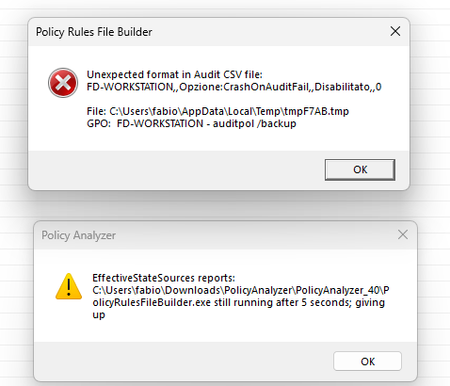
Hello everyone, regarding baselines I am a beginner, I downloaded them yesterday for Windows 11 pro and tried to document myself to use them in the right way but I found fragmentary information around the web. First I ran the script to install them as a standalone machine : PowerShell.exe -ExecutionPolicy RemoteSigned -File .\Baseline-LocalInstall.ps1 -Win11NonDomainJoined and everything was applied at least from what I read in the logs file. The first question is, if I wanted to return to the starting situation then without the applied changes should I run the Remove-EPBaselineSettings.ps1 script without specifying any parameters? Then I tried using the policy analyzer by feeding it the rules xslx file for Windows 11 and comparing with the current state. Would this already be enough to verify that indeed everything has been applied? However, when I do the comparison I get an error message and a warning but then it still shows me the comparison. Attached is the screenshot Can you tell me if there is complete and detailed documentation on both the baselines and for the policy analyzer? There are several options that I don't really understand so I haven't ventured to use. Thanks to all626Views0likes1Comment
Question regarding MSCT 1.0 baselines for Windows Server 2016, 2019, and 2022
Hi All, I have a mix of Windows Server 2016, 2019, and 2022 Domain Controllers. Given the above, what admx and adml files should I copy to the respective SYSVOL folders: C:\Windows\SYSVOL\domain\Policies C:\Windows\SYSVOL\domain\Policies\en-US E.G. If you look in the Templates folder for 2016, 2019, and 2022 they all have the same filenames and will overwrite each other. I'm assuming I should use Windows Server-2022-Security-Baseline-FINAL, but won't this have incompatibilities with 2016/2019 DCs? Windows-Server-2016-Security-Baseline Templates AdmPwd.admx 4k MSS-legacy.admx 19k SecGuide.admx 4k AdmPwd.adml 4k MSS-legacy.adml 17k SecGuide.adml 4k Windows Server 2019 Security Baseline Templates AdmPwd.admx 4k MSS-legacy.admx 19k SecGuide.admx 28k AdmPwd.adml 4k MSS-legacy.adml 17k SecGuide.adml 12k Windows Server-2022-Security-Baseline-FINAL Templates AdmPwd.admx 4k MSS-legacy.admx 19k SecGuide.admx 32k en-US AdmPwd.adml 4k MSS-legacy.adml 17k SecGuide.adml 16k656Views0likes2CommentsSecurity Baseline Version 23H2, greenfield deployment
Hi, Is there a best practice to start rolling out the Microsoft security baseline. I am in a Greenfield situation where I would like to use this baseline as a starting point. This by first adjusting the baseline by removing what I think might be causing issues for the user. There are a lot of settings in this baseline so I am sure some of them will causes issues for users. Since you simply can't disable the policy and all settings will be reverted what is the best practice around this? Make a copy of the existing baseline adjust settings and re-apply the correct settings? I read that Intune is tattooing some settings an the only way to reverse is to wipe and re-deploy, or manually fix in registry. Any advice on this, maybe not use the baseline and built template gradually.911Views0likes1CommentQuestion Regarding Server 2022 Domain & Controller MSCT baselines
I have a basic 'Newbie' question regarding the MSCT baselines. I see the GPO for 'MSFT Windows Server 2022 - Domain Controller' and also 'MSFT Windows Server 2022 - Member Server'. I just want to confirm that we should only apply the 'MSFT Windows Server 2022 - Domain Controller' policies to our DC's, and not the Member Server policies as well. While this seems obvious, I just want to make sure.2.2KViews0likes6CommentsOffice security baseline breaks excel feature: "analysis toolpak"
Hi team, I have found that the Office security baseline (Intune v2306) breaks an excel feature: analysis toolpak add-in (the data analysis menu item does not load). There was a known issue note on the v2206 office baseline that stated the setting "Prevent Excel from running XLM macros" broke analysis toolpak and referred to a workaround: https://support.microsoft.com/office/06cd719c-1e9b-4624-815b-c377ad5ca236 But, I have tested removing/disabling the "Prevent Excel from running XLM macros" from the baseline and the issue persists. I also tested deploying/enabling only the "Prevent Excel from running XLM macros" and it doesn't cause the feature to stop working. I've come to the conclusion that "Prevent Excel from running XLM macros" is no longer a relevant setting (and the workaround is no longer accurate). I've tested a dozen settings from excel trust center without success in finding the offending setting. The "analysis toolpak" doesn't show in the trust center logging. 1. It looks like this needs to be a known issue for the office baseline again, 2. Any recommendations on how to troubleshoot the issue (short of working through each setting in the baseline)?2.3KViews0likes1CommentYour connection isn't private on edge after hardening plus no home page
Hi, We are in the process of setting up a policy for organizational users using Edge and GPO. We have had a few hickups, two of which I would be happy for assistance with fixing. It's important that all the fixes are via the GPO settings (ADMX as of build 101 of Edge). The first issue is that when the browser starts, we want it to open to our organizational portal, but it opens to "edge://newtab". We managed to set the home page (when you click the home icon) to our portal, but can't figure out how to get Edge to always open with our portal as the main page. The second issue is even more problematic. On some external web sites, even those you would not expect to get it, we get a "Your connection isn't private" message (when trying to browse to "http://www.google.com" for example. and the internal error is "NET::ERR_CERT_NO_REVOCATION_MECHANISM" We don't have this issue with IE or chrome to the same websites on the same ws's. And we don't have this issue with internal websites. Anyone have any idea why this is happening only on Edge and what the parameter that could be causing this ? Again, it does not happen on all web sites. Some web sites that give this error allow us to move forwards, while others like google, won't even allow that. Would appreciate any help. Mike21KViews0likes7CommentsSecuring Group Policy Template and importing it to windows server 2016 Group Policy
Hi, I'm working on the Security Hardening of windows server 2016 according to [CIS Benchmark V 1.2.0][1], for this I found a Security Compliance project from Microsoft which is [Microsoft Security Compliance Toolkit 1.0][2]. This project works on a preconfigured Group Policy for Member Server or Domain Controller and that group policy has a Hardened configuration that complies with the CIS Benchmark. Microsoft Security Compliance Toolkit 1.0 has some tools and configurations that can be installed from [here][3]. the main problem with this toolkit and its group policy configuration is they are not implementing all the CIS Benchmark for windows server 2016 so I start working on my own Group Policy Template. For building my Hardening Group Policy Template I started by taking snapshot from my windows server 2016 so I can work on a system, like the production, then deploying the Hardened Group policy that comes with the Toolkit (as a starting point) then check every point from the CIS Benchmark document and reflect the Recommended configuration on that Template Group Policy. after finishing some of those Security recommendations I took another snapshot from the production server and used the LGPO.exe (included in the toolkit) tool to import the Hardened Group Policy Template that I was working on and apply it to the new server snapshot. after importing the Hardened Group Policy to the test server I start facing many problems when trying to log in to my administrator account, as seen in the photos : 1. After login, I receive this error, and if log in again it doesn't occur again : https://drive.google.com/file/d/1emPuoTKajuUmTifi8sSirb1vUJIhi9sI/view?usp=sharing 2. After login sometimes the server hangs on the following state : https://drive.google.com/file/d/1Vp48d7sxdCfabs93IfRW10_T9xHo44R3/view?usp=sharing 3. receive this error sometimes : https://drive.google.com/file/d/16BJEMn6OZAS8J5pTRFF4tGcFfGMAYRGN/view?usp=sharing Note that the previous errors occur sometimes and if you try to access the same thing again it works, 4.this occurs every time I log in to the account : https://drive.google.com/file/d/16W86tVTVgoo9amvhlsfCsmsMb-XMAFZl/view?usp=sharing All of these errors start happening after deploying the Hardened Group Policy to the test server, Also I had another snapshot from the production server where I tried to do the same Security Recommendations Manually, so I did the same Security Recommendations that I configured in the Group Policy and caused all the previous errors but this time manually and everything was working as expected with no errors !! So my Issue Is what goes wrong with having a tool such as LGPO.exe (official Microsoft tool) that imports Group Policy GPO to the current Group Policy, and why I had all the previous issues when doing that? but when doing manual works it worked well? what is the best way to Make Secure Group Policy as per CIS Benchmark and export it then import to each Server you have ? what is the best way for doing this? **Note:** 1. I have only one admin user that I'm using during the work 2. my win server 2016 is non-domain machine - stand alone Thanks in advance [1]: https://www.newnettechnologies.com/cis-benchmark.html?utm_campaign=Search+-+ROW+-+Quantity&utm_medium=ppc&utm_source=adwords&utm_term=&hsa_acc=2189148223&hsa_cam=134925607&hsa_grp=78721086889&hsa_src=g&hsa_tgt=dsa-688559004445&hsa_kw=&hsa_ad=361557470862&hsa_net=adwords&hsa_mt=b&hsa_ver=3&gclid=Cj0KCQjw3ZX4BRDmARIsAFYh7ZIAuQlReBpbGLHvKYCCQxq7QQrBYKgvrhxZu7tJne57NuBNQtT7gDIaAjDYEALw_wcB [2]: https://docs.microsoft.com/en-us/windows/security/threat-protection/security-compliance-toolkit-10 [3]: https://www.microsoft.com/en-us/download/details.aspx?id=553198.8KViews0likes1Comment



Events
Recent Blogs
- We are pleased to announce the enterprise-ready release of the security baseline for Microsoft Edge version 151! We have reviewed the settings in Microsoft Edge version 151 and updated our guid...Aug 25, 2026119Views0likes0Comments
- We have reviewed the new settings in Microsoft Edge version 150 and determined that there are no additional security settings that require enforcement. The Microsoft Edge version 139 security baselin...Aug 13, 2026418Views0likes0Comments