Recent Discussions
Welcome
Welcome to the new home for blogs & discussion around the Security Compliance Toolkit (SCT) and the Microsoft Security Baselines. Please bear with Aaron Margosis and me as we sort through the old content from the SecGuide TechNet blog and get it migrated over to here. This new platform will give us the ability to more easily collaborate with the community. Also, we heard your feedback, be on the lookout for a new DRAFT security baseline (coming very soon) that we have been working on… Office 365 ProPlus!2.3KViews7likes2CommentsWindows 10/11 22h2 Security Baseline missing in Intune
Hi, can you please enlighten when the Windows 10/11 Security Baseline will be updated to 22H2? The current baseline is of November 2021, I am sure that there are new recommedations in the new baseline ( Windows 10, version 22H2 Security baseline - Microsoft Community Hub ) that would be helpful while managing Windows in a more modern way. As an example, currently missing the 22H2 option "Allow Administrator account lockout" to manage it without the need of a GPO. 19KViews4likes32Comments
Security Baseline for Office 365 July 2017 DRAFT Feedback
A bit of feedback on the "Security baseline for Office 365 ProPlus (v1907, July 2019) - DRAFT" settings. For reference, I deployed the settings via Group Policy and my Office suite at the time was on version 1907 (Build 11901.20176). Macro Runtime Scan Scope With the "Macro Runtime Scan Scope" policy, I have had difficulties related to some built-in functionality in Access. When the Scan Scope is set to "Enable for all documents", and used at the same time as with Windows Defender Attack Surface Reduction, I seem to receive blocks against the "Block Win32 API calls from Office macro" (92E97FA1-2EDF-4476-BDD6-9DD0B4DDDC7B) rule from the .accde files within "C:\PROGRAM FILES\MICROSOFT OFFICE\ROOT\OFFICE16\ACCWIZ". Example: Windows Defender Exploit Guard has blocked an operation that is not allowed by your IT administrator. For more information please contact your IT administrator. ID: 92E97FA1-2EDF-4476-BDD6-9DD0B4DDDC7B Detection time: 2019-08-12T23:08:11.700Z User: (unknown user) Path: C:\PROGRAM FILES\MICROSOFT OFFICE\ROOT\OFFICE16\ACCWIZ\ACWZMAIN.ACCDE Process Name: OFFICE_VBA Security intelligence Version: 1.299.1840.0 Engine Version: 1.1.16200.1 Product Version: 4.18.1907.4 That particular event was a result of making a new local Access Database, putting 1 record in a table and then Create -> Query Wizard -> Simple Query Wizard -> OK. While I am not a fan of Access, we have a number of users who leverage the tool quite a bit and these blocks make Access "less than functional" to them. If I set the "Macro Runtime Scan Scope" back to my previously configured "Enable for low trust documents", the built-in Access functions work fine, since I have that specific folder added to Trusted Locations, as it is a default trusted location when the Office suite installs. Interestingly enough, adding exceptions to ASR for the respective folder or specific .accde does not work. (I also attempted a simultaneous Path exception to Windows Defender itself, with no luck.) I assume that this is a result of the way in which the data is passed to Windows Defender via AMSI due to the "Macro Runtime Scan Scope", which perhaps makes it difficult/impossible to make exclusions. Excel File Block prevents copy/paste from Access On a somewhat different note, the file block settings setting "Excel 97-2003 workbooks and templates" which prevents Open/Save, conflicts with, again, Access. If you have query results, or a table you wish to cut and paste into Excel, the default paste mechanism seems to require the ability to open "Excel 97-2003 workbooks and templates". If you set the file block settings for that file type to "Save Blocked", the paste from Access to Excel will work. If you set it to another value other than "Do not block", the paste will fail and you will receive a warning that Excel 97-2003 files are blocked. If you choose an alternative paste method, such as "Paste Special -> Text" or "Paste, match destination formatting", it will work, but depending on the data in Access, there could be some clean up needed (leading zeroes could be stripped). The remaining difficulties my organization may have with file block settings will be a result of how we operate, and those we work with, but this particular instance seemed worthy of note, since it impacts what could be viewed as a standard workflow/interplay between two Microsoft developed applications. Hope the information is useful. If you can think of something I have overlooked that will allow these to work and enable me to tighten up the policies a bit more, please let me know.4.6KViews3likes3Comments
TLS 1.1 is set as a recommended value in the latest security baseline
In the latest security baseline for Windows 11 24H2, the following item is set to "Use TLS 1.1 and TLS 1.2," but could you please explain the reason for this? Download Microsoft Security Compliance Toolkit 1.0 from Official Microsoft Download Center Windows Components\Internet Explorer\Internet Control Panel\Advanced Page Turn off encryption support Enabled: Use TLS 1.1 and TLS 1.2 Generally, I believe TLS 1.1 should no longer be used, and that using "TLS 1.2 and TLS 1.3" would be better from a security standpoint.567Views3likes2CommentsEdge - Bypass HTTPS Warning Page
In the latest security baselines for Microsoft Edge v81, the setting "Allow users to proceed from the HTTPS warning page" is recommended to set as Disabled. Setting to Disabled prevents users from clicking through warning pages about invalid SSL certificates. With this setting in place, users are prevented from accessing sites with expired SSL certificates, often due to an administrator forgetting to renew it. This happens fairly often to sites/services on the Internet, which of course is something my company cannot control. For example, earlier this year https://www.theverge.com/2020/2/3/21120248/microsoft-teams-down-outage-certificate-issue-status. I can imagine this recommended setting has potential to cause a significant problem for organizations if users are unable to access a critical site because they are unable to bypass the SSL warning. That leads me to a few questions: Given the risk of this setting blocking access to sites, why is this a recommended setting? Does Microsoft have this setting set to "Disabled" internally? Are any workarounds available for allowing bypass to specific sites, including when a certificate has expired? Some hotel Wi-Fi Internet access is only accessible after logging in via a captive portal page, which is sometimes hosted internally on RFC1918 private IP space and can not have a valid public certificate. How would users access the portal in order to connect to the Internet? Would they need to add the Certificate Authority to their Trusted Roots? I'm struggling to see how many companies could implement this setting without increasing the risk of an outage by being unable to access a critical site.27KViews3likes2CommentsPolicy Analyzer Command Line or any way to automate Policy Analyzer?
We are looking for a way to scan systems against a backup GPO in an automated fashion. The Policy Analyzer works great, but there doesn't seem to be a way to run it in an automated fashion. Are there any plans to offer this functionality? Or am I unaware of another tool or technique I should be using? Thank you.Solved12KViews2likes7Comments
Start strong with MCSB v2
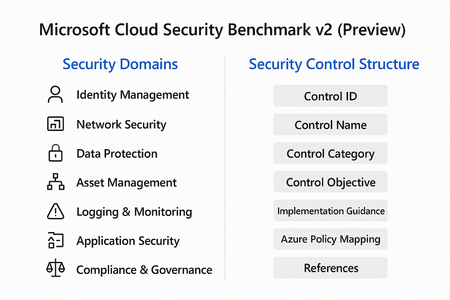
Cloud adoption is accelerating, but so are threats. Organizations often rush to deploy workloads without a clear security baseline, leaving critical gaps that attackers can exploit. Enter Microsoft Cloud Security Benchmark (MCSB) v2, now in public preview, designed to help you start well-protected and evolve securely. What Is Microsoft Cloud Security Benchmark v2? MCSB v2 is a comprehensive set of best practices and controls for securing cloud resources across Azure and hybrid environments. It aligns with: Industry standards: NIST, CIS, ISO Microsoft Secure Future Initiative (SFI) Zero Trust principles This benchmark provides prescriptive guidance for identity, network, data, and workload security helping organizations establish a strong foundation before customizing for their unique needs. Security Domains in MCSB v2 The benchmark organizes guidance into security domains, each representing a critical area of cloud security: Identity Management MFA enforcement, Conditional Access, privileged identity management. Network Security Segmentation, firewall rules, private endpoints. Data Protection Encryption at rest and in transit, key management. Asset Management Resource inventory, tagging, and governance. Logging & Monitoring Centralized logging, alerting, and SIEM integration. Incident Response Playbooks, automation, and escalation workflows. Application Security Secure coding practices, vulnerability scanning. Compliance & Governance Policy enforcement, regulatory alignment. Security Control Structure Each control in MCSB v2 follows a structured format for clarity and implementation: Control ID: Unique identifier for tracking. Control Name: Descriptive title (e.g., “Enable MFA for all users”). Control Category: Maps to a security domain. Control Objective: What the control aims to achieve. Implementation Guidance: Detailed steps for configuration. Azure Policy Mapping: Built-in policy definitions for automation. References: Links to Microsoft Learn and industry standards. This structure ensures consistency, traceability and ease of adoption across large environments. Integration with Azure Policy & Defender for Cloud One of the most powerful aspects of MCSB v2 is its native integration with Azure governance and security tools: Azure Policy Pre-built policy initiatives mapped to MCSB controls. Enables policy-as-code for automated enforcement across subscriptions. Supports compliance dashboards for visibility and reporting. Microsoft Defender for Cloud Monitors compliance against MCSB controls in real time. Provides secure score and recommendations for remediation. Integrates with workflows for alerting and automation. How to Get Started Review the Benchmark Explore the full guidance here: https://learn.microsoft.com/en-us/security/benchmark/azure/overview Apply Built-In Policies Use Azure Policy initiatives mapped to MCSB controls for quick enforcement. Monitor Compliance Leverage Microsoft Defender for Cloud to track adherence and remediate gaps. Tune for Your Needs Start with the baseline, then customize based on workload sensitivity and business requirements. Best Practices for Organizations Enable MFA and Conditional Access for all identities. Segment networks and enforce least privilege. Encrypt data at rest and in transit using Azure-native capabilities. Enable Defender for Cloud for continuous posture management. Automate compliance with policy-as-code. Cloud security isn’t static. Threats evolve, and so should your defenses. MCSB v2 gives you a future-ready foundation that scales with your business and integrates with Microsoft’s security ecosystem.390Views2likes0CommentsMicrosoft Zero Trust Assessment v2: Operationalizing Security with Precision
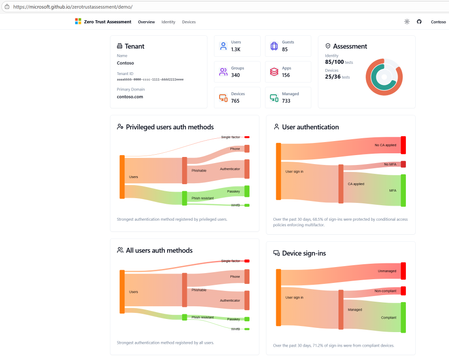
In an era where cyber threats evolve faster than ever, organizations can’t afford blind spots. Zero Trust is no longer optional it’s the foundation of modern security. With the release of the Microsoft Zero Trust Assessment v2, enterprises now have a powerful tool to measure, prioritize, and remediate security gaps with actionable intelligence. What Is Zero Trust Assessment v2? The Zero Trust Assessment is a security posture evaluation tool designed to help organizations operationalize Zero Trust principles. It automates checks across hundreds of configuration items aligned with: Secure Future Initiative (SFI) Zero Trust pillars: Identity, Devices, Applications, Data, Infrastructure and Networks Industry standards: NIST, CISA, CIS Microsoft’s internal security baselines Insights from thousands of real-world customer implementations How Does It Work? The assessment follows a structured, automated workflow: 1. Data Collection & Configuration Analysis Scans your Microsoft 365 environment and connected workloads. Evaluates identity configurations (e.g., MFA enforcement, conditional access policies). Reviews device compliance (e.g., Intune policies, OS hardening). Pulls telemetry from Azure AD, Microsoft Defender, and other integrated services. 2. Automated Testing Against Standards Runs hundreds of tests mapped to Zero Trust principles. Benchmarks your settings against: NIST Cybersecurity Framework CISA Zero Trust Maturity Model Microsoft security baselines Flags misconfigurations and policy gaps. 3. Risk Scoring & Prioritization Assigns risk levels based on: Impact (how critical the gap is) Effort (complexity of remediation) Provides a prioritized list of actions so you can focus on what matters most. 4. Actionable Recommendations Generates clear remediation steps not vague advice. Links to Microsoft Learn and security documentation for quick implementation. Suggests policy templates and automation scripts where applicable. 5. Comprehensive Reporting Delivers a detailed report with: Trends over time Risk heatmaps Compliance scores Enables executive dashboards for leadership visibility. Integration with Microsoft Security Tools Zero Trust Assessment v2 doesn’t operate in isolation it integrates seamlessly with Microsoft’s security ecosystem: Microsoft Defender for Endpoint Detects device vulnerabilities and feeds compliance data into the assessment. Microsoft Intune Ensures device configuration policies align with Zero Trust principles. Microsoft Sentinel Correlates assessment findings with threat intelligence for proactive incident response. Azure AD Conditional Access Validates identity policies like MFA and session controls. Microsoft Purview Extends Zero Trust to data governance and compliance. This integration ensures that remediation steps can be automated and enforced across your environment, reducing manual effort and accelerating security posture improvement. Sample Remediation Workflow Diagram Below is a simplified view of how remediation flows after an assessment: This closed-loop process ensures continuous improvement and operationalization of Zero Trust. Key Benefits Speed: Automates what used to take weeks of manual audits. Accuracy: Aligns with global standards and Microsoft’s own security posture. Operationalization: Moves Zero Trust from theory to practice with actionable steps. Future-Ready: Tests will soon be available enabling continuous improvement. Why This Matters Blind spots in identity or device security can lead to breaches, financial loss and reputational damage. Zero Trust Assessment v2 helps you: Respond faster to evolving threats. Reduce risk with prioritized remediation. Build resilience by embedding Zero Trust principles into daily operations.1.4KViews2likes1CommentSecurity Baselines for Linux
Currently only Windows OS is in scope of the Security Baseline assessments. Are there any plans to expand it for Linux (RedHat) as well? I mean our organization has deployed Defender on Linux, so it might be possible Microsoft will support this on Linux OS'es as well. Thanks, Dragi3.2KViews2likes5Comments
UAC elevation prompt for standard users
MSFT Windows 10 21H2 - Computer have the following setting recommendation Policy: User Account Control: Behavior of the elevation prompt for standard users Setting: Automatically deny elevation requests How do I provide support if I need to install software that requires Run as Administrator permissions? Will I need to switch user to the Administrator, and install the software?5.5KViews2likes12Comments
LGPO - SECEDIT.EXE exited with exit code 1
Hi, when I run this command: .\LGPO.exe /g "\\server\folder1\folder2\LGPO" /v I get this error as part of my output: Apply security template: \\server\folder1\folder2\LGPO\DefaultPolicy_Backup\DomainSysvol\GPO\Machine\microsoft\windows nt\SecEdit\GptTmpl.inf [[[ Security template log file output follows: C:\Users\Username\AppData\Local\Temp\GPTA2AC.tmp ]]] Access is denied. The task has completed with an error. SECEDIT.EXE exited with exit code 1 Any ideas what is going on? Thanks, JoshSolved11KViews1like4CommentsSecurity baseline with Hyper-V default switch
Continued from old TechNet blog discussion... Thanks Aaron Margosis. I've figured out what is preventing clipboard file copying. It is the GPO setting "Do not allow drive redirection" (Computer Configuration\Administrative Templates\Windows Components\Remote Desktop Services\Remote Desktop Session Host\Device and Resource Redirection). Haven't figured out why applying the security baseline disables guest VM network connectivity through the "Default Switch" (automatically created on Client Hyper-V), but a solution is to connect guest VMs directly to the external network adapter using the "External Switch". UPDATE: Network connectivity issues caused by GPO blocking local firewall rules (inbound allow rules are needed for Default Switch to work, see below discussion).9.5KViews1like5CommentsHow can I safely implement required ldap signing?
https://docs.microsoft.com/en-us/windows/security/threat-protection/security-policy-settings/network-security-ldap-client-signing-requirements "If you configure the server to require LDAP signatures, you must also configure the client computers. If you do not configure the client devices, they cannot communicate with the server, which could cause many features to fail, including user authentication, Group Policy, and logon scripts." Given this - how in the world can you safely implement this? It seems to me that unless everything processed right at the same time - you're guaranteed to have some clients that cannot communicate to even get group policy anymore?Solved8.4KViews1like7CommentsWindows 11 24H2 Sec Baseline → Broken SSO to on‑prem (Root cause: PKINIT SHA‑1 baseline)
Hi all, I ran into an issue with Entra-joined devices using Windows Hello for Business (Cloud Kerberos Trust) that might help others working with Windows 11 24H2 security baselines. Scenario Windows 11 25H2 devices Entra-joined (not hybrid) Intune-managed Windows Hello for Business (WHfB) enabled Cloud Kerberos Trust configured On-prem AD (Windows Server 2019/2022 DCs) Access to SMB shares / on-prem applications Symptoms SSO to on-prem resources fails Users get credential/PIN prompt instead of SSO Error message: “The system cannot contact a domain controller to service the authentication request” Client-side observations: klist → no tickets (initially) After enabling Cloud Kerberos Trust: klist get krbtgt → works klist get cifs/server.domain → fails Error: 0xc000a100 / 0x3bc4 Hash generation for the specified version and hash type is not enabled on server Root Cause The issue was caused by a Windows 11 24H2 security baseline setting related to Kerberos/PKINIT. The 24H2 baseline introduces a policy for configuring hash algorithms for certificate-based Kerberos authentication (PKINIT). This setting allows environments to disable SHA-1 and require SHA-2 algorithms. [applepie.se] Important detail: This configuration only works if the domain controllers fully support PKINIT with SHA-2, which effectively requires Windows Server 2025 domain controllers across the environment. If SHA-1 is disabled while running: Windows Server 2019 or 2022 DCs Mixed environments then PKINIT authentication fails, which directly impacts: Windows Hello for Business Cloud Kerberos Trust Any passwordless Kerberos-based authentication Why this is difficult to troubleshoot Cloud Kerberos Trust appears correctly configured AzureADKerberos object exists PRT is valid Network connectivity is fine However: Kerberos tickets are not issued correctly Service tickets (CIFS, HTTP, etc.) fail Errors are misleading and point to KDC/hash issues No explicit warning is provided in baseline guidance that mixed environments will break Resolution Revert the baseline change and allow SHA-1 for PKINIT again. Policy location: Computer Configuration → System → Kerberos / KDC → Configure hash algorithms for certificate logon Ensure: SHA-1 is set to Allowed/Default After reverting: Kerberos ticket issuance works SSO to on-prem resources is restored Recommendation Do not disable SHA-1 for PKINIT unless: All domain controllers are Windows Server 2025, and PKINIT SHA-2 support has been fully validated Treat this setting as future hardening, not production-safe for mixed environments today. Takeaway If you experience: WHfB + Cloud Kerberos Trust SSO failures klist get errors with hash generation issues Missing or failing Kerberos service tickets check the PKINIT hash configuration from the 24H2 security baseline first.704Views1like4CommentsMicrosoft Policy Analyzer 4.0 crashes after apply April updates
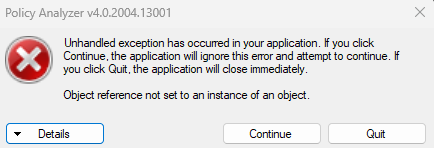
Good morning community !! After apply security/.NET patches corresponding to April, the policy analyzer is not working anymore... On details See the end of this message for details on invoking just-in-time (JIT) debugging instead of this dialog box. ************** Exception Text ************** Deleted because system do not permit to publish it ************** Loaded Assemblies ************** mscorlib Assembly Version: 4.0.0.0 Win32 Version: 4.8.9032.0 built by: NET481REL1 CodeBase: file:///C:/Windows/Microsoft.NET/Framework64/v4.0.30319/mscorlib.dll ---------------------------------------- PolicyAnalyzer Assembly Version: 4.0.2004.13001 Win32 Version: 4.0.2004.13001 CodeBase: file:///C:/Personal/PolicyAnalyzer/PolicyAnalyzer/PolicyAnalyzer_40/PolicyAnalyzer.exe ---------------------------------------- System.Windows.Forms Assembly Version: 4.0.0.0 Win32 Version: 4.8.9032.0 built by: NET481REL1 CodeBase: file:///C:/WINDOWS/Microsoft.Net/assembly/GAC_MSIL/System.Windows.Forms/v4.0_4.0.0.0__b77a5c561934e089/System.Windows.Forms.dll ---------------------------------------- System Assembly Version: 4.0.0.0 Win32 Version: 4.8.9032.0 built by: NET481REL1 CodeBase: file:///C:/WINDOWS/Microsoft.Net/assembly/GAC_MSIL/System/v4.0_4.0.0.0__b77a5c561934e089/System.dll ---------------------------------------- System.Drawing Assembly Version: 4.0.0.0 Win32 Version: 4.8.9032.0 built by: NET481REL1 CodeBase: file:///C:/WINDOWS/Microsoft.Net/assembly/GAC_MSIL/System.Drawing/v4.0_4.0.0.0__b03f5f7f11d50a3a/System.Drawing.dll ---------------------------------------- System.Configuration Assembly Version: 4.0.0.0 Win32 Version: 4.8.9032.0 built by: NET481REL1 CodeBase: file:///C:/WINDOWS/Microsoft.Net/assembly/GAC_MSIL/System.Configuration/v4.0_4.0.0.0__b03f5f7f11d50a3a/System.Configuration.dll ---------------------------------------- System.Xml Assembly Version: 4.0.0.0 Win32 Version: 4.8.9032.0 built by: NET481REL1 CodeBase: file:///C:/WINDOWS/Microsoft.Net/assembly/GAC_MSIL/System.Xml/v4.0_4.0.0.0__b77a5c561934e089/System.Xml.dll ---------------------------------------- Accessibility Assembly Version: 4.0.0.0 Win32 Version: 4.8.9032.0 built by: NET481REL1 CodeBase: file:///C:/WINDOWS/Microsoft.Net/assembly/GAC_MSIL/Accessibility/v4.0_4.0.0.0__b03f5f7f11d50a3a/Accessibility.dll ---------------------------------------- System.Core Assembly Version: 4.0.0.0 Win32 Version: 4.8.9032.0 built by: NET481REL1 CodeBase: file:///C:/WINDOWS/Microsoft.Net/assembly/GAC_MSIL/System.Core/v4.0_4.0.0.0__b77a5c561934e089/System.Core.dll ---------------------------------------- ************** JIT Debugging ************** To enable just-in-time (JIT) debugging, the .config file for this application or computer (machine.config) must have the jitDebugging value set in the system.windows.forms section. The application must also be compiled with debugging enabled. For example: <configuration> <system.windows.forms jitDebugging="true" /> </configuration> When JIT debugging is enabled, any unhandled exception will be sent to the JIT debugger registered on the computer rather than be handled by this dialog box. It was working fine since patching apply. I tried to uninstall patches, but the error still remains Any clue to fix this? Thank you !!Solved2.7KViews1like18CommentsWindows 11 22H2, Server 2022 Baselines - CIS Level 1
Are the security baselines downloaded in the SCT "CIS Level 1"? I've used the Policy Analyzer to compare the group of baseline GPOs (all the ones in the \GPOs\ folder) to the 'current environment' using a freshly provisioned PC, and a Vm for sever 2022. The 'baseline' vs 'current state' comparison is helpful, but I'm wondering if I was to enable every gpo in the baseline column, does that get you CIS Level 1? MS does not seem to use the CIS terms in the documentation I've found.7.1KViews1like3Comments
Continuous ATO when new services installed
What is best process used to add new services to environment and meet compliance. Does the new service need ATO? Does Azure need Continuous ATO process. How to conduct a review of the product baseline against existing Azure baselines? I am experienced in on prem FISMA but new to cloud compliance.814Views1like1CommentDashboards for SCT
Hello and greetings from Portugal! I'm trying to find some kind of free tool that allows me to had MSFT Security Baseline files, run it against a machine and get some kind of dashboard about the differences between them. Does anyone knows something similar? Best regards, Diogo Sousa891Views1like0Comments





Events
Recent Blogs
- We are pleased to announce the enterprise-ready release of the security baseline for Microsoft Edge version 151! We have reviewed the settings in Microsoft Edge version 151 and updated our guid...Aug 25, 202674Views0likes0Comments
- We have reviewed the new settings in Microsoft Edge version 150 and determined that there are no additional security settings that require enforcement. The Microsoft Edge version 139 security baselin...Aug 13, 2026415Views0likes0Comments