Forum Widgets
Latest Discussions

Can I uninstall individual Office apps and reinstall them later?
Hello everyone, My C: drive is running out of space, and I've noticed that installed Office applications take up a lot of storage. I don't use Access, Publisher and OneNote for now, so I'd like to know if it's possible to uninstall these apps separately to free up space. I have an authentic perpetual Office Professionnel Plus 2016 license that came with my Lenovo laptop when I bought it. Will uninstalling these apps cause any issues with the license? And will I be able to reinstall them later if I need them? Thanks for your feedback.MandresyMar 11, 2026Copper Contributor119Views0likes0Comments
Office 2016 Product Key Redeemed But License Not Showing in Account
Hello, I purchased Office 2016 and I'm facing an unusual issue with my product key activation. **The Problem:** When I try to activate Office 2016 with my product key, the system tells me the key was redeemed by the email address c****email address removed for privacy reasons. I have access to this email account, so I tried logging into office.com to check, but surprisingly there is NO Office license associated with this account. **What I've Done:** 1. I contacted Microsoft support. The first agent confirmed no Office was linked to that email address. 2. After a few minutes, the same agent then confirmed that the product key WAS indeed activated on that email account - but they said they couldn't help much because Office 2016 is already end-of-life. 3. When I try to sign into Office apps (Word, Excel, etc.) with that email, it says the account has no Office license. 4. However, when I use the product key, it says it's been redeemed on that email account. **The Contradiction:** There's a clear disconnect: the product key system says it's redeemed on my email, but the Office account management system says there's no license on that same email. **My Question:** How can I proceed to use my Office 2016 license? Is there a way to recover or re-link the license, or migrate it despite Office 2016 being end-of-life? Thank you for any guidance.igoronxFeb 11, 2026Copper Contributor163Views0likes1Comment
Moving Office 2019 license
Hello, due to end of support for Office 2019, it's no longer possible to get phone and chat support from Microsoft Support for licenses. I'd like to move my license from one e-mail adress to another. Chat Agent recommended to reach out on techcommunity forum for solution.AdamGeniuszNov 24, 2025Copper Contributor91Views0likes0Comments
Office 2019 users getting error when opening files in app from sharepoint
Hi, since two days ago, our users who didnt upgrade to office 365 and still use office 2019 are getting an error when trying to sign in from office to their cloud account. The error is: "Your account is in bad state. Please sign-in to this account online to address the issue" Now I know support for cloud connectivity for office 2019 has officially ended in october 10, two days ago, in microsoft website its stated that: "In practical terms, what this means is that older Office versions might not be able to use all the latest functionality and features of Microsoft 365 services... No active measures will be made to block older Office versions from connecting to Microsoft 365 services if they're in extended support and are kept up to date. For example, Office 2019 and Office 2016, both of which are in extended support until October 14, 2025."https://learn.microsoft.com/en-us/deployoffice/endofsupport/microsoft-365-services-connectivity So why it looks like Microsoft actively blocked office 2019 connection to cloud?elor21Oct 12, 2023Copper Contributor452Views0likes0CommentsWindows Server 2022 and M365
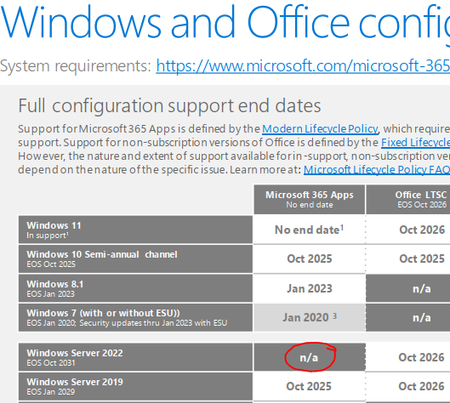
I'm looking at the Win and Office support matrix and Win Server 2022 and M365 Apps aren't supported. Can anyone explain why this is? It looks like Microsoft if going to remove the ability to host virtual desktop for clients and install M365 licensing on it. I assume in a push forcing people to use Azure.Eric_Koop_UniserveApr 06, 2022Copper Contributor3.7KViews1like4Comments
MS office 2016 perpetual Volume Licenses Queries
Hi , pl help me to get clarification of following points :- How do we find the number of activation done against one MAK (Multiple Activation Key) Volume Licenses –Office 2016 What is the maximum number of activation allowed on a volume licenses- say the key for 100 licenses. Reallocation of volume licenses - Can we disable the volume licenses from one machine and activate it in another in case the user is changing the laptops. if yes steps to be followed. regards ACAchackoOct 18, 2020Copper Contributor2.6KViews0likes1CommentSupport for Office 2010—and Office 2016 for Mac—has ended: Here’s what you need to know
On October 13, we marked the end of support for Office 2010 and Office 2016 for Mac. This means that we’ll no longer provide technical support, bug fixes, or security updates for these products, and organizations that continue to use them may face increased security risks and compliance issues over time. The requirements for connecting to Office 365 services have also changed—and customers will now need Microsoft 365 Apps, Office 2019, or Office 2016 to connect to Office 365 services like Exchange Online and SharePoint Online. While we will not take any active measures to block legacy versions of the Office client from connecting, these older clients will fall out of step with the service enhancements and may present performance and/or reliability issues over time. Read the full announcement of these changes here.4.3KViews0likes2Comments
Workflow 2013 Deprecation
As mentioned in the following article: https://techcommunity.microsoft.com/t5/office-end-of-support-blog/support-update-for-sharepoint-2010-workflows-in-microsoft-365/ba-p/1505453 Workflow 2013 will become deprecated in the near future. When workflow 2013 will reach end of support, does this also mean that the related content type 'Workflow Task (SharePoint 2013)' will be deleted? How will this work? This would not be desired in some cases, because maybe we would want the new power automate to use the same data structure for their tasks. In that case, we could still reuse the same content type which reduces the impact of the rework. Also, there is a lot of historical data for us in these workflow tasks (or a content type that inherits from 'Workflow Task (SharePoint 2013)'), deleting the content type would mess up this historical data. With kind regards, Stijn BrouwersStijn BrouwersAug 31, 2020Copper Contributor5.3KViews0likes1Comment



Tags
- support2 Topics
- PowerPoint 20101 Topic
- Upgrading1 Topic
- Excel 20101 Topic
- outlook 20101 Topic
- Word 20101 Topic