Forum Widgets
Latest Discussions

Can't get a new subscription again
I has a problem for get new subscription. Detailed my case: - In Apr 19, i deleted profile (my subscription expired in Apr 19, 2024). - Got email confirm for deleted and Invite to Dev Program. - Today (Jun 20), after wait 60 days for delete current profile. - I visit join developer page and join again. - But, I got same screen in Apr 19, it include a old subscription expried and no any button for register new subscription/subscriptions. - I deleted profile again (Jun 20)... Also, i read all document and faq in Microsoft Learn for Microsoft 365 Dev Program but can't help more. I try click to Support in Navigation(Menu) bar in top of page, redirect to Microsoft ServicesHub and can't use my account for login. And my question: How can register subscription again, and how can contact to support via email?LEDOITSJun 19, 2025Copper Contributor195Views0likes2Comments
How to transfer the E5 developer account to another email
Currently the E5 developer account is working, but the tenant email address that was used to create this account, will be deleted from the main organization records (this user is not part of the users of E5 developer), i couln't change it from the developer account, also i couldn't add another email, so before this email deleted, how can i transfer the subscription to another email, since it has many structures and i've performed alot of tests and developed many apps. I tried to create a new account from the scratch, but they said i am not eligible for. Please support. Regards.MuhittinSep 07, 2024Copper Contributor374Views0likes2CommentsSharepoint HUB site permissions
Hey all I've been looking around but cant seem to find the answer. If I set up permission inheritance - does that mean that the sites that are associated with the hub will create read permissions for the users in the hub? If i want to give a selection of those owner permissions to the site it needs to be added manually?SolvedFrodeBKMar 13, 2024Copper Contributor1.1KViews0likes2Comments
M365 Developer E5 Sandbox provisioning failed despite active Visual Studio Enterprise subscription
Hi everyone, I'm looking for some help with an issue I'm facing while setting up a Microsoft 365 Developer E5 sandbox. I have an active Visual Studio Enterprise subscription (valid until 2029), and it is successfully linked to my Microsoft 365 Developer Program account. What happened I joined the Microsoft 365 Developer Program. I selected Instant Sandbox. I entered the required information and selected my Visual Studio Enterprise subscription. The portal initially displayed the following message: "It's taking longer than expected. Your setup is being processed. There is no action required from you at this time." After waiting for nearly 24 hours, the dashboard changed to: "You don't currently qualify for a Microsoft 365 Developer Program sandbox subscription." What I've verified Visual Studio Enterprise subscription is active and linked to my Developer Program account. A developer tenant appears to have been created. I can access the tenant through the Microsoft Entra Admin Center. An Azure subscription named similar to devProgram_... is visible. In the Microsoft 365 Admin Center (Billing → Your products), only Microsoft Entra ID Free is listed. No Microsoft 365 E5 Developer subscription was provisioned. No sample users or Microsoft 365 workloads (Exchange, Teams, SharePoint, etc.) appear to have been created. My understanding It appears that the developer tenant was created successfully, but the Microsoft 365 Developer E5 sandbox provisioning either failed or never completed. As a result, I don't have a usable Microsoft 365 developer environment for testing Declarative Agents and MCP integrations. Has anyone experienced this before? Is there a way to retry the E5 provisioning without creating a new Developer Program account? Is there anything I can check on my side? Does this require intervention from the Microsoft Developer Program team? Any guidance would be greatly appreciated. Thank you!AmithDebnathJul 21, 2026Copper Contributor16Views0likes1Comment
I have trouble with phone number and Microsoft Authentication when login. Where can I find support?
Hello, Currently, I am unable to log in to my email address removed for privacy reasons account. I have the password. I have a backup email address, but when I try to log in, at the authentication step, I don't have the option to receive the OTP code via email. I can only choose to have it sent to my phone number or the Microsoft Authentication app. But when I tried sending it to the phone number, I got the following error: Error Code: 399287 Request Id: 4d13566b-7aa4-4b3f-a03b-0c9416841000 Correlation Id: 019f785d-514f-7eaa-b1a3-ee66302634ae Timestamp: 2026-07-19T03:13:40Z Also, I can't access the Microsoft Authentication app because I've changed devices multiple times. I couldn't find the support form, so I replied to this email. With the admin account password and backup email, how can I log into the admin panel? Sincerely, Thangwinofwin292Jul 18, 2026Copper Contributor25Views0likes1Comment
Microsoft 365 E5 configuration grayed out - TrackingID#2607060030007237
Hello Team, We are currently facing an issue while setting up the Microsoft 365 E5 Sandbox through Microsoft 365 Developer Program. Users are only seeing the option to create an Instant Sandbox, which appears to require billing details. However, the Configurable Sandbox option, which does not involve any cost, is currently grayed out and cannot be selected. We tested this with multiple users within our organization, and the same behavior was observed for both users. This issue was not encountered earlier, as users were previously able to view and select both options — Instant Sandbox and Configurable Sandbox — by default. All impacted users are signing in with organizational email accounts associated with valid Visual Studio Dev Essentials, Professional, or Enterprise subscriptions. We also raised a MS Support case regarding this issue. However, we were informed that this falls outside the scope of a break/fix support case and were advised to post the issue in Microsoft 365 Developer Community forum. This is surprising, as the issue appears to be impacting multiple organizational users and may potentially affect many more members. Requesting your support to review this issue on priority and advise on why the Configurable Sandbox option is disabled, along with the recommended resolution or next steps. Previous Microsoft Support Case related to M365 Developer program different issue: 2601080030003703 Thank you.GnanakumaranMJul 08, 2026Copper Contributor113Views0likes1Comment
New sandbox subscription not avaible - You don't current qualify
Hello, I joined the Microsoft 365 Developer Program today with a personal Microsoft account. After completing the join process, my dashboard shows I don't qualify for a sandbox subscription / no tenant was provisioned. Could someone please review my account and help enable the E5 sandbox subscription? Thank you.tom6Jun 26, 2026Copper Contributor29Views0likes1Comment
Sandbox subscription issue: "You don't currently qualify" for M365 Developer
Hello Microsoft Community Support Team, I am currently taking an training course on Microsoft Power Platform, with a special focus on building chatbots using Microsoft Copilot Studio (formerly Power Virtual Agents), Power Automate, and Power Apps. I wanted to set up a dedicated environment to practice the modules, configure cloud flows, and test the integrations. However, when I joined the Microsoft 365 Developer Program using my personal account, I encountered the following message: "Thank you for joining. You don't currently qualify for a Microsoft 365 Developer Program sandbox subscription." I do not intend to use this for commercial purposes; my sole objective is learning, studying the curriculum, and practicing developer scenarios for my training. Unfortunately, my university's IT administrator has disabled trial features on our student accounts, so creating my own developer sandbox is my only viable path to complete the practical exercises. Could you please assist me in manually reviewing my profile or enabling the M365 E5 developer sandbox subscription for my account so I can continue with my Power Platform learning journey? Thank you very much for your time and support. Best regards, PabloPablexJun 09, 2026Copper Contributor75Views0likes1CommentM365 Developer expired without notification
In Mid-August, I was excited being able to create a new M365 Developer subscription after my old one expired (lack of activity). This week, I noticed this new Developer subscription was again expired after 90 days, while I did lots of testing in the past 2 months. Created many users and groups Setup Intune, enrolled VMs and tested policy settings Creating and testing many conditional access policies Unfortunately, I didn't receive a notification at all this was about to happen and I don't really understand the reason behind it. How are Microsoft professionals currently able to test products in a production-like isolated setup (multiple users, Entra security, Defender, Intune, etc.) without having to pay lots of money for a Visual Studio yearly subscription or multiple Business Premium licenses?? How can I export my Intune configurations without being able to access Intune (Entra license is already converted to Free)? Spinning up a new DEV tenant is also not possible, because my phone number is still attached in a profile which I deleted more than 6 months ago. When I login, it appears the profile still exists with my initial expired M365 developer subscription (December 2024). Because I have 2 phone numbers, I'm stuck. When is this mess going to be solved? For professionals, it's important having reliable possibilities to learn, test and play around with products to be able to advise our customers. I don't mind spinning up a new tenant every X months, but then it would be nice if I'm actually being able to do so without being blocked by duplicate phone numbers in profiles that should have been cleaned up months ago. Looking forward on your advice how to proceed.ArdeZNov 15, 2025Copper Contributor112Views1like1Comment
How to call User Contact Card
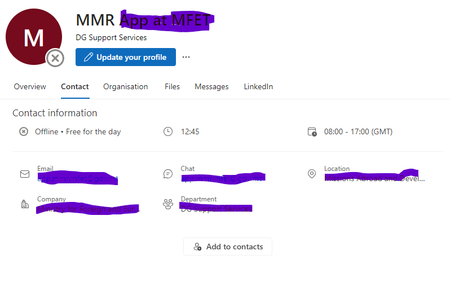
Hi We have a custom webpart that we create that allows users to search through the 365 User directory. This works fine, however what we want to do is when a user name is found, we want the user to be able to click on that user name and it pull up the 365 Contact Card for that user eg the one you get when you click on user in Outlook etc... so this one.... Anyone any idea how to do this? ThanksBob19721495Mar 18, 2024Copper Contributor401Views0likes1Comment
Tags
- Need Help3 Topics
- M365 Developer2 Topics
- office3651 Topic
- e51 Topic
- E5 Subscriptions1 Topic
- Login1 Topic