Forum Widgets
Latest Discussions

Number of concurrent transactions supported for an Azure SQL 4 vCores
I have an Azure SQL: Parameters Specifications Deployment Model General Purpose – Serverless SKU / Performance Tier Standard Series Database Size 128 GB Max vCores 4 vCores (scalable within Serverless range) How many concurrent transactions are supported for an Azure SQL db with the above specifications. ThanksSudeepSahdevaJul 06, 2026Copper Contributor68Views0likes1CommentCounting distinct values
I’m trying to create a view but I’m struggling to find a solution to this issue. I need a method that counts multiple visits to the same location as one if they occur within 14 days of each other. If there are multiple visits to the same location and the gap between them is more than 14 days, then each should be counted separately. For example, in the attached screenshot: Brussels had visits on 08/05 and 15/05, which are less than 14 days apart, so this should be counted as one visit. Dublin had visits more than a month apart, so these should be counted as two separate visits. Could someone please guide me on how to achieve this? Thanks.KrishKKMar 10, 2026Copper Contributor147Views0likes3Comments
Switch Azure SQL Provisioned to Serverless and back to Provisioned
Hi Can we switch Azure SQL from "Provisioned" to "Serverless" and back to "Provisioned" without any interruptions? Wanted to observe how serverless works for a week. Data should never be lost while switching the mode (NOT a transactional data). Its more of nightly refresh and nothing much happening during day time. Its a retail dataWH. Currently im connecting to the below Azure SQL which is a provisioned instance. We are scaling up or down per our needs / work load and paying $X. sql-xxxx-xxx-xxx-dev.database.windows.net Nightly process runs at higher cores and then scales back to the lowest 2 core. When someone queries tables, joins during day time, it takes 10-30 mins or so depending on the table size. I'm wondering if i switch to serverless i would save money even if billed by seconds since nightly process runs 1hr and not much of querying every day during day time. i would like to test that.AJ-AJDec 17, 2025Copper Contributor379Views1like3Comments
Azure SQL server rollback itself?
We have an Azure SQL server. It is a datasource of a Power App canvas app. Today I connected to it with SSMS v19. First, I ran 'Begin tran' twice (is it a mistake?). Then 'Delete From dbo.table1 where ID=30' and another row with ID=31. Then I verified these 2 rows are deleted by 'Select * from dbo.table1' Finally, I ran 'Commit tran' I verified again above 2 rows are deleted by 'Select * from dbo.table1' However, there is no change in the Power App. So I reopen the SSMS and connect to the DB again. This time when I ran 'Select * from dbo.table1', the 2 rows are showing up. What could be the problem? Is it a bug in old version SSMS?SharePointAdmin1030Sep 22, 2025Copper Contributor230Views1like2CommentsAzure SQL Firewall / Locks
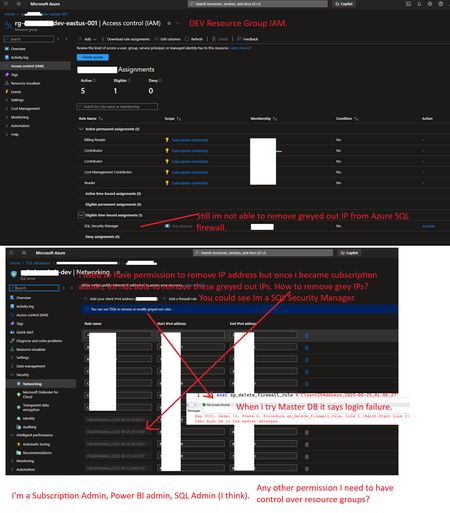
Hi there, I have 2 environments. I'm more of admin on Azure environment (recently made as subscription admin) after which Dev issue - Azure SQL I'm having difficulty to remove IP from Azure SQL Firewall. (Earlier i was able to) today my manager granted me subscription admin and as SQL Security Manager and it still not able to remove grayed out IPs.AJ-AJAug 06, 2025Copper Contributor240Views0likes1CommentBetter way to check database for dups
I have vba in Excel that incorporates SQL to iterate through all the records in a sheet and checks the databsase for that record using a combination of two fields to make a unique id. If it's in the database then it's deleted from the sheet. Otherwise it goes to the next one. Easy enough. I've had this code for years and it's always been fine but now there are too many records to do it this way. It takes too long. What would be a better way to query the SQL database to return those records that are dups and then delete them from the sheet. Here's an idea of the snippet of code I currently use: 'i is the record number from bottom to top For i = DataSheet.Range("A" & Rows.Count).End(xlUp).Row To 2 Step -1 CountyName = DataSheet.Cells(i, 1).Value CaseNumber = DataSheet.Cells(i, 3).Value strSQL = "SELECT County, Case_Number FROM tblAdLetter " & _ "WHERE County = '" & CountyName & "' AND Case_Number = '" & CaseNumber & "'" rs.Open strSQL, cn If Not rs.EOF Then DataSheet.Rows(i).Delete End If rs.Close Next i Is there a better way or faster way? todTod_LayAug 05, 2025Copper Contributor193Views0likes1Comment
Replicate Azure SQL database with a lag
Hello, I am new to Azure SQL database. I am being asked by my manager to replicate our Azure SQL databases to an Azure SQL VM with a lag of 3 hours. Does anyone know what solutions are available? Thank you.pasAug 03, 2025Copper Contributor414Views1like3Comments
Dropping interimTables
Is there a script to allow the dropping all InterimTables from a database without having to do them one by one. I seem to have built up an amount of these when building tables from various pipelines that have failed.Roop_s610May 08, 2025Copper Contributor130Views0likes1Comment
Extend the period of storing telemetry of all services of my subscription.
I have had now 4 support cases in which i see strange behavior of my services in the Azure cloud. For this i created support cases. We are a software company building solution on the Microsoft stack. In case of an incident we first look to our solution and will do an RCA. Sometimes the root cause is not related to our solution but to the Azure services. When seeing this we create a MS support case. It will take some time for MS to understand the case. A lot of time the case, is moved to different engineers. Because of this we run out of the 30 days for which telemetry of our services are available for the MS engineers. So we loose all interesting data to find the Root cause. Please extend the 30 days. This is really too short for analyzing situations. In our company we store telemetry information for 1 year. It is not acceptable for our customers that we do not know the root cause of the incident.AndrevandeGraafFeb 04, 2025Copper Contributor332Views0likes6CommentsGlobal secure access client doesn't connect to the Azure SQL Server engine
Unlike other resources such as keyvault, cosmosdb, virtual machine; it is not possible to connect to SQL Databases. Has anyone tried to achieve the connection without having to add the ip in the server engine firewall?ksalazar1655Jan 07, 2025Copper Contributor103Views0likes0Comments


Tags
- azure sql database19 Topics
- azure sql17 Topics
- Managed Instance6 Topics
- sql server5 Topics
- development4 Topics
- SQL Connector4 Topics
- azure active directory3 Topics
- security2 Topics
- azure1 Topic