security
3 TopicsI tried to rewrite history in an Azure SQL ledger table. Here's what the database said.
I keep getting asked whether a project "needs a distributed ledger". In most cases the real requirement is simpler: prove that nobody, including a DBA, quietly changed a record. So I tested Azure SQL ledger end to end on the Azure SQL Database free offer (cost: €0). The setup: an updatable ledger table with two accounts, a digest taken before any change, then a "quiet" balance correction from 250 to 9000. What I observed: • The ledger view shows the update as a DELETE of 250.00 and an INSERT of 9000.00, in the same transaction, with the commit time and the Entra identity that made it. • Deleting the history, even as server admin: Cannot update ledger history table 'ledgerlab.dbo.AccountHistory'. • Switching versioning off, as you could on a normal temporal table: System Versioning cannot be altered for Ledger Tables. • Updating an append-only ledger table: Updates are not allowed for the append only Ledger table 'dbo.AuditEvent'. • Verifying against a wrong digest: The hash of block 0 in the database ledger does not match the hash provided in the digest for this block. With the real digest: last_verified_block_id = 0, and a fresh digest verifies block 1, which contains the update. Two practical notes: 1. On a subscription that has never used Azure SQL, run "az provider register -n Microsoft.Sql" first, or server creation fails in every region with MissingSubscriptionRegistration. 2. Verification proves nothing was altered after the digest. Whether a change was legitimate is what the ledger view is for, so store digests automatically in immutable Blob storage or Azure confidential ledger. The full lab, with the T-SQL, screenshots and a checklist for when a distributed ledger IS the right answer, is on my blog: https://cloudtales.gr/azure-sql-ledger-lab/ Curious how others use ledger in production: automatic digest storage to immutable Blob or to confidential ledger?73Views0likes0Comments
Azure SQL programmatic access
I work with a team of statisticians who would like to programmatically access an Azure SQL database via R/R Studio without human interaction. Access is setup currently with Microsoft Entra with MFA. The team ideally want to run their R script and connect to the database, without having to be there to enter their login credentials and MFA, can this be done via a key or SAS token? What is the best or recommended method to do this? Thank you. Z219Views0likes0Comments
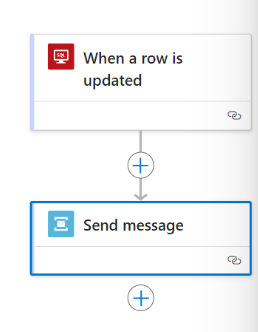
Azure Logic App: SQL trigger on When Row Is Update is not working
Hello Experts, I'm using the "When a row is updated" SQL connector in my logic app workflow. I turned on change tracking on the Azure SQL DB and the table in question per requirements. The connector connects to the SQL instance okay, but never triggers when a row is updated. No errors or indications to troubleshoot. Has anyone been able to get this to work? Thanks, -Sri631Views0likes0Comments