Forum Widgets
Latest Discussions

Cannot verify email
I have put in a request for quota to deploy an OpenAI model. I was then sent a link to verify my email address - I've signed out everywhere, tried incognito windows in multiple browsers, copied the link out of the email and pasted it into a browser etc. but when I click the link to verify I always get: The request is blocked. Any ideas?!jonfrontfootAug 07, 2026Copper Contributor36Views0likes2Comments
Microsoft's six Responsible AI pillars: how do you operationalize them in practice?
Deploying AI without a trust criterion isn't innovation. It's risk taken on without awareness. Microsoft organizes this problem into six pillars: reliability and safety, privacy and security, inclusiveness, transparency, accountability, and fairness. It's not a marketing list. It's a governance structure applicable to any AI adoption decision. The pillar that generates the most debate in practice, at least in the conversations I've had, is transparency. Systems that can't explain why they reached a given output create a real accountability problem: who signs off on the decision, the model or the manager? Accountability doesn't transfer to the tool. It stays with whoever decided to use it. Fairness also tends to be underestimated. Models trained on historical data carry the biases in that data. If the historical record was biased, the model replicates it at scale. Speed amplifies the problem, it doesn't fix it. Privacy and security are about where the data goes, who accesses it, what gets retained. Questions that need answers before deployment, not after an incident. The framework doesn't guarantee an outcome. It creates the right questions before any adoption decision. I'd like to hear how this plays out in practice for you all: which of these six pillars tends to be the hardest to operationalize on your team? And how are you documenting that decision process today?rafaellimaesilvaAug 04, 2026Copper Contributor60Views1like2Comments
One agent, three runtimes: porting a CSA agent to Microsoft Scout and Foundry Local
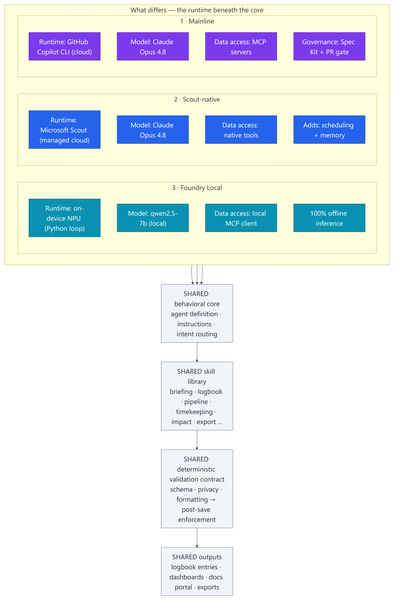
Most of my posts here are about Azure infrastructure lessons from customer engagements. This one is a little different — it's a real‑world engineering lesson from something I built to run my own practice. In my role as a Senior Cloud Solution Architect (CSA), I'm part of a grass-roots organic development team for an internal persona‑driven productivity agent called CSA‑Sherpa. It runs my daily rhythm: a morning briefing, a running logbook of wins and blockers, pipeline and timekeeping summaries, and reporting/exports. It started life in the GitHub Copilot CLI. But over the last few months two things changed the ground under it: Microsoft Scout arrived as a managed cloud agent with native tooling, scheduling, and memory; and Foundry Local made it realistic to run a capable model entirely on‑device on a Copilot+ PC's NPU — no cloud round‑trip at all. That raised a question I think a lot of people building agents will eventually ask: If I designed the framework well, can I change how the model runs without rewriting the agent? To find out, I stood the same agent up in three runtimes, then wrote a whitepaper and a comparison deck measuring what actually changed. This post explains: How one shared, deterministic core made three very different runtimes comparable What the three ports — Copilot CLI, Scout‑native, and Foundry Local (on‑device NPU) — actually took What the analysis showed, and a simple decision framework for which runtime to use when The part that stayed the same: a deterministic core The whole exercise only works because all three implementations load the same behavioral core: Agent definition — persona, behavioral rules, intent routing, workflow dispatch Instructions — conventions, session bootstrap, change‑management rules Skill library — one procedure file per workflow (morning briefing, logbook, pipeline, timekeeping, impact, ops, export…) A deterministic validation contract — schema, formatting, and privacy validators plus a post‑save enforcement chain That last point is the whole thesis: reliability belongs in code, not in the prompt. Rather than asking the model to "remember" to validate its output, a real gate (a validation step → a post‑save enforcement chain → index regeneration) enforces it every single run. This wasn't my idea in a vacuum — it follows the enterprise prompt‑engineering principles Kathiravan Thangavelu lays out in his article Prompt Engineering for Enterprise AI: Why Reliability Matters: keep deterministic logic in code, prefer schema‑driven / structured output over prompt‑enforced formatting, and replace "before you answer, verify that…" mental checklists with real machine validation. My validation gate is that principle in practice. And because that contract is identical across all three runtimes, I'm comparing three ways to execute one product — not three different products. The deterministic payoff: faster and cheaper Retrofitting those principles into the agent — moving work out of the model and into deterministic scripts — is the single change that paid off the most, on two axes at once: Faster. Letting code (not the model) gather and aggregate history cut the average model round‑trips per workflow from ~8.7 to ~5.5 — roughly a third fewer turns. Fewer turns means less waiting on generation and less back‑and‑forth to finish a task. Cheaper. The same change cut usage‑based cost ~24% — and, more importantly, held it flat as the logbook grew to hundreds of entries, because scripts carry the history the model used to re‑read every run. That's the quiet lesson: the reliability work I did for correctness turned out to be the same work that made the agent quicker and less expensive. Determinism isn't a tax on speed — here it bought all three. The work: three repositories, three runtimes Everything below the core — runtime, data access, governance, file layout — is where the effort went. 1 · Mainline — Copilot CLI + MCP. The upstream, most feature‑complete build. Runs as a primary agent in the GitHub Copilot CLI on Claude Opus 4.8; data services are discovered through MCP. It carries the heaviest governance: a Spec Kit layer (spec‑driven‑development agents, a constitution + templates, and 50+ per‑feature spec artifacts gated at PR time) plus an add‑on framework. The richest architecture — and the most complex to operate. 2 · Scout‑native. A thin wrapper loads the exact same core onto Microsoft Scout — again on Claude Opus 4.8 — but data access is re‑platformed onto Scout's native tooling instead of MCP subprocesses. No broker to configure; native tools negotiate their own auth. It adds two things the CLI can't do as cleanly: ✅ Scheduled automations — my morning briefing fires automatically on weekday mornings ✅ Cross‑session memory in place of hand‑off files The deterministic finalize gate stays fully intact. 3 · Foundry Local — on‑device NPU. The genuine outlier and the most involved port: a Python re‑implementation that runs the model — qwen2.5‑7b, an open ~7‑billion‑parameter model — 100% locally on the device's NPU (a Snapdragon X Elite Copilot+ PC) via Foundry Local's OpenAI‑compatible server. The agent loop, an MCP client, skill loading, and a distinct finalize pipeline all had to be rebuilt outside the CLI. The model never leaves the machine; only data connectors reach out when connected. The trade‑offs are real — modest throughput and a fixed context window — but so is the payoff: offline, private, near‑zero marginal cost. The effort This wasn't a weekend spike. Across the three code bases (plus a clean isolation clone I kept as an A/B baseline): ~340–380 commits per repository, three versions maintained in parallel 17 skills in each cloud build; 18 in the Foundry port ~37 scripts in the streamlined Scout build, up to ~97 in the governed Mainline build A Spec Kit governance layer with 50+ feature specs on Mainline A four‑part cost study and two written deliverables: an architecture whitepaper and a 20‑slide comparison deck The analysis and reporting The whitepaper and deck do two jobs. First, they document each runtime as a layered diagram — runtime, core, skills, scripting/validation, external services — so the differences are visible at a glance. Second, they convert the architecture fork into economics: a study that measured the actual token footprints of each repo and priced runs across billing models and hardware. The four dimensions: per‑skill cost, optimized‑vs‑out‑of‑the‑box, Copilot CLI vs Scout, and cloud vs local NPU. By the numbers The study priced measured token footprints at frontier‑model rates (treat the dollars as ±30% — the relative conclusions are far more robust than the absolute figures): Per skill: roughly $0.6–$1.4 per run usage‑based — or a single flat "premium request" under request‑based billing The determinism dividend: optimized, script‑driven skills cut model round‑trips ~8.7 → ~5.5 and usage‑based cost ~24% — and held cost flat as the logbook grew Scout vs CLI: Scout ran ~37% cheaper across a five‑command session and consumed none of the premium‑request allowance Cloud vs local: on‑device NPU inference came in 50–3,400× cheaper in cash than cloud — at the cost of throughput, context, and first‑pass reliability A full active day (~4 runs) landed around a few dollars usage‑based The headline isn't any single figure — it's the shape: cloud cents buy first‑pass reliability, on‑device near‑zero cost trades your time, and determinism makes either one cheaper and steadier. What held up The core is portable. The same agent, skills, and validation gate ran under all three runtimes. Good separation of concerns paid off. Determinism pays three ways — faster, cheaper, and more reliable (detailed above). It was the highest‑leverage change I made. Managed cloud wins the day job. Scout is the best daily driver: reliability gate intact, lower setup friction, scheduling + memory, and cheaper across a multi‑command session because it caches the bootstrap. On‑device is strategic — but reliability is the tax. Local NPU inference is dramatically cheaper in cash. We ran an in‑depth test pass across every function and closed the gaps it surfaced — yet the smaller model that makes Foundry Local possible still hallucinates and drops instructions often enough on the first pass to matter. Each re‑run is nearly free in dollars, but it costs real time to catch and correct. The winning pattern is hybrid. Draft and triage locally for ~nothing; escalate the correctness‑critical steps to cloud Opus 4.8, paying only where it buys first‑pass reliability. Three runtimes, side by side Figure: Three runtimes, one shared core. Only the top rows — runtime, model, data access, and governance — differ; the behavioral core, skill library, validation gate, and outputs are identical across all three. Capability Mainline (Copilot CLI) Scout‑native Foundry Local (NPU) Runtime Copilot CLI (cloud) Scout (cloud, managed) On‑device NPU Model Claude Opus 4.8 Claude Opus 4.8 qwen2.5‑7b (open, ~7B) Data access MCP Native tools MCP via local client Governance Spec Kit + PR gate Behavioral rules Behavioral rules Scheduling + memory ❌ ✅ ❌ Runs fully offline ❌ ❌ ✅ Marginal cost / run cloud per‑token cloud per‑token (cheaper/session) ≈ free Best for Framework development Daily production Offline / privacy / bulk When to use each Daily CSA workflows → Scout‑native. Managed, cheaper across a session, reliable, and it doesn't burn your Copilot request allowance. Building or versioning the framework → Mainline. Spec Kit governance and the add‑on system earn their keep here. Offline, air‑gapped, or sensitive data → Foundry Local. 100% on‑device inference. Bulk / high‑volume / non‑critical → Foundry Local. Zero marginal cost. Must be right on the first pass → Cloud Opus 4.8. The cents are worth it. Mixed, cost‑sensitive workload → Hybrid. Local draft → cloud escalate. Closing Thoughts The most useful reframe from this work: the three architectures aren't competitors — they're a portfolio. A managed cloud daily‑driver (Scout), a governed development platform (Mainline), and a sovereign on‑device runtime (Foundry Local). The job is to match the runtime to the task, not to crown one winner. And the same lesson that applies to Azure infrastructure applies to agents: build reliability into the system, not into good intentions. Because CSA‑Sherpa keeps its guarantees in code, I could change the entire execution model underneath it — cloud CLI, managed cloud, on‑device NPU — and the agent still behaved the same way. That portability is the dividend of a deterministic design. These workflows are genuinely complex, and that's exactly where the small model shows its limits: even after closing the gaps our testing surfaced, it still hallucinates and drops instructions often enough on the first pass to be a real cost. That's the honest trade‑off — near‑zero dollars, paid back in review‑and‑retry time — and it's why my recommendation lands on hybrid: let the small model draft where it's cheap and low‑risk, and escalate anything that has to be right the first time to cloud Opus 4.8. I use the agent in Microsoft Scout daily, as part of my personal production process. I did use AI to help draft and format this post — fittingly, the very agent it describes. The architecture, the analysis, and the conclusions are my own. Thanks for reading.174Views1like1Comment
Microsoft Foundry External MCP Server Traffic Routing via Corporate Firewall
The customer would like to confirm whether traffic from an Azure AI Foundry agent to an external MCP server can be routed through a corporate firewall and whether this scenario is officially supported. To validate this scenario, I configured the following in my lab: Deployed an Azure AI Foundry resource using the Standard Agent Service with network injection. Created a dedicated subnet for the Foundry Agent Service and delegated it to Microsoft.App/environments. Associated a route table with the Foundry Agent subnet to route outbound traffic through Azure Firewall. Configured the required application and network rules on Azure Firewall. The Foundry agent is able to successfully retrieve data from the external MCP server. However, no corresponding traffic is visible in the Azure Firewall logs. Could you please confirm whether outbound traffic from the Foundry agent to an external MCP server can be routed through Azure Firewall or a corporate firewall? Also, is this routing scenario officially supported? Appreciate your support!46Views0likes1Comment
Hosted Agent ZIP deployment fails because adduser is missing for fuse-zip
Hi, I am encountering a reproducible issue with a Microsoft Foundry Hosted Agent deployed through the Source Code ZIP deployment path. Environment: - Region: West Europe - Runtime: dotnet_10 - Target framework: net10.0 - Publish runtime: linux-x64 - Dependency resolution: bundled - Protocol: Responses 2.0.0 - API version: 2025-11-15-preview The agent version reaches the "active" status. However, the first invocation fails with: session_not_ready The relevant session logs are: Selecting previously unselected package fuse. Unpacking fuse (2.9.9-5ubuntu3) ... Selecting previously unselected package fuse-zip. Unpacking fuse-zip (0.6.0-0ubuntu3) ... dpkg: dependency problems prevent configuration of fuse: fuse depends on adduser; however: Package adduser is not installed. dpkg: error processing package fuse (--install): dependency problems - leaving unconfigured dpkg: dependency problems prevent configuration of fuse-zip: fuse-zip depends on fuse; however: Package fuse is not configured yet. dpkg: error processing package fuse-zip (--install): dependency problems - leaving unconfigured Errors were encountered while processing: fuse fuse-zip Successfully connected to container No .NET application startup logs appear after this. The application entry point does not appear to be executed, and /readiness never becomes healthy. I have already verified: A clean linux-x64 publish is used. The entry DLL is located directly at the ZIP root. The ZIP contains no nested bin, obj, or artifacts directories. All dependencies are bundled. appsettings.json, .deps.json, and .runtimeconfig.json are present. The exact published application starts successfully locally. The local /readiness endpoint returns HTTP 200. The issue is reproducible with newly deployed agent versions and new sessions. The current Foundry hosting packages and Responses Protocol 2.0 are used. The same Source Code ZIP deployment path worked successfully approximately two weeks ago. Is this a known regression in the managed source-code runtime in West Europe? Is there a workaround other than switching to the container-based deployment path? Session and request IDs can be provided privately to the Microsoft product team if required.TristanReJul 20, 2026Copper Contributor69Views0likes1Comment
Getting Started with AI Applications and Agents on Azure
Hello everyone 👋 After exploring Microsoft Fabric and Microsoft Copilot, I wanted to explore another important area of Microsoft's AI ecosystem: building AI applications and agents on Azure. For anyone interested in AI, Data Science, or software development, this Microsoft Learn path provides a beginner-friendly introduction to several important AI workloads. You can explore topics such as: 🤖 Generative AI and AI agents 📝 Text analysis 🎙️ Speech 👁️ Computer vision 📄 Information extraction 📘 Learning path: https://learn.microsoft.com/training/paths/get-started-ai-apps-agents/?wt.mc_id=studentamb_547403 This is a useful starting point for students and developers who want to understand how AI workloads can be built and explored on Microsoft Azure. I think learning the fundamentals of different AI workloads is valuable before moving into more advanced AI application development. Which area of AI are you most interested in learning: Generative AI, AI Agents, Computer Vision, NLP, or Speech? #AzureAI #ArtificialIntelligence #GenerativeAI #AIAgents #MicrosoftLearnPavitra5107Jul 19, 2026Copper Contributor41Views0likes1Comment
Multiple Fabric Data Agent Tools on a Single Foundry Agent
a { text-decoration: none; color: #464feb; } tr th, tr td { border: 1px solid #e6e6e6; } tr th { background-color: #f5f5f5; } We are evaluating the Microsoft Fabric Data Agent integration with Azure AI Foundry Agents and are looking for clarification on the supported architecture. Scenario We would like to create a single Foundry Agent as the orchestrator and attach multiple Microsoft Fabric Data Agents as tools. Each Fabric Data Agent is registered as a separate Foundry tool representing a specific business domain. Executive Assistant Agent (Orchestrator) ├─ Too: Sales Fabric Data Agent ├─ Tool: Finance Fabric Data Agent └─ Tool: HR Fabric Data Agent The expectation is that the Foundry Agent would automatically select the appropriate Fabric Data Agent tool based on the user's request. Examples: "What was our Q2 revenue?" → Sales Fabric Data Agent tool "What is current headcount?" → HR Fabric Data Agent tool "Show budget variance by region." → Finance Fabric Data Agent tool Is it a supported scenario to attach multiple Microsoft Fabric Data Agent tools to a single Foundry Agent? We are unable to find documentation that explicitly states whether: Multiple Fabric Data Agent tools can be attached to the same Foundry Agent. Multiple Fabric tools are supported within a single agent configuration. The error Duplicate tool argument name: 'azure_fabric' indicates a configuration issue, SDK limitation, or unsupported architectureEnvisionJul 08, 2026Copper Contributor59Views0likes2CommentsCalling a Workflow from an Agent
I created a workflow and an agent using the Microsoft Foundry UI. Can I call the workflow from the agent, or link the workflow to the agent, so that when a user chats with the agent, it automatically runs the workflow?Abdou1Jul 01, 2026Copper Contributor72Views0likes1CommentConnected agents
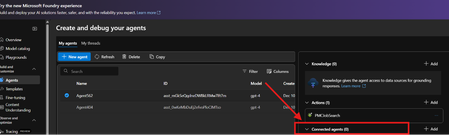
There used to be connected agents before, but I can't find that feature in the new Foundry. I'd like to know if this feature is still available in the new Foundry or if there is an alternative way to achieve the same functionality.Abdou1Jul 01, 2026Copper Contributor66Views0likes1Comment
Data Visualisation / Charting in Azure Foundry
Hi Foundry community, We are working on an agent that can query internal data sources, and are looking for ways that we can visualise data (think pie charts, bar charts, etc.). This would be consumed by end users through Copilot/Teams. However we are unable to find a way to do so, which is surprising given that you easily can create charts through M365 Copilot Chat and through Copilot Studio. We have tried using the 'Code Interpreter' tool, but the Teams/Copilot client UIs just do not render the results inline, either interactive or as an embedded image. They also do not give any option to download them. Has anyone tackled this before? How have you been able generate charts? Many thanks!jherbert44Jun 30, 2026Copper Contributor78Views0likes2Comments
Tags
- AMA74 Topics
- AI Platform59 Topics
- TTS50 Topics
- azure ai foundry31 Topics
- azure ai29 Topics
- azure ai services23 Topics
- azure15 Topics
- azureai14 Topics
- azure machine learning13 Topics
- machine learning10 Topics