Forum Widgets
Latest Discussions
Is Microsoft Foundry the Future of Enterprise AI?
After reviewing several recent Microsoft Foundry presentations, one theme stood out: The future of AI isn't about having the best model. It's about connecting models to business context, systems, governance, and observability. The slides consistently highlight the challenges organizations face: Choosing and managing models Connecting AI to enterprise knowledge Integrating with business systems Governing agents at scale Microsoft's answer appears to be Foundry, an AI app and agent factory that brings together models, knowledge, tools, orchestration, security, and lifecycle management into a single platform. What I found most interesting is the emphasis on Foundry IQ and business context. The message seems to be that AI becomes truly valuable when it understands not just language, but how your organization operates. As AI evolves from chatbots → copilots → agents, governance and context may become more important than raw model intelligence.JonEricEubanksSep 03, 2026Brass Contributor53Views0likes0Comments
Reliability starts with separating instruction from content
Want to understand what real security risk looks like in generative AI? This 2025 case is a masterclass. Researchers at Aim Security found a zero-click vulnerability in Microsoft 365 Copilot, catalogued as CVE-2025-32711, CVSS 9.3. They named it EchoLeak. The attack required zero clicks from the victim. All it took was a malicious email landing in the inbox. When Copilot later processed that email as part of a user's query, hidden instructions in the body caused the model to pull sensitive data from other internal sources (email, SharePoint, OneDrive, Teams) and embed it in a URL, exfiltrating it to an external server. What stands out is how it slipped past the defenses. Microsoft's XPIA (Cross-Prompt Injection Attempt) classifier already existed. So did link redaction. The attack bypassed both using specific markdown formatting and an already-allowlisted Teams image proxy, so the traffic looked legitimate. Microsoft shipped a server-side fix in June 2025, with no user action required and no confirmed real-world exploitation. But the case exposed a structural problem: any AI assistant with access to multiple internal data sources has this same attack surface. The most interesting technical response Microsoft Research built for this is called Spotlighting. The idea is simple to explain and hard to implement well: the model needs to distinguish user instructions from untrusted external text. It does this three ways: delimiting with a randomized marker, datamarking by inserting a special character between words, or encoding the untrusted text in base64 or ROT13, always paired with a system prompt warning that the text is external. In tests with GPT-family models, Spotlighting dropped the indirect prompt injection attack success rate from over 50% to under 2%, without hurting task performance. It's now part of Prompt Shields, inside Azure AI Content Safety. If you work on AI projects that pull from multiple data sources, this is the kind of technical content that should be on your risk radar, not just on the security team's. Agent reliability starts with how it separates instruction from content it's merely processing.rafaellimaesilvaSep 03, 2026Copper Contributor50Views0likes0Comments
Making Azure AI Foundry Agents Explainable — Knowledge Graphs + Source Attribution
90% of Azure AI demos work on stage — most never ship. The gap is architecture, not the model. I wrote up a field guide on taking Azure AI Foundry agents from POC to production, with knowledge graphs (GraphRAG) doing the grounding and source attribution. What the post covers Grounding with a knowledge graph — multi-hop retrieval + inline citations so every answer is traceable to a source (critical for regulated/medical use cases). Externalized state — keeping agent memory and session state outside the model. Identity at the boundary — Entra ID / RBAC instead of trusting the prompt. Observability & compliance — tracing, evaluation, and auditability. The stack — Azure AI Foundry + Model Context Protocol (MCP) + Azure Functions (Flex Consumption) + Azure OpenAI, from a real build (VeritasGraph medical MCP server). 📖 Full write-up: https://bibinprathap.com/blog/azure-ai-proof-of-concept-to-production ▶️ 6-min walkthrough: https://youtu.be/z-CPS5WUvyw?si=fmpo1RN28Bh9KbIb Questions for the community How are you grounding Foundry agents today — vector RAG, GraphRAG, or hybrid? Anyone combining knowledge graphs with MCP tools in Foundry? What worked / broke? For regulated domains, how are you handling source attribution and audit trails? Curious to compare notes — happy to share more detail on the GraphRAG retrieval design if useful.bibinprathapAug 24, 2026Copper Contributor133Views0likes0CommentsAzure Foundry / Fireworks Ai | Error NOT_FOUND: Model not found, inaccessible, and/or not deployed
Today, Deepseek-v4-flash-0731 was released through azure foundry and through fireworks. We were able to a implement the model, but when we try to use, we get this message: Error NOT_FOUND: Model not found, inaccessible, and/or not deployed Anyone is getting the same error?albcunhaAug 20, 2026Copper Contributor55Views0likes0CommentsThe Cloud Foundation for Safe Agentic AI
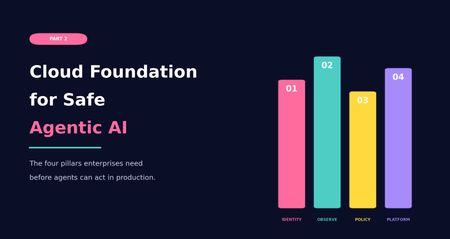
Why enterprise agents need more than a working prototype Most AI conversations start with the model. Which model should we use? Which framework? Which agent platform? Which demo can we build quickly enough to make the idea feel real? Those questions are not wrong, but they are rarely the first questions that matter in an enterprise environment. In real projects, the hard part usually appears after the first prototype works. The demo can answer a question, call a tool, retrieve a document, or update a record. Then someone asks whether it can be connected to production data, used by more teams, or allowed to trigger real actions. That is where the conversation changes. In the first part of this series, I looked at why many companies are less ready for agentic AI than they think. The blockers were practical and familiar: unclear business problems, immature processes, weak data foundations, and no clear owner when an AI system makes a poor recommendation or takes a wrong action. The message was simple: Before a company asks what agents can do, it needs to understand what it is ready to delegate. But business readiness is only the first layer. Even when the use case is clear, the process is understood, and leadership is aligned, another question appears. Is the platform ready to support agents safely? This is where Part 2 begins. Agentic AI does not behave like a normal application workload. A traditional application usually follows predefined paths. It receives a request, processes logic, returns a response, writes to a database, or calls an API. Agents introduce a different pattern. They reason over context, retrieve information, choose tools, trigger actions, interact with other services, and sometimes operate across multiple systems at once. That makes the surrounding cloud platform much more important. There is also a shadow AI angle to this. In many organizations, agent-like capabilities are already entering through SaaS platforms, vendor copilots, browser extensions, and productivity tools. These systems may not run inside the organization’s governed Azure subscriptions, but they can still interact with enterprise data and business workflows. If the official platform is not ready, teams will often find less governed ways to experiment anyway. That is not always malicious. Sometimes it is just people trying to solve their work with the tools available to them. The marketing analyst pasting customer data into a public chatbot because the official AI platform is six months away. The support team using a browser extension that summarizes tickets, without anyone realizing those tickets are also being sent to a third-party service. From a governance point of view, the effect is the same. Cloud readiness for agentic AI is not defined by access to cloud services or model endpoints alone. The real question is whether the platform can support controlled autonomy. Before enterprises can trust agents to act, the platform must be able to identify them, observe their behavior, restrict their permissions, enforce policy, and contain failure. Without that, an organization is not really deploying an intelligent assistant in a controlled way. It is introducing a workload that can interact with enterprise systems without anyone clearly watching what it does or being able to stop it. From business readiness to cloud readiness After the business foundation is clear, the next layer is the cloud foundation. A company may have a strong use case, executive support, and even a working prototype. But that does not mean it is ready to deploy agents in production. A prototype can run with broad access, manual supervision, loose logging, and a small group of test users. Production requires more discipline. It requires clear identity, controlled access, traceable activity, enforceable policy, and operational ownership. Cloud readiness for agentic AI comes down to four pillars, in this order: Identity-first architecture Observability Policy controls Platform constraints The order matters. 1. Identity-first architecture Identity comes first because nothing can be governed properly if it cannot be identified. In traditional cloud systems, we already learned this lesson with users, applications, service principals, managed identities, and workloads. Agents add another layer of non-human actors into the enterprise environment. If an agent can retrieve data, call tools, trigger workflows, or interact with business systems, it needs a clear identity. Without that foundation, governance becomes fragile. Teams may struggle to control what the agent can access, understand what it did, or determine who is accountable when something goes wrong. I have seen agents running in production where nobody could clearly say who owned them. They worked. Until they did not. Identity-first architecture means each agent or agentic workload should have a defined identity, ownership model, permission scope, and lifecycle. It should be clear whether the agent is acting on behalf of a user, acting as a service, or operating within a delegated boundary. This matters because permissions are not an implementation detail. They define the blast radius and accountability model of the system. In Azure environments, this is where Microsoft Entra ID and newer agent identity capabilities become important. As agents become more common across Azure AI Foundry, Copilot Studio, Microsoft 365, and custom frameworks, organizations need a way to understand which agents exist, who owns them, what they can access, and how their lifecycle is managed. Identity is not only about authentication. It is also about visibility, traceability, ownership, permission boundaries, and accountability. Agents should not remain hidden inside application logic or operate through shared identities. If they can retrieve data, call tools, or trigger actions, they need to be managed with the same care as any other production workload. 2. Observability Once identity is established, observability becomes the next pillar. Knowing that an agent exists is not enough. The platform must be able to show what the agent did. For normal applications, observability often focuses on service health, latency, failures, and resource usage. For agents, those signals still matter, but they are incomplete. Agent observability also needs to capture the execution path across model calls, retrieved context, orchestration steps, tool calls, policy decisions, approvals, denials, and final actions. This changes how we think about monitoring. With agentic systems, the question is not only whether a request succeeded or failed. Teams also need to understand the path that led to the outcome, the context used, the tools called, the policies applied, and the point where behavior changed. Without that visibility, it is difficult to investigate failures and improve reliability. This is also where observability starts to support governance, not just troubleshooting. Once teams can measure how agents behave, they can move toward KPI-based governance. That may include reliability, escalation rates, policy denials, grounding quality, tool-call failures, cost per interaction, latency, and business outcome metrics. Without this measurement layer, maturity remains mostly opinion-based. With it, governance becomes evidence-based. In Azure, Azure Monitor is the obvious starting point. Together with services such as Application Insights and Log Analytics, it provides the telemetry foundation needed to understand how AI workloads behave in production. For agentic systems, this usually requires combining platform telemetry with application-level traces from orchestration, retrieval, model calls, policy decisions, and tool execution. This visibility is what makes continuous improvement possible. It is also what allows governance to mature from “we think the agent is behaving correctly” to “we can measure how the agent behaves over time.” Small difference. Large consequence. 3. Policy controls The third pillar is policy controls. This comes after identity and observability because policy needs both. Identity defines who or what the rule applies to. Observability helps teams understand whether the rule is effective, bypassed, misconfigured, or too restrictive. Policy controls define the boundaries for what agents are allowed to do. They determine how agents access data, which tools they can use, which environments are in scope, when approval is required, and when an action or response should be blocked. The key point is simple: Prompts can guide behavior, but they are not a reliable enforcement layer. For enterprise systems, policy needs to be external, testable, auditable, and enforceable. This becomes especially important because agents may operate across multiple systems. An agent may retrieve information from one source, reason over the result, call a tool, update a ticket, send a message, or trigger a workflow. Each step may appear safe in isolation, while the full chain creates risk. Policy controls provide boundaries around that chain. In Azure, this starts at the cloud governance layer. Azure landing zones, management group structures, and Azure Policy can help define where AI workloads are deployed, how environments are separated, and which rules apply consistently across subscriptions. At runtime, Azure AI Content Safety can help detect harmful content, prompt attacks, unsafe interactions, or outputs that drift away from the intended task. For tool and API access, Azure API Management can also be used as a controlled gateway between agents and downstream systems. This can support centralized authentication, throttling, mediation, logging, and policy enforcement. It is not mandatory in every design, but it is a useful option when agents need governed access to APIs instead of direct backend connectivity. The goal is not to create friction for the sake of control. The goal is to make sure the agent operates inside boundaries that are defined outside the prompt and outside the model response. 4. Platform constraints The fourth pillar is platform constraints. This area often receives less attention early in the project, but it strongly shapes whether an agentic system can operate safely and reliably in production. These constraints include network isolation, private connectivity, data residency, regional availability, quota limits, model throughput, latency, logging retention, integration boundaries, cost behavior, and operational ownership. They may seem like implementation details during early design discussions, but they often determine whether the system can actually run in production. For agentic workloads, these constraints also shape where experimentation happens. Sandboxed environments, isolated subscriptions, limited tool access, and controlled test data can help teams evaluate agent behavior before exposing it to production systems. This becomes even more important when agents are allowed to generate code, call external tools, or execute actions that may not be fully trusted at design time. Platform constraints are where the earlier pillars meet implementation reality. Identity affects how agents connect to services. Observability affects logging cost, retention, and investigation capability. Policy affects routing, network design, tool exposure, and user experience. By the time an agentic system reaches production, these constraints are no longer background details. They become design boundaries. In Azure, this is where landing zone design, private networking, regional planning, quota management, cost management, and operational runbooks matter. Azure landing zones, private endpoints, private DNS, Azure Firewall, NSGs, and controlled network paths all influence whether the agent architecture can move from prototype to production without being redesigned halfway through. And yes, that redesign usually happens at the least convenient moment. Architecture has a sense of humor. Not a kind one. From principles to Azure capabilities The four pillars are not only architectural principles. They need to be translated into platform capabilities, operating practices, and governance controls. In practice, controlled agent deployment is rarely achieved by a single product or service. It requires multiple layers working together. Identity, monitoring, policy, networking, runtime safety, API exposure, and operational controls all play a part. Azure provides several services and patterns that can help implement these controls, but there is no fixed blueprint that applies to every organization. The right combination depends on the use case, regulatory requirements, existing landing zone design, integration landscape, and the level of autonomy expected from the agent. The examples below should be seen as a practical toolset, not as a mandatory checklist. Pillar Goal Example Azure capabilities Identity-first architecture Make agents visible, owned, permissioned, and governable as enterprise workloads. Microsoft Entra ID, Microsoft Entra Agent ID, managed identities, service principals, workload identities, access reviews, Conditional Access, Privileged Identity Management Observability Understand runtime behavior, trace execution paths, investigate failures, and improve reliability. Azure Monitor, Application Insights, Log Analytics, Azure AI Foundry tracing, diagnostic settings, distributed tracing, correlation IDs, application-level telemetry Policy controls Enforce boundaries around access, actions, content safety, APIs, and governance. Azure landing zones, management groups, Azure Policy, Azure AI Content Safety, Prompt Shields, Microsoft Purview, Azure API Management, RBAC, approval flows Platform constraints Operate within real cloud boundaries such as networking, region, quota, compliance, and operations. Azure landing zones, private endpoints, private DNS, private networking, Azure Firewall, NSGs, quota planning, regional architecture, cost management The purpose of this mapping is not to suggest that Azure has one single service for each pillar. It does not. The practical goal is to combine the right services and patterns so the platform can identify agents, monitor their behavior, enforce boundaries, and operate within known cloud constraints. Conclusion Agentic AI does not become enterprise-ready simply because a model is available, a prototype works, or a business sponsor is excited. The real question is whether the surrounding cloud foundation can support agents that act within boundaries the platform actually enforces. Together, these pillars move the discussion from building an agent to preparing the environment in which the agent can operate responsibly. That distinction is important. A prototype can rely on broad access, limited logging, and close manual supervision. A production system needs clearer boundaries around ownership, access, traceability, and control. This is also where the series moves naturally into Part 3. Once the business foundation is clear and the cloud foundation is in place, the next challenge is the design of the agent itself. The cloud foundation matters here because it provides the controlled environment in which agents can be tested, limited, and observed before they are trusted with broader enterprise access. For more advanced scenarios, that also includes sandboxing patterns for generated code, tool execution, and untrusted actions. In Part 3, I will move closer to implementation and look at how to design an enterprise-ready agent. That means defining the agent’s scope, grounding it with reliable knowledge, deciding which tools it can use, designing safe execution loops, adding human oversight where it matters, and thinking carefully about when a single agent is enough versus when multi-agent coordination is justified. That is where agentic AI starts becoming more than an idea. And, as usual, that is also where the architecture starts to matter. This article is part of my Agentic AI readiness series and was also published on Medium.104Views0likes0CommentsThe Business Foundation: Why Most Companies Aren’t Ready for Agentic AI
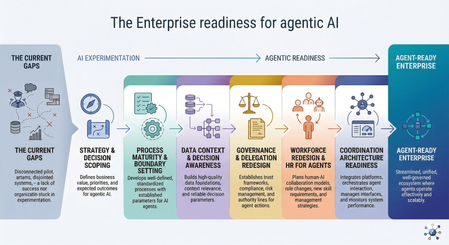
Before agents can execute decisions, organizations must redesign how they structure responsibility, data, governance, and operational context before autonomy can scale. The enterprise AI landscape has shifted. Organizations are moving beyond chatbots and isolated predictive models toward systems that can plan, decide, and execute multi-step work across finance, engineering operations, supply chains, and customer service. Many analysts now expect agentic AI to unlock major productivity gains across knowledge work. But despite the momentum, adoption remains limited. As of 2025, only about 2% of organizations have deployed agent-based systems at real operational scale, while most remain stuck in pilots. The reason is not model capability. It is readiness. The Core Problem Most organizations still treat AI adoption as a technical rollout exercise and measure progress through deployment indicators such as copilots enabled, pilots launched, or models evaluated. These metrics reflect experimentation activity, but they do not show whether an organization is ready to operate systems that make decisions and execute actions inside business workflows. Agentic systems do more than generate insights; they participate directly in operational processes. The gap between deploying AI tools and safely delegating decision-making authority to them is where many transformation efforts begin to stall. True enterprise readiness for agentic AI is not defined by how many models an organization deploys or how many pilots it launches. It depends on whether the organization can safely delegate bounded decisions to autonomous systems. In practice, this requires: Strategy and decision scoping: identifying where autonomous execution creates value and where human oversight must remain in place Process and decision-system maturity: redesigning workflows for human-agent collaboration with clear escalation boundaries Context-ready data foundations: ensuring agents operate on consistent, policy-aware operational context rather than fragmented data silos Governance and accountability structures: defining what agents may recommend, execute, escalate, or never touch, supported by auditability and oversight Team readiness and lifecycle management: preparing teams to supervise autonomous execution and managing agents as ongoing operational participants rather than static tools Coordination architecture readiness: aligning multiple agents across domains so local optimization does not create organizational conflict This article explains why traditional enterprise environments are not yet prepared for autonomous agents, what true agentic readiness actually looks like in practice, and the sequence of organizational changes required before decision-capable systems can be deployed safely at scale. I. The Readiness Illusion and the Root Causes of Failure Most organizations are deploying agentic systems into environments designed exclusively for human execution. That mismatch produces predictable friction across five structural layers. 1. Fragmented Operational Context (The Data Problem) Enterprises have a lot of data. What they often lack is usable context. Traditional systems record what happened. Agents also need to understand why something happened, how systems are connected, and where policy limits apply. In most organizations, customer systems, telemetry platforms, identity services, and finance tools do not stay aligned in real time. As a result, agents operate across disconnected information rather than a shared operational picture. This creates real risk. With generative AI, poor data quality usually produces a weak answer. With agentic AI, poor data quality can produce the wrong action at scale. More APIs, more pipelines, and more dashboards do not fix this by themselves. Without a shared semantic context across systems, agents can still make decisions that are internally logical but operationally wrong. For example, an agent may see that a customer received a large discount and conclude that future discounts should be limited, while missing that the original discount was approved because of a service outage and a retention risk. The data is available, but the business meaning behind it is not. 2. Undocumented Decision Systems Most organizations document workflows. However, very few document decision authority clearly enough for autonomous execution. Agents need to know where they are allowed to act, when they must escalate, and which decisions remain human-only. Without these boundaries, organizations often follow the same pattern: the first unexpected situation appears, confidence drops, and the agent is switched off. This is not a model problem. It is a decision-structure problem. Before deploying agents, organizations must be able to explain which decisions can be delegated and who remains responsible for each step. Many cannot yet do this. 3. The Governance Paradox Agentic systems do not fit traditional governance models. Most organizations still assume a simple structure: user → application → resource Agent-based systems introduce a new layer: user → agent → tools → resource This change affects access control, compliance processes, and audit visibility. Organizations usually buy agents like software tools but must manage them more like team members. That gap is rarely addressed before deployment begins. This issue is already visible today. Many enterprises are using vendor copilots and embedded AI features inside business systems without clear ownership, audit coverage, or governance rules. This creates a growing “shadow AI” layer even before intentional agent programs start. 4. Identity and Accountability Ambiguity Many organizations cannot clearly answer a simple question: who is responsible when an agent makes a mistake? In practice, agents often receive permissions that are broader than necessary, execution traces are difficult to follow across multiple systems, and accountability is split between IT, compliance, and business teams. Without clear attribution, autonomy introduces hidden risk instead of efficiency. Delegation without accountability is not automation. It is unmanaged risk. 5. Organizational Misalignment Most transformation programs still assume employees will use AI as a tool. Agentic environments change the role of employees from operators to supervisors. People are expected to review outcomes, guide behavior, and manage exceptions instead of executing every step themselves. Research from BCG shows that around 70% of AI project challenges come from people and process issues rather than technology. Organizations that invest in change management are significantly more likely to see successful results. Organizational readiness is not something to address later. It is required before agents can operate safely. Common Failure Patterns at a Glance Common failure patterns like these are already visible in real deployments. The Klarna case illustrates the challenge well. After replacing several hundred customer service roles with AI, the company later reported lower resolution quality for complex cases, declining satisfaction scores, and higher escalation rates, which led to renewed hiring in support roles. The outcome did not point to a failure of the model itself. It highlighted what happens when autonomous systems are introduced without the supporting process, governance, and team structures required for sustained operation. II. Defining True Agentic Readiness Agentic readiness is not just about having the right tools in place. It is about whether the organization has the capability to use autonomous systems safely and effectively. Definition Agentic readiness is the ability to safely delegate bounded operational decisions to autonomous systems while maintaining accountability, observability, and policy alignment across the full execution chain. Research consistently shows that organizations benefit from AI only when multiple maturity layers advance together. The MIT CISR AI Maturity Model, based on data from 721 companies, demonstrates that financial performance improves as organizations progress through the stages. Companies in early stages often perform below industry averages, while those reaching later stages perform significantly better. The key insight is that maturity is cumulative. Organizations cannot skip foundational steps and still expect reliable outcomes. For agentic systems, those cumulative layers include strategy alignment, decision-ready processes, context-ready data, governance structures, organizational roles, and technical architecture. When only some of these elements are in place, organizations produce pilots. When they advance together, organizations produce transformation. From Activity Metrics to Outcome Metrics One of the clearest signs of readiness is how an organization measures progress. Organizations at an early stage usually focus on activity: Number of models deployed Pilots launched Features enabled User onboarding numbers and API call volume More mature organizations focus on outcomes: Better decision quality and fewer errors Higher throughput for clearly defined tasks Consistent operation within safe autonomy boundaries Complete audit trails and accurate escalation handling This is not a semantic distinction. Organizations measuring activity invest indefinitely in pilots because they have no signal telling them a pilot has succeeded or failed. The measurement framework is itself a prerequisite for the transformation sequence. III. The Transformation Sequence Most Organizations Skip Many organizations begin agent adoption in the wrong order. Platforms are procured before governance is defined. Models are evaluated before workflows are structured. Autonomy is introduced before decision authority is mapped. The result is not faster progress. It is earlier failure, followed by expensive cleanup later. In traditional cloud transformation, architecture precedes automation. Agentic transformation follows the same rule: decision structure must exist before delegation can scale. Step 1: Strategic Alignment and Decision Scoping Organizations should begin by identifying where autonomy creates value safely — not where it is technically possible and not where ambitions are highest. Strong early candidates usually share the same characteristics: structured decisions, bounded scope, reversible actions, and high execution frequency. Typical examples include incident triage and routing, capacity classification, environment status updates, and prioritization support. These are good starting points not because they are simple, but because failures are visible, recoverable, and useful for learning. Delegation should grow gradually from bounded decision spaces toward broader authority. Organizations that struggle often start with highly visible, high-risk use cases because the business case looks attractive. Organizations that succeed usually begin with frequent, lower-impact decisions where feedback loops are short and improvements can happen quickly. Step 2: Process Maturity and Boundary Setting Agents do not fix broken workflows. They execute them faster. If a process depends on informal judgment, tribal knowledge, or undocumented exception handling, an agent will reproduce those weaknesses at machine speed. Before introducing autonomy, organizations should establish structured runbooks with clear execution paths, explicit escalation logic an agent can evaluate, defined exception-handling rules that do not rely on intuition, and clear boundaries between decisions an agent may take and those that must remain with humans. This level of discipline requires documentation precision that many organizations have never needed before. A statement such as “the engineer uses judgment” is not a runbook step. It is an undocumented dependency that will later appear as an agent failure. This is also where leaders face a practical choice: add agents on top of fragile legacy workflows, or redesign those workflows so delegation can happen safely. In many cases, the second path is slower at first but far more durable. Step 3: Data Context and Decision Awareness Agents cannot operate reliably in fragmented environments. The solution is not simply collecting more data. What they require is decision-aware context: structured knowledge about relationships between systems, service dependencies, environment classification, policy boundaries, and operational intent. This is a different challenge from building analytics platforms. Analytics depends on broad visibility across large datasets. Agentic execution depends on precise, current, and consistent information at the moment a decision is made. A customer record that is accurate enough for reporting may not be reliable enough for an agent executing a contract action. Because of this difference, data readiness becomes a leadership concern rather than only an infrastructure task. Microsoft’s digital transformation guidance captures this clearly with the principle “no AI without data”: organizations should identify critical data sources, establish governance ownership, improve quality, and define controlled access before introducing agents into operational workflows. Step 4: Governance and Delegation Redesign Organizations must explicitly define four categories of agent authority before deployment: What agents may recommend (advisory boundary) What agents may execute autonomously (execution boundary) What requires human approval before execution (escalation boundary) What remains permanently restricted regardless of confidence (prohibition boundary) These policies cannot remain static. Agentic systems require continuous supervision, not periodic review. Research supports this shift. Studies of governance professionals working with autonomous systems show that adopting traditional Enterprise Risk Management frameworks alone does not significantly reduce governance incidents. What makes the difference is integrating human oversight into execution loops and strengthening machine identity security. In practice, this means organizations need a delegated-autonomy governance function: a cross-functional group with representation from IT, compliance, legal, and business teams that continuously defines and monitors the boundaries of agent behavior. This is different from extending existing approval committees. Governance must move from acting as a gate before deployment to operating as a supervision layer throughout the lifecycle of the agent. This creates a basic operational tension: organizations adopt agents to reduce manual work, but safe autonomy requires stronger supervision, better observability, and tighter control over identity and permissions — especially in the early stages. Step 5: Operating Model Redesign: Operationalizing Human-Agent Collaboration Agentic systems create responsibilities that do not yet exist in most organizations. This shift is not mainly about replacing people with agents. It is about redesigning how people work with them, supervise them, and remain accountable for outcomes. New operational roles typically include: Agent reliability engineers who monitor performance, detect degradation, and define retraining triggers Policy designers who translate business rules into machine-evaluable decision logic Workflow supervisors who oversee autonomous execution and handle escalations Context curators who maintain the data foundations agents depend on for accurate reasoning Organizations that succeed with agents do not treat them as static automation tools. They treat them as managed participants inside workflows. That is why they need an HR layer for agents. An HR layer for agents means applying the same lifecycle thinking used for people to autonomous systems. Before an agent is allowed to operate, it needs a clearly defined role, scope, level of authority, and access to the right systems. Once deployed, its performance must be reviewed over time, its behavior monitored, and its permissions adjusted when quality drops or risks increase. When the agent no longer fits the workflow, it should be retired or replaced instead of being left running by default. In practice, this means agent management should include: Onboarding, by defining scope, authority, and access boundaries Supervision, through observability, escalation paths, and performance review Retraining or re-scoping, when quality declines or conditions change Retirement, when the agent no longer fits the process or creates more risk than value In higher-risk workflows, this HR layer must also include graceful degradation. For example, an underperforming agent may automatically lose write access, be moved to read-only mode, and hand control back to a human supervisor until its behavior is corrected. This shift also requires leadership readiness. The Harvard 2025 Global Leadership Development Study found that 71% of senior leaders now see the ability to lead through continuous change as critical, yet only 36% say AI is fully integrated into their strategy. That gap between intention and execution is where many organizational transformation programs begin to stall. Step 6: Coordination Architecture Readiness As organizations deploy agents across multiple domains, a new challenge appears: agents begin optimizing locally instead of organizationally. An agent focused on cost efficiency in one area may conflict with another agent responsible for quality assurance elsewhere. Without coordination structures, these conflicts often remain invisible until they surface as operational failures. Coordination architecture helps align agent behavior across the organization. It ensures policy consistency between agents, maintains a shared understanding of the operational environment, prevents conflicts when actions intersect, and supports stable communication between agents working together across workflows. This capability is not required for the first agent deployment. It becomes important as soon as organizations begin operating multiple agents in parallel. Many organizations encounter coordination problems earlier than expected, which is why coordination readiness belongs in the transformation sequence even if its implementation happens later. Local optimization is rarely what enterprises intend. Coordination architecture is how you prevent it from becoming what they get. IV. The Regulatory Clock Is Already Running For organizations operating in or serving European markets, readiness is no longer only a strategic question. It is also a regulatory one. The EU AI Act’s high-risk provisions take effect in August 2026, with potential penalties reaching €35 million or 7% of global revenue. Colorado’s AI Act follows in June 2026, and a growing number of U.S. states now require documented AI governance programs for specific sectors and use cases. The governance and data foundations described earlier in this article are therefore not only best practice. For many organizations, they are becoming compliance prerequisites. Treating readiness as optional before deployment increasingly means accepting regulatory exposure before value is realized. The transformation sequence described here is not a slower path to deployment. It is the only path that avoids accumulating technical and legal risk at the same time. V. Conclusion: Shifting Toward Outcome-Based Pragmatism Agentic systems rarely fail because language models are incapable. They fail because they are introduced into environments designed for human execution, governed by frameworks built for deterministic software, and evaluated using metrics that cannot distinguish a promising pilot from a production-ready capability. The readiness gap is structural and, in many cases, self-inflicted. Organizations skip foundational steps because platform procurement is faster, more visible, and easier to justify internally than operating-model redesign. The result is earlier failure, higher remediation cost, and — in regulated industries — increasing legal exposure. What this means in practice Organizations should stop measuring readiness through activity indicators and start measuring it through decision quality, execution safety, throughput improvement, and bounded autonomy performance. Governance and data foundations must be established before platform rollout. Organizational transition planning must begin before deployment. Decision authority must be defined before the first agent workflow is introduced. Only then can enterprises safely unlock the productivity gains promised by agentic systems — not because the technology suddenly becomes capable, but because the organization becomes ready to use it. Up Next in This Series Part 2 looks at the cloud foundation needed for safe agent deployment, including identity-first architecture, observability, policy controls, and the platform constraints that often appear only after design decisions have been made. Part 3 focuses on how to design agents that work reliably in enterprise environments, including RAG maturity, loop design, multi-agent coordination, and human oversight built into the architecture from the start. References Weinberg, A. I. (2025). A Framework for the Adoption and Integration of Generative AI in Midsize Organizations and Enterprises (FAIGMOE). Patel, R. (2026). Agentic AI Frameworks: A Complete Enterprise Guide for 2026. Space-O Technologies. Microsoft Learn. Agentic AI maturity model. Keenan, K. (2026). How the right context can reshape agentic AI’s productivity output. Business Insider / Reltio. Ransbotham, S., Kiron, D., Khodabandeh, S., Iyer, S., & Das, A. (2025). The Emerging Agentic Enterprise: How Leaders Must Navigate a New Age of AI. MIT Sloan Management Review & Boston Consulting Group.872Views0likes0CommentsEnabling Secure Access to Private Resources with Azure AI Foundry
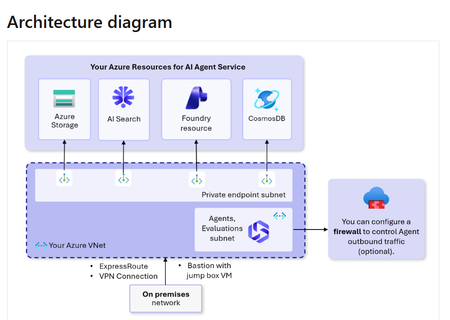
One of our client’s key requirements was to build an AI agent that could securely access private resources without exposing any data over the public internet. To meet this requirement, we followed an architecture similar to the diagram above, leveraging Azure AI Foundry with private networking. How We Designed the Solution As shown in the diagram, all core services - Azure Storage, AI Search, Foundry, and Cosmos DB - are placed behind private endpoints within the client’s virtual network. This ensures that none of these resources are publicly accessible. We deployed the agent inside a dedicated subnet within the same VNet. This allowed the agent to communicate directly with these services through private endpoints, without any need to traverse the public internet. The private endpoint subnet acts as a secure bridge between the agent and the underlying Azure services. At the same time, the client has full control over the network, including the option to apply firewall rules to manage outbound traffic. Why This Approach Worked All communication between the agent and data sources stays within the private network. Sensitive data, including queries and retrieved content, never leaves the network boundary. Access to resources is controlled through private endpoints and proper authorization. This design removes the risks associated with public endpoints and ensures compliance with enterprise security requirements. Final Outcome Using this approach, we delivered an AI solution that is both secure and scalable. The client now has an agent that can safely interact with private data sources while maintaining full control over network traffic and access policies. To learn more about the configuration, follow this documentation: https://learn.microsoft.com/en-us/azure/foundry/agents/how-to/virtual-networks How are you currently securing your AI workloads when accessing sensitive data?257Views1like0CommentsMulti-agent systems on Azure: identity, monitoring, and security guardrails
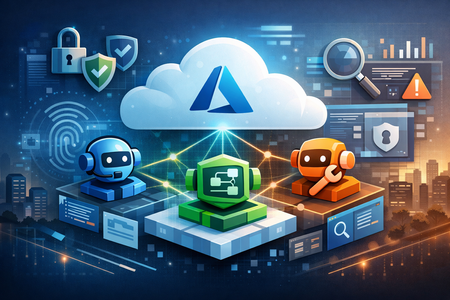
I wrote this piece because I know security concerns around AI agents are one of the main things holding many companies back from getting started. There is a lot of excitement around what agents can do on Azure, especially as multi-agent systems become more practical to build. But for many teams, the real hesitation starts when questions come up around trust, identity, permissions, monitoring, and what happens when something goes wrong. This PDF is my attempt to break that down in a practical way, from an Azure architect’s perspective: what multi-agent systems are, where they can fail, and which security layers matter most if you want to build them responsibly in Azure. It is based on hands-on architecture experience, Microsoft guidance, and recent security thinking around agentic systems. Read it on https://medium.com/@SCSA_MJ/multi-agent-systems-on-azure-identity-monitoring-and-security-guardrails-b8b7c82a0c57:cloudmastermindMar 27, 2026Copper Contributor151Views1like0Comments
Typo in Azure Foundry Learn
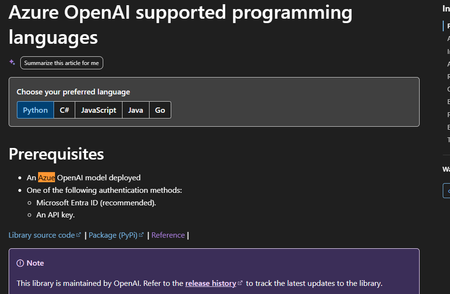
Hi Microsoft Foundry, I am not sure if this is the right place to post this, but I just wanted to report that there is a typo on this specific page : https://learn.microsoft.com/en-us/azure/foundry/openai/supported-languages?tabs=dotnet-secure%2Csecure%2Cpython-entra&pivots=programming-language-python Have a nice day.BenjaminChou1120Mar 18, 2026Copper Contributor36Views0likes0CommentsGet to know the core Foundry solutions
Foundry includes specialized services for vision, language, documents, and search, plus Microsoft Foundry for orchestration and governance. Here’s what each does and why it matters: Azure Vision With Azure Vision, you can detect common objects in images, generate captions, descriptions, and tags based on image contents, and read text in images. Example: Automate visual inspections or extract text from scanned documents. Azure Language Azure Language helps organizations understand and work with text at scale. It can identify key information, gauge sentiment, and create summaries from large volumes of content. It also supports building conversational experiences and question-answering tools, making it easier to deliver fast, accurate responses to customers and employees. Example: Understand customer feedback or translate text into multiple languages. Azure Document IntelligenceWith Azure Document Intelligence, you can use pre-built or custom models to extract fields from complex documents such as invoices, receipts, and forms. Example: Automate invoice processing or contract review. Azure SearchAzure Search helps you find the right information quickly by turning your content into a searchable index. It uses AI to understand and organize data, making it easier to retrieve relevant insights. This capability is often used to connect enterprise data with generative AI, ensuring responses are accurate and grounded in trusted information. Example: Help employees retrieve policies or product details without digging through files. Microsoft FoundryActs as the orchestration and governance layer for generative AI and AI agents. It provides tools for model selection, safety, observability, and lifecycle management. Example: Coordinate workflows that combine multiple AI capabilities with compliance and monitoring. Business leaders often ask: Which Foundry tool should I use? The answer depends on your workflow. For example: Are you trying to automate document-heavy processes like invoice handling or contract review? Do you need to improve customer engagement with multilingual support or sentiment analysis? Or are you looking to orchestrate generative AI across multiple processes for marketing or operations? Connecting these needs to the right Foundry solution ensures you invest in technology that delivers measurable results.




Tags
- AMA74 Topics
- AI Platform60 Topics
- TTS50 Topics
- azure ai foundry33 Topics
- azure ai29 Topics
- azure ai services23 Topics
- azure15 Topics
- azureai14 Topics
- azure machine learning13 Topics
- machine learning10 Topics