azure ai services
22 Topics
Azure AI Foundry Agent Unable to Use Credentials Stored in Key Vault Through Playwright MCP Tool
Hello everyone, I am trying to understand how Azure AI Foundry agents interact with Azure Key Vault when using custom MCP tools, and I would appreciate any guidance from the community. My Setup - Created an Azure AI Foundry agent. - Created an Azure Key Vault and configured all permissions according to Microsoft's official documentation. - Stored the required website credentials (username and password) in the Key Vault. - Deployed the official Playwright MCP Docker image. - Exposed the MCP server using ngrok and verified that the endpoint is accessible. - Connected the MCP endpoint as a Custom MCP Tool in Azure AI Foundry. - Performed all configuration through the Azure portal, Foundry UI, and Playground only (no SDK or custom application code involved). The Issue The agent can access and use the Playwright MCP tool. However, when I ask it to log in to a website using credentials that are already stored in Key Vault, it does not populate the username and password fields. My expectation was that the agent would be able to retrieve the secrets from Key Vault and provide them to the Playwright tool during execution. Questions Is there currently a supported mechanism for Azure AI Foundry agents to automatically retrieve Key Vault secrets and pass them to a Custom MCP tool? Does the Playwright MCP Docker image have any built-in integration with Azure Key Vault? When using only the Foundry UI (without SDK code), can a Foundry agent securely inject Key Vault secrets into MCP tool calls? Are additional configurations required beyond Key Vault permissions and agent connections? Has anyone successfully implemented a similar setup where a Foundry agent uses credentials stored in Key Vault to perform browser automation through Playwright MCP? Any clarification on the expected architecture and whether this scenario is currently supported in Azure AI Foundry would be greatly appreciated. Thank you.436Views0likes3Comments
GPT-5.5-Pro not listed in foundry?
The model is mentioned in this blog post : https://azure.microsoft.com/en-us/blog/openais-gpt-5-5-in-microsoft-foundry-frontier-intelligence-on-an-enterprise-ready-platform/ But it is currently not listed on Foundry. Only latest pro model is 5.4-pro. When will 5.5-pro model be available on azure foundry?402Views0likes1CommentNeed Guidance on cost breakdown of Microsoft Foundry Agent portal I created
I have developed a complaint handling portal for customers and employees using Azure AI Foundry. The solution is built with Foundry agents, models from the catalog, input/output caching, agent logging/tracing, and other Foundry capabilities. The frontend and orchestration layer are deployed on Azure Container Apps. While Azure Cost Analysis provides an overview of spending, several parts remain unclear or act as a black box for accurate estimation, including: Token consumption assumptions (input/output tokens across different models and agents) User concurrency, sessions, and behavior patterns Agent logging and observability costs Impact of input/output caching Detailed resource consumption and billing in Azure Container Apps What is the best way to accurately calculate or estimate the total running cost for such an Azure AI Foundry-based platform with Container Apps frontend? Are there official Microsoft documentation, pricing guides, or reference architectures for cost breakdown? How do companies typically present costs for such AI platforms to attract customers (e.g., TCO models or per-user pricing)? I want to know how the platform costs are shown to customers. Thank you.The Business Foundation: Why Most Companies Aren’t Ready for Agentic AI
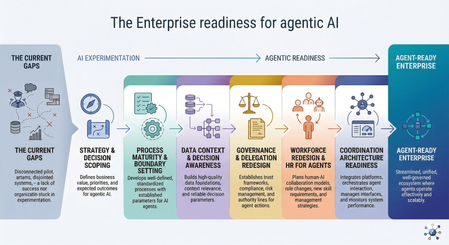
Before agents can execute decisions, organizations must redesign how they structure responsibility, data, governance, and operational context before autonomy can scale. The enterprise AI landscape has shifted. Organizations are moving beyond chatbots and isolated predictive models toward systems that can plan, decide, and execute multi-step work across finance, engineering operations, supply chains, and customer service. Many analysts now expect agentic AI to unlock major productivity gains across knowledge work. But despite the momentum, adoption remains limited. As of 2025, only about 2% of organizations have deployed agent-based systems at real operational scale, while most remain stuck in pilots. The reason is not model capability. It is readiness. The Core Problem Most organizations still treat AI adoption as a technical rollout exercise and measure progress through deployment indicators such as copilots enabled, pilots launched, or models evaluated. These metrics reflect experimentation activity, but they do not show whether an organization is ready to operate systems that make decisions and execute actions inside business workflows. Agentic systems do more than generate insights; they participate directly in operational processes. The gap between deploying AI tools and safely delegating decision-making authority to them is where many transformation efforts begin to stall. True enterprise readiness for agentic AI is not defined by how many models an organization deploys or how many pilots it launches. It depends on whether the organization can safely delegate bounded decisions to autonomous systems. In practice, this requires: Strategy and decision scoping: identifying where autonomous execution creates value and where human oversight must remain in place Process and decision-system maturity: redesigning workflows for human-agent collaboration with clear escalation boundaries Context-ready data foundations: ensuring agents operate on consistent, policy-aware operational context rather than fragmented data silos Governance and accountability structures: defining what agents may recommend, execute, escalate, or never touch, supported by auditability and oversight Team readiness and lifecycle management: preparing teams to supervise autonomous execution and managing agents as ongoing operational participants rather than static tools Coordination architecture readiness: aligning multiple agents across domains so local optimization does not create organizational conflict This article explains why traditional enterprise environments are not yet prepared for autonomous agents, what true agentic readiness actually looks like in practice, and the sequence of organizational changes required before decision-capable systems can be deployed safely at scale. I. The Readiness Illusion and the Root Causes of Failure Most organizations are deploying agentic systems into environments designed exclusively for human execution. That mismatch produces predictable friction across five structural layers. 1. Fragmented Operational Context (The Data Problem) Enterprises have a lot of data. What they often lack is usable context. Traditional systems record what happened. Agents also need to understand why something happened, how systems are connected, and where policy limits apply. In most organizations, customer systems, telemetry platforms, identity services, and finance tools do not stay aligned in real time. As a result, agents operate across disconnected information rather than a shared operational picture. This creates real risk. With generative AI, poor data quality usually produces a weak answer. With agentic AI, poor data quality can produce the wrong action at scale. More APIs, more pipelines, and more dashboards do not fix this by themselves. Without a shared semantic context across systems, agents can still make decisions that are internally logical but operationally wrong. For example, an agent may see that a customer received a large discount and conclude that future discounts should be limited, while missing that the original discount was approved because of a service outage and a retention risk. The data is available, but the business meaning behind it is not. 2. Undocumented Decision Systems Most organizations document workflows. However, very few document decision authority clearly enough for autonomous execution. Agents need to know where they are allowed to act, when they must escalate, and which decisions remain human-only. Without these boundaries, organizations often follow the same pattern: the first unexpected situation appears, confidence drops, and the agent is switched off. This is not a model problem. It is a decision-structure problem. Before deploying agents, organizations must be able to explain which decisions can be delegated and who remains responsible for each step. Many cannot yet do this. 3. The Governance Paradox Agentic systems do not fit traditional governance models. Most organizations still assume a simple structure: user → application → resource Agent-based systems introduce a new layer: user → agent → tools → resource This change affects access control, compliance processes, and audit visibility. Organizations usually buy agents like software tools but must manage them more like team members. That gap is rarely addressed before deployment begins. This issue is already visible today. Many enterprises are using vendor copilots and embedded AI features inside business systems without clear ownership, audit coverage, or governance rules. This creates a growing “shadow AI” layer even before intentional agent programs start. 4. Identity and Accountability Ambiguity Many organizations cannot clearly answer a simple question: who is responsible when an agent makes a mistake? In practice, agents often receive permissions that are broader than necessary, execution traces are difficult to follow across multiple systems, and accountability is split between IT, compliance, and business teams. Without clear attribution, autonomy introduces hidden risk instead of efficiency. Delegation without accountability is not automation. It is unmanaged risk. 5. Organizational Misalignment Most transformation programs still assume employees will use AI as a tool. Agentic environments change the role of employees from operators to supervisors. People are expected to review outcomes, guide behavior, and manage exceptions instead of executing every step themselves. Research from BCG shows that around 70% of AI project challenges come from people and process issues rather than technology. Organizations that invest in change management are significantly more likely to see successful results. Organizational readiness is not something to address later. It is required before agents can operate safely. Common Failure Patterns at a Glance Common failure patterns like these are already visible in real deployments. The Klarna case illustrates the challenge well. After replacing several hundred customer service roles with AI, the company later reported lower resolution quality for complex cases, declining satisfaction scores, and higher escalation rates, which led to renewed hiring in support roles. The outcome did not point to a failure of the model itself. It highlighted what happens when autonomous systems are introduced without the supporting process, governance, and team structures required for sustained operation. II. Defining True Agentic Readiness Agentic readiness is not just about having the right tools in place. It is about whether the organization has the capability to use autonomous systems safely and effectively. Definition Agentic readiness is the ability to safely delegate bounded operational decisions to autonomous systems while maintaining accountability, observability, and policy alignment across the full execution chain. Research consistently shows that organizations benefit from AI only when multiple maturity layers advance together. The MIT CISR AI Maturity Model, based on data from 721 companies, demonstrates that financial performance improves as organizations progress through the stages. Companies in early stages often perform below industry averages, while those reaching later stages perform significantly better. The key insight is that maturity is cumulative. Organizations cannot skip foundational steps and still expect reliable outcomes. For agentic systems, those cumulative layers include strategy alignment, decision-ready processes, context-ready data, governance structures, organizational roles, and technical architecture. When only some of these elements are in place, organizations produce pilots. When they advance together, organizations produce transformation. From Activity Metrics to Outcome Metrics One of the clearest signs of readiness is how an organization measures progress. Organizations at an early stage usually focus on activity: Number of models deployed Pilots launched Features enabled User onboarding numbers and API call volume More mature organizations focus on outcomes: Better decision quality and fewer errors Higher throughput for clearly defined tasks Consistent operation within safe autonomy boundaries Complete audit trails and accurate escalation handling This is not a semantic distinction. Organizations measuring activity invest indefinitely in pilots because they have no signal telling them a pilot has succeeded or failed. The measurement framework is itself a prerequisite for the transformation sequence. III. The Transformation Sequence Most Organizations Skip Many organizations begin agent adoption in the wrong order. Platforms are procured before governance is defined. Models are evaluated before workflows are structured. Autonomy is introduced before decision authority is mapped. The result is not faster progress. It is earlier failure, followed by expensive cleanup later. In traditional cloud transformation, architecture precedes automation. Agentic transformation follows the same rule: decision structure must exist before delegation can scale. Step 1: Strategic Alignment and Decision Scoping Organizations should begin by identifying where autonomy creates value safely — not where it is technically possible and not where ambitions are highest. Strong early candidates usually share the same characteristics: structured decisions, bounded scope, reversible actions, and high execution frequency. Typical examples include incident triage and routing, capacity classification, environment status updates, and prioritization support. These are good starting points not because they are simple, but because failures are visible, recoverable, and useful for learning. Delegation should grow gradually from bounded decision spaces toward broader authority. Organizations that struggle often start with highly visible, high-risk use cases because the business case looks attractive. Organizations that succeed usually begin with frequent, lower-impact decisions where feedback loops are short and improvements can happen quickly. Step 2: Process Maturity and Boundary Setting Agents do not fix broken workflows. They execute them faster. If a process depends on informal judgment, tribal knowledge, or undocumented exception handling, an agent will reproduce those weaknesses at machine speed. Before introducing autonomy, organizations should establish structured runbooks with clear execution paths, explicit escalation logic an agent can evaluate, defined exception-handling rules that do not rely on intuition, and clear boundaries between decisions an agent may take and those that must remain with humans. This level of discipline requires documentation precision that many organizations have never needed before. A statement such as “the engineer uses judgment” is not a runbook step. It is an undocumented dependency that will later appear as an agent failure. This is also where leaders face a practical choice: add agents on top of fragile legacy workflows, or redesign those workflows so delegation can happen safely. In many cases, the second path is slower at first but far more durable. Step 3: Data Context and Decision Awareness Agents cannot operate reliably in fragmented environments. The solution is not simply collecting more data. What they require is decision-aware context: structured knowledge about relationships between systems, service dependencies, environment classification, policy boundaries, and operational intent. This is a different challenge from building analytics platforms. Analytics depends on broad visibility across large datasets. Agentic execution depends on precise, current, and consistent information at the moment a decision is made. A customer record that is accurate enough for reporting may not be reliable enough for an agent executing a contract action. Because of this difference, data readiness becomes a leadership concern rather than only an infrastructure task. Microsoft’s digital transformation guidance captures this clearly with the principle “no AI without data”: organizations should identify critical data sources, establish governance ownership, improve quality, and define controlled access before introducing agents into operational workflows. Step 4: Governance and Delegation Redesign Organizations must explicitly define four categories of agent authority before deployment: What agents may recommend (advisory boundary) What agents may execute autonomously (execution boundary) What requires human approval before execution (escalation boundary) What remains permanently restricted regardless of confidence (prohibition boundary) These policies cannot remain static. Agentic systems require continuous supervision, not periodic review. Research supports this shift. Studies of governance professionals working with autonomous systems show that adopting traditional Enterprise Risk Management frameworks alone does not significantly reduce governance incidents. What makes the difference is integrating human oversight into execution loops and strengthening machine identity security. In practice, this means organizations need a delegated-autonomy governance function: a cross-functional group with representation from IT, compliance, legal, and business teams that continuously defines and monitors the boundaries of agent behavior. This is different from extending existing approval committees. Governance must move from acting as a gate before deployment to operating as a supervision layer throughout the lifecycle of the agent. This creates a basic operational tension: organizations adopt agents to reduce manual work, but safe autonomy requires stronger supervision, better observability, and tighter control over identity and permissions — especially in the early stages. Step 5: Operating Model Redesign: Operationalizing Human-Agent Collaboration Agentic systems create responsibilities that do not yet exist in most organizations. This shift is not mainly about replacing people with agents. It is about redesigning how people work with them, supervise them, and remain accountable for outcomes. New operational roles typically include: Agent reliability engineers who monitor performance, detect degradation, and define retraining triggers Policy designers who translate business rules into machine-evaluable decision logic Workflow supervisors who oversee autonomous execution and handle escalations Context curators who maintain the data foundations agents depend on for accurate reasoning Organizations that succeed with agents do not treat them as static automation tools. They treat them as managed participants inside workflows. That is why they need an HR layer for agents. An HR layer for agents means applying the same lifecycle thinking used for people to autonomous systems. Before an agent is allowed to operate, it needs a clearly defined role, scope, level of authority, and access to the right systems. Once deployed, its performance must be reviewed over time, its behavior monitored, and its permissions adjusted when quality drops or risks increase. When the agent no longer fits the workflow, it should be retired or replaced instead of being left running by default. In practice, this means agent management should include: Onboarding, by defining scope, authority, and access boundaries Supervision, through observability, escalation paths, and performance review Retraining or re-scoping, when quality declines or conditions change Retirement, when the agent no longer fits the process or creates more risk than value In higher-risk workflows, this HR layer must also include graceful degradation. For example, an underperforming agent may automatically lose write access, be moved to read-only mode, and hand control back to a human supervisor until its behavior is corrected. This shift also requires leadership readiness. The Harvard 2025 Global Leadership Development Study found that 71% of senior leaders now see the ability to lead through continuous change as critical, yet only 36% say AI is fully integrated into their strategy. That gap between intention and execution is where many organizational transformation programs begin to stall. Step 6: Coordination Architecture Readiness As organizations deploy agents across multiple domains, a new challenge appears: agents begin optimizing locally instead of organizationally. An agent focused on cost efficiency in one area may conflict with another agent responsible for quality assurance elsewhere. Without coordination structures, these conflicts often remain invisible until they surface as operational failures. Coordination architecture helps align agent behavior across the organization. It ensures policy consistency between agents, maintains a shared understanding of the operational environment, prevents conflicts when actions intersect, and supports stable communication between agents working together across workflows. This capability is not required for the first agent deployment. It becomes important as soon as organizations begin operating multiple agents in parallel. Many organizations encounter coordination problems earlier than expected, which is why coordination readiness belongs in the transformation sequence even if its implementation happens later. Local optimization is rarely what enterprises intend. Coordination architecture is how you prevent it from becoming what they get. IV. The Regulatory Clock Is Already Running For organizations operating in or serving European markets, readiness is no longer only a strategic question. It is also a regulatory one. The EU AI Act’s high-risk provisions take effect in August 2026, with potential penalties reaching €35 million or 7% of global revenue. Colorado’s AI Act follows in June 2026, and a growing number of U.S. states now require documented AI governance programs for specific sectors and use cases. The governance and data foundations described earlier in this article are therefore not only best practice. For many organizations, they are becoming compliance prerequisites. Treating readiness as optional before deployment increasingly means accepting regulatory exposure before value is realized. The transformation sequence described here is not a slower path to deployment. It is the only path that avoids accumulating technical and legal risk at the same time. V. Conclusion: Shifting Toward Outcome-Based Pragmatism Agentic systems rarely fail because language models are incapable. They fail because they are introduced into environments designed for human execution, governed by frameworks built for deterministic software, and evaluated using metrics that cannot distinguish a promising pilot from a production-ready capability. The readiness gap is structural and, in many cases, self-inflicted. Organizations skip foundational steps because platform procurement is faster, more visible, and easier to justify internally than operating-model redesign. The result is earlier failure, higher remediation cost, and — in regulated industries — increasing legal exposure. What this means in practice Organizations should stop measuring readiness through activity indicators and start measuring it through decision quality, execution safety, throughput improvement, and bounded autonomy performance. Governance and data foundations must be established before platform rollout. Organizational transition planning must begin before deployment. Decision authority must be defined before the first agent workflow is introduced. Only then can enterprises safely unlock the productivity gains promised by agentic systems — not because the technology suddenly becomes capable, but because the organization becomes ready to use it. Up Next in This Series Part 2 looks at the cloud foundation needed for safe agent deployment, including identity-first architecture, observability, policy controls, and the platform constraints that often appear only after design decisions have been made. Part 3 focuses on how to design agents that work reliably in enterprise environments, including RAG maturity, loop design, multi-agent coordination, and human oversight built into the architecture from the start. References Weinberg, A. I. (2025). A Framework for the Adoption and Integration of Generative AI in Midsize Organizations and Enterprises (FAIGMOE). Patel, R. (2026). Agentic AI Frameworks: A Complete Enterprise Guide for 2026. Space-O Technologies. Microsoft Learn. Agentic AI maturity model. Keenan, K. (2026). How the right context can reshape agentic AI’s productivity output. Business Insider / Reltio. Ransbotham, S., Kiron, D., Khodabandeh, S., Iyer, S., & Das, A. (2025). The Emerging Agentic Enterprise: How Leaders Must Navigate a New Age of AI. MIT Sloan Management Review & Boston Consulting Group.891Views0likes0CommentsMulti-agent systems on Azure: identity, monitoring, and security guardrails
I wrote this piece because I know security concerns around AI agents are one of the main things holding many companies back from getting started. There is a lot of excitement around what agents can do on Azure, especially as multi-agent systems become more practical to build. But for many teams, the real hesitation starts when questions come up around trust, identity, permissions, monitoring, and what happens when something goes wrong. This PDF is my attempt to break that down in a practical way, from an Azure architect’s perspective: what multi-agent systems are, where they can fail, and which security layers matter most if you want to build them responsibly in Azure. It is based on hands-on architecture experience, Microsoft guidance, and recent security thinking around agentic systems. Read it on https://medium.com/@SCSA_MJ/multi-agent-systems-on-azure-identity-monitoring-and-security-guardrails-b8b7c82a0c57:
Import error: Cannot import name "PromptAgentDefinition" from "azure.ai.projects.models"
Hello, I am trying to build the agentic retrieval using Azure Ai search. During the creation of agent i am getting "ImportError: cannot import name 'PromptAgentDefinition' from 'azure.ai.projects.models'". Looked into possible ways of building without it but I need the mcp connection. This is the documentation i am following: https://learn.microsoft.com/en-us/azure/search/agentic-retrieval-how-to-create-pipeline?tabs=search-perms%2Csearch-development%2Cfoundry-setup Note: There is no Promptagentdefinition in the directory of azure.ai.projects.models. ['ApiKeyCredentials', 'AzureAISearchIndex', 'BaseCredentials', 'BlobReference', 'BlobReferenceSasCredential', 'Connection', 'ConnectionType', 'CosmosDBIndex', 'CredentialType', 'CustomCredential', 'DatasetCredential', 'DatasetType', 'DatasetVersion', 'Deployment', 'DeploymentType', 'EmbeddingConfiguration', 'EntraIDCredentials', 'EvaluatorIds', 'FieldMapping', 'FileDatasetVersion', 'FolderDatasetVersion', 'Index', 'IndexType', 'ManagedAzureAISearchIndex', 'ModelDeployment', 'ModelDeploymentSku', 'NoAuthenticationCredentials', 'PendingUploadRequest', 'PendingUploadResponse', 'PendingUploadType', 'SASCredentials', 'TYPE_CHECKING', '__all__', '__builtins__', '__cached__', '__doc__', '__file__', '__loader__', '__name__', '__package__', '__path__', '__spec__', '_enums', '_models', '_patch', '_patch_all', '_patch_evaluations', '_patch_sdk'] Traceback (most recent call last): Please let me know what i should do and if there is any other alternative. Thanks in advance.741Views0likes3CommentsGet to know the core Foundry solutions
Foundry includes specialized services for vision, language, documents, and search, plus Microsoft Foundry for orchestration and governance. Here’s what each does and why it matters: Azure Vision With Azure Vision, you can detect common objects in images, generate captions, descriptions, and tags based on image contents, and read text in images. Example: Automate visual inspections or extract text from scanned documents. Azure Language Azure Language helps organizations understand and work with text at scale. It can identify key information, gauge sentiment, and create summaries from large volumes of content. It also supports building conversational experiences and question-answering tools, making it easier to deliver fast, accurate responses to customers and employees. Example: Understand customer feedback or translate text into multiple languages. Azure Document IntelligenceWith Azure Document Intelligence, you can use pre-built or custom models to extract fields from complex documents such as invoices, receipts, and forms. Example: Automate invoice processing or contract review. Azure SearchAzure Search helps you find the right information quickly by turning your content into a searchable index. It uses AI to understand and organize data, making it easier to retrieve relevant insights. This capability is often used to connect enterprise data with generative AI, ensuring responses are accurate and grounded in trusted information. Example: Help employees retrieve policies or product details without digging through files. Microsoft FoundryActs as the orchestration and governance layer for generative AI and AI agents. It provides tools for model selection, safety, observability, and lifecycle management. Example: Coordinate workflows that combine multiple AI capabilities with compliance and monitoring. Business leaders often ask: Which Foundry tool should I use? The answer depends on your workflow. For example: Are you trying to automate document-heavy processes like invoice handling or contract review? Do you need to improve customer engagement with multilingual support or sentiment analysis? Or are you looking to orchestrate generative AI across multiple processes for marketing or operations? Connecting these needs to the right Foundry solution ensures you invest in technology that delivers measurable results.164Views0likes0Comments
Issue with: Connected Agent Tool Forcing from an Orchestrator Agent
Hi Team, I am trying to force tool selection for my Connected Agents from an Orchestrator Agent for my Multi-Agent Model. Not sure if that is possible Apologies in advance for too much detail as I really need this to work! Please let me know if there is a flaw in my approach! The main intention behind going towards Tool forcing was because with current set of instructions provided to my Orchestrator Agent, It was providing hallucinated responses from my Child Agents for each query. I have an Orchestrator Agent which is connected to the following Child Agents (Each with detailed instructions) Child Agent 1 - Connects to SQL DB in Fabric to fetch information from Log tables. Child Agent 2 - Invokes OpenAPI Action tool for Azure Functions to run pipelines in Fabric. I have provided details on 3 approaches. Approach 1: I have checked the MS docs "CONNECTED_AGENT" is a valid property for ToolChoiceType "https://learn.microsoft.com/en-us/python/api/azure-ai-agents/azure.ai.agents.models.agentsnamedtoolchoicetype?view=azure-python" Installed the latest Python AI Agents SDK Beta version as it also supports "Connected Agents": https://pypi.org/project/azure-ai-agents/1.2.0b6/#create-an-agent-using-another-agents The following code is integrated into a streamlit UI code. Python Code: agents_client = AgentsClient( endpoint=PROJECT_ENDPOINT, credential=DefaultAzureCredential( exclude_environment_credential=True, exclude_managed_identity_credential=True ) ) # ------------------------------------------------------------------- # UPDATE ORCHESTRATOR TOOLS (executed once) # ------------------------------------------------------------------- fabric_tool = ConnectedAgentTool( id=FABRIC_AGENT_ID, name="Fabric_Agent", description="Handles Fabric pipeline questions" ) openapi_tool = ConnectedAgentTool( id=OPENAPI_AGENT_ID, name="Fabric_Pipeline_Trigger", description="Handles OpenAPI pipeline triggers" ) # Update orchestrator agent to include child agent tools agents_client.update_agent( agent_id=ORCH_AGENT_ID, tools=[ fabric_tool.definitions[0], openapi_tool.definitions[0] ], instructions=""" You are the Master Orchestrator Agent. Use: - "Fabric_Agent" when the user's question includes: "Ingestion", "Trigger", "source", "Connection" - "Fabric_Pipeline_Trigger" when the question mentions: "OpenAPI", "Trigger", "API call", "Pipeline start" Only call tools when needed. Respond clearly and concisely. """ ) # ------------------------- TOOL ROUTING LOGIC ------------------------- def choose_tool(user_input: str): text = user_input.lower() if any(k in text for k in ["log", "trigger","pipeline","connection"]): return fabric_tool if any(k in text for k in ["openapi", "api call", "pipeline start"]): return openapi_tool # No forced routing → let orchestrator decide return None forced_tool = choose_tool(user_query) run = agents_client.runs.create_and_process( thread_id=st.session_state.thread.id, agent_id=ORCH_AGENT_ID, tool_choice={ "type": "connected_agent", "function": forced_tool.definitions[0] } Error: Azure.core.exceptions.HttpResponseError: (invalid_value) Invalid value: 'connected_agent'. Supported values are: 'code_interpreter', 'function', 'file_search', 'openapi', 'azure_function', 'azure_ai_search', 'bing_grounding', 'bing_custom_search', 'deep_research', 'sharepoint_grounding', 'fabric_dataagent', 'computer_use_preview', and 'image_generation'. Code: invalid_value Message: Invalid value: 'connected_agent'. Supported values are: 'code_interpreter', 'function', 'file_search', 'openapi', 'azure_function', 'azure_ai_search', 'bing_grounding', 'bing_custom_search', 'deep_research', 'sharepoint_grounding', 'fabric_dataagent', 'computer_use_preview', and 'image_generation'." Approach 2: Create ConnectedAgentTool as you do, and pass its definitions to update_agent(...). Force a tool by name using tool_choice={"type": "function", "function": {"name": "<tool-name>"}}. Do not set type: "connected_agent" anywhere—there is no such tool_choice.type. Code: from azure.identity import DefaultAzureCredential from azure.ai.agents import AgentsClient # Adjust imports to your SDK layout: # e.g., from azure.ai.agents.tool import ConnectedAgentTool agents_client = AgentsClient( endpoint=PROJECT_ENDPOINT, credential=DefaultAzureCredential( exclude_environment_credential=True, exclude_managed_identity_credential=True # keep your current credential choices ) ) # ------------------------------------------------------------------- # CREATE CONNECTED AGENT TOOLS (child agents exposed as function tools) # ------------------------------------------------------------------- fabric_tool = ConnectedAgentTool( id=FABRIC_AGENT_ID, # the **child agent ID** you created elsewhere name="Fabric_Agent", # **tool name** visible to the orchestrator description="Handles Fabric pipeline questions" ) openapi_tool = ConnectedAgentTool( id=OPENAPI_AGENT_ID, # another child agent ID name="Fabric_Pipeline_Trigger", # tool name visible to the orchestrator description="Handles OpenAPI pipeline triggers" ) # ------------------------------------------------------------------- # UPDATE ORCHESTRATOR: attach child tools # ------------------------------------------------------------------- # NOTE: definitions is usually a list of ToolDefinition objects produced by the helper agents_client.update_agent( agent_id=ORCH_AGENT_ID, tools=[ fabric_tool.definitions[0], openapi_tool.definitions[0] ], instructions=""" You are the Master Orchestrator Agent. Use: - "Fabric_Agent" when the user's question includes: "Ingestion", "Trigger", "source", "Connection" - "Fabric_Pipeline_Trigger" when the question mentions: "OpenAPI", "Trigger", "API call", "Pipeline start" Only call tools when needed. Respond clearly and concisely. """ ) # ------------------------- TOOL ROUTING LOGIC ------------------------- def choose_tool(user_input: str): text = user_input.lower() if any(k in text for k in ["log", "trigger", "pipeline", "connection"]): return "Fabric_Agent" # return the **tool name** if any(k in text for k in ["openapi", "api call", "pipeline start"]): return "Fabric_Pipeline_Trigger" # return the **tool name** return None forced_tool_name = choose_tool(user_query) # ------------------------- RUN INVOCATION ------------------------- if forced_tool_name: # FORCE a specific connected agent by **function name** run = agents_client.runs.create_and_process( thread_id=st.session_state.thread.id, agent_id=ORCH_AGENT_ID, tool_choice={ "type": "function", # <-- REQUIRED "function": { "name": forced_tool_name # <-- must match the tool's name as registered } } ) else: # Let the orchestrator auto-select (no tool_choice → "auto") run = agents_client.runs.create_and_process( thread_id=st.session_state.thread.id, agent_id=ORCH_AGENT_ID ) Error: azure.core.exceptions.HttpResponseError: (None) Invalid tool_choice: Fabric_Agent. You must also pass this tool in the 'tools' list on the Run. Code: None Message: Invalid tool_choice: Fabric_Agent. You must also pass this tool in the 'tools' list on the Run. Approach 3: Modified version of the 2nd Approach with Took Definitions call: # ------------------------- TOOL ROUTING LOGIC ------------------------- def choose_tool(user_input: str): text = user_input.lower() if any(k in text for k in ["log", "trigger","pipeline","connection"]): # return "Fabric_Agent" return ( "Fabric_Agent", fabric_tool.definitions[0] ) if any(k in text for k in ["openapi", "api call", "pipeline start"]): # return "Fabric_Pipeline_Trigger" return ( "Fabric_Pipeline_Trigger", openapi_tool.definitions[0] ) # No forced routing → let orchestrator decide # return None return (None, None) # forced_tool = choose_tool(user_query) forced_tool_name, forced_tool_def = choose_tool(user_query) # ------------------------- ORCHESTRATOR CALL ------------------------- if forced_tool_name: tool_choice = { "type": "function", "function": { "name": forced_tool_name } } run = agents_client.runs.create_and_process( thread_id=st.session_state.thread.id, agent_id=ORCH_AGENT_ID, tool_choice=tool_choice, tools=[ forced_tool_def ] # << only the specific tool ) else: # no forced tool, orchestrator decides run = agents_client.runs.create_and_process( thread_id=st.session_state.thread.id, agent_id=ORCH_AGENT_ID ) Error: TypeError: azure.ai.agents.operations._patch.RunsOperations.create() got multiple values for keyword argument 'tools'331Views0likes1CommentAzure OpenAI: GPT-5-Codex Availability?
Greetings everyone! I just wanted to see if there's any word as to when/if https://openai.com/index/introducing-upgrades-to-codex/ will make it's way to the AI Foundry. It was released on September 15th, 2025, but I have no idea how long Azure tends to follow behind OpenAI's releases. It doesn't really seem like there's any source of information to view whenever new models drop as to what Azure is going to do with them, if any. Any conversation around this would be helpful and appreciated, thanks!669Views5likes2CommentsIntroducing Azure AI Models: The Practical, Hands-On Course for Real Azure AI Skills
Hello everyone, Today, I’m excited to share something close to my heart. After watching so many developers, including myself—get lost in a maze of scattered docs and endless tutorials, I knew there had to be a better way to learn Azure AI. So, I decided to build a guide from scratch, with a goal to break things down step by step—making it easy for beginners to get started with Azure, My aim was to remove the guesswork and create a resource where anyone could jump in, follow along, and actually see results without feeling overwhelmed. Introducing Azure AI Models Guide. This is a brand new, solo-built, open-source repo aimed at making Azure AI accessible for everyone—whether you’re just getting started or want to build real, production-ready apps using Microsoft’s latest AI tools. The idea is simple: bring all the essentials into one place. You’ll find clear lessons, hands-on projects, and sample code in Python, JavaScript, C#, and REST—all structured so you can learn step by step, at your own pace. I wanted this to be the resource I wish I’d had when I started: straightforward, practical, and friendly to beginners and pros alike. It’s early days for the project, but I’m excited to see it grow. If you’re curious.. Check out the repo at https://github.com/DrHazemAli/Azure-AI-Models Your feedback—and maybe even your contributions—will help shape where it goes next!Solved1.1KViews1like5Comments