azure ai services
579 TopicsNested virtualization on Azure : a step-by-step guide
This article serves as a practical guide for developers and engineers to enable and configure nested virtualization on Azure. Nested virtualization allows running Hyper-V inside a virtual machine, providing enhanced flexibility and scalability for various development and data science applications. The guide walks through selecting the right Azure VM, setting up the environment, and installing Docker Desktop for efficient container management. It also addresses common troubleshooting tips to ensure a smooth setup. Whether you're working with complex machine learning models or developing applications, this guide will help you maximize the potential of nested virtualization on Azure.22KViews1like6Comments
Azure AI Foundry Agent Unable to Use Credentials Stored in Key Vault Through Playwright MCP Tool
Hello everyone, I am trying to understand how Azure AI Foundry agents interact with Azure Key Vault when using custom MCP tools, and I would appreciate any guidance from the community. My Setup - Created an Azure AI Foundry agent. - Created an Azure Key Vault and configured all permissions according to Microsoft's official documentation. - Stored the required website credentials (username and password) in the Key Vault. - Deployed the official Playwright MCP Docker image. - Exposed the MCP server using ngrok and verified that the endpoint is accessible. - Connected the MCP endpoint as a Custom MCP Tool in Azure AI Foundry. - Performed all configuration through the Azure portal, Foundry UI, and Playground only (no SDK or custom application code involved). The Issue The agent can access and use the Playwright MCP tool. However, when I ask it to log in to a website using credentials that are already stored in Key Vault, it does not populate the username and password fields. My expectation was that the agent would be able to retrieve the secrets from Key Vault and provide them to the Playwright tool during execution. Questions Is there currently a supported mechanism for Azure AI Foundry agents to automatically retrieve Key Vault secrets and pass them to a Custom MCP tool? Does the Playwright MCP Docker image have any built-in integration with Azure Key Vault? When using only the Foundry UI (without SDK code), can a Foundry agent securely inject Key Vault secrets into MCP tool calls? Are additional configurations required beyond Key Vault permissions and agent connections? Has anyone successfully implemented a similar setup where a Foundry agent uses credentials stored in Key Vault to perform browser automation through Playwright MCP? Any clarification on the expected architecture and whether this scenario is currently supported in Azure AI Foundry would be greatly appreciated. Thank you.708Views0likes3Comments
GPT-5.5-Pro not listed in foundry?
The model is mentioned in this blog post : https://azure.microsoft.com/en-us/blog/openais-gpt-5-5-in-microsoft-foundry-frontier-intelligence-on-an-enterprise-ready-platform/ But it is currently not listed on Foundry. Only latest pro model is 5.4-pro. When will 5.5-pro model be available on azure foundry?565Views0likes1CommentFine-Tuning and Deploying Phi-3.5 Model with Azure and AI Toolkit
What is Phi-3.5? Phi-3.5 as a state-of-the-art language model with strong multilingual capabilities. Emphasize that it is designed to handle multiple languages with high proficiency, making it a versatile tool for Natural Language Processing (NLP) tasks across different linguistic backgrounds. Key Features of Phi-3.5 Highlight the core features of the Phi-3.5 model: Multilingual Capabilities: Explain that the model supports a wide variety of languages, including major world languages such as English, Spanish, Chinese, French, and others. You can provide an example of its ability to handle a sentence or document translation from one language to another without losing context or meaning. Fine-Tuning Ability: Discuss how the model can be fine-tuned for specific use cases. For instance, in a customer support setting, the Phi-3.5 model can be fine-tuned to understand the nuances of different languages used by customers across the globe, improving response accuracy. High Performance in NLP Tasks: Phi-3.5 is optimized for tasks like text classification, machine translation, summarization, and more. It has superior performance in handling large-scale datasets and producing coherent, contextually correct language outputs. Applications in Real-World Scenarios To make this section more engaging, provide a few real-world applications where the Phi-3.5 model can be utilized: Customer Support Chatbots: For companies with global customer bases, the model’s multilingual support can enhance chatbot capabilities, allowing for real-time responses in a customer’s native language, no matter where they are located. Content Creation for Global Markets: Discuss how businesses can use Phi-3.5 to automatically generate or translate content for different regions. For example, marketing copy can be adapted to fit cultural and linguistic nuances in multiple languages. Document Summarization Across Languages: Highlight how the model can be used to summarize long documents or articles written in one language and then translate the summary into another language, improving access to information for non-native speakers. Why Choose Phi-3.5 for Your Project? End this section by emphasizing why someone should use Phi-3.5: Versatility: It’s not limited to just one or two languages but performs well across many. Customization: The ability to fine-tune it for particular use cases or industries makes it highly adaptable. Ease of Deployment: With tools like Azure ML and Ollama, deploying Phi-3.5 in the cloud or locally is accessible even for smaller teams. Objective Of Blog Specialized Language Models (SLMs) are at the forefront of advancements in Natural Language Processing, offering fine-tuned, high-performance solutions for specific tasks and languages. Among these, the Phi-3.5 model has emerged as a powerful tool, excelling in its multilingual capabilities. Whether you're working with English, Spanish, Mandarin, or any other major world language, Phi-3.5 offers robust, reliable language processing that adapts to various real-world applications. This makes it an ideal choice for businesses looking to deploy multilingual chatbots, automate content generation, or translate customer interactions in real time. Moreover, its fine-tuning ability allows for customization, making Phi-3.5 versatile across industries and tasks. Customization and Fine-Tuning for Different Applications The Phi-3.5 model is not just limited to general language understanding tasks. It can be fine-tuned for specific applications, industries, and language models, allowing users to tailor its performance to meet their needs. Customizable for Industry-Specific Use Cases: With fine-tuning, the model can be trained further on domain-specific data to handle particular use cases like legal document translation, medical records analysis, or technical support. Example: A healthcare company can fine-tune Phi-3.5 to understand medical terminology in multiple languages, enabling it to assist in processing patient records or generating multilingual health reports. Adapting for Specialized Tasks: You can train Phi-3.5 to perform specialized tasks like sentiment analysis, text summarization, or named entity recognition in specific languages. Fine-tuning helps enhance the model's ability to handle unique text formats or requirements. Example: A marketing team can fine-tune the model to analyse customer feedback in different languages to identify trends or sentiment across various regions. The model can quickly classify feedback as positive, negative, or neutral, even in less widely spoken languages like Arabic or Korean. Applications in Real-World Scenarios To illustrate the versatility of Phi-3.5, here are some real-world applications where this model excels, demonstrating its multilingual capabilities and customization potential: Case Study 1: Multilingual Customer Support Chatbots Many global companies rely on chatbots to handle customer queries in real-time. With Phi-3.5’s multilingual abilities, businesses can deploy a single model that understands and responds in multiple languages, cutting down on the need to create language-specific chatbots. Example: A global airline can use Phi-3.5 to power its customer service bot. Passengers from different countries can inquire about their flight status or baggage policies in their native languages—whether it's Japanese, Hindi, or Portuguese—and the model responds accurately in the appropriate language. Case Study 2: Multilingual Content Generation Phi-3.5 is also useful for businesses that need to generate content in different languages. For example, marketing campaigns often require creating region-specific ads or blog posts in multiple languages. Phi-3.5 can help automate this process by generating localized content that is not just translated but adapted to fit the cultural context of the target audience. Example: An international cosmetics brand can use Phi-3.5 to automatically generate product descriptions for different regions. Instead of merely translating a product description from English to Spanish, the model can tailor the description to fit cultural expectations, using language that resonates with Spanish-speaking audiences. Case Study 3: Document Translation and Summarization Phi-3.5 can be used to translate or summarize complex documents across languages. Its ability to preserve meaning and context across languages makes it ideal for industries where accuracy is crucial, such as legal or academic fields. Example: A legal firm working on cross-border cases can use Phi-3.5 to translate contracts or legal briefs from German to English, ensuring the context and legal terminology are accurately preserved. It can also summarize lengthy documents in multiple languages, saving time for legal teams. Fine-Tuning Phi-3.5 Model Fine-tuning a language model like Phi-3.5 is a crucial step in adapting it to perform specific tasks or cater to specific domains. This section will walk through what fine-tuning is, its importance in NLP, and how to fine-tune the Phi-3.5 model using Azure Model Catalog for different languages and tasks. We'll also explore a code example and best practices for evaluating and validating the fine-tuned model. What is Fine-Tuning? Fine-tuning refers to the process of taking a pre-trained model and adapting it to a specific task or dataset by training it further on domain-specific data. In the context of NLP, fine-tuning is often required to ensure that the language model understands the nuances of a particular language, industry-specific terminology, or a specific use case. Why Fine-Tuning is Necessary Pre-trained Large Language Models (LLMs) are trained on diverse datasets and can handle various tasks like text summarization, generation, and question answering. However, they may not perform optimally in specialized domains without fine-tuning. The goal of fine-tuning is to enhance the model's performance on specific tasks by leveraging its prior knowledge while adapting it to new contexts. Challenges of Fine-Tuning Resource Intensiveness: Fine-tuning large models can be computationally expensive, requiring significant hardware resources. Storage Costs: Each fine-tuned model can be large, leading to increased storage needs when deploying multiple models for different tasks. LoRA and QLoRA To address these challenges, techniques like LoRA (Low-rank Adaptation) and QLoRA (Quantized Low-rank Adaptation) have emerged. Both methods aim to make the fine-tuning process more efficient: LoRA: This technique reduces the number of trainable parameters by introducing low-rank matrices into the model while keeping the original model weights frozen. This approach minimizes memory usage and speeds up the fine-tuning process. QLoRA: An enhancement of LoRA, QLoRA incorporates quantization techniques to further reduce memory requirements and increase the efficiency of the fine-tuning process. It allows for the deployment of large models on consumer hardware without the extensive resource demands typically associated with full fine-tuning. from transformers import AutoModelForSequenceClassification, Trainer, TrainingArguments from peft import get_peft_model, LoraConfig # Load a pre-trained model model = AutoModelForSequenceClassification.from_pretrained("bert-base-uncased") # Configure LoRA lora_config = LoraConfig( r=16, # Rank lora_alpha=32, lora_dropout=0.1, ) # Wrap the model with LoRA model = get_peft_model(model, lora_config) # Define training arguments training_args = TrainingArguments( output_dir="./results", evaluation_strategy="epoch", learning_rate=2e-5, per_device_train_batch_size=16, per_device_eval_batch_size=16, num_train_epochs=3, ) # Create a Trainer trainer = Trainer( model=model, args=training_args, train_dataset=train_dataset, eval_dataset=eval_dataset, ) # Start fine-tuning trainer.train() This code outlines how to set up a model for fine-tuning using LoRA, which can significantly reduce the resource requirements while still adapting the model effectively to specific tasks. In summary, fine-tuning with methods like LoRA and QLoRA is essential for optimizing pre-trained models for specific applications in NLP, making it feasible to deploy these powerful models in various domains efficiently. Why is Fine-Tuning Important in NLP? Task-Specific Performance: Fine-tuning helps improve performance for tasks like text classification, machine translation, or sentiment analysis in specific domains (e.g., legal, healthcare). Language-Specific Adaptation: Since models like Phi-3.5 are trained on general datasets, fine-tuning helps them handle industry-specific jargon or linguistic quirks. Efficient Resource Utilization: Instead of training a model from scratch, fine-tuning leverages pre-trained knowledge, saving computational resources and time. Steps to Fine-Tune Phi-3.5 in Azure AI Foundry Fine-tuning the Phi-3.5 model in Azure AI Foundry involves several key steps. Azure provides a user-friendly interface to streamline model customization, allowing you to quickly configure, train, and deploy models. Step 1: Setting Up the Environment in Azure AI Foundry Access Azure AI Foundry: Log in to Azure AI Foundry. If you don’t have an account, you can create one and set up a workspace. Create a New Experiment: Once in the Azure AI Foundry, create a new training experiment. Choose the Phi-3.5 model from the pre-trained models provided in the Azure Model Zoo. Set Up the Data for Fine-Tuning: Upload your custom dataset for fine-tuning. Ensure the dataset is in a compatible format (e.g., CSV, JSON). For instance, if you are fine-tuning the model for a customer service chatbot, you could upload customer queries in different languages. Step 2: Configure Fine-Tuning Settings Select the Training Dataset: Select the dataset you uploaded and link it to the Phi-3.5 model. 2) Configure the Hyperparameters: Set up training hyperparameters like the number of epochs, learning rate, and batch size. You may need to experiment with these settings to achieve optimal performance. 3) Choose the Task Type: Specify the task you are fine-tuning for, such as text classification, translation, or summarization. This helps Azure AI Foundry understand how to optimize the model during fine-tuning. 4) Fine-Tuning for Specific Languages: If you are fine-tuning for a specific language or multilingual tasks, ensure that the dataset is labeled appropriately and contains enough examples in the target language(s). This will allow Phi-3.5 to learn language-specific features effectively. Step 3: Train the Model Launch the Training Process: Once the configuration is complete, launch the training process in Azure AI Foundry. Depending on the size of your dataset and the complexity of the model, this could take some time. Monitor Training Progress: Use Azure AI Foundry’s built-in monitoring tools to track performance metrics such as loss, accuracy, and F1 score. You can view the model’s progress during training to ensure that it is learning effectively. Code Example: Fine-Tuning Phi-3.5 for a Specific Use Case Here's a code snippet for fine-tuning the Phi-3.5 model using Python and Azure AI Foundry SDK. In this example, we are fine-tuning the model for a customer support chatbot in multiple languages. from azure.ai import Foundry from azure.ai.model import Model # Initialize Azure AI Foundry foundry = Foundry() # Load the Phi-3.5 model model = Model.load("phi-3.5") # Set up the training dataset training_data = foundry.load_dataset("customer_queries_dataset") # Fine-tune the model model.fine_tune(training_data, epochs=5, learning_rate=0.001) # Save the fine-tuned model model.save("fine_tuned_phi_3.5") Best Practices for Evaluating and Validating Fine-Tuned Models Once the model is fine-tuned, it's essential to evaluate and validate its performance before deploying it in production. Split Data for Validation: Always split your dataset into training and validation sets. This ensures that the model is evaluated on unseen data to prevent overfitting. Evaluate Key Metrics: Measure performance using key metrics such as: Accuracy: The proportion of correct predictions. F1 Score: A measure of precision and recall. Confusion Matrix: Helps visualize true vs. false predictions for classification tasks. Cross-Language Validation: If the model is fine-tuned for multiple languages, test its performance across all supported languages to ensure consistency and accuracy. Test in Production-Like Environments: Before full deployment, test the fine-tuned model in a production-like environment to catch any potential issues. Continuous Monitoring and Re-Fine-Tuning: Once deployed, continuously monitor the model’s performance and re-fine-tune it periodically as new data becomes available. Deploying Phi-3.5 Model After fine-tuning the Phi-3.5 model, the next crucial step is deploying it to make it accessible for real-world applications. This section will cover two key deployment strategies: deploying in Azure for cloud-based scaling and reliability, and deploying locally with AI Toolkit for simpler offline usage. Each deployment strategy offers its own advantages depending on the use case. Deploying in Azure Azure provides a powerful environment for deploying machine learning models at scale, enabling organizations to deploy models like Phi-3.5 with high availability, scalability, and robust security features. Azure AI Foundry simplifies the entire deployment pipeline. Set Up Azure AI Foundry Workspace: Log in to Azure AI Foundry and navigate to the workspace where the Phi-3.5 model was fine-tuned. Go to the Deployments section and create a new deployment environment for the model. Choose Compute Resources: Compute Target: Select a compute target suitable for your deployment. For large-scale usage, it’s advisable to choose a GPU-based compute instance. Example: Choose an Azure Kubernetes Service (AKS) cluster for handling large-scale requests efficiently. Configure Scaling Options: Azure allows you to set up auto-scaling based on traffic. This ensures that the model can handle surges in demand without affecting performance. Model Deployment Configuration: Create an Inference Pipeline: In Azure AI Foundry, set up an inference pipeline for your model. Specify the Model: Link the fine-tuned Phi-3.5 model to the deployment pipeline. Deploy the Model: Select the option to deploy the model to the chosen compute resource. Test the Deployment: Once the model is deployed, test the endpoint by sending sample requests to verify the predictions. Configuration Steps (Compute, Resources, Scaling) During deployment, Azure AI Foundry allows you to configure essential aspects like compute type, resource allocation, and scaling options. Compute Type: Choose between CPU or GPU clusters depending on the computational intensity of the model. Resource Allocation: Define the minimum and maximum resources to be allocated for the deployment. For real-time applications, use Azure Kubernetes Service (AKS) for high availability. For batch inference, Azure Container Instances (ACI) is suitable. Auto-Scaling: Set up automatic scaling of the compute instances based on the number of requests. For example, configure the deployment to start with 1 node and scale to 10 nodes during peak usage. Cost Comparison: Phi-3.5 vs. Larger Language Models When comparing the costs of using Phi-3.5 with larger language models (LLMs), several factors come into play, including computational resources, pricing structures, and performance efficiency. Here’s a breakdown: Cost Efficiency Phi-3.5: Designed as a Small Language Model (SLM), Phi-3.5 is optimized for lower computational costs. It offers competitive performance at a fraction of the cost of larger models, making it suitable for budget-conscious projects. The smaller size (3.8 billion parameters) allows for reduced resource consumption during both training and inference. Larger Language Models (e.g., GPT-3.5): Typically require more computational resources, leading to higher operational costs. Larger models may incur additional costs for storage and processing power, especially in cloud environments. Performance vs. Cost Performance Parity: Phi-3.5 has been shown to achieve performance parity with larger models on various benchmarks, including language comprehension and reasoning tasks. This means that for many applications, Phi-3.5 can deliver similar results to larger models without the associated costs. Use Case Suitability: For simpler tasks or applications that do not require extensive factual knowledge, Phi-3.5 is often the more cost-effective choice. Larger models may still be preferred for complex tasks requiring deep contextual understanding or extensive factual recall. Pricing Structure Azure Pricing: Phi-3.5 is available through Azure with a pay-as-you-go billing model, allowing users to scale costs based on usage. Pricing details for Phi-3.5 can be found on the Azure pricing page, where users can customize options based on their needs. Code Example: API Setup and Endpoints for Live Interaction Below is a Python code snippet demonstrating how to interact with a deployed Phi-3.5 model via an API in Azure: import requests # Define the API endpoint and your API key api_url = "https://<your-azure-endpoint>/predict" api_key = "YOUR_API_KEY" # Prepare the input data input_data = { "text": "What are the benefits of renewable energy?" } # Make the API request response = requests.post(api_url, json=input_data, headers={"Authorization": f"Bearer {api_key}"}) # Print the model's response if response.status_code == 200: print("Model Response:", response.json()) else: print("Error:", response.status_code, response.text) Deploying Locally with AI Toolkit For developers who prefer to run models on their local machines, the AI Toolkit provides a convenient solution. The AI Toolkit is a lightweight platform that simplifies local deployment of AI models, allowing for offline usage, experimentation, and rapid prototyping. Deploying the Phi-3.5 model locally using the AI Toolkit is straightforward and can be used for personal projects, testing, or scenarios where cloud access is limited. Introduction to AI Toolkit The AI Toolkit is an easy-to-use platform for deploying language models locally without relying on cloud infrastructure. It supports a range of AI models and enables developers to work in a low-latency environment. Advantages of deploying locally with AI Toolkit: Offline Capability: No need for continuous internet access. Quick Experimentation: Rapid prototyping and testing without the delays of cloud deployments. Setup Guide: Installing and Running Phi-3.5 Locally Using AI Toolkit Install AI Toolkit: Go to the AI Toolkit website and download the platform for your operating system (Linux, macOS, or Windows). Install AI Toolkit by running the appropriate installation command in your terminal. Download the Phi-3.5 Model: Once AI Toolkit is installed, you can download the Phi-3.5 model locally by running: 3. Run the Model Locally: After downloading the model, start a local session by running: This will launch a local server on your machine where the model will be available for interaction. Code Example: Using Phi-3.5 Locally in a Project Below is a Python code example demonstrating how to send a query to the locally deployed Phi-3.5 model running on the AI Toolkit. import requests # Define the local endpoint local_url = "http://localhost:8000/predict" # Prepare the input data input_data = { "text": "What are the benefits of renewable energy?" } # Make the API request response = requests.post(local_url, json=input_data) # Print the model's response if response.status_code == 200: print("Model Response:", response.json()) else: print("Error:", response.status_code, response.text) Comparing Language Capabilities Test Results: How Phi-3.5 Handles Different Languages The Phi-3.5 model demonstrates robust multilingual capabilities, effectively processing and generating text in various languages. Below are comparative examples showcasing its performance in English, Spanish, and Mandarin: English Example: Input: "What are the benefits of renewable energy?" Output: "Renewable energy sources, such as solar and wind, reduce greenhouse gas emissions and promote sustainability." Spanish Example: Input: "¿Cuáles son los beneficios de la energía renovable?" Output: "Las fuentes de energía renovable, como la solar y la eólica, reducen las emisiones de gases de efecto invernadero y promueven la sostenibilidad." Mandarin Example: Input: "可再生能源的好处是什么?" Output: "可再生能源,如太阳能和风能,减少温室气体排放,促进可持续发展。" Performance Benchmarking and Evaluation Across Different Languages Benchmarking Phi-3.5 across different languages involves evaluating its accuracy, fluency, and contextual understanding. For instance, using BLEU scores and human evaluations, the model can be assessed on its translation quality and coherence in various languages. Real-World Use Case: Multilingual Customer Service Chatbot A practical application of Phi-3.5's multilingual capabilities is in developing a customer service chatbot that can interact with users in their preferred language. For instance, the chatbot could provide support in English, Spanish, and Mandarin, ensuring a wider reach and better user experience. Optimizing and Validating Phi-3.5 Model Model Performance Metrics To validate the model's performance in different scenarios, consider the following metrics: Accuracy: Measure how often the model's outputs are correct or align with expected results. Fluency: Assess the naturalness and readability of the generated text. Contextual Understanding: Evaluate how well the model understands and responds to context-specific queries. Tools to Use in Azure and Ollama for Evaluation Azure Cognitive Services: Utilize tools like Text Analytics and Translator to evaluate performance. Ollama: Use local testing environments to quickly iterate and validate model outputs. Conclusion In summary, Phi-3.5 exhibits impressive multilingual capabilities, effective deployment options, and robust performance metrics. Its ability to handle various languages makes it a versatile tool for natural language processing applications. Phi-3.5 stands out for its adaptability and performance in multilingual contexts, making it an excellent choice for future NLP projects, especially those requiring diverse language support. We encourage readers to experiment with the Phi-3.5 model using Azure AI Foundry or the AI Toolkit, explore fine-tuning techniques for their specific use cases, and share their findings with the community. For more information on optimized fine-tuning techniques, check out the Ignite Fine-Tuning Workshop. References Customize the Phi-3.5 family of models with LoRA fine-tuning in Azure Fine-tune Phi-3.5 models in Azure Fine Tuning with Azure AI Foundry and Microsoft Olive Hands on Labs and Workshop Customize a model with fine-tuning https://learn.microsoft.com/en-us/azure/ai-services/openai/how-to/fine-tuning?tabs=azure-openai%2Cturbo%2Cpython-new&pivots=programming-language-studio Microsoft AI Toolkit - AI Toolkit for VSCode2.1KViews1like2CommentsGetting Started with the AI Toolkit: A Beginner’s Guide with Demos and Resources
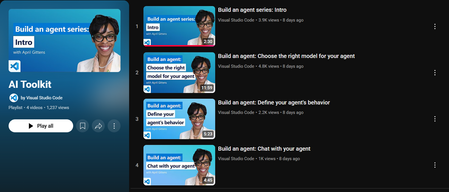
If you're curious about building AI solutions but don’t know where to start, Microsoft’s AI Toolkit is a great place to begin. Whether you’re a student, developer, or just someone exploring AI for the first time, this toolkit helps you build real-world solutions using Microsoft’s powerful AI services. In this blog, I’ll Walk you through what the AI Toolkit is, how you can get started, and where you can find helpful demos and ready-to-use code samples. What is the AI Toolkit? The AI Toolkit is a collection of tools, templates, and sample apps that make it easier to build AI-powered applications and copilots using Microsoft Azure. With the AI Toolkit, you can: Build intelligent apps without needing deep AI expertise. Use templates and guides that show you how everything works. Quickly prototype and deploy apps with natural language, speech, search, and more. Watch the AI Toolkit in Action Microsoft has created a video playlist that covers the AI Toolkit and shows you how to build apps step-by-step. You can watch the full playlist here: It is especially useful for developers who want to bring AI into their projects, but also for beginners who want to learn by doing. AI Toolkit Playlist – https://aka.ms/AIToolkit/videos These videos help you understand the flow of building AI agents, using Azure OpenAI, and other cognitive services in a hands-on way. Explore Sample Projects on GitHub Microsoft also provides a public GitHub repository where you can find real code examples built using the AI Toolkit. Here’s the GitHub repo: AI Toolkit Samples – https://github.com/Azure-Samples/AI_Toolkit_Samples This repository includes: Sample apps using Azure AI services like OpenAI, Cognitive Search, and Speech. Instructions to deploy apps using Azure. Code that you can clone, test, and build on top of. You don’t have to start from scratch just open the code, understand the structure, and make small edits to experiment. How to Get Started Here’s a simple path if you’re just starting: Watch 2 or 3 videos from the AI Toolkit Playlist. Go to the GitHub repository and try running one of the examples. Make small changes to the code (like updating the prompt or output). Try deploying the solution on Azure by following the guide in the repo. Keep building and learning. Why This Toolkit is Worth Exploring As someone who is also learning and experimenting, I found this toolkit to be: Easy to understand, even for beginners. Focused on real-world applications, not just theory. Helpful for building responsible AI solutions with good documentation. It gives a complete picture — from writing code to deploying apps. Final Thoughts The AI Toolkit helps you start your journey in AI without feeling overwhelmed. It provides real code, real use cases, and practical demos. With the support of Microsoft Learn and Azure samples, you can go from learning to building in no time. If you’re serious about building with AI, this is a resource worth exploring. Continue the discussion in the Azure AI Foundry Discord community at Https://aka.ms/AI/discord Join the Azure AI Foundry Discord Server! References AI Toolkit Playlist (YouTube) https://aka.ms/AIToolkit/videos AI Toolkit GitHub Repository https://github.com/Azure-Samples/AI_Toolkit_Samples Microsoft Learn: AI Toolkit Documentation https://learn.microsoft.com/en-us/azure/ai-services/toolkit/ Azure AI Services https://azure.microsoft.com/en-us/products/ai-services/2.3KViews0likes0CommentsModel Mondays S2E9: Models for AI Agents
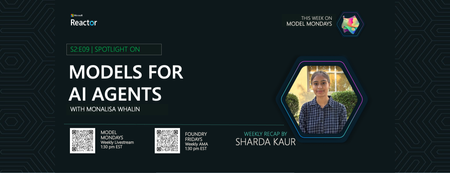
1. Weekly Highlights This episode kicked off with the top news and updates in the Azure AI ecosystem: GPT-5 and GPT-OSS Models Now in Azure AI Foundry: Azure AI Foundry now supports OpenAI’s GPT-5 lineup (including GPT-5, GPT-5 Mini, and GPT-5 Nano) and the new open-weight GPT-OSS models (120B, 20B). These models offer powerful reasoning, real-time agent tasks, and ultra-low latency Q&A, all with massive context windows and flexible deployment via the Model Router. Flux 1 Context Pro & Flux 1.1 Pro from Black Forest Labs: These new vision models enable in-context image generation, editing, and style transfer, now available in the Image Playground in Azure AI Foundry. Browser Automation Tool (Preview): Agents can now perform real web tasks—search, navigation, form filling, and more—via natural language, accessible through API and SDK. GitHub Copilot Agent Mode + Playwright MCP Server: Debug UIs with AI: Copilot’s agent mode now pairs with Playwright MCP Server to analyze, identify, and fix UI bugs automatically. Discord Community: Join the conversation, share your feedback, and connect with the product team and other developers. 2. Spotlight On: Azure AI Agent Service & Agent Catalog This week’s spotlight was on building and orchestrating multi-agent workflows using the Azure AI Agent Service and the new Agent Catalog. What is the Azure AI Agent Service? A managed platform for building, deploying, and scaling agentic AI solutions. It supports modular, multi-agent workflows, secure authentication, and seamless integration with Azure Logic Apps, OpenAPI tools, and more. Agent Catalog: A collection of open-source, ready-to-use agent templates and workflow samples. These include orchestrator agents, connected agents, and specialized agents for tasks like customer support, research, and more. Demo Highlights: Connected Agents: Orchestrate workflows by delegating tasks to specialized sub-agents (e.g., mortgage application, market insights). Multi-Agent Workflows: Design complex, hierarchical agent graphs with triggers, events, and handoffs (e.g., customer support with escalation to human agents). Workflow Designer: Visualize and edit agent flows, transitions, and variables in a modular, no-code interface. Integration with Azure Logic Apps: Trigger workflows from 1400+ external services and apps. 3. Customer Story: Atomic Work Atomic Work showcased how agentic AI can revolutionize enterprise service management, making employees more productive and ops teams more efficient. Problem: Traditional IT service management is slow, manual, and frustrating for both employees and ops teams. Solution: Atomic Work’s “Atom” is a universal, multimodal agent that works across channels (Teams, browser, etc.), answers L1/L2 questions, automates requests, and proactively assists users. Technical Highlights: Multimodal & Cross-Channel: Atom can guide users through web interfaces, answer questions, and automate tasks without switching tools. Data Ingestion & Context: Regularly ingests up-to-date documentation and context, ensuring accurate, current answers. Security & Integration: Built on Azure for enterprise-grade security and seamless integration with existing systems. Demo: Resetting passwords, troubleshooting VPN, requesting GitHub repo access—all handled by Atom, with proactive suggestions and context-aware actions. Atom can even walk users through complex UI tasks (like generating GitHub tokens) by “seeing” the user’s screen and providing step-by-step guidance. 4. Key Takeaways Here are the key learnings from this episode: Agentic AI is Production-Ready: Azure AI Agent Service and the Agent Catalog make it easy to build, deploy, and scale multi-agent workflows for real-world business needs. Modular, No-Code Workflow Design: The workflow designer lets you visually create and edit agent graphs, triggers, and handoffs—no code required. Open-Source & Extensible: The Agent Catalog provides open-source templates and welcomes community contributions. Real-World Impact: Solutions like Atomic Work show how agentic AI can transform IT, HR, and customer support, making organizations more efficient and employees more empowered. Community & Support: Join the Discord and Forum to connect, ask questions, and share your own agentic AI projects. Sharda's Tips: How I Wrote This Blog Writing this blog is like sharing my own learning journey with friends. I start by thinking about why the topic matters and how it can help someone new to Azure or agentic AI. I use simple language, real examples from the episode, and organize my thoughts with GitHub Copilot to make sure I cover all the important points. Here’s the prompt I gave Copilot to help me draft this blog: Generate a technical blog post for Model Mondays S2E9 based on the transcript and episode details. Focus on Azure AI Agent Service, Agent Catalog, and real-world demos. Explain the concepts for students, add a section on practical applications, and share tips for writing technical blogs. Make it clear, engaging, and useful for developers and students. After watching the video, I felt inspired to try out these tools myself. The way the speakers explained and demonstrated everything made me believe that anyone can get started, no matter their background. My goal with this blog is to help you feel the same way—curious, confident, and ready to explore what AI and Azure can do for you. If you have questions or want to share your own experience, I’d love to hear from you. Coming Up Next Week Next week: Document Processing with AI! Join us as we explore how to automate document workflows using Azure AI Foundry, with live demos and expert guests. 1️⃣ | Register For The Livestream – Aug 18, 2025 2️⃣ | Register For The AMA – Aug 22, 2025 3️⃣ | Ask Questions & View Recaps – Discussion Forum About Model Mondays Model Mondays is a weekly series designed to help you build your Azure AI Foundry Model IQ with three elements: 5-Minute Highlights – Quick news and updates about Azure AI models and tools on Monday 15-Minute Spotlight – Deep dive into a key model, protocol, or feature on Monday 30-Minute AMA on Friday – Live Q&A with subject matter experts from Monday livestream Want to get started? Register For Livestreams – every Monday at 1:30pm ET Watch Past Replays to revisit other spotlight topics Register For AMA – to join the next AMA on the schedule Recap Past AMAs – check the AMA schedule for episode specific links Join The Community Great devs don't build alone! In a fast-paced developer ecosystem, there's no time to hunt for help. That's why we have the Azure AI Developer Community. Join us today and let's journey together! Join the Discord – for real-time chats, events & learning Explore the Forum – for AMA recaps, Q&A, and Discussion! About Me I'm Sharda, a Gold Microsoft Learn Student Ambassador interested in cloud and AI. Find me on GitHub, Dev.to, Tech Community, and LinkedIn. In this blog series, I summarize my takeaways from each week's Model Mondays livestream.492Views0likes0CommentsNeed Guidance on cost breakdown of Microsoft Foundry Agent portal I created
I have developed a complaint handling portal for customers and employees using Azure AI Foundry. The solution is built with Foundry agents, models from the catalog, input/output caching, agent logging/tracing, and other Foundry capabilities. The frontend and orchestration layer are deployed on Azure Container Apps. While Azure Cost Analysis provides an overview of spending, several parts remain unclear or act as a black box for accurate estimation, including: Token consumption assumptions (input/output tokens across different models and agents) User concurrency, sessions, and behavior patterns Agent logging and observability costs Impact of input/output caching Detailed resource consumption and billing in Azure Container Apps What is the best way to accurately calculate or estimate the total running cost for such an Azure AI Foundry-based platform with Container Apps frontend? Are there official Microsoft documentation, pricing guides, or reference architectures for cost breakdown? How do companies typically present costs for such AI platforms to attract customers (e.g., TCO models or per-user pricing)? I want to know how the platform costs are shown to customers. Thank you.Power Up Your Open WebUI with Azure AI Speech: Quick STT & TTS Integration
Introduction Ever found yourself wishing your web interface could really talk and listen back to you? With a few clicks (and a bit of code), you can turn your plain Open WebUI into a full-on voice assistant. In this post, you’ll see how to spin up an Azure Speech resource, hook it into your frontend, and watch as user speech transforms into text and your app’s responses leap off the screen in a human-like voice. By the end of this guide, you’ll have a voice-enabled web UI that actually converses with users, opening the door to hands-free controls, better accessibility, and a genuinely richer user experience. Ready to make your web app speak? Let’s dive in. Why Azure AI Speech? We use Azure AI Speech service in Open Web UI to enable voice interactions directly within web applications. This allows users to: Speak commands or input instead of typing, making the interface more accessible and user-friendly. Hear responses or information read aloud, which improves usability for people with visual impairments or those who prefer audio. Provide a more natural and hands-free experience especially on devices like smartphones or tablets. In short, integrating Azure AI Speech service into Open Web UI helps make web apps smarter, more interactive, and easier to use by adding speech recognition and voice output features. If you haven’t hosted Open WebUI already, follow my other step-by-step guide to host Ollama WebUI on Azure. Proceed to the next step if you have Open WebUI deployed already. Learn More about OpenWeb UI here. Deploy Azure AI Speech service in Azure. Navigate to the Azure Portal and search for Azure AI Speech on the Azure portal search bar. Create a new Speech Service by filling up the fields in the resource creation page. Click on “Create” to finalize the setup. After the resource has been deployed, click on “View resource” button and you should be redirected to the Azure AI Speech service page. The page should display the API Keys and Endpoints for Azure AI Speech services, which you can use in Open Web UI. Settings things up in Open Web UI Speech to Text settings (STT) Head to the Open Web UI Admin page > Settings > Audio. Paste the API Key obtained from the Azure AI Speech service page into the API key field below. Unless you use different Azure Region, or want to change the default configurations for the STT settings, leave all settings to blank. Text to Speech settings (TTS) Now, let's proceed with configuring the TTS Settings on OpenWeb UI by toggling the TTS Engine to Azure AI Speech option. Again, paste the API Key obtained from Azure AI Speech service page and leave all settings to blank. You can change the TTS Voice from the dropdown selection in the TTS settings as depicted in the image below: Click Save to reflect the change. Expected Result Now, let’s test if everything works well. Open a new chat / temporary chat on Open Web UI and click on the Call / Record button. The STT Engine (Azure AI Speech) should identify your voice and provide a response based on the voice input. To test the TTS feature, click on the Read Aloud (Speaker Icon) under any response from Open Web UI. The TTS Engine should reflect Azure AI Speech service! Conclusion And that’s a wrap! You’ve just given your Open WebUI the gift of capturing user speech, turning it into text, and then talking right back with Azure’s neural voices. Along the way you saw how easy it is to spin up a Speech resource in the Azure portal, wire up real-time transcription in the browser, and pipe responses through the TTS engine. From here, it’s all about experimentation. Try swapping in different neural voices or dialing in new languages. Tweak how you start and stop listening, play with silence detection, or add custom pronunciation tweaks for those tricky product names. Before you know it, your interface will feel less like a web page and more like a conversation partner.2.8KViews3likes2CommentsThe Business Foundation: Why Most Companies Aren’t Ready for Agentic AI
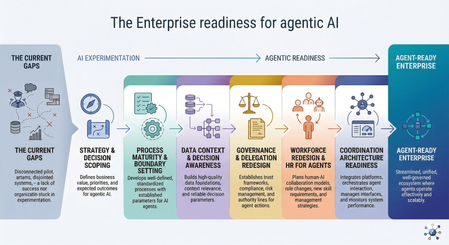
Before agents can execute decisions, organizations must redesign how they structure responsibility, data, governance, and operational context before autonomy can scale. The enterprise AI landscape has shifted. Organizations are moving beyond chatbots and isolated predictive models toward systems that can plan, decide, and execute multi-step work across finance, engineering operations, supply chains, and customer service. Many analysts now expect agentic AI to unlock major productivity gains across knowledge work. But despite the momentum, adoption remains limited. As of 2025, only about 2% of organizations have deployed agent-based systems at real operational scale, while most remain stuck in pilots. The reason is not model capability. It is readiness. The Core Problem Most organizations still treat AI adoption as a technical rollout exercise and measure progress through deployment indicators such as copilots enabled, pilots launched, or models evaluated. These metrics reflect experimentation activity, but they do not show whether an organization is ready to operate systems that make decisions and execute actions inside business workflows. Agentic systems do more than generate insights; they participate directly in operational processes. The gap between deploying AI tools and safely delegating decision-making authority to them is where many transformation efforts begin to stall. True enterprise readiness for agentic AI is not defined by how many models an organization deploys or how many pilots it launches. It depends on whether the organization can safely delegate bounded decisions to autonomous systems. In practice, this requires: Strategy and decision scoping: identifying where autonomous execution creates value and where human oversight must remain in place Process and decision-system maturity: redesigning workflows for human-agent collaboration with clear escalation boundaries Context-ready data foundations: ensuring agents operate on consistent, policy-aware operational context rather than fragmented data silos Governance and accountability structures: defining what agents may recommend, execute, escalate, or never touch, supported by auditability and oversight Team readiness and lifecycle management: preparing teams to supervise autonomous execution and managing agents as ongoing operational participants rather than static tools Coordination architecture readiness: aligning multiple agents across domains so local optimization does not create organizational conflict This article explains why traditional enterprise environments are not yet prepared for autonomous agents, what true agentic readiness actually looks like in practice, and the sequence of organizational changes required before decision-capable systems can be deployed safely at scale. I. The Readiness Illusion and the Root Causes of Failure Most organizations are deploying agentic systems into environments designed exclusively for human execution. That mismatch produces predictable friction across five structural layers. 1. Fragmented Operational Context (The Data Problem) Enterprises have a lot of data. What they often lack is usable context. Traditional systems record what happened. Agents also need to understand why something happened, how systems are connected, and where policy limits apply. In most organizations, customer systems, telemetry platforms, identity services, and finance tools do not stay aligned in real time. As a result, agents operate across disconnected information rather than a shared operational picture. This creates real risk. With generative AI, poor data quality usually produces a weak answer. With agentic AI, poor data quality can produce the wrong action at scale. More APIs, more pipelines, and more dashboards do not fix this by themselves. Without a shared semantic context across systems, agents can still make decisions that are internally logical but operationally wrong. For example, an agent may see that a customer received a large discount and conclude that future discounts should be limited, while missing that the original discount was approved because of a service outage and a retention risk. The data is available, but the business meaning behind it is not. 2. Undocumented Decision Systems Most organizations document workflows. However, very few document decision authority clearly enough for autonomous execution. Agents need to know where they are allowed to act, when they must escalate, and which decisions remain human-only. Without these boundaries, organizations often follow the same pattern: the first unexpected situation appears, confidence drops, and the agent is switched off. This is not a model problem. It is a decision-structure problem. Before deploying agents, organizations must be able to explain which decisions can be delegated and who remains responsible for each step. Many cannot yet do this. 3. The Governance Paradox Agentic systems do not fit traditional governance models. Most organizations still assume a simple structure: user → application → resource Agent-based systems introduce a new layer: user → agent → tools → resource This change affects access control, compliance processes, and audit visibility. Organizations usually buy agents like software tools but must manage them more like team members. That gap is rarely addressed before deployment begins. This issue is already visible today. Many enterprises are using vendor copilots and embedded AI features inside business systems without clear ownership, audit coverage, or governance rules. This creates a growing “shadow AI” layer even before intentional agent programs start. 4. Identity and Accountability Ambiguity Many organizations cannot clearly answer a simple question: who is responsible when an agent makes a mistake? In practice, agents often receive permissions that are broader than necessary, execution traces are difficult to follow across multiple systems, and accountability is split between IT, compliance, and business teams. Without clear attribution, autonomy introduces hidden risk instead of efficiency. Delegation without accountability is not automation. It is unmanaged risk. 5. Organizational Misalignment Most transformation programs still assume employees will use AI as a tool. Agentic environments change the role of employees from operators to supervisors. People are expected to review outcomes, guide behavior, and manage exceptions instead of executing every step themselves. Research from BCG shows that around 70% of AI project challenges come from people and process issues rather than technology. Organizations that invest in change management are significantly more likely to see successful results. Organizational readiness is not something to address later. It is required before agents can operate safely. Common Failure Patterns at a Glance Common failure patterns like these are already visible in real deployments. The Klarna case illustrates the challenge well. After replacing several hundred customer service roles with AI, the company later reported lower resolution quality for complex cases, declining satisfaction scores, and higher escalation rates, which led to renewed hiring in support roles. The outcome did not point to a failure of the model itself. It highlighted what happens when autonomous systems are introduced without the supporting process, governance, and team structures required for sustained operation. II. Defining True Agentic Readiness Agentic readiness is not just about having the right tools in place. It is about whether the organization has the capability to use autonomous systems safely and effectively. Definition Agentic readiness is the ability to safely delegate bounded operational decisions to autonomous systems while maintaining accountability, observability, and policy alignment across the full execution chain. Research consistently shows that organizations benefit from AI only when multiple maturity layers advance together. The MIT CISR AI Maturity Model, based on data from 721 companies, demonstrates that financial performance improves as organizations progress through the stages. Companies in early stages often perform below industry averages, while those reaching later stages perform significantly better. The key insight is that maturity is cumulative. Organizations cannot skip foundational steps and still expect reliable outcomes. For agentic systems, those cumulative layers include strategy alignment, decision-ready processes, context-ready data, governance structures, organizational roles, and technical architecture. When only some of these elements are in place, organizations produce pilots. When they advance together, organizations produce transformation. From Activity Metrics to Outcome Metrics One of the clearest signs of readiness is how an organization measures progress. Organizations at an early stage usually focus on activity: Number of models deployed Pilots launched Features enabled User onboarding numbers and API call volume More mature organizations focus on outcomes: Better decision quality and fewer errors Higher throughput for clearly defined tasks Consistent operation within safe autonomy boundaries Complete audit trails and accurate escalation handling This is not a semantic distinction. Organizations measuring activity invest indefinitely in pilots because they have no signal telling them a pilot has succeeded or failed. The measurement framework is itself a prerequisite for the transformation sequence. III. The Transformation Sequence Most Organizations Skip Many organizations begin agent adoption in the wrong order. Platforms are procured before governance is defined. Models are evaluated before workflows are structured. Autonomy is introduced before decision authority is mapped. The result is not faster progress. It is earlier failure, followed by expensive cleanup later. In traditional cloud transformation, architecture precedes automation. Agentic transformation follows the same rule: decision structure must exist before delegation can scale. Step 1: Strategic Alignment and Decision Scoping Organizations should begin by identifying where autonomy creates value safely — not where it is technically possible and not where ambitions are highest. Strong early candidates usually share the same characteristics: structured decisions, bounded scope, reversible actions, and high execution frequency. Typical examples include incident triage and routing, capacity classification, environment status updates, and prioritization support. These are good starting points not because they are simple, but because failures are visible, recoverable, and useful for learning. Delegation should grow gradually from bounded decision spaces toward broader authority. Organizations that struggle often start with highly visible, high-risk use cases because the business case looks attractive. Organizations that succeed usually begin with frequent, lower-impact decisions where feedback loops are short and improvements can happen quickly. Step 2: Process Maturity and Boundary Setting Agents do not fix broken workflows. They execute them faster. If a process depends on informal judgment, tribal knowledge, or undocumented exception handling, an agent will reproduce those weaknesses at machine speed. Before introducing autonomy, organizations should establish structured runbooks with clear execution paths, explicit escalation logic an agent can evaluate, defined exception-handling rules that do not rely on intuition, and clear boundaries between decisions an agent may take and those that must remain with humans. This level of discipline requires documentation precision that many organizations have never needed before. A statement such as “the engineer uses judgment” is not a runbook step. It is an undocumented dependency that will later appear as an agent failure. This is also where leaders face a practical choice: add agents on top of fragile legacy workflows, or redesign those workflows so delegation can happen safely. In many cases, the second path is slower at first but far more durable. Step 3: Data Context and Decision Awareness Agents cannot operate reliably in fragmented environments. The solution is not simply collecting more data. What they require is decision-aware context: structured knowledge about relationships between systems, service dependencies, environment classification, policy boundaries, and operational intent. This is a different challenge from building analytics platforms. Analytics depends on broad visibility across large datasets. Agentic execution depends on precise, current, and consistent information at the moment a decision is made. A customer record that is accurate enough for reporting may not be reliable enough for an agent executing a contract action. Because of this difference, data readiness becomes a leadership concern rather than only an infrastructure task. Microsoft’s digital transformation guidance captures this clearly with the principle “no AI without data”: organizations should identify critical data sources, establish governance ownership, improve quality, and define controlled access before introducing agents into operational workflows. Step 4: Governance and Delegation Redesign Organizations must explicitly define four categories of agent authority before deployment: What agents may recommend (advisory boundary) What agents may execute autonomously (execution boundary) What requires human approval before execution (escalation boundary) What remains permanently restricted regardless of confidence (prohibition boundary) These policies cannot remain static. Agentic systems require continuous supervision, not periodic review. Research supports this shift. Studies of governance professionals working with autonomous systems show that adopting traditional Enterprise Risk Management frameworks alone does not significantly reduce governance incidents. What makes the difference is integrating human oversight into execution loops and strengthening machine identity security. In practice, this means organizations need a delegated-autonomy governance function: a cross-functional group with representation from IT, compliance, legal, and business teams that continuously defines and monitors the boundaries of agent behavior. This is different from extending existing approval committees. Governance must move from acting as a gate before deployment to operating as a supervision layer throughout the lifecycle of the agent. This creates a basic operational tension: organizations adopt agents to reduce manual work, but safe autonomy requires stronger supervision, better observability, and tighter control over identity and permissions — especially in the early stages. Step 5: Operating Model Redesign: Operationalizing Human-Agent Collaboration Agentic systems create responsibilities that do not yet exist in most organizations. This shift is not mainly about replacing people with agents. It is about redesigning how people work with them, supervise them, and remain accountable for outcomes. New operational roles typically include: Agent reliability engineers who monitor performance, detect degradation, and define retraining triggers Policy designers who translate business rules into machine-evaluable decision logic Workflow supervisors who oversee autonomous execution and handle escalations Context curators who maintain the data foundations agents depend on for accurate reasoning Organizations that succeed with agents do not treat them as static automation tools. They treat them as managed participants inside workflows. That is why they need an HR layer for agents. An HR layer for agents means applying the same lifecycle thinking used for people to autonomous systems. Before an agent is allowed to operate, it needs a clearly defined role, scope, level of authority, and access to the right systems. Once deployed, its performance must be reviewed over time, its behavior monitored, and its permissions adjusted when quality drops or risks increase. When the agent no longer fits the workflow, it should be retired or replaced instead of being left running by default. In practice, this means agent management should include: Onboarding, by defining scope, authority, and access boundaries Supervision, through observability, escalation paths, and performance review Retraining or re-scoping, when quality declines or conditions change Retirement, when the agent no longer fits the process or creates more risk than value In higher-risk workflows, this HR layer must also include graceful degradation. For example, an underperforming agent may automatically lose write access, be moved to read-only mode, and hand control back to a human supervisor until its behavior is corrected. This shift also requires leadership readiness. The Harvard 2025 Global Leadership Development Study found that 71% of senior leaders now see the ability to lead through continuous change as critical, yet only 36% say AI is fully integrated into their strategy. That gap between intention and execution is where many organizational transformation programs begin to stall. Step 6: Coordination Architecture Readiness As organizations deploy agents across multiple domains, a new challenge appears: agents begin optimizing locally instead of organizationally. An agent focused on cost efficiency in one area may conflict with another agent responsible for quality assurance elsewhere. Without coordination structures, these conflicts often remain invisible until they surface as operational failures. Coordination architecture helps align agent behavior across the organization. It ensures policy consistency between agents, maintains a shared understanding of the operational environment, prevents conflicts when actions intersect, and supports stable communication between agents working together across workflows. This capability is not required for the first agent deployment. It becomes important as soon as organizations begin operating multiple agents in parallel. Many organizations encounter coordination problems earlier than expected, which is why coordination readiness belongs in the transformation sequence even if its implementation happens later. Local optimization is rarely what enterprises intend. Coordination architecture is how you prevent it from becoming what they get. IV. The Regulatory Clock Is Already Running For organizations operating in or serving European markets, readiness is no longer only a strategic question. It is also a regulatory one. The EU AI Act’s high-risk provisions take effect in August 2026, with potential penalties reaching €35 million or 7% of global revenue. Colorado’s AI Act follows in June 2026, and a growing number of U.S. states now require documented AI governance programs for specific sectors and use cases. The governance and data foundations described earlier in this article are therefore not only best practice. For many organizations, they are becoming compliance prerequisites. Treating readiness as optional before deployment increasingly means accepting regulatory exposure before value is realized. The transformation sequence described here is not a slower path to deployment. It is the only path that avoids accumulating technical and legal risk at the same time. V. Conclusion: Shifting Toward Outcome-Based Pragmatism Agentic systems rarely fail because language models are incapable. They fail because they are introduced into environments designed for human execution, governed by frameworks built for deterministic software, and evaluated using metrics that cannot distinguish a promising pilot from a production-ready capability. The readiness gap is structural and, in many cases, self-inflicted. Organizations skip foundational steps because platform procurement is faster, more visible, and easier to justify internally than operating-model redesign. The result is earlier failure, higher remediation cost, and — in regulated industries — increasing legal exposure. What this means in practice Organizations should stop measuring readiness through activity indicators and start measuring it through decision quality, execution safety, throughput improvement, and bounded autonomy performance. Governance and data foundations must be established before platform rollout. Organizational transition planning must begin before deployment. Decision authority must be defined before the first agent workflow is introduced. Only then can enterprises safely unlock the productivity gains promised by agentic systems — not because the technology suddenly becomes capable, but because the organization becomes ready to use it. Up Next in This Series Part 2 looks at the cloud foundation needed for safe agent deployment, including identity-first architecture, observability, policy controls, and the platform constraints that often appear only after design decisions have been made. Part 3 focuses on how to design agents that work reliably in enterprise environments, including RAG maturity, loop design, multi-agent coordination, and human oversight built into the architecture from the start. References Weinberg, A. I. (2025). A Framework for the Adoption and Integration of Generative AI in Midsize Organizations and Enterprises (FAIGMOE). Patel, R. (2026). Agentic AI Frameworks: A Complete Enterprise Guide for 2026. Space-O Technologies. Microsoft Learn. Agentic AI maturity model. Keenan, K. (2026). How the right context can reshape agentic AI’s productivity output. Business Insider / Reltio. Ransbotham, S., Kiron, D., Khodabandeh, S., Iyer, S., & Das, A. (2025). The Emerging Agentic Enterprise: How Leaders Must Navigate a New Age of AI. MIT Sloan Management Review & Boston Consulting Group.1.1KViews0likes0Comments