azure foundry
3 TopicsWhen Should You Use RAG vs Fine-Tuning in Microsoft Foundry?
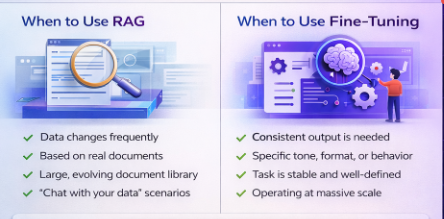
If you've been working with Microsoft Foundry, you've likely come across this question: Should I use RAG or Fine-Tuning? The answer becomes much simpler when you focus on the core goal of your solution. Here's a straightforward way to think about it. What is RAG (Retrieval-Augmented Generation)? RAG allows your model to retrieve relevant information from your data sources before generating a response. Instead of relying only on what the model already knows, it: Searches your documents or knowledge base Retrieves relevant content Uses that context to generate grounded, cited answers Use RAG when: ✅ Your data changes frequently ✅ You need answers based on real documents ✅ You have a large, evolving document library ✅ You are building "chat with your data" experiences What is Fine-Tuning? Fine-tuning customizes how the model behaves by training it on task-specific examples. It helps the model: Produce consistent and structured outputs Follow a specific tone, format, or brand voice Align with business rules, compliance policies, and workflows Use Fine-Tuning when: ✅ You need consistent and predictable responses ✅ You want a specific tone, format, or behavior ✅ Your task is stable and well-defined ✅ You are operating at massive scale Visual Overview Below is a quick visual summary to help compare both approaches: A Simple Way to Decide Ask yourself: Is my problem about accessing the right data, or controlling how the model behaves? If it's about data → use RAG If it's about behavior → use Fine-Tuning Quick Comparison What You Need RAG Fine-Tuning Data changes often ✅ Yes ❌ Not ideal Change model behavior/style ❌ No ✅ Yes Fast to get started ✅ Faster ❌ Needs training High-volume, stable queries ⚠️ Token costs grow ✅ Predictable cost Brand voice / compliance ⚠️ Limited ✅ Built into model Large, evolving document library ✅ Perfect fit ❌ Hard to maintain Can You Use Both? In many real-world scenarios, the best teams do exactly that: RAG brings in the right, up-to-date information Fine-Tuning ensures consistent behavior and output quality Think of RAG as giving your model the right books to read, and Fine-Tuning as teaching it how to think and respond. Together, they cover both sides of the equation. I'd love to hear from others in the community: Are you using RAG, Fine-Tuning, or both in your Foundry projects? What use cases are you solving? What challenges or trade-offs have you experienced along the way? Looking forward to your insights. Let's learn from each other! 🚀
cosmos_vnet_blocked error with BYO standard agent setup
Hi! We've tried deploying the standard agent setup using terraform as described in the https://learn.microsoft.com/en-us/azure/ai-foundry/agents/how-to/virtual-networks?view=foundry-classic and using the terraform sample available https://github.com/azure-ai-foundry/foundry-samples/tree/main/infrastructure/infrastructure-setup-terraform/15a-private-network-standard-agent-setup/code as a basis to give the necessary support in our codebase. However we keep getting the following error: cosmos_vnet_blocked: Access to Cosmos DB is blocked due to VNET configuration. Please check your network settings and make sure CosmosDB is public network enabled, if this is a public standard agent setup. Has anyone experienced this error?899Views8likes7CommentsAgent in Azure AI Foundry not able to access SharePoint data via C# (but works in Foundry portal)
Hi Team, I created an agent in Azure AI Foundry and added a knowledge source using the SharePoint tool. When I test the agent inside the Foundry portal, it works correctly; it can read from the SharePoint site and return file names/data. However, when I call the same agent using C# code, it answers normal questions fine, but whenever I ask about the SharePoint data, I get the error: Sorry, something went wrong. Run status: failed I also referred to the official documentation and sample here: https://learn.microsoft.com/en-us/azure/ai-foundry/agents/how-to/tools/sharepoint-samples?pivots=rest I tried the cURL samples as well, and while the agent is created successfully, the run status always comes back as failed. Has anyone faced this issue? Do I need to configure something extra for SharePoint when calling the agent programmatically (like additional permissions or connection binding)? Any help on this would be greatly appreciated. Thanks!328Views0likes1Comment