Forum Widgets
Latest Discussions

AI Hub --> Project Structure In Microsoft Foundry
The AI Hub → Project structure works great for a single team. But when you've got a large org with multiple departments, each running their own hub with several projects. I found it doesn't quite fit the deployment model we needed. Here's the scenario: I create a hub per department, and they can share resources and apply governance across their projects. But I also need org-level policies that apply across all department hubs. And visibility into programs that span multiple departments. With the current two-level structure, I don't have a structural layer for that. Current options both have tradeoffs: Single org-wide hub with departments as projects = lose department-level resource isolation and independent governance Separate hubs per department = manually replicate org-level policies, no rollup reporting across departments For my scenario, it would help if: there was an intermediate level , either nested hubs or an explicit "portfolio/program" grouping, so governance can work at both org and department levels, with rollup visibility. Curious: are others running into this? How are you structuring org-level governance across multiple department hubs? Looking forward for suggestions on this, how others are doing this.amol_polDec 30, 2025Copper Contributor48Views0likes1Comment
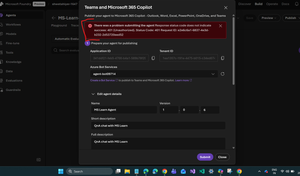
Unable to publish Foundry agent to M365 copilot or Teams
I’m encountering an issue while publishing an agent in Microsoft Foundry to M365 Copilot or Teams. After creating the agent and Foundry resource, the process automatically created a Bot Service resource. However, I noticed that this resource has the same ID as the Application ID shown in the configuration. Is this expected behavior? If not, how should I resolve it? I followed the steps in the official documentation: https://learn.microsoft.com/en-us/azure/ai-foundry/agents/how-to/publish-copilot?view=foundry Despite this, I keep getting the following error: There was a problem submitting the agent. Response status code does not indicate success: 401 (Unauthorized). Status Code: 401 Any guidance on what might be causing this and how to fix it would be greatly appreciated.Solved57Views0likes3Comments
Turning “cool agent demos” into accountable systems – how are you doing this in Azure AI Foundry?
Hi everyone, I’m working with customers who are very excited about the new agentic capabilities in Azure AI Foundry (and the Microsoft Agent Framework). The pattern is always the same: Building a cool agent demo is easy. Turning it into an accountable, production-grade system that governance, FinOps, security and data people are happy with… not so much. I’m curious how others are dealing with this in the real world, so here’s how I currently frame it with customers and I’d love to hear where you do things differently or better. Governance: who owns the agent, and what does “safe enough” mean? - For us, an agent is not “just another script”. It’s a proper application with: - An owner (a real person, not a team name). - A clear purpose and scope. - A policy set (what it can and cannot do). - A minimum set of controls (access, logging, approvals, evaluation, rollback). In Azure AI Foundry terms: we try to push as much as possible into “as code” (config, infra, CI/CD) instead of burying it in PowerPoint and Word docs. The litmus test I use: if this agent makes a bad decision in production, can we show – to audit or leadership – which data, tools, policies and model versions were involved? If the answer is “not really”, we’re not done. FinOps: if you can’t cap it, you can’t scale it Agentic solutions are fantastic at chaining calls and quietly generating cost. We try to design with: Explicit cost budgets per agent / per scenario. A clear separation between “baseline” workloads and “burst / experimentation”. Observability on cost per unit of value (per ticket, per document, per transaction, etc.). Some of this maps nicely to existing cloud FinOps practices, some feels new because of LLM behaviour. My personal rule: I don’t want to ship an agent to production if I can’t explain its cost behaviour in 2–3 slides to a CFO. Data, context and lineage: where most of the real risk lives In my experience, most risk doesn’t come from the model, but from: Which data the agent can see. How fresh and accurate that data is. Whether we can reconstruct the path from data → answer → decision. We’re trying to anchor on: Data products/domains as the main source of truth. Clear contracts around what an agent is allowed to read or write. Strong lineage for anything that ends up in front of a user or system of record. From a user’s point of view, “Where did this answer come from?” is quickly becoming one of the most important questions. GreenOps / sustainability: starting to show up in conversations Some customers now explicitly ask: “What is the energy impact of this AI workload?” “Can we schedule, batch or aggregate work to reduce energy use and cost?” So we’re starting to treat GreenOps as the “next layer” after cost: not just “is it cheap enough?”, but also “is it efficient and responsible enough?”. What I’d love to learn from this community: In your Azure AI Foundry/agentic solutions, where do governance decisions actually live today? Mostly in documentation and meetings, or do you already have patterns for policy-as-code / eval-as-code? How are you bringing FinOps into the design of agents? Do you have concrete cost KPIs per agent/scenario, or is it still “we’ll see what the bill says”? How are you integrating data governance and lineage into your agent designs? Are you explicitly tying agents to data products/domains with clear access rules? Any “red lines” for data they must never touch? Has anyone here already formalised “GreenOps” thinking for AI Foundry workloads? If yes, what did you actually implement (scheduling, consolidation, region choices, something else)? And maybe the most useful bit: what went wrong for you so far? Without naming customers, obviously. Any stories where a nice lab pattern didn’t survive contact with governance, security or operations? I’m especially interested in concrete patterns, checklists or “this is the minimum we insist on before we ship an agent” criteria. Code examples are very welcome, but I’m mainly looking for the operating model and guardrails around the tech. Thanks in advance for any insights, patterns or war stories you’re willing to share.MartijnMuilwijkDec 28, 2025Copper Contributor52Views1like1Comment
Index data from SharePoint document libraries => Visioning / Image Analysis
Hi, I`m currently testing the indexing of SharePoint data according to the following instructions https://learn.microsoft.com/en-us/azure/search/search-how-to-index-sharepoint-online So far, so good. My question: Visioning on images is not enabled. Besides the Microsoft links, I found 2-3 other good links for the SharePoint indexer, but unfortunately none for Visioning / Image Analysis. Does anyone here have this working? Any tips or links on how to implement it? Many thanksnamor38Dec 28, 2025Copper Contributor56Views1like1CommentHow to Reliably Gauge LLM Confidence?
a { text-decoration: none; color: #464feb; } tr th, tr td { border: 1px solid #e6e6e6; } tr th { background-color: #f5f5f5; } I’m trying to estimate an LLM’s confidence in its answers in a way that correlates with correctness. Self-reported confidence is often misleading, and raw token probabilities mostly reflect fluency rather than truth. I don’t have grounding options like RAG, human feedback, or online search, so I’m looking for approaches that work in this constraint. What techniques have you found effective—entropy-based signals, calibration (temperature scaling), self-evaluation, or others? Any best practices for making confidence scores actionable?its-mirzabaigDec 28, 2025Copper Contributor27Views0likes1Comment
cosmos_vnet_blocked error with BYO standard agent setup
Hi! We've tried deploying the standard agent setup using terraform as described in the https://learn.microsoft.com/en-us/azure/ai-foundry/agents/how-to/virtual-networks?view=foundry-classic and using the terraform sample available https://github.com/azure-ai-foundry/foundry-samples/tree/main/infrastructure/infrastructure-setup-terraform/15a-private-network-standard-agent-setup/code as a basis to give the necessary support in our codebase. However we keep getting the following error: cosmos_vnet_blocked: Access to Cosmos DB is blocked due to VNET configuration. Please check your network settings and make sure CosmosDB is public network enabled, if this is a public standard agent setup. Has anyone experienced this error?peter_31415Dec 13, 2025Copper Contributor113Views4likes3Comments
Import error: Cannot import name "PromptAgentDefinition" from "azure.ai.projects.models"
Hello, I am trying to build the agentic retrieval using Azure Ai search. During the creation of agent i am getting "ImportError: cannot import name 'PromptAgentDefinition' from 'azure.ai.projects.models'". Looked into possible ways of building without it but I need the mcp connection. This is the documentation i am following: https://learn.microsoft.com/en-us/azure/search/agentic-retrieval-how-to-create-pipeline?tabs=search-perms%2Csearch-development%2Cfoundry-setup Note: There is no Promptagentdefinition in the directory of azure.ai.projects.models. ['ApiKeyCredentials', 'AzureAISearchIndex', 'BaseCredentials', 'BlobReference', 'BlobReferenceSasCredential', 'Connection', 'ConnectionType', 'CosmosDBIndex', 'CredentialType', 'CustomCredential', 'DatasetCredential', 'DatasetType', 'DatasetVersion', 'Deployment', 'DeploymentType', 'EmbeddingConfiguration', 'EntraIDCredentials', 'EvaluatorIds', 'FieldMapping', 'FileDatasetVersion', 'FolderDatasetVersion', 'Index', 'IndexType', 'ManagedAzureAISearchIndex', 'ModelDeployment', 'ModelDeploymentSku', 'NoAuthenticationCredentials', 'PendingUploadRequest', 'PendingUploadResponse', 'PendingUploadType', 'SASCredentials', 'TYPE_CHECKING', '__all__', '__builtins__', '__cached__', '__doc__', '__file__', '__loader__', '__name__', '__package__', '__path__', '__spec__', '_enums', '_models', '_patch', '_patch_all', '_patch_evaluations', '_patch_sdk'] Traceback (most recent call last): Please let me know what i should do and if there is any other alternative. Thanks in advance.135Views0likes3CommentsGet to know the core Foundry solutions
Foundry includes specialized services for vision, language, documents, and search, plus Microsoft Foundry for orchestration and governance. Here’s what each does and why it matters: Azure Vision With Azure Vision, you can detect common objects in images, generate captions, descriptions, and tags based on image contents, and read text in images. Example: Automate visual inspections or extract text from scanned documents. Azure Language Azure Language helps organizations understand and work with text at scale. It can identify key information, gauge sentiment, and create summaries from large volumes of content. It also supports building conversational experiences and question-answering tools, making it easier to deliver fast, accurate responses to customers and employees. Example: Understand customer feedback or translate text into multiple languages. Azure Document IntelligenceWith Azure Document Intelligence, you can use pre-built or custom models to extract fields from complex documents such as invoices, receipts, and forms. Example: Automate invoice processing or contract review. Azure SearchAzure Search helps you find the right information quickly by turning your content into a searchable index. It uses AI to understand and organize data, making it easier to retrieve relevant insights. This capability is often used to connect enterprise data with generative AI, ensuring responses are accurate and grounded in trusted information. Example: Help employees retrieve policies or product details without digging through files. Microsoft FoundryActs as the orchestration and governance layer for generative AI and AI agents. It provides tools for model selection, safety, observability, and lifecycle management. Example: Coordinate workflows that combine multiple AI capabilities with compliance and monitoring. Business leaders often ask: Which Foundry tool should I use? The answer depends on your workflow. For example: Are you trying to automate document-heavy processes like invoice handling or contract review? Do you need to improve customer engagement with multilingual support or sentiment analysis? Or are you looking to orchestrate generative AI across multiple processes for marketing or operations? Connecting these needs to the right Foundry solution ensures you invest in technology that delivers measurable results.Azure Bot (Teams) 401 ERROR on Reply - Valid Token, Manual SP, NO API Permissions, No Logs!
Hi all, I'm facing a persistent 401 Unauthorized when my on-prem bot app tries to send a reply back to an MS Teams conversation via the Bot Framework Connector. I have an open support request but nothing back yet. Key details & what's NOT the issue (all standard checks passed): Authentication: client_credentials flow. Token: Acquired successfully, confirmed valid (aud: https://api.botframework.com, correct appid, not expired). Scope is https://api.botframework.com/.default. Config: Bot endpoint, App ID/Secret, MS Teams channel - all verified many times. The UNUSUAL aspects (possible root cause?): Service Principal Creation Anomaly: The Enterprise Application (Service Principal) for my bot's App Registration was NOT automatically generated; I had to create it using a link on the app registration page (see screenshot below). Missing API Permissions: In the App Registration's "API permissions," the "Bot Framework Service" API (or equivalent Bots.Send permission) is NOT listed/discoverable, so explicit admin consent cannot be granted. Diagnostic Logs are Silent: Azure Bot Service diagnostic logs (ABSBotRequests table) do NOT show any 401 errors for these outbound reply attempts, only successful inbound messages. Curl command (shows the exact failure): curl -v -X POST \ 'https://smba.trafficmanager.net/au/<YourTenantID>/v3/conversations/<ConversationID>/activities' \ -H 'Authorization: Bearer <YourValidToken>' \ -H 'Content-Type: application/json' \ -d '{ "type": "message", "text": "Hello, this is a reply!" }' # ... (curl output) ... < HTTP/2 401 < content-type: application/json; charset=utf-8 < date: Tue, 01 Jul 2025 00:00:00 GMT < server: Microsoft-IIS/10.0 < x-powered-by: ASP.NET < content-length: 59 {"message":"Authorization has been denied for this request."} After bot creation, the app registration has a link for creation of the service principal. Could this be an indication that the bot creation has not set up the internal "wiring" that allows my tokens to be accepted by the bot framework? Any insights on why a seemingly valid and linked Service Principal would be denied, especially with the manual creation and missing API permission options, would be greatly appreciated! I'm stumped why logs aren't even showing the error.logularjasonNov 28, 2025Copper Contributor307Views1like1Comment


Resources
Tags
- AMA74 Topics
- AI Platform56 Topics
- TTS50 Topics
- azure ai21 Topics
- azure ai foundry20 Topics
- azure ai services18 Topics
- azure machine learning13 Topics
- AzureAI11 Topics
- machine learning9 Topics
- azure8 Topics