Recent Discussions

Complete rewrite of the SQL Server R2DBC driver – seeking collaboration
I’ve completed a full rewrite of the R2DBC driver for SQL Server, focused on resolving performance, stability, and feature gaps in the current driver. I’m looking to connect with people who can help move this work forward — whether through feedback, collaboration, or introductions within the R2DBC and SQL Server engineering communities. Would you be open to a brief conversation or pointing me toward the right people? Thank you.53Views0likes0Comments
Query Store transaction preventing restoring database
I have a database backup that was taken on SQL Server 2019 instance. While trying to restore it to a SQL Server 2025 instance, the files restored without issue, but it remained "In Recovery" for three days before I tried to take it to Emergency, Single User, and back online, though it still remained in recovery. I then took the backup to a SQL Server 2019 instance and was able to restore it and bring it online there. Though the logs on both servers had shown similar errors to these two. The Page and Log record Id were consistant. ```text Database ID 5, Page (1:47416) is marked RestorePending, which may indicate disk corruption. During undoing of logged operation in database (page(1:301040) if any), an error occurred at log record ID (15885:36832:180). ``` Doing some investigation has provided that there is a stuck transaction, and I was able to pin this down to Query Store. OPENTRAN (This spid was from the original server.): ```text ransaction information for database 'BrokenDatabase'. Oldest active transaction: SPID (server process ID): 26s UID (user ID) : -1 Name : DELETE LSN : (15885:19072:1) Start time : Mar 1 2025 7:27:58:633PM SID : 0x01 DBCC execution completed. If DBCC printed error messages, contact your system administrator. ``` I had the Top and bottom 50 of 938 transactions from fn_dblog, but since it contains data this community will not allow it. Makes it harder to get an answer without the data showing that query store is the issue, but to play by the rules you have give lackluster information, because the guidelines are even searching through code blocks, markdown, and tables. With Query Store in the Read_Write mode, I was unable to return anything from sys.query_store_plan and / or sys.query_store_runtime_stats, because they were locked by the ASYNC_LOAD of QDS. All that I have collected show that is internal to the Query Store. sys.internal_tables: | name | object_id | principal_id | schema_id | parent_object_id | type | type_desc | create_date | modify_date | is_ms_shipped | is_published | is_schema_published | internal_type | internal_type_desc | parent_id | parent_minor_id | lob_data_space_id | filestream_data_space_id | | :--- | :--- | :--- | :--- | :--- | :--- | :--- | :--- | :--- | :--- | :--- | :--- | :--- | :--- | :--- | :--- | :--- | :--- | | plan_persist_runtime_stats | 213575799 | NULL | 4 | 0 | IT | INTERNAL_TABLE | 2019-09-24 | 2019-12-28 | 0 | 0 | 0 | 243 | QUERY_DISK_STORE_RUNTIME_STATS | 0 | 0 | 0 | NULL | sys.dm_tran_active_transactions: | transaction_id | database_id | database_transaction_begin_time | database_transaction_type | database_transaction_state | database_transaction_status | database_transaction_status2 | database_transaction_log_record_count | database_transaction_replicate_record_count | database_transaction_log_bytes_used | database_transaction_log_bytes_reserved | database_transaction_log_bytes_used_system | database_transaction_log_bytes_reserved_system | database_transaction_begin_lsn | database_transaction_last_lsn | database_transaction_most_recent_savepoint_lsn | database_transaction_commit_lsn | database_transaction_last_rollback_lsn | database_transaction_next_undo_lsn | | :--- | :--- | :--- | :--- | :--- | :--- | :--- | :--- | :--- | :--- | :--- | :--- | :--- | :--- | :--- | :--- | :--- | :--- | :--- | | 255756374 | 5 | NULL | 1 | 4 | 524289 | 1 | 0 | 0 | 0 | 10677320 | 0 | 0 | 15885-00000-19072-00001 | 15885-00000-36952-00023 | NULL | NULL | NULL | 15885-00000-36832-00179 | Last Thursday, I was able to force the database to turn query store off, I tried after that setting it for Read_only and then clearing Query Store, but the clearing went into a lock for ASYNC_LOAD of QDS, after 6 hours of nothing happening and checking requests and seeing the lock, I ended that task. It was not actively doing anything just sleeping. My ultimate goal is to be able to get his database to the SQL Server 2025 instance and have it online. What can I do with the original backup or currently the online version of the database on the SQL Server 2019 instance to be able to make that happen?245Views1like7CommentsSQL Server 2022 (Compatibility Level 160): GetSchemaTable() returns null
We have encountered a reproducible metadata derivation issue on some customer installations after moving databases to SQL Server 2022 compatibility level 160. The issue occurs during ADO.NET schema discovery when DbCommandBuilder attempts to derive base-table and key information in order to automatically generate INSERT/UPDATE/DELETE commands. Environment SQL Server 2022 (different releases) Database compatibility level 160 Microsoft.Data.SqlClient (different versions) as well as System.Data.SqlClient ADO.NET DbCommandBuilder Parameterized SELECT statements Identical database schema across customers Symptoms For some customers (7 so far, since 2023) for certain tables and columns, DbDataReader.GetSchemaTable() returns null. As a consequence, automatic command generation fails with errors similar to: Dynamic SQL generation is not supported against a SelectCommand that does not return any base table information. The underlying SELECT statement itself works correctly and returns rows when executed normally. The issue only occurs during metadata derivation. Example The following pattern triggers the problem: SELECT * FROM SomeTable WHERE SomePrimaryKeyColumn = @Parameter GetSchemaTable() returns null. However, if we use a constant value instead of a parameter or cast the value of the column explicitly, GetSchemaTable() returns valid metadata. SELECT * FROM SomeTable WHERE SomePrimaryKeyColumn = 0 or SELECT * FROM SomeTable WHERE CAST(SomePrimaryKeyColumn AS int) = @Parameter Characteristics of the issue The behavior is deterministic. It always affects the same primary key column(s) of a composite primary key. It is independent of the SELECT list. It depends on the presence of a parameterized predicate. The actual parameter value does not matter. NULL, DBNull.Value and non-null integer values all show the same behavior. The parameter type is always int. The issue currently affects only few tables. Different tables for different customers. Other columns in the same tables may work correctly. Metadata retrieval mode The issue only occurs when the command is executed using: CommandBehavior.SchemaOnly | CommandBehavior.KeyInfo which is the mode internally used by DbCommandBuilder to derive schema and key information If SchemaOnly is removed, metadata retrieval succeeds. Observed behavior: SchemaOnly | KeyInfo -> GetSchemaTable() returns null KeyInfo only -> Metadata returned correctly Normal execution -> Query executes and returns metadata correctly Therefore the problem appears to be specific to SQL Server's metadata-only derivation path rather than normal query execution. Things we verified Database schema The database schema is identical across customer installations. The issue cannot be correlated with schema differences. Query text / Select list The issue is independent of the projection. For example: SELECT * and SELECT ColumnA show the same behavior. Only the predicate appears to matter. Execution vs metadata retrieval The query executes successfully. Only metadata discovery fails. Plan cache The behavior does not appear to be related to plan cache reuse. The same affected predicate consistently fails during schema discovery. SQL Profiler observations During schema derivation we observed the following with SQL Profiler (re-worked to an example and reformatted to make it more easily readable for a human being): exec sp_executesql N'SET FMTONLY OFF; SET NO_BROWSETABLE ON; SET FMTONLY ON; SELECT SomeColumn FROM SomeTable WHERE PrimaryKeyColumn1 = @PrimaryKeyColumn1 AND PrimaryKeyColumn2 = @PrimaryKeyColumn2 AND PrimaryKeyColumn3 = @PrimaryKeyColumn3 AND PrimaryKeyColumn4 = @PrimaryKeyColumn4 ' ,N'@PrimaryKeyColumn1 int,@PrimaryKeyColumn2 int,@PrimaryKeyColumn3 int,@PrimaryKeyColumn4 int' ,@PrimaryKeyColumn1=NULL,@PrimaryKeyColumn2=NULL,@PrimaryKeyColumn3=NULL,@PrimaryKeyColumn4=NULL The issue occurs only in the metadata-only path used by SchemaOnly | KeyInfo. When the same query is actually executed, metadata and result data are returned correctly. Compatibility level observations The issue is reproducible at: COMPATIBILITY_LEVEL = 160 only. It disappears when the database compatibility level is lowered to: COMPATIBILITY_LEVEL = 150 or smaller. More interestingly, the database can remain at compatibility level 160 while the problem disappears if the query is compiled using compatibility level 150 (or smaller) optimizer behavior: OPTION (USE HINT('QUERY_OPTIMIZER_COMPATIBILITY_LEVEL_150')) With this hint, GetSchemaTable() successfully returns metadata. Additional observations The following query hints also make schema derivation succeed: OPTION (RECOMPILE) and OPTION (OPTIMIZE FOR UNKNOWN) This suggests that the metadata derivation path is sensitive to optimizer behavior, despite the fact that the query is not actually executed. Question Has anyone encountered a SQL Server 2022 / Compatibility Level 160 issue where: GetSchemaTable() returns null the command is executed with SchemaOnly | KeyInfo the underlying query executes normally the problem only occurs for specific parameterized predicates compatibility level 150 or smaller works QUERY_OPTIMIZER_COMPATIBILITY_LEVEL_150 also works while the database remains at level 160 If so, do you have any idea on how to solve this?Solved262Views0likes7Comments
Can anyone explain this error and maybe even suggest how to avoid it?
I came across a very strange and unexpected error today, and while I managed to make it "go away" I cannot for the life of me understand why it happened in the first place. And I would like to invite a discussion on what could have caused it, whether it's possible to recognise the situation if it occurs again, and how to prevent it happening in future. I cannot use proprietary data so I can only describe the problem in generic terms I am transferring data between two Azure databases. To do this, I use an external data source. The "from" and "to" tables have the exact same layout, so: Step 1, I create a "work" table by doing a SELECT INTO SELECT TOP 0 [Column1], [Column2], [Column3] INTO [KII].[KIIWorkTable] FROM [dbo].[maintable] Step 2, I add the [$ShardName] column ALTER TABLE [KII].[KIIWorkTable] ADD [$ShardName] NVARCHAR(128) NOT NULL Step 3, read the data from the external data source which also has the maintable with an identical definition INSERT INTO [KII].[KIIWorkTable] EXEC sp_execute_remote [externaldatasource], N'SELECT [Column1], [Column2], [Column3] FROM [dbo].[maintable] Step 4, remove the shard name. I don't need it anymore ALTER TABLE [KII].[KIIWorkTable] DROP COLUMN [$ShardName] So far everything worked perfectly, but now something really bizarre happens Step 5, insert the additional rows: INSERT INTO [dbo].[maintable] ([Column1], [Column2], [Column3]) SELECT [KID].[Column1], [KID].[Column2], [KID].[Column3] FROM [KII].[KIIWorkTable] [KID] And SQL complains that the columns in the insert do not match the columns in the select. Of course in my real world scenario the tables have a lot more columns and the situation is much more complex, but I eventually narrow it down by starting with just one column and slowly trying it again and again, adding more columns as I go on INSERT INTO [dbo].[maintable] ([Column1]) SELECT [KID].[Column1] ..... Works perfectly I keep going until I hit [Column2] and the problem resurfaces I skip [Column2] INSERT INTO [dbo].[maintable] ([Column1], [Column3]) SELECT [KID].[Column1], [KID].[Column3] ...... It works perfectly. It doesn't work if I keep [Column2] between the first and last column, but INSERT INTO [dbo].[maintable] ([Column1], [Column3], [Column2]) SELECT [KID].[Column1], [KID].[Column3], [KID].[Column2] ...... What the..... NOW it works!?!! So obviously there is something not quite right with [Column2]. I look at the table and I see [Column2] is nullable and it contains NULLs in some rows. And I happen to know that it's an integer, and the database design is not ideal, but for our business logic NULL and 0 are interchangeable so I run an update UPDATE [dbo].[maintable] SET [Column2] = 0 WHERE [Column2] IS NULL And now the original statement works as expected. While doing this fixed the problem, I know NULL values aren't the problem. I have done the same thing for several other tables and even this table has other columns that are nullable and that contain nulls, and the same thing doesn't happen for those. I can keep the columns in the order they are defined in the DB schema and the inserts just work, nulls or no nulls. So I'm just wondering what the underlying reason for this could be. Is there anything I can run in t-sql to recognise the scenario if it occurs so I can fix it BEFORE it causes an issue?Solved163Views0likes2Commentsservices.exe D:\MSSQL\MSSQL17.MSSQLSERVER\MSSQL\Binn\SQLAGENT.EXE ACCESS DENIED
I've been getting failed installs with SQL Server Developer Standard Edition on Windows 2025 Standard edition, error has been: services.exe 1000 QueryOpen D:\MSSQL\MSSQL17.MSSQLSERVER\MSSQL\Binn\sqlceip.exe ACCESS DENIED services.exe 1000 QueryOpen D:\MSSQL\MSSQL17.MSSQLSERVER\MSSQL\Binn\SQLAGENT.EXE ACCESS DENIED I ended up granting local admin rights to the service account I'm using for the SQL Server, whcih allowed the install to complete but still had the same error on sqlceip.exe. I'm logged in to the server the install is running on, as a Domain Admin. The detail file from the setup bootstrap files shows these errors, see below. Any idea why this is happening? 2026-07-26 13:54:31 Slp: Prompting user if they want to retry this action due to the following failure: (01) 2026-07-26 13:54:31 Slp: ---------------------------------------- (01) 2026-07-26 13:54:31 Slp: The following is an exception stack listing the exceptions in outermost to innermost order (01) 2026-07-26 13:54:31 Slp: Inner exceptions are being indented (01) 2026-07-26 13:54:31 Slp: (01) 2026-07-26 13:54:31 Slp: Exception type: Microsoft.SqlServer.Configuration.Sco.ScoException (01) 2026-07-26 13:54:31 Slp: Message: (01) 2026-07-26 13:54:31 Slp: Attempted to perform an unauthorized operation. (01) 2026-07-26 13:54:31 Slp: HResult : 0x84bb0001 (01) 2026-07-26 13:54:31 Slp: FacilityCode : 1211 (4bb) (01) 2026-07-26 13:54:31 Slp: ErrorCode : 1 (0001) (01) 2026-07-26 13:54:31 Slp: Data: (01) 2026-07-26 13:54:31 Slp: DisableRetry = true (01) 2026-07-26 13:54:31 Slp: Inner exception type: System.UnauthorizedAccessException (01) 2026-07-26 13:54:31 Slp: Message: (01) 2026-07-26 13:54:31 Slp: Attempted to perform an unauthorized operation. (01) 2026-07-26 13:54:31 Slp: HResult : 0x80070005 (01) 2026-07-26 13:54:31 Slp: Stack: (01) 2026-07-26 13:54:31 Slp: at Microsoft.SqlServer.Configuration.Sco.Service.StartService(String[] startParams) (01) 2026-07-26 13:54:31 Slp: ---------------------------------------- (01) 2026-07-26 13:54:33 Slp: User has chosen to retry this action (01) 2026-07-26 13:54:33 Slp: Sco: Attempting to close service handle for service SQLSERVERAGENT (01) 2026-07-26 13:54:33 Slp: Sco: Attempting to close SC Manager (01) 2026-07-26 13:54:33 Slp: Sco: Attempting to open SC Manager (01) 2026-07-26 13:54:33 Slp: Sco: Attempting to open service handle for service SQLSERVERAGENT (01) 2026-07-26 13:54:33 Slp: Prompting user if they want to retry this action due to the following failure: (01) 2026-07-26 13:54:33 Slp: ---------------------------------------- (01) 2026-07-26 13:54:33 Slp: The following is an exception stack listing the exceptions in outermost to innermost order (01) 2026-07-26 13:54:33 Slp: Inner exceptions are being indented (01) 2026-07-26 13:54:33 Slp: (01) 2026-07-26 13:54:33 Slp: Exception type: Microsoft.SqlServer.Configuration.Sco.ScoException (01) 2026-07-26 13:54:33 Slp: Message: (01) 2026-07-26 13:54:33 Slp: Attempted to perform an unauthorized operation. (01) 2026-07-26 13:54:33 Slp: HResult : 0x84bb0001 (01) 2026-07-26 13:54:33 Slp: FacilityCode : 1211 (4bb) (01) 2026-07-26 13:54:33 Slp: ErrorCode : 1 (0001) (01) 2026-07-26 13:54:33 Slp: Data: (01) 2026-07-26 13:54:33 Slp: DisableRetry = true (01) 2026-07-26 13:54:33 Slp: Inner exception type: System.UnauthorizedAccessException (01) 2026-07-26 13:54:33 Slp: Message: (01) 2026-07-26 13:54:33 Slp: Attempted to perform an unauthorized operation. (01) 2026-07-26 13:54:33 Slp: HResult : 0x80070005 (01) 2026-07-26 13:54:33 Slp: Stack: (01) 2026-07-26 13:54:33 Slp: at Microsoft.SqlServer.Configuration.Sco.Service.StartService(String[] startParams) (01) 2026-07-26 13:54:33 Slp: ---------------------------------------- (01) 2026-07-26 13:54:33 Slp: User has chosen to retry this action (01) 2026-07-26 13:54:33 Slp: Sco: Attempting to close service handle for service SQLSERVERAGENT (01) 2026-07-26 13:54:33 Slp: Sco: Attempting to close SC Manager (01) 2026-07-26 13:54:33 Slp: Sco: Attempting to open SC Manager (01) 2026-07-26 13:54:33 Slp: Sco: Attempting to open service handle for service SQLSERVERAGENT (01) 2026-07-26 13:54:33 Slp: Prompting user if they want to retry this action due to the following failure: (01) 2026-07-26 13:54:33 Slp: ---------------------------------------- (01) 2026-07-26 13:54:33 Slp: The following is an exception stack listing the exceptions in outermost to innermost order (01) 2026-07-26 13:54:33 Slp: Inner exceptions are being indented (01) 2026-07-26 13:54:33 Slp: (01) 2026-07-26 13:54:33 Slp: Exception type: Microsoft.SqlServer.Configuration.Sco.ScoException (01) 2026-07-26 13:54:33 Slp: Message: (01) 2026-07-26 13:54:33 Slp: Attempted to perform an unauthorized operation. (01) 2026-07-26 13:54:33 Slp: HResult : 0x84bb0001 (01) 2026-07-26 13:54:33 Slp: FacilityCode : 1211 (4bb) (01) 2026-07-26 13:54:33 Slp: ErrorCode : 1 (0001) (01) 2026-07-26 13:54:33 Slp: Data: (01) 2026-07-26 13:54:33 Slp: DisableRetry = true (01) 2026-07-26 13:54:33 Slp: Inner exception type: System.UnauthorizedAccessException (01) 2026-07-26 13:54:33 Slp: Message: (01) 2026-07-26 13:54:33 Slp: Attempted to perform an unauthorized operation. (01) 2026-07-26 13:54:33 Slp: HResult : 0x80070005 (01) 2026-07-26 13:54:33 Slp: Stack: (01) 2026-07-26 13:54:33 Slp: at Microsoft.SqlServer.Configuration.Sco.Service.StartService(String[] startParams) (01) 2026-07-26 13:54:33 Slp: ---------------------------------------- (01) 2026-07-26 13:54:34 Slp: User has chosen to cancel this action133Views0likes1Comment
SQL Server Audit Specification
Is it possible to predicate an Event in a Specification on a Principal Name? The Specification 'Properties' dialogue box seem to indicate filtering on is possible, including 'Object Class', Object Schema', 'Object Name', a but the Syntax doesn't show how.143Views0likes2Comments
Some Questions About `log_send_rate`, `log_send_queue_size`, `redo_queue_size`, and `redo_rate`.
Hello, I've recently been trying to monitor the latency of the Available Group. Regarding logsend latency and redo latency, I hope to monitor them using the `log_send_queue_size` / `log_send_rate` and `redo_queue_size` / `redo_rate` metrics in the `dm_hadr_database_replica_states` DMV. However, in the process, I noticed that even in busy systems, `log_send_queue_size` and `log_send_rate` are often 0, whereas in idle systems, `redo_rate` is never 0. Could you please explain the specific definitions of `log_send_rate` and `redo_rate`? Why is `redo_rate` not zero when no data synchronization is taking place? In a system where data synchronization is occurring, `log_send_rate` and `log_send_queue_size` may be zero. My understanding is that log sends occur very quickly, while the monitoring granularity is not fine-grained enough—is that correct? Hope someone from the community comment on this.141Views0likes2CommentsSQL 2025 Fabric Mirroring
We have setup fabric mirroring in SQL 2025 on top of a replicated subscriber using azure arc, this is just for a proof of concept, the mirroring seems to work but there is a microsoft document https://learn.microsoft.com/en-us/fabric/mirroring/sql-server-limitations#database-level-limitations advising CDC and replication is not supported in 2025 for fabric mirroring, We observed with CDC enabled it did not allow fabric mirroring to be configured, but with replication it still allowed, we noticed change feed doesnt seem to work as there was a latecy of atleast 30 secs to mirror data to fabric. Is this something to do with replication being enabled we dont know, we still havent tested a plain database (without replication and/or cdc enabled) Following details are shared to our BI team about the current situation in an email Current Observations When executing the following command on the source database: EXEC sp_help_change_feed; the engine returns: Change Feed or Fabric Link is not enabled on database 'ourdb'. Additionally: SELECT [name], is_data_lake_replication_enabled FROM sys.databases WHERE [name] = 'ourdb'; returns: 0 Based on these results, the SQL Server 2025 Change Feed engine does not appear to be enabled for the database under test. Mirroring Behavior Despite the Change Feed status indicating disabled, data continues to be synchronized successfully to Fabric. This suggests that Fabric Mirroring is currently obtaining changes through an alternative mechanism rather than through the native SQL Server 2025 Change Feed feature. We also observed an approximate latency of 30 seconds, even for single-row insert or update operations. Further clarification from Microsoft may be required to determine the exact mechanism being used and whether this behavior is expected when SQL Server Replication is present. Production Considerations While the functionality appears to work in a test environment, several questions remain regarding production suitability: If the native SQL Server 2025 Change Feed engine cannot be enabled alongside replication, it is unclear how Fabric guarantees change retention and recovery during periods of high transaction volume. Additional validation is required to determine whether transaction log truncation, checkpoints, or backup activity could affect Fabric's ability to capture all changes consistently. Fabric Mirroring may introduce additional background workload against the source database, resulting in increased read I/O and resource consumption on a server already processing replication activity. Conclusion At present, data is successfully reaching Fabric; however, the native SQL Server 2025 Change Feed functionality does not appear to be active. The key question requiring clarification is whether SQL Server Replication prevents or alters Change Feed operation, and whether the current mirroring behavior is a fully supported production configuration. Until this is confirmed, we should treat the current implementation as a successful proof of concept rather than confirmation of a supported production architecture. Next Step: test a plain database with some rapid data insertion mechanism to see if change feed kicks in to push data to fabric at near real time speed. --Can someone from the community comment on this.110Views0likes1Comment
Feature Proposal: Ability to Exclude a column/subset of Columns in Select.
Summary I would like to propose a new T-SQL feature that allows developers to select all columns from a table while explicitly excluding a small subset of columns. Currently, when a table contains many columns and only one or two need to be omitted, developers are forced to mention every remaining column manually in the "Select" SQL. This leads to verbose queries, reduced maintainability, and a higher chance of mistakes when the schema evolves. Motivation Consider a table with 20 or more columns. Current approach, SELECT EmployeeId, FirstName, LastName, Department, Designation, Email, PhoneNumber, DateOfBirth, Address, City, State, Country, PostalCode, ManagerId, JoiningDate, LastModifiedDate, Status, IsActive, CreatedDate FROM Employees; If the intention is simply to exclude a single sensitive column such as Salary, the query becomes unnecessarily long. A more concise alternative could be: SELECT * FROM Employees EXCLUDE (Salary); The engine would expand * internally and remove the specified columns before execution. Benefits 1. Reduces boilerplate code. 2. Improves readability for wide tables. 3. Makes queries easier to maintain as schemas evolve. 4. Reduces the likelihood of accidentally omitting newly added columns. 5. Makes it simpler to exclude sensitive or internal-use columns from result sets. Expected Behavior Single column exclusion SELECT * FROM Employees EXCLUDE (Salary); Returns all columns except Salary. Multiple column exclusion SELECT * FROM Employees EXCLUDE (Salary, PasswordHash); Returns all columns except Salary and PasswordHash. Suggested Validation Rules 1. Every excluded column must exist in the projected result set. If an excluded column does not exist, compilation should fail with an appropriate error. 2. Duplicate column names in the exclusion list should either: be ignored, or produce a validation error. 3. If the exclusion list removes every projected column, the statement should fail. Example: SELECT * FROM Employees EXCLUDE (Employee, Name, Salary); If these are the only columns in the table, an error could be raised such as: The EXCLUDE clause cannot eliminate all columns from the SELECT list. Returning a zero-column result set would likely be confusing and less useful. Additional Considerations This syntax could also be valuable when selecting from joins, views, or derived tables, where developers frequently want "everything except a few fields." Closing Thoughts I believe this would be a practical quality-of-life enhancement for T-SQL that addresses a common developer pain point while remaining simple to understand and implement. It would reduce repetitive code and improve maintainability without affecting existing queries.160Views0likes1Comment
SSRS reports not working
Hi Microsoft team, We are looking for tech support on an issue with SSRS reports that are used in one of our applications. The details of the issue are as foll: When Trying to access an SSRS ReportServer instance (either through the SOAP Service, or directly from the browser) does not work. There are Errors observed in the log files as well as the user interface . The error message is An error occurred within the report server database. This may be due to a connection failure, timeout or low disk condition within the database. The user interface fails to load Report as a result Attached are the SSRS log files from the last month from one of the servers. The last time reports were successfully accessed was on Friday, June 15th. Starting this Monday all functionality stopped working. This environment has 4 SSRS servers under an High Availability AGL. RSManagement log files indicate that the ReportServer schemas may be in an inconsistent state |FATAL|8|Database upgrade failed!! The database may now be in an inconsistent state. Further research indicates that this may be corrected by the following procedure… Stop SSRS services Backup and delete ReportServer and ReportServerTempDB databases Start the SSRS services Use the wizard to create a new ReportServer set of databases Stop the SSRS services Delete the new (empty ReportServer) database Restore the backup of the ReportServer (from step 2 - do not restore the temp database) Fix schema of ReportServer.dbo.Catalog.PropertyField and ReportServer.dbo.Segment.Content (change columns from ntext to nvarchar(max)) Start the SSRS services (Monitor the RSManagement log file) Verify Backout if fail: (Stop Services, Restore the databases, Restart Services) This may also include refreshing of encryption keys and removing servers from the AGL prior to this procedure Can you please help identify what could be a possible root cause for this issue, confirm if the steps listed below present a plausible solution, and advise on any additional triaging steps or corrective procedures? Thanks in Advance152Views0likes1CommentSQL Server 2022 Database Engine Crash During Startup on Intel Core Ultra 5 / Windows 11 25H2
SQL Server Database Engine crashes during startup on HP OmniBook X Flip 14-fm0xxx (Intel Core Ultra 5 226V, Windows 11 25H2 Build 26200.8655). Reproduced on SQL Server 2019 RTM, SQL Server 2022 RTM, and SQL Server 2022 CU25 (16.0.4255.1). Installation completes successfully, but MSSQLSERVER fails to start with Error 1067 and "Wait on the Database Engine recovery handle failed." Event Viewer shows sqlservr.exe crashing in ntdll.dll (0xc0000005). Crash occurs after master database and CLR initialization.199Views0likes1CommentSQL Server FCI CSV storage flips multiple times into Online (No Access) state and eventually fails
Dear Team, I'm encountering an issue with our SQL Server multi‑instance failover cluster after applying the OS security patches and restarting the second node. Once the second node comes back online, the Cluster Shared Volume (CSV) briefly flips multiple times into Online (No Access) state and eventually fails.(we can make it online manually, but again flips and failed after sometime). To make the SQL cluster available, we either need to shut down the VM or revert the patch. Before the patching, all cluster roles and SQL instances were moved off the node, and the cluster appeared healthy. The issue only occurs after the reboot of the second node. (first node patched and restarted and everything working fine) OS : Windows Server 2025 Standard Patch tried: KB5075899 (February,2026 ) KB5078740 (March,2026) KB5082063 (April 2026 ) KB5087539 (May 2026) Could you please advise if there are any specific checks or steps we should follow during OS patching to prevent CSV access loss? Is it an issue with the patch or something else? Any insights or recommended actions would be really helpful to perform the security OS patch in the server Thanks you!88Views0likes0CommentsWindows server 2025 SQL patching cluster problem.
Dear Team, I have a problem when I am patching upgrade windows server 2025 with KB5091157. After patching is the clustering is not able to join back; it shows the error with credentials. The log error is "Cannot connect sqlxxxxxxx." you do not have administrative privileges on the cluster. Contact your network administrator to request access. Note: The server is not in a different VLAN network.206Views0likes1CommentSQL Server 2025 Express - service starts with delay of some hours after restart of computer
Dear Community, we started using SQL Server 2025 Express but experienced problems with the start of service at startup. When the computer is restarted, the service is not started. I observed this on nearly all installations and in one case it took kinda exactly 2 hours to start the service (or it was somehow delayed but without any trace in settings or windows logs). When we start the service manually or by batch script it is starting properly at startup ... What exactly causes this? We only have this issue with 2025 Express and i have not yet found similar cases in the internet. Thank you, kind regardsSolved382Views1like3CommentsFailure to run SSMS
Hi, ALL, For sometime I had both MSVC 2010 and 2017 installed on my laptop. Recently I needed space and decided to remove the old version. Unfortunately I thin I killed one of the SSMS libraries, because while it successfully starts, trying to go to the "New Query" window, Im getting the error "Library not registered". The server itself operates just fine as I can connect to it. Is there anyway to make it work again? Than you.97Views0likes1CommentA bizarre situation - SQL query finds no records when record is present.
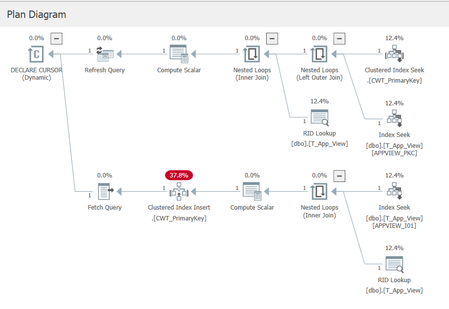
I am trying to troubleshoot a bizarre situation, and looking for either an explanation of the cause, or assistance in determining the cause. The situation is esoteric (to say the least), so I'll need to paint a picture. I am using SQL 2019 Enterprise for testing. Our database has Allow Snapshot Isolation set to true, and the Is Read Committed Snapshot On is also true. We have a table called T_App_View, with essentially these important fields (plus some audit fields not shown): CREATE TABLE T_App_View ( C_Id int not null, C_Type varchar( 20 ) not null, C_Entity varchar( 250 ) not null, C_Specialisation varchar( 250 ) null, CONSTRAINT APPVIEW_PKC PRIMARY KEY NONCLUSTERED( C_Id ) ) We have an index on (Type, Entity, Specialisation): create unique index APPVIEW_I01 on T_App_View( C_Type, C_Entity, C_Specialisation ) And from a historical hangover we have a view against the table that is used for queries: CREATE VIEW dbo.VS_App_View AS SELECT * FROM dbo.T_App_View WITH CHECK OPTION The table is used to define "UI views" for our application, and contains about 1000 records. As part of commissioning a new database, we use a tool to load data into this table, and then the data basically sits there unchanged. Each time the tool is run it deletes any old data in the table, before populating the new data. The tool deletes the old data row-by-row rather than using a truncate table statement or similar. When our web tier is asked to provide the "definition" of a view, it performs a query on VS_App_View using the three compound key components of Type, Entity, and Specialisation. A dynamic cursor is used (a historical hangover from many years ago). A typical query would look similar to this: SELECT appview.C_Id, appview.C_Entity_Id, appview.C_Specialisation, appview.C_View_Type FROM dbo.VS_App_View appview WHERE appview.C_View_Type = 'DETAIL' AND appview.C_Entity_Id = 'a' AND appview.C_Specialisation = 'Finance' We are using the standard isolation level of Read Committed (which means Read Committed Snapshot in reality). Notice the select statement is not using an option of READCOMMITTED in the query. The fun part Sometimes when we do a lookup in SQL Server, the above query finds no matching records. This bug is very evasive, we cannot reproduce it, and it appears maybe once or twice a month, and other months not at all. It is not limited to specific key values, it just appears to happen randomly (or the pattern is obscure enough that we cannot yet see it). Our QA team experienced the find failure the other day and one of our developers jumped into SSMS and ran the query manually and sure enough it came back with no records found. And now the bizarre bit: The developer ran the query directly against the T_App_View table, and the record appeared. He then re-ran the query against the View, and the record appeared. We have the Query Store enabled for this database and I can see two plans matching the above query (one for a null specialisation, and one for a non-null specialisation). The query plans look odd (due to the dynamic cursor presumably) because even though the index guarantees a maximum of one matching record, the query plan still shows a temporary table being constructed along with a clustered index for that table. I feel like I am reasonably proficient in SQL Server but this one has me stumped. ChatGpt suggested it is a query plan issue, but I'm skeptical as I've never heard of a query plan not finding a record. I've only experienced query plan issues in terms of performance impacts. Has anyone ever come across such a situation? Is Snapshot Isolation part of the problem here, or database statistics, or the fact we are deleting an entire table of records individually and then repopulating them (resulting in bad statistics)? Should we have used WITH( READCOMMITTEDLOCK ) for this query perhaps? Any suggestions on how to troubleshoot effectively, as in what to look at and for? Thanks in advance for any help.281Views0likes3CommentsDocumentation contradictory
Hi, ALL, Page https://learn.microsoft.com/en-us/sql/t-sql/statements/create-database-transact-sql?view=sql-server-ver17&tabs=sqlpool states [quote] SIZE, MAXSIZE, and FILEGROWTH parameters can be set when a UNC path is specified for the file. [/quote] However later on that same page it states [quote] SIZE can't be specified when the os_file_name is specified as a UNC path. [/quote] I think those 2 sentences contradicts each other.....101Views0likes1CommentKerberos double hop delegation on SQL Linked Server fails on AG listener after RC4 disablement
Environment 3 Node- SQL Server 2022 with Availability Group Windows Server 2022 - Linked Server configured with Kerberos delegation (double-hop scenario) - RC4 encryption recently disabled via GPO The Problem After disabling RC4 in the domain (not sure of this root cause), Kerberos delegation through a Linked Server stopped working — but only when connecting via the **AG listener name**. Connecting via the **node name** works fine. I try to migrate my service account to gMSA and I've recreate all SPN and all delegation for the new account, but the issue is the same: Authentication works if the linked server us the node name, if it use the Listener AG name the connection fail with ------------------------------ Login failed for user 'NT AUTHORITY\ANONYMOUS LOGON'. (Microsoft SQL Server, Error: 18456) Connection Id 6d654295-0538-4837-b900-ff65c9e86ee9 at 2026-04-29 11:59:25Z I Confirmed via Kerberos event logging (Event ID 4769 on DC)** On a healthy request (node name), ticket encryption type is `0x12` (AES256). - Confirmed SPN registration with `setspn -L` - Verified Kerberos events on the DC (4768/4769) - Confirmed forwardable flag (`0x40000000`) is present in ticket options — delegation is active - Confirmed pre-auth and session encryption are both `0x12` (AES256) for the working path set `msDS-SupportedEncryptionTypes = AES128+AES256` on the SQL service account and resetting its password rotete kdc key Are there any additional steps needed on the Linked Server or constrained delegation configuration side after the service account change? Any guidance appreciated. Thanks.291Views0likes1CommentMS ODBC and OLE DB failed
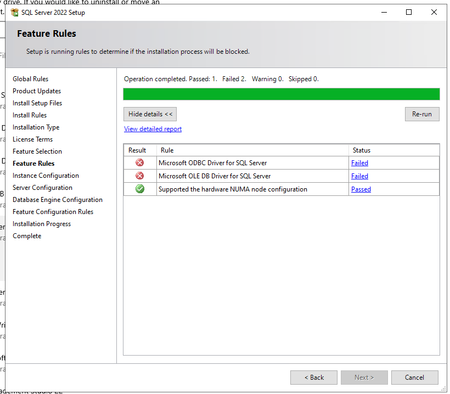
Hello, In SQL Server 2022 (16.0.4250.1) showed two fails and can´t continue (see screenshot) On system are installed those versions of ODBC and OLE DB System was previously working (not stopped on this window for fail). We did repair of both installation and restart pc, but not helpful. Whta and how to repair it, please? Thank you.103Views0likes1CommentIs there a way to check for ODBC driver UNICODE support
Hi, ALL, I'm writing a C++ code to talk to a different DBMSes and wonder if there is a way to check programmatically for the UNICODE support. I know its a year 2026 and 99.9999% of the programs are using UNICODE, but many drivers are still being shipped as ANSI counterparts as well. Thank you for any pointers.93Views0likes2Comments
Events
Recent Blogs
- mssql-python 1.14.0 is now available on PyPI. This release moves the standard parameter detection and execution path into native C++, improving throughput for wide parameterized statements and batche...Aug 28, 2026154Views0likes0Comments
- 7 MIN READThis blog post is primarily targeted at customers in the Japan region and is therefore written in Japanese as well. If you would like to read it in English, please use the link Jump to English below...Aug 26, 2026186Views0likes0Comments