Forum Widgets
Latest Discussions
Governing Entra‑Registered AI Apps with Microsoft Purview
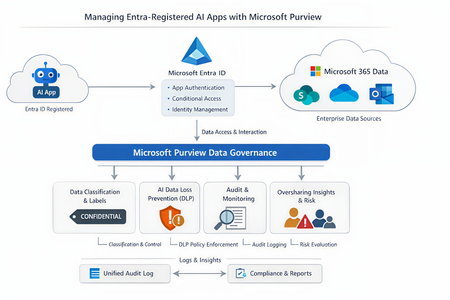
As the enterprise adoption of AI agents and intelligent applications continues to accelerate, organizations are rapidly moving beyond simple productivity tools toward autonomous, Entra‑registered AI workloads that can access, reason over, and act on enterprise data. While these capabilities unlock significant business value, they also introduce new governance, security, and compliance risks—particularly around data oversharing, identity trust boundaries, and auditability. In this context, it becomes imperative to govern AI interactions at the data layer, not just the identity layer. This is where Microsoft Purview, working alongside Microsoft Entra ID, provides a critical foundation for securing AI adoption—ensuring that AI agents can operate safely, compliantly, and transparently without undermining existing data protection controls. Lets look at the role of each solution Entra ID vs Microsoft Purview A very common misconception is that Purview “manages AI apps.” In reality, Purview and Entra serve distinct but complementary roles: Microsoft Entra ID Registers the AI app Controls authentication and authorization Enforces Conditional Access and identity governance Microsoft Purview Governs data interactions once access is granted Applies classification, sensitivity labels, DLP, auditing, and compliance controls Monitors and mitigates oversharing risks in AI prompts and responses Microsoft formally documents this split in its guidance for Entra‑registered AI apps, where Purview operates as the data governance and compliance layer on top of Entra‑secured identities. Lets look at how purview governs the Entra registered AI apps. Below is the high level reference architecture which can be extended to low level details 1. Visibility and inventory of AI usage Once an AI app is registered in Entra ID and integrated with Microsoft Purview APIs or SDK, Purview can surface AI interaction telemetry through Data Security Posture Management (DSPM). DSPM for AI provides: Visibility into which AI apps are being used Which users are invoking them What data locations and labels are touched during interactions Early indicators of oversharing risk This observability layer becomes increasingly important as organizations adopt Copilot extensions, custom agents and third‑party AI apps. 2. Classification and sensitivity awareness Purview does not rely on the AI app to “understand” sensitivity. Instead the Data remains classified and labeled at rest. AI interactions inherit that metadata at runtime Prompts and responses are evaluated against existing sensitivity labels If an AI app accesses content labeled Confidential or Highly Confidential, that classification travels with the interaction and becomes enforceable through policy. This ensures AI does not silently bypass years of data classification work already in place. 3. DLP for AI prompts and responses One of the most powerful but yet misunderstood purview capabilities is the AI‑aware DLP. Using DSPM for AI and standard Purview DLP: Prompts sent to AI apps are inspected Responses generated by AI can be validated Sensitive data types (PII, PCI, credentials, etc.) can be blocked, warned, or audited Policies are enforced consistently across M365 and AI workloads Microsoft specifically highlights this capability to prevent sensitive data from leaving trust boundaries via AI interactions. 4. Auditing and investigation Every AI interaction governed by Purview can be recorded in the Unified Audit Log, enabling: Forensic investigation Compliance validation Insider risk analysis eDiscovery for legal or regulatory needs This becomes critical when AI output influences business decisions and regulatory scrutiny increases. Audit records treat AI interactions as first‑class compliance events, not opaque system actions 5. Oversharing risk management Rather than waiting for a breach, Purview proactively highlights oversharing patterns using DSPM: AI repeatedly accessing broadly shared SharePoint sites High volumes of sensitive data referenced in prompts Excessive AI access to business‑critical repositories These insights feed remediation workflows, enabling administrators to tighten permissions, re‑scope access, or restrict AI visibility into specific datasets. In a nutshell, With agentic AI accelerating rapidly, Microsoft has made it clear that organizations must move governance closer to data, not embed it into individual AI apps. Purview provides a scalable way to enforce governance without rewriting every AI workload, while Entra continues to enforce who is allowed to act in the first place. This journey makes every organizations adopt Zero Trust at scale as its no longer limited to users, devices, and applications; It must now extend to AI apps and autonomous agents that act on behalf of the business. If you find the article insightful and you appreciate my time, please do not forget to like it 🙂23Views0likes0Comments
Importación de términos en un glosario (tipo clásico) con metadatos de tipo entero
Buenas tardes. Estamos haciendo una importación de términos mediante archivo CSV en un glosario (tipo clásico). Dicho CSV usa Plantillas personalizadas con metadatos que tenemos definidos como enteros, metadatos como Precisión y Longitud. El problema nos viene cuando importamos dichos metadatos (como son opcionales ) y en el fichero viajan en blanco... Purview nos asigna a dichos metadatos el valor de cero. Es decir que en ausencia de valor, le pone un cero. Lo cual no es lo que buscamos. Tampoco podemos modificar el metadato del término una vez importado ya que a pesar de que lo dejamos en blanco al guardar el término le vuelve a asignar el valor de cero. Alguien mas ha tenido esa problemática? He leido que la forma de solucionarlo es definiendo aquellos metadatos que son opcionales de tipo String, que es un tipo de dato que acepta valores nulos.anmarmonMar 23, 2026Copper Contributor54Views0likes1Comment
Feature request: Get rid of "Welcome to new Microsoft Purview portal" screen
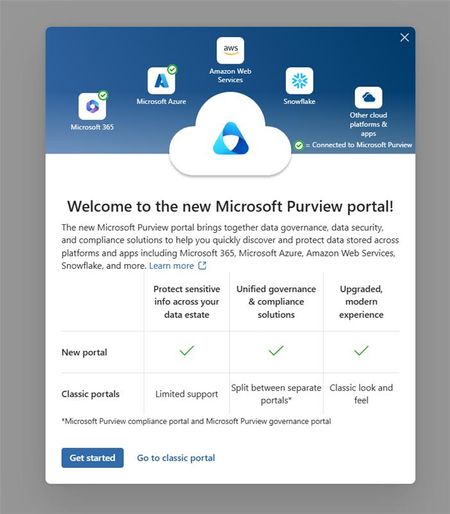
Any new user of Purview DGS will be shown this screen: I strongly believe this should be an admin led tenant-wide decision, and not an 'any new user on it's own decision'. The screen is confusing and completely unnecessary for new users with "Global Catalog Reader" permissions only. The problem with this screen is that it results in some users landing in the classic portal, while all documentation and training materials that we share are based on the new portal. My suggestions would be to move this option to 'settings'. After all, as Microsoft, you want your users to use the new portal too, right? P.S. in the meantime, please get rid of the homepage and move all that under a 'getting started' page: Catalog homepage improvements are urgently needed | Microsoft Community HubRikMar 16, 2026Iron Contributor520Views4likes8CommentsData Product Owner and Contacts should be separate fields
Currently, the 'contacts' field under a data product has a 1 on 1 relationship with the 'data product owner' field. It is not possible to add 'contacts' seperately. I believe this does not make sense for most organizations. For example, our data products have one owner, and multiple contacts (e.g. data stewards, data experts). That's how our governance works. We are not going to add people to the 'data product owner' field that are no data owners, just to show them in contacts. Also, why would you have two fields that basically do the same? Clicking on 'data product owner' already gives me the information for 'contacts'. Please let us add contacts here, that are not the data product owner.RikFeb 26, 2026Iron Contributor510Views4likes11CommentsUnified Catalog Self-Serve Analytics - Data products and other elements do not sync
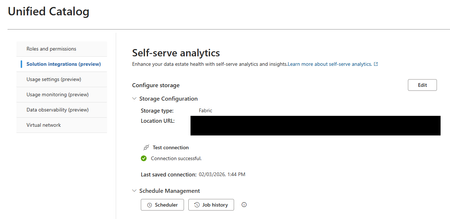
Dears, I intend to create a custom interface through a PowerBI report in Fabric to distribute Purview Unified Catalog browser. I use the feature "Unified Catalog Self-Serve Analytics" to deliver the Unified Data Catalog content in a Fabric Lakehouse. However, from the 44 data products created, only 22 are delivered to the lakehouse, in the data product table I have tried in different lakehouse, same result. I would love some advice to help me configure this properly. Do you face the same issue ? Best, AntoinehentoneFeb 25, 2026Copper Contributor99Views0likes2Comments
How to Unassign Assets from Data Products in Microsoft Purview at Once
Hello, I’ve assigned around 100 assets to a specific data product and would now like to unassign all of them at once, rather than removing them individually. Using the Purview REST API with Python, I was able to retrieve the list of my data products and successfully identify the target data product. However, I haven’t been able to fetch the list of assets currently assigned to it, which prevents me from performing a bulk unassignment. Could anyone please advise how to retrieve and unassign all assets from a data product programmatically?pardis1368Feb 24, 2026Copper Contributor226Views1like3Comments
Scaling Data Governance- Does a Purview in a Day Framework Exist?
Hello Purview Community, I’ve been exploring the available acceleration resources for Microsoft Purview, and one thing I noticed is a potential gap in the "In a Day" workshop series. While we have excellent programs like Power BI in a Day or Fabric in a Day, I haven't yet seen a formalized Purview in a Day framework designed to help organizations jumpstart their governance journey in a single, cohesive session. I am reaching out because my team is currently preparing something in this area that we believe will be very useful to the community and Microsoft in the future. Rather than working in isolation, we want to ensure we are aligned with the official roadmap. I wanted to reach out to the community and the Microsoft product team to ask: Is there an official "In a Day" initiative for Purview currently in the works? If not, who would be the best point of contact to discuss alignment? Looking forward to hearing your thoughts and seeing if we can build something impactful together!151Views2likes3Comments
How to cancel a Norton subscription Allow Uniqueness of Glossary Terms across Governance Domains
When glossary terms are created and published, there is no check for the same term name in another governance domain. Some organizations do want to enforce term uniqueness across all domains. Would it be feasible to provide an optional switch in Unified Catalog settings to turn this on?poiuytreFeb 18, 2026Copper Contributor65Views0likes1CommentShutdown impossible, How to cancel a Norton subscription fan running Update KB5073455
Hi! I'm running Windows 11 Enterprise, OS Version Dial 87.7.41934 . 68. BIOS version: LENOVO R2SET29W (1.05 ). System model 21S7S0ER00. Intel processor Family 6 Model 181. After the latest update KB5073455 I'm experiencing inability to shutdown the computer. Also, a very annoying problem since the latest update is that the computer fan is constantly on since startup. Closing the lid of the laptop will not turn the fan off and will continue until the battery runs out. Because of the corporate environment, I am unable to advancedly control the fans, or for example uninstall the latest update until a fixed one is provided. Do you know when can we expect a fix to be released? Thank you already in advance! Best regards, dhirajpoiuytreFeb 18, 2026Copper Contributor66Views0likes1Comment
Salesforce to MS Purview Integration
Hi, we are trying to setup Salesforce to MS Purview Integration for Data Mapping. Registration step is straightforward; however, we have run into issues trying to setup the scan itself. Error: Failed to testConnection: Exception when processing request: Connector Exception: Server returns ResponseCode:'400' We have raised this as an issue for MS Support but not making much progress. Any tips, advice or links to how to guides etc. would be very much appreciated!!fmcmahonFeb 16, 2026Copper Contributor104Views0likes1Comment


Tags
- data governance8 Topics
- purview8 Topics
- data product4 Topics
- fabric3 Topics
- developer3 Topics
- data catalog2 Topics
- Classifications2 Topics
- api2 Topics
- Developer Platform2 Topics
- Compliance Licensing1 Topic