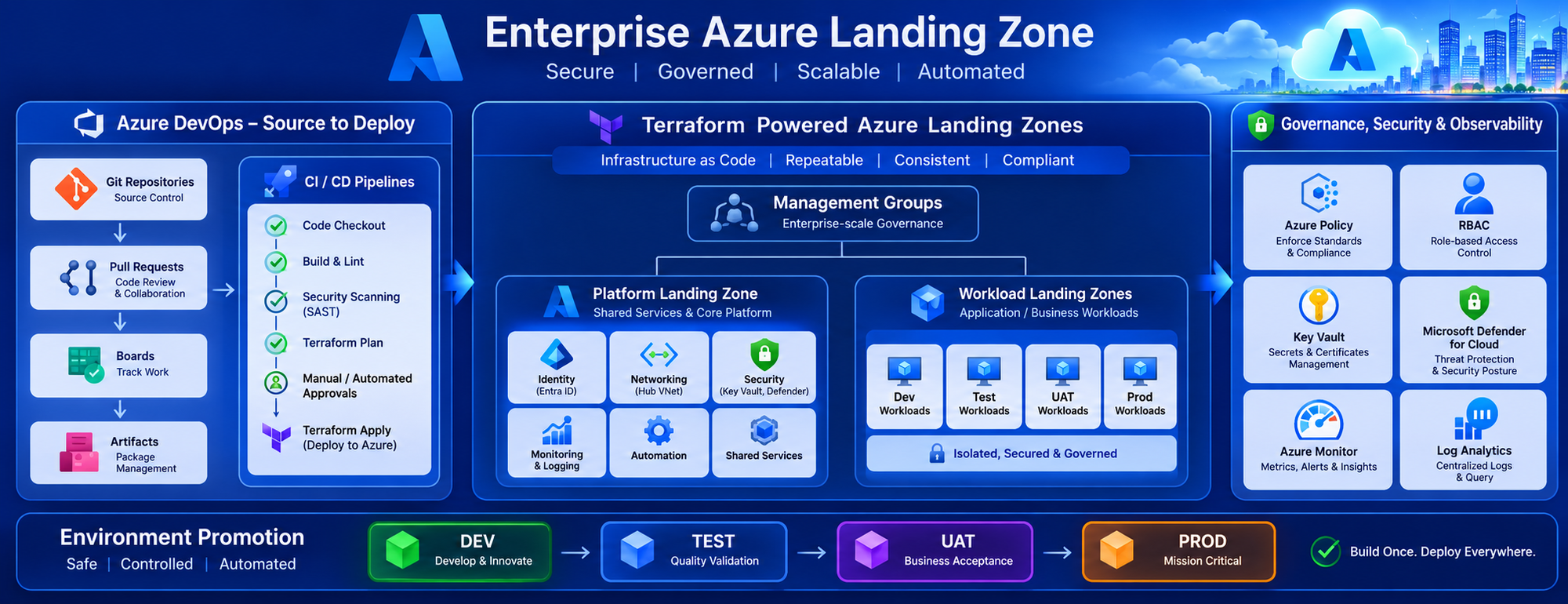
In many organizations, creating an Azure subscription is simple. Creating an enterprise-ready Azure environment that is secure, governed, standardized, and scalable is where the real challenge begins. Early in cloud adoption, teams often deploy resources manually through the Azure Portal. This approach may work for a few workloads, but as the number of subscriptions, applications, and business units grows, managing the environment becomes increasingly difficult. To address these challenges, organizations implement Azure Landing Zones. When combined with Terraform and Azure DevOps, Landing Zones can be deployed consistently, repeatedly, and securely through fully automated CI/CD pipelines. This article explains how Azure DevOps and Terraform can be used together to deploy Azure Landing Zones with governance, security, and environment promotion built into the process.
What is an Azure Landing Zone?
Think of an Azure Landing Zone as the foundation of a cloud environment.
Before application teams deploy workloads, the Landing Zone establishes:
- Management Groups
- Subscriptions
- Networking
- Identity Integration
- Security Baselines
- Governance Controls
- Monitoring Configuration
Without a Landing Zone, every team creates resources differently, leading to inconsistent and difficult-to-manage environments.
Real-World Architecture
A typical automated Landing Zone deployment consists of:
Git Repository
       │
       ▼
Azure DevOps Pipeline
       │
       ▼
Terraform Validation
       │
       ▼
Terraform Plan
       │
       ▼
Approval Stage
       │
       ▼
Terraform Apply
       │
       ▼
Azure Landing Zone
       │
 ┌─────┼─────┐
 ▼     ▼     ▼
Policy Security Monitoring
This approach ensures every deployment follows the same standardized process.
Step 1: Git Workflow Strategy
One of the biggest mistakes organizations make is allowing direct modifications to the main branch.
A structured Git workflow helps maintain quality and governance.
Recommended Branch Structure
main
 │
 ├── develop
 │
 ├── feature/networking
 │
 ├── feature/policies
 │
 └── feature/monitoring
Example
A cloud engineer wants to add a new Azure Policy Assignment.
Instead of updating the production environment directly:
- Create a feature branch
- Make Terraform changes
- Raise a Pull Request
- Review code
- Merge into develop
- Promote to production via pipeline
This ensures every infrastructure change is auditable.
Step 2: Automated CI Pipeline
Whenever code is committed, Azure DevOps automatically starts validation.
CI Pipeline Activities
Terraform Format Validation
terraform fmt -checkTerraform Validation
terraform validateSecurity Scanning
Checkov
Tfsec
Terraform Plan
terraform planThe pipeline generates a deployment plan before any changes reach Azure.
This reduces deployment failures and unexpected infrastructure modifications.
Step 3: Environment Promotion Strategy
Many organizations deploy directly to production.
A better approach is using multiple environments.
DEV
 │
 ▼
TEST
 │
 ▼
UAT
 │
 ▼
PROD
Each environment uses dedicated:
- State Files
- Variables
- Service Connections
- Approvals
Example
A new network security group is introduced.
Deployment flow:
Developer Commit
       │
       ▼
DEV Validation
       │
       ▼
TEST Verification
       │
       ▼
UAT Approval
       │
       ▼
PRODUCTION
Issues are identified long before production deployment.
Step 4: Governance Integration
This is where most Landing Zone implementations become truly enterprise-ready.
Governance should be deployed automatically alongside infrastructure.
Azure Policies
Example restrictions:
- Restrict resource locations
- Block public IP creation
- Enforce tagging standards
- Require diagnostics settings
Terraform example:
resource "azurerm_policy_assignment" "allowed_locations" {

  name = "allowed-locations"

}
Every subscription receives the same security standards automatically.
Step 5: Identity and Access Management
Enterprise environments require controlled access.
Terraform can automate:
- RBAC Assignments
- Managed Identities
- Custom Roles
- Service Principals
Example:
resource "azurerm_role_assignment" "contributor" {

 role_definition_name = "Contributor"

}
No manual permission assignments are needed.
Step 6: Monitoring from Day One
Many organizations deploy monitoring months after deployment.
This creates visibility gaps.
A Landing Zone should automatically deploy:
- Log Analytics Workspace
- Azure Monitor
- Diagnostic Settings
- Alerts
- Action Groups
Example:
Virtual Network
       │
       ▼
Diagnostic Settings
       │
       ▼
Log Analytics Workspace
       │
       ▼
Monitoring Dashboard
Every deployed resource becomes observable immediately.
Step 7: State Management Best Practices
One of the most critical Terraform components is state management.
Store state files in Azure Storage.
Terraform State
       │
       ▼
Azure Storage Account
       │
       ▼
Blob Container
Benefits:
- State Locking
- Centralized Storage
- Team Collaboration
- Recovery Capability
Never store state files locally in enterprise environments.
a { text-decoration: none; color: #464feb; } tr th, tr td { border: 1px solid #e6e6e6; } tr th { background-color: #f5f5f5; }
Lessons Learned from Real Projects
After working on Azure migration and platform deployments, I observed that successful cloud platforms are not built through manual deployments.
The most effective organizations automate:
- Governance
- Security
- Networking
- Monitoring
- Identity
- Infrastructure Provisioning
using Terraform and Azure DevOps from the very beginning.
Teams that delay automation often struggle with inconsistent environments, policy violations, and operational overhead.
a { text-decoration: none; color: #464feb; } tr th, tr td { border: 1px solid #e6e6e6; } tr th { background-color: #f5f5f5; }
Key Takeaways
A fully automated Azure Landing Zone provides:
- Faster environment provisioning
- Consistent infrastructure deployments
- Reduced operational effort
- Built-in governance
- Improved security posture
- Easier auditing and compliance
By combining Azure DevOps and Terraform, organizations can transform cloud deployment from a manual process into a repeatable, governed, and scalable platform engineering practice.
Azure Landing Zones are not just about deploying resources. They are about creating a secure, governed, and scalable foundation for an organization's cloud journey. When powered by Terraform and Azure DevOps, that foundation becomes repeatable, reliable, and enterprise-ready.

 Microsoft