learning
7 Topics
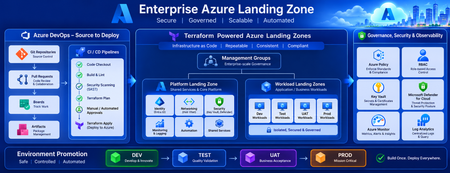
Building a Fully Automated Azure Landing Zone Deployment Using Azure DevOps and Terraform
Discover how to build a fully automated Azure Landing Zone using Azure DevOps and Terraform. This article walks through real-world Git workflows, CI/CD automation, environment promotion strategies, and governance integration to create secure, scalable, and enterprise-ready Azure environments.1.4KViews1like0CommentsFrom Prompt to Production: Open in VS Code for Terraform in Azure Copilot
We’re excited to introduce a new step in the Terraform on Azure experience: Open in VS Code, now available directly from Azure Copilot in the Azure Portal. This capability helps you move seamlessly from AI‑generated Terraform code to real Azure deployments - within a connected, guided workflow designed for enterprise scenarios. Why This Matters Infrastructure as Code with Terraform is powerful, but moving from generated configuration to a deployed environment typically involves multiple tools and handoffs. Teams need to understand Terraform state, work with remote backends, and integrate their code into version‑controlled CI/CD pipelines - often backed by Terraform Cloud or Azure‑native backends in enterprise environments. Open in VS Code brings these steps together. It bridges the gap between AI‑assisted authoring in the Azure Portal and the real‑world workflows required to validate, manage state, and deploy infrastructure with confidence. Continue Your Workflow in VS Code With Azure Copilot, you can describe your infrastructure in natural language and generate Terraform configurations in seconds. For example: “Create an Azure Container App using Terraform with a managed environment, Log Analytics enabled, and a system‑assigned managed identity to securely pull images from Azure Container Registry.” Copilot generates the Terraform configuration for you. From there, you can select Open full view to enter a full‑screen Terraform editor, and then choose Open in VS Code to launch the configuration in an Azure‑hosted VS Code environment. There’s no need to download files or set up a local development environment. VS Code for the web opens with Azure authentication already configured, along with commonly used extensions, so you can immediately focus on refining, validating, and preparing your infrastructure for deployment. Built‑in Guidance for Real Deployments Beyond editing, the VS Code experience includes built‑in, step‑by‑step guidance to help you deploy your Terraform configuration into your own Azure environment - whether you’re experimenting or preparing for production. Because Terraform relies on state management, the workflow starts by helping you choose and configure a backend. Backend Options Option 1: Azure Storage Account as a remote backend A natural fit for Azure‑native and enterprise environments. The experience guides you through creating or selecting a storage account and configuring Terraform to store state securely in Azure. Option 2: HCP Terraform (Terraform Cloud) as a remote backend Ideal for teams already using Terraform Cloud. The guided flow helps you authenticate, connect to an existing organization and workspace, and generate the required backend configuration directly into your Terraform files. Option 3: Temporary workspace for quick validation Designed for learning and experimentation. You can run terraform plan and terraform apply directly in the Azure workspace with temporary state, without committing to a long‑term backend - ideal for quick validation, but not intended for production use. Each option includes an end‑to‑end walkthrough, so you can complete backend setup and run Terraform commands without leaving the VS Code environment or searching through external documentation. Connecting Code, State, and Deployment This experience connects three essential parts of the Terraform workflow: AI‑assisted code generation in Azure Portal Copilot Interactive editing and guided execution in VS Code for the web Flexible backend options for managing Terraform state Together, these pieces make it easier to move from idea to infrastructure in a structured, supported way—whether you’re new to Terraform or managing production workloads with established CI/CD pipelines. Available Now - and What’s Next The Open in VS Code experience for Terraform is now public preview in Azure Portal Copilot. We’re continuing to invest in this workflow, including clearer deployment guidance, future integration with GitHub Actions and other CI/CD pipelines, and deeper enhancements to the full‑screen Terraform editor experience. If you haven’t tried it yet, generate a Terraform configuration with Azure Copilot and open it in VS Code to go from prompt to production end to end in one connected workflow.1.4KViews0likes0CommentsGaining Confidence with Az CLI and Az PowerShell: Introducing What if & Export Bicep
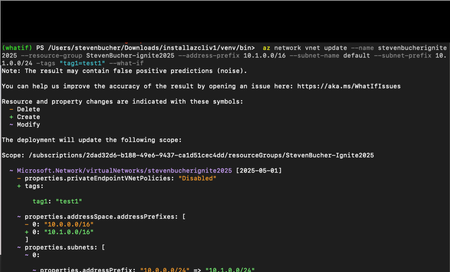
Ever hesitated before hitting Enter on a command, wondering what changes it might make? You’re not alone. Whether you’re deploying resources or updating configurations, the fear of unintended consequences can slow you down. That’s why we’re introducing new powerful features in Azure CLI and Azure PowerShell to preview the changes the commands may make: the What if and Export Bicep features. These capabilities allow you to preview the impact of your commands and allow you to export them as Bicep templates, all before making any changes to your Azure environment. Think of them as your safety net: you can validate actions, confirm resource changes, and even generate reusable infrastructure-as-code templates with confidence. Currently, these features are in private preview, and we’re excited to share how you can get early access. Why This Matters Reduce risk: Avoid accidental resource deletions or costly misconfigurations. Build confidence: Understand exactly what your command will do before execution. Accelerate adoption of IaC: Convert CLI commands into Bicep templates automatically. Improve productivity: Validate scripts quickly without trial-and-error deployments. How It Works What if preview of commands All you have to do is add the `--what-if` parameter to Azure CLI commands and then the `-DryRun` command to Azure PowerShell commands like below. Azure CLI: az storage account create --name "mystorageaccount" --resource-group "myResourceGroup" --location "eastus" --what-if Azure PowerShell: New-AzVirtualNetwork -name MyVNET -ResourceGroupName MyResourceGroup -Location eastus -AddressPrefix "10.0.0.0/16" -DryRun Exporting commands to Bicep To generate bicep from the command you will have to add the `--export-bicep` command with the --what-if parameter to generate a bicep file. The bicep code will be saved under the `~/.azure/whatif` directory on your machine. The command will specific exactly where the file is saved on your machine. Behind the scenes, AI translates your CLI command into Bicep code, creating a reusable template for future deployments. After generating the Bicep file, the CLI automatically runs a What-If analysis on the Bicep template to show you the expected changes before applying them. Here is a video of it in action! Here is another example where there is delete, modify and create actions happening all together. Private Preview Access These features are available in private preview. To sign up: Visit the aka.ms/PreviewSignupPSCLI Submit your request for access. Once approved, you’ll receive instructions to download the preview package. Supported Commands (Private Preview) Given these features are in a preview we have only added support for a small set of commands for the time being. Here’s a list of commands that will support these features during the private preview: Azure CLI Az vm create Az vm update az storage account create az storage container create az storage share create az network vnet create az network vnet update az storage account network-rule add az vm disk attach az vm disk detach az vm nic remove Azure PowerShell New-AzVM Update-AzVM New-AzStorageAccount New-AzRmStorageShare New-AzRmStorageContainer New-AzVirtualNetwork Set-AzVirtualNetwork Add-AzStorageAccountNetworkRule Next Steps Sign up for the private preview. Install the packages using the upcoming script. Start using --what-if, -DryRun, and --export-bicep to make safer, smarter decisions and accelerate your IaC journey. Give us feedback on what you think of the feature! At https://aka.ms/PreviewFeedbackWhatIf Thanks so much! Steven Bucher PM for Azure Client Tools1.1KViews2likes0CommentsUnlocking the Best of Azure with AzureRM and AzAPI Providers
With the recent release of AzAPI 2.0, Azure offers two powerful Terraform providers to meet your infrastructure needs: AzureRM and AzAPI. The key question is, when should you use each one? This article offers a clear guide for Terraform users, particularly those familiar with the AzureRM provider, on some ideal scenarios for each. The recommendations provided within this post are jointly provided between HashiCorp and Microsoft; click here for HashiCorp's blogpost.11KViews7likes0CommentsIntroducing Azure Verified Modules!
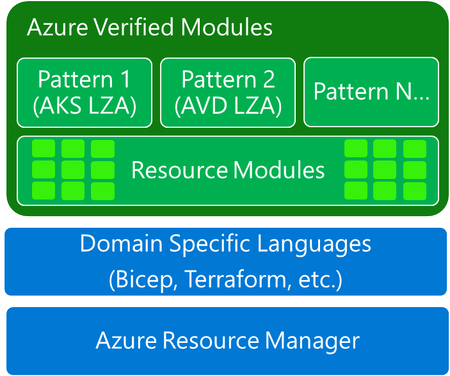
Accelerate the delivery Infrastructure-as-Code solutions with Azure Verified Modules! AVM is a community-driven initiative that sets the standards for Infrastructure-as-Code modules within Microsoft and the engaged community. These atomic building blocks encapsulate groups of resources dedicated to one task and are used to deploy Azure resources and their extensions consistently. Stay tuned for more information on how AVM can help you reliably and consistently deliver at scale.19KViews11likes0Comments