tips and tricks
8 Topics
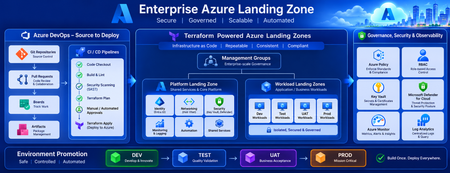
Building a Fully Automated Azure Landing Zone Deployment Using Azure DevOps and Terraform
Discover how to build a fully automated Azure Landing Zone using Azure DevOps and Terraform. This article walks through real-world Git workflows, CI/CD automation, environment promotion strategies, and governance integration to create secure, scalable, and enterprise-ready Azure environments.1.4KViews1like0CommentsFrom Prompt to Production: Open in VS Code for Terraform in Azure Copilot
We’re excited to introduce a new step in the Terraform on Azure experience: Open in VS Code, now available directly from Azure Copilot in the Azure Portal. This capability helps you move seamlessly from AI‑generated Terraform code to real Azure deployments - within a connected, guided workflow designed for enterprise scenarios. Why This Matters Infrastructure as Code with Terraform is powerful, but moving from generated configuration to a deployed environment typically involves multiple tools and handoffs. Teams need to understand Terraform state, work with remote backends, and integrate their code into version‑controlled CI/CD pipelines - often backed by Terraform Cloud or Azure‑native backends in enterprise environments. Open in VS Code brings these steps together. It bridges the gap between AI‑assisted authoring in the Azure Portal and the real‑world workflows required to validate, manage state, and deploy infrastructure with confidence. Continue Your Workflow in VS Code With Azure Copilot, you can describe your infrastructure in natural language and generate Terraform configurations in seconds. For example: “Create an Azure Container App using Terraform with a managed environment, Log Analytics enabled, and a system‑assigned managed identity to securely pull images from Azure Container Registry.” Copilot generates the Terraform configuration for you. From there, you can select Open full view to enter a full‑screen Terraform editor, and then choose Open in VS Code to launch the configuration in an Azure‑hosted VS Code environment. There’s no need to download files or set up a local development environment. VS Code for the web opens with Azure authentication already configured, along with commonly used extensions, so you can immediately focus on refining, validating, and preparing your infrastructure for deployment. Built‑in Guidance for Real Deployments Beyond editing, the VS Code experience includes built‑in, step‑by‑step guidance to help you deploy your Terraform configuration into your own Azure environment - whether you’re experimenting or preparing for production. Because Terraform relies on state management, the workflow starts by helping you choose and configure a backend. Backend Options Option 1: Azure Storage Account as a remote backend A natural fit for Azure‑native and enterprise environments. The experience guides you through creating or selecting a storage account and configuring Terraform to store state securely in Azure. Option 2: HCP Terraform (Terraform Cloud) as a remote backend Ideal for teams already using Terraform Cloud. The guided flow helps you authenticate, connect to an existing organization and workspace, and generate the required backend configuration directly into your Terraform files. Option 3: Temporary workspace for quick validation Designed for learning and experimentation. You can run terraform plan and terraform apply directly in the Azure workspace with temporary state, without committing to a long‑term backend - ideal for quick validation, but not intended for production use. Each option includes an end‑to‑end walkthrough, so you can complete backend setup and run Terraform commands without leaving the VS Code environment or searching through external documentation. Connecting Code, State, and Deployment This experience connects three essential parts of the Terraform workflow: AI‑assisted code generation in Azure Portal Copilot Interactive editing and guided execution in VS Code for the web Flexible backend options for managing Terraform state Together, these pieces make it easier to move from idea to infrastructure in a structured, supported way—whether you’re new to Terraform or managing production workloads with established CI/CD pipelines. Available Now - and What’s Next The Open in VS Code experience for Terraform is now public preview in Azure Portal Copilot. We’re continuing to invest in this workflow, including clearer deployment guidance, future integration with GitHub Actions and other CI/CD pipelines, and deeper enhancements to the full‑screen Terraform editor experience. If you haven’t tried it yet, generate a Terraform configuration with Azure Copilot and open it in VS Code to go from prompt to production end to end in one connected workflow.1.4KViews0likes0CommentsAn Update on Bicep Azure Verified Modules for Platform Landing Zone (ALZ)
But first some history and context As you may of heard in one of our Azure Landing Zone (ALZ) community calls over the past year, across ALZ we have been working hard to refactor both our Terraform and Bicep implementation options to be built upon Azure Verified Modules (AVM). Earlier this year we announced that the work for Terraform, which we started on first, was complete; and you can read more about that in the announcement blog post we posted here. But whilst this work was going on the ALZ Bicep team where already busy planning how they would go about doing the same and rebuilding ALZ Bicep from AVM modules. You can see the original plans and where we also asked for feedback in the GitHub issue (#791) . Enough history, what's the latest? Now to answer the question everyone has and rightly so 😁 Well, it's good news! We have been busy working away on getting a number of the AVM Bicep Resource Modules updated with missing bits and pieces that we need from an ALZ perspective. All fairly minor in most cases but some required some bigger updates than others, and some modules didn't exist at all so we have had to propose, create, and publish those of which we are pretty much done with 👍 We are still working towards an end of Q4 (June/July) target for a preview release of all the modules, accelerator and guidance on how to use the new version of ALZ Bicep, which will be called "Bicep Azure Verified Modules for Platform Landing Zone (ALZ)"; this is to align with Terraform and also to provide clear distinction between ALZ Bicep and the new AVM based version. Please note that the timeline shared above is an ETA and may move Announcing the preview release of `avm/ptn/alz/empty` AVM Pattern Module Before we get to a more complete release of all the required resources and modules to build the entire ALZ architecture with the new Bicep Azure Verified Modules for Platform Landing Zone (ALZ), we wanted to share an early look at the module that will be at the heart of all of your ALZ deployments. That module is called `avm/ptn/alz/empty` and is available in the Public Bicep Registry for you to try out today (currently version `0.1.0`)! Tip: Checkout the "max" test in the tests directory for advanced usage examples! module testMg 'br/public:avm/ptn/alz/empty:0.1.0' = { params: { managementGroupName: 'test-mg' // Other parameters here... } } This module is 1 of 11 modules that will all be based off the same code. The module optionally creates all of the below: The Management Group itself Can also target an existing Management Group Management Group Subscription Associations RBAC Custom Role Definitions RBAC Role Assignments Policy Assignments Custom Policy Definitions Custom Policy Set Definitions (Initiatives) There will also be 1 x Bicep Azure Verified Modules for Platform Landing Zone (ALZ) pattern module for each of the ALZ Architectures Management Groups, plus this empty one for custom and advanced scenarios. A reminder of those Management Groups and the associated modules that will be created for each of them: `avm/ptn/alz/int-root` `avm/ptn/alz/platform` `avm/ptn/alz/platform-management` `avm/ptn/alz/platform-identity` `avm/ptn/alz/platform-connectivity` `avm/ptn/alz/landing-zones` `avm/ptn/alz/landing-zones-corp` `avm/ptn/alz/landing-zones-online` `avm/ptn/alz/decommissioned` `avm/ptn/alz/sandbox` These Management Group aligned pattern modules will create the same resources as above, but will have the latest release of the ALZ Library baked in to each of the modules. Meaning that for the `avm/ptn/alz/int-root` pattern module, you won't have to declare all of the ALZ RBAC Custom Role Definitions, Custom Policy Definitions, Policy Assignments etc. via the input parameters as they'll be hardcoded in the module based off the latest release from the ALZ Library at the point the version of the module was released. This means that to build the ALZ Management Group hierarchy and make all of the default ALZ policy assignments, as documented here, you'd need a bicep file that would look something like this as a starting point: Important: None of these modules exist below today! module intRootMg 'br/public:avm/ptn/alz/int-root:0.1.0' = { params: { managementGroupName: 'int-root-mg' } } module platformMg 'br/public:avm/ptn/alz/platform:0.1.0' = { params: { managementGroupName: 'platform-mg' managementGroupParentId: intRootMg.outputs.managementGroupId } } module platformConnectivityMg 'br/public:avm/ptn/alz/platform-connectivity:0.1.0' = { params: { managementGroupName: 'platform-mg' managementGroupParentId: platformMg.outputs.managementGroupId } } This will make getting the ALZ Architecture out of the box really fast, and also really easy to upgrade and get the latest updates, by just bumping the version number as you desire when you are ready. Coupled with the `avm/ptn/alz/empty` module to add your own additional Policy Definitions and assignments, etc. at the same Management Groups scopes also helps you decouple the constant updates to the ALZ architecture and policies etc. from your own additional requirements. Helping you keep your code cleaner and our modules simple to maintain as we won't have to cater for handling additional custom definitions and assignments alongside the defaults from ALZ that are baked into the modules. Note: We are looking at suggesting that all of these are deployed via Deployment Stacks to help with lifecycle management of resources. e.g. help clean-up resources as well as deploy new ones; think policy assignments and definitions etc. We need to complete a lot more testing on this, but would love your feedback on experiences if you have any using Deployment Stacks to manage these kind of resources today. Open an issue/discussion on the ALZ Bicep GitHub repo 👍 Our asks to you 🫵 Please go try out and test the new `avm/ptn/alz/empty` module and test it out for all the scenarios you can think of relating to Management Groups, RBAC, Policies etc. we want to make sure it's "match fit/ready" before we then build the Management Group aligned modules and bake in the ALZ defaults to them. So please go and put the module through its paces and test it out. Tip: Checkout the "max" test in the tests directory for advanced usage examples! If you find any issues, bugs, feature requests or just have a question on how to use it, please just raise them as GitHub issues here (make sure to select the `avm/ptn/alz/empty` module from the drop down 👍) Thanks in advance for all your efforts and assistance and we look forward to hearing and getting your feedback on the module 👏2.4KViews4likes1CommentUnlocking the Best of Azure with AzureRM and AzAPI Providers
With the recent release of AzAPI 2.0, Azure offers two powerful Terraform providers to meet your infrastructure needs: AzureRM and AzAPI. The key question is, when should you use each one? This article offers a clear guide for Terraform users, particularly those familiar with the AzureRM provider, on some ideal scenarios for each. The recommendations provided within this post are jointly provided between HashiCorp and Microsoft; click here for HashiCorp's blogpost.11KViews7likes0Comments