tips and tricks
604 Topics
Fix all annoying Copilot bugs
I’m experiencing an issue with Microsoft Edge on Android. Starting today (September 22, 2026), whenever I try to visit copilot.microsoft.com, Edge automatically redirects me to the Google Play Store to install the Copilot app. I prefer using Copilot in the browser and do not want to install the app. And even when i try to install the copilot app it does not let me do anything and thinks I need a license or subscription to access it like copilot is litterly supposed to be free and also even when i try to get rid of the app redirection it for some dumb reason it redirects me to from copilot.microsoft.com to copilot.com and they put in restrictions like after a lot of chats you must wait for a specific time period and a couple months ago you guys removed the ability to use copilot without registration like come on that is so dumb I want Microsoft Copilot to be fixed revert how copilot was before how is this consumer friendly53Views0likes1Comment
Copilot Access not working for only 1 user
Hello, I am facing an issue where I have 1 user that is unable to get answers out of the chatbot on teams. The user is opening the chatbot using the 'open with copilot' option like the rest of the team members, but when they ask a questions, the chatbot returns that it has not found information on the topic, even when the information is in the training documents the chatbot reads off of. Other users can ask the same questions and get valid answers, it is only not working for this specific user. Any suggestions on how to resolve this?45Views0likes1Comment
Excel challenge question
I have a very large database that needs to be split up in an interesting way and I can’t figure out how to word the question for google. Here is my best shot as a description. I have rows with about 40 columns of data points. I need to take every row that I have and split it into 8 equal parts and move it to 8 new rows. Thanks in advance for anything!643Views0likes2Comments
I need HELP with excel sheet sample below
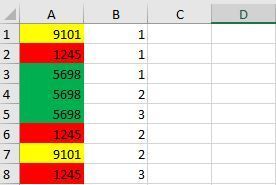
Hello, I have same numbers with same colours.(Ex: Yellow for 9101) I want to fill B column with 1 to infinity(1,2,3,4.....) for same numbers or colours(it does'n matter becasue every number has already a colour) in A column automatically. For example, A2:1245, 1 should be written automatically to B2, A6:1245, 2 for B6 A8:1245, 3 for B8 like the Excel sheet sample below. Is there any formula or hit to do this?1.8KViews0likes8CommentsEngineering Agentic Recall Controls with MCP and Microsoft Foundry
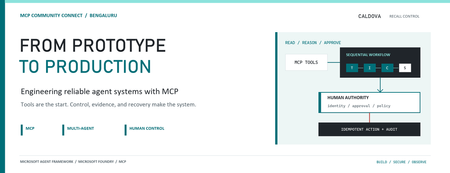
AI agents become operationally interesting when they can reach real systems. They also become operationally dangerous at exactly the same moment. Caldova Recall Control Tower is a developer demonstration built around that tension. It uses a fictional pharmaceutical recall to show how an agent can gather evidence and prepare a decision while deterministic application code retains authority over approval and inventory mutation. The implementation combines the Model Context Protocol (MCP), Microsoft Agent Framework, a Microsoft Foundry Hosted Agent, FastAPI, Microsoft Entra authentication, managed identity, and optimistic concurrency in Azure Blob Storage. Central design rule: Let the model interpret and recommend. Make ordinary code authenticate, authorize, mutate, and prove what happened. Caldova is fictional, all operational data is synthetic, and this sample is not a production recall system or a source of clinical advice. The scenario: useful reasoning, consequential action The demo starts with a temperature excursion affecting batch B-2408-AX7 of Caldova Relief 20 mg tablets. The synthetic inventory contains 2,196 units across two distribution centers and two retail stores. A useful system must establish the notice, locate every affected position, check supplier status, explain uncertainty, and recommend an action. That analysis is a good fit for specialized agents. Quarantining inventory is not. Quarantine changes operational state. It therefore needs an authenticated human, explicit authorization, a batch-scoped approval, concurrency control, idempotency, and an audit record. None of those guarantees should depend on a prompt being followed. The authenticated hosted application at the start of the fictional recall. Architecture: separate reasoning from authority The solution has two related but deliberately separate paths. Caldova separates model reasoning from application authority. Official Microsoft service icons identify Foundry Agent Service, App Service, Managed Identity, and Blob Storage. The reasoning path invokes a Hosted Agent through the Responses protocol. Four agents run in a fixed sequence: triage, inventory impact, supplier/compliance, and supervisor. The first three have narrow read-only tools. The supervisor has no tools and synthesizes the accumulated context into a decision brief. The authority path remains in the web application. It validates the EasyAuth identity claims, checks an approver allowlist, binds approval to the caller, batch, action, and current demo generation, and only then calls deterministic domain code. State is stored per actor in Blob Storage and updated with ETag match conditions so concurrent writes fail instead of silently overwriting each other. There is also a deterministic localhost demo. It reuses synthetic domain fixtures and demonstrates MCP contracts, approval, quarantine, and replay without a model or cloud account. It is useful for development, but its typed approver name and in-memory state are not production identity or durable compliance evidence. Building a narrow MCP surface MCP standardizes how an AI application discovers and calls external tools. It does not remove the need to design those tools carefully. Caldova exposes small, typed operations such as get_recall_notice , locate_inventory , and get_supplier_status . Inputs are constrained with Pydantic, and tool annotations tell clients that these operations are read-only and closed-world: @mcp.tool( title="Locate affected inventory", annotations=ToolAnnotations( read_only_hint=True, open_world_hint=False, ), ) def locate_inventory(batch_id: BatchId) -> dict[str, Any]: return STORE.locate_inventory(batch_id) The mutation tool is separately marked destructive and requires a batch-scoped approval token. Those annotations improve discovery and planning, but they are metadata, not an authorization boundary. The real check occurs inside quarantine_batch , below the model and below the tool description. The Hosted Agent does not receive the mutation tools at all. Its specialists call only three read operations through an isolated MCP stdio subprocess. This is stronger than asking an all-powerful agent to "please remain read-only": capability is constrained by construction. The subprocess boundary also keeps MCP v2 dependencies isolated from the Foundry hosting environment. Each call has a timeout, bounded concurrency, structured JSON handling, and a generic failure response that does not leak subprocess details. Fixed workflows beat vague autonomy for this case Multi-agent does not have to mean dynamic routing. Caldova uses an explicit sequence because the business dependency is explicit: validate the notice before locating inventory, locate inventory before checking supplier implications, and synthesize only after all three specialist outputs exist. return ( WorkflowBuilder(start_executor=triage, output_from=[supervisor]) .add_edge(triage, inventory) .add_edge(inventory, compliance) .add_edge(compliance, supervisor) .build() .as_agent() ) This topology is easier to test and reason about than an unconstrained planner. Each specialist has one job and one tool allowlist. Full context is passed where synthesis requires it, while the supervisor remains tool-free. Request isolation matters too. A hosted process can serve concurrent users, so workflow state must not leak between requests. The sample creates a fresh workflow agent for each request context rather than reusing mutable agent state globally. What the live hosted run showed The hosted application completed a read-only assessment for the synthetic batch. The resulting brief reported: 2,196 affected units across four locations. A high-risk inbound temperature excursion. Supplier acknowledgement, a 36-hour replacement estimate, and a drafted credit note. Unknown transit temperature details, excursion duration, stability impact, final supplier disposition, and potentially issued stock. A recommendation to hold or quarantine stock, explicitly stating that no quarantine had occurred. A required human approval before any inventory restriction. The live Hosted Agent decision brief. Transient response and correlation identifiers are masked; the operations rail is excluded because it contains actor-scoped audit data. The screenshot also shows an important truthfulness choice: the UI says Hosted workflow trace unavailable. The application does not invent stage completion or tool-call evidence when the hosted endpoint does not return trustworthy trace data. The answer can be displayed, but it must not be presented as proof of an internal execution path. Approval is a protocol, not a button The hosted web path uses App Service authentication with Microsoft Entra. The application accepts the injected principal only on the configured App Service host, validates tenant and object identifiers, applies a user allowlist, and performs an additional approver check for mutation requests. State-changing calls also require the expected origin and an application request header. Approval is then bound to five facts: The authenticated actor. The current demo generation. The affected batch. The quarantine action. A ten-minute validity window until first use. Resetting the demo creates a new generation, invalidating old handles. Consuming an approval does not make replay unsafe: the same bound handle can repeat the same quarantine operation, but domain code changes only positions that are not already quarantined. A second call reports an idempotent replay with zero additional positions changed. This is the difference between a human-in-the-loop interface and a human-authorized system. A modal dialog provides user experience; identity binding and deterministic policy provide control. Durable state needs concurrency semantics The hosted application stores each actor's synthetic session in a separate Blob object. A load returns both JSON state and its ETag. A save uses IfNotModified semantics; if another request updated the same state first, Azure Storage rejects the stale write and the API returns a conflict. conditions = ( {"etag": etag, "match_condition": MatchConditions.IfNotModified} if etag else {} ) await blob.upload_blob( json.dumps(state), overwrite=etag is not None, **conditions, ) Without that condition, two browser requests could both read the same approval state and overwrite one another using last-writer-wins behavior. Agent systems do not get a concurrency exemption: ordinary distributed-systems rules still apply. Fail closed, and make the failure legible The analysis adapter accepts only HTTPS Foundry endpoints with the expected path, uses a managed-identity token for https://ai.azure.com/.default , disables redirects, and enforces bounded connect and overall timeouts. It accepts only a completed assistant response with non-empty output text. If the endpoint times out, returns partial output, returns malformed data, or becomes unavailable, the application clears the analysis lease and reports that no inventory changed. It does not substitute a local answer and label it as hosted. Approval remains locked until a new hosted analysis succeeds. This can feel strict during a demo, but it protects provenance. A degraded fallback is useful only when the UI and audit model can identify it accurately. What is proven, and what is not The sample provides useful evidence for several engineering claims: Typed MCP tools reject malformed input. Hosted specialists receive read-only capabilities only. Approval is checked below the model and bound to identity and session state. Quarantine is idempotent in the synthetic domain. Blob ETags prevent stale session writes. Empty, partial, failed, and timed-out hosted responses fail closed. Local tests cover domain, MCP, workflow, API, and repository-hygiene behavior. It does not prove that the sample is a production recall platform. The scenario is synthetic. The local audit log is not tamper-evident. The hosted UI currently lacks trustworthy per-stage and per-tool trace rendering. Deployment-specific RBAC, EasyAuth configuration, telemetry access, model behavior, load characteristics, costs, and recovery procedures require validation in each environment. Evaluation evidence also expires. Golden cases and evaluator configuration are useful assets, but historical results are not a current release certificate. Re-run evaluations against the deployed agent version and inspect failures before making quality claims. Try the pattern Start with the deterministic path before provisioning cloud resources: Set-Location (git rev-parse --show-toplevel) py -3.13 -m venv caldova-recall-control/.venv ./caldova-recall-control/.venv/Scripts/python.exe -m pip install ` -r caldova-recall-control/requirements-ui.txt ./caldova-recall-control/.venv/Scripts/python.exe -m uvicorn ` control_tower_api:app ` --app-dir caldova-recall-control/src ` --host 127.0.0.1 ` --port 8091 Then inspect the MCP server over stdio: ./caldova-recall-control/.venv/Scripts/python.exe ` caldova-recall-control/scripts/inspect_mcp.py The inspector discovers the real tool schemas, reads the synthetic inventory, rejects malformed input and an unapproved mutation, and confirms the stock remains unchanged. Only after that local contract is understood should you configure a Foundry project, deployment identity, model deployment, and Hosted Agent. Engineering takeaways The most reusable lesson in Caldova is not the number of agents. It is the placement of authority. Give each model the smallest useful toolset. Prefer explicit workflow topology when the business process is known. Treat tool annotations as descriptive metadata, not access control. Bind consequential approval to authenticated identity, resource, action, and session generation. Put mutation and idempotency in deterministic domain code. Use optimistic concurrency for durable web state. Preserve provenance by failing closed instead of silently changing execution paths. Show only evidence the system actually captured. Agents are excellent at turning fragmented evidence into an actionable brief. Reliable systems make sure the brief and the action remain two different things. References Caldova source repository Model Context Protocol introduction Microsoft Agent Framework workflow capabilities Deploy a Hosted Agent in Microsoft Foundry Configure Microsoft Entra authentication for Azure App Service Manage concurrency in Azure Blob Storage
Which Accessible Source Can Reliably Return Current Date, Time, Timezone and UTC Offset?
Question for Microsoft 365 Copilot experts I am trying to implement a reliable "Current Time Validation" control inside a Microsoft 365 Copilot workflow. The requirement is to obtain a machine-readable and repeatable timestamp containing: - Current date - Current time - Time zone identifier - UTC offset For example: 2026-09-16T18:09:00+08:00 Timezone: Asia/Shanghai UTC Offset: +08:00 My goal is not a human-readable world clock page, but a source that Microsoft 365 Copilot can actually access and consume reliably during execution. Business context: The timestamp is used as a mandatory validation gate before generating operational reports. If the timestamp is wrong, downstream conclusions may become invalid because greetings, operating-hours logic, OOO/PTO analysis, and action ownership are all time-dependent. Problems encountered so far I have already tested several approaches and found multiple reliability issues: 1. Conversation context is not a reliable clock source. Copilot may retain or reuse a timestamp from the beginning of a conversation rather than reflecting the actual current time. 2. External "current time" web pages are problematic. Some sites appear to return cached/indexed content when accessed through Copilot, producing timestamps that are clearly inconsistent with real-world elapsed time. 3. Human-readable sources are insufficient. I need a source that returns structured data which can be validated programmatically. 4. Timezone information alone is not enough. The solution must provide: - current date - current time - timezone identifier - UTC offset 5. The source must be repeatable. Two consecutive queries should return updated timestamps reflecting actual elapsed time. Questions 1. Among the data sources that Microsoft 365 Copilot can realistically access today, which source can provide: - date - time - timezone - UTC offset in a machine-readable format? 2. Is there any Microsoft-native source (Microsoft Graph, Outlook, Exchange Online, mailbox settings, tenant settings, calendar services, etc.) that exposes this information directly? 3. Which source would be considered the most reliable and repeatable for workflow-validation purposes? 4. Has anyone implemented a trusted "current time authority" pattern for Microsoft 365 Copilot or Copilot Studio agents? 5. Does Microsoft 365 Copilot have access to a real-time clock source that is guaranteed to be refreshed at query time rather than returning indexed or cached timestamp information? The objective is to establish a trusted and auditable timestamp before generating business reports, task summaries, or workflow decisions. Thanks in advance.23Views0likes0CommentsHow to Activate Microsoft 365 Copilot After Purchase
Buying Microsoft 365 Copilot is an exciting step if you want to use AI to work faster, create better content, analyze information, and get more done inside Microsoft 365. But after completing your purchase, you may wonder: How do I activate Microsoft 365 Copilot? link to the post66Views0likes0CommentsHow to Use Copilot Cowork to Create an Executive Report
Creating an executive report sounds simple until you actually have to do it. You may have spreadsheets full of numbers, meeting notes scattered across documents, emails containing important updates, presentation slides from different teams, and research collected from multiple sources. Turning all of that information into a clear report for executives can take hours — sometimes days. Link to the post71Views0likes0CommentsHow to Fix Copilot Not Showing in Microsoft 365
Microsoft Copilot can be a huge time-saver when you use Microsoft 365 for work, school, or everyday tasks. It can help draft emails, summarize documents, analyze information, create presentations, and speed up many routine tasks. Link to the post58Views0likes0Comments