resources
9 TopicsAzure Verified Modules (AVM) is now owned by Azure engineering
Next community call: Monday 26th October 2026 @ 16:00 UK | 12:00 EDT | 09:00 PDT | 21:30 IST | 03:00 AEDT This call will be streamed to YouTube live so use the "Set reminder" / "Notify Me" options on YouTube and also put an entry in your calendar to remind you. This means it will automatically be recorded and published live once finished as well 👍 YouTube Live Link: aka.ms/AVM/CommunityCall ICS for your calendar: aka.ms/AVM/CommunityCall/ICS GitHub Issue Link: AVM Community Call - October 2026 · Issue #3079 · Azure/Azure-Verified-Modules - please add a comment for any topics or discussions you'd like covered Everyone is welcome whether you contribute to AVM or just use it. We want to welcome you for an insight into our roadmap over the next 6 months as well as an open discussion with you all. Azure Verified Modules (AVM) has moved into the Azure Deployments team, inside Microsoft’s Azure engineering organization. That is the headline, and it is a big one for us. AVM started as a community-led project inside Microsoft, built and maintained largely by people who cared about it alongside their day jobs in various roles and teams across Microsoft. It is now owned by an engineering team, with dedicated engineers working on it every day; as well as those who helped make AVM what it is today. I want to be clear about what that does and does not mean, because I know the questions this raises. AVM is still open source. The repositories, specifications, the contribution model and the way you consume modules from the public registries are all unchanged. What has changed is the level of investment behind it, and how sustainable we can make it. In short: Microsoft has increased its investment in AVM. It has moved from a community-led project into Azure engineering, with dedicated engineering resources behind it. It stays open-source. On the back of that, we are updating the support statement and introducing a three-tier module ownership model at the start of 2027 (more on these below). This blog post has a lot of content, please take the time to read it all but feel free to use the table of contents below to help you navigate it. If AVM is new to you AVM is the Microsoft standard for Infrastructure as Code (IaC) modules for Azure, in both Bicep and Terraform. Every module is built to the same published specification, passes the same continuous integration (CI) tests, and is published to the official public Bicep and Terraform registries. The idea is simple: you should not have to write the same Azure IaC code again, and you should be able to trust what you pick up. There is a lot more detail at aka.ms/AVM. And if you would rather watch than read, Jared Holgate and I covered AVM in our recent Azure Infra Summit session: watch the recording on YouTube. What the move lets us fix: our support statement Today, the AVM support statement includes day-based targets for responses and fixes. We have not met them consistently, and that does not give you clear or reliable expectations. We are removing those targets and aligning with the support model used by Azure CLI, Azure PowerShell, Bicep, AzAPI, and the AzureRM Terraform provider. The move into Azure engineering is the important part. Dedicated engineers will maintain modules directly and improve the tooling, automation, and framework used by all module owners. That is a stronger commitment than any fixed target we cannot reliably meet. It also lets us be clearer about who maintains each module. Right now, every AVM module is treated identically, and that is not sustainable. So, we are introducing module tiering. Introducing module tiering Right now, every AVM module is treated identically. That is not sustainable. A resource group module needs almost no attention. A storage account or virtual machine module needs constant work as the underlying service evolves. So, today we are introducing two tiers (and thinking about a third) based on who owns and maintains a module: Tier Owned by What it means Tier 1 (Core) The AVM engineering team Modules are owned directly by the AVM team inside Azure engineering. These are the ones we maintain as our day job alongside the AVM specifications and framework Tier 2 (Maintained) Any Microsoft employee (FTE) Modules are owned by any Microsoft full-time employee or team/s. It also includes other Azure engineering teams owning the modules for their own services. This is the model we have today, and it is not going away. Tier 3 (Open-Source) * being considered for future * Vetted external owners (future) An idea, not a commitment. It would let trusted external parties such as Microsoft MVPs and accredited partners own modules. We will not look at this until the 2nd half of calendar year 2027. One thing that will not change: the bar. Every module in every tier is built to the same AVM specification and passes the same CI checks. Tiering describes who is behind a module, not its quality. Ownership also stays aligned across languages if in Tier 1. If we own a module in Tier 1, we own it in both Bicep and Terraform. Why we are not publishing the module tiering list yet We want to know our real maintenance capacity before we commit. We are spending the rest of 2026 reducing toil and clearing the backlog. This work will show how many modules we can maintain. We would rather publish a list that we can sustain than change it soon after publication. Publishing a list will also focus attention on excluded modules. We want clear evidence before those discussions start. For context, our draft puts about 50 resource modules in Tier 1, across Bicep and Terraform. Current telemetry suggests these modules represent about 85 percent of AVM module deployments. Usage is one input. Critical services and other factors also matter. We will validate the draft before making a public commitment. Distributed ownership is still the point AVM has always run on decentralized ownership and moving into engineering does not change that. If anything, it should help. Being inside Azure engineering puts us much closer to the product teams who build the services, and getting more of those teams to own the modules for their own service has been a goal from day one. That is already happening. With the recent transition of Azure Landing Zones (ALZ), the Azure Migrate team now maintain the ALZ modules and the subscription vending modules in AVM. Those sit in Tier 2, but they are maintained by a dedicated engineering team. Tier 2 is not a lesser tier, it is a broader one. However, if they currently own a resource module that will be included in Tier 1, they are still welcome to be involved in its ownership alongside the AVM engineering team, but we would also encourage them to own a module outside of Tier 1 so we have an owner on as many modules as possible. But all of this will be dealt with when we implement the tiering structure in early 2027. Tier 2 ownership remains open to Microsoft employees and teams. The AVM engineering team will support those owners through improved tooling, automation, and the AVM framework. We will confirm ownership changes when we implement module tiering in early 2027. Come and meet the team (AVM Community Call) Rather than list names on a page, we would rather you meet the people. Join our next AVM community call, where the new engineering team looking after AVM will introduce themselves and take your questions. If you want to know who is behind AVM now, or discuss anything in this post, this will be the place to do it, and we can’t wait to see you all there! Next community call: Monday 26th October 2026 @ 16:00 UK | 12:00 EDT | 09:00 PDT | 21:30 IST | 03:00 AEDT This call will be streamed to YouTube live so use the "Set reminder" / "Notify Me" options on YouTube and also put an entry in your calendar to remind you. This means it will automatically be recorded and published live once finished as well 👍 YouTube Live Link: aka.ms/AVM/CommunityCall ICS for your calendar: aka.ms/AVM/CommunityCall/ICS GitHub Issue Link: AVM Community Call - October 2026 · Issue #3079 · Azure/Azure-Verified-Modules - please add a comment for any topics or discussions you'd like covered Everyone is welcome whether you contribute to AVM or just use it. We want to welcome you for an insight into our roadmap over the next 6 months as well as an open discussion with you all. What happens next We update the published module support statement and remove the day-based response targets. The team keeps burning down issues and pull requests and keeps reducing the manual toil in our CI. We validate our maintenance run rate through the end of calendar year 2026. We publish the initial tier classifications once we can stand behind them. We revisit Tier 3, including the legal and intellectual property questions, in 2027. AVM got here because customers, partners and contributors backed it and used it in anger. That has not changed, and neither has our need for your input. If you think we are getting this wrong, tell us in GitHub Discussions. Candidly, the feedback we get on this will shape how we land it. And finally, thank you to everyone who built this AVM exists because many people put real work into it, often alongside their day jobs. Matt White, Charlie Grabiaud, Mate Barabas, Pankaj Meshram, were some of AVM’s key founders and helped shape the project during its early days that are no longer involved in AVM day-to-day. Jared Holgate, Alexander Sehr, Erika Gressi, Kris Baranek, Sebastian Graf, Rene Hezser and Chris Sidebotham remain involved today helping develop and maintain the AVM framework and specifications with the engineering team. Some contributors have moved to other roles, teams, or companies. Many continue through issues, pull requests, community calls, and module ownership and contributions. Every contribution helped AVM reach this point and continue to drive it forward today. The move into Azure engineering adds dedicated investment. It does not replace the community that built and sustained AVM. To every past and present contributor and module owner: thank you for your time, commitment, and belief in AVM. Thanks, Jack and the AVM team.2.7KViews3likes0Comments
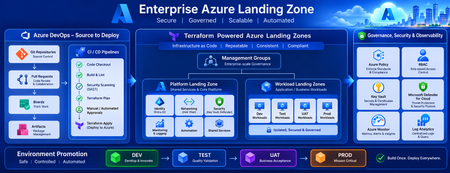
Building a Fully Automated Azure Landing Zone Deployment Using Azure DevOps and Terraform
Discover how to build a fully automated Azure Landing Zone using Azure DevOps and Terraform. This article walks through real-world Git workflows, CI/CD automation, environment promotion strategies, and governance integration to create secure, scalable, and enterprise-ready Azure environments.1.5KViews1like0CommentsFrom Prompt to Production: Open in VS Code for Terraform in Azure Copilot
We’re excited to introduce a new step in the Terraform on Azure experience: Open in VS Code, now available directly from Azure Copilot in the Azure Portal. This capability helps you move seamlessly from AI‑generated Terraform code to real Azure deployments - within a connected, guided workflow designed for enterprise scenarios. Why This Matters Infrastructure as Code with Terraform is powerful, but moving from generated configuration to a deployed environment typically involves multiple tools and handoffs. Teams need to understand Terraform state, work with remote backends, and integrate their code into version‑controlled CI/CD pipelines - often backed by Terraform Cloud or Azure‑native backends in enterprise environments. Open in VS Code brings these steps together. It bridges the gap between AI‑assisted authoring in the Azure Portal and the real‑world workflows required to validate, manage state, and deploy infrastructure with confidence. Continue Your Workflow in VS Code With Azure Copilot, you can describe your infrastructure in natural language and generate Terraform configurations in seconds. For example: “Create an Azure Container App using Terraform with a managed environment, Log Analytics enabled, and a system‑assigned managed identity to securely pull images from Azure Container Registry.” Copilot generates the Terraform configuration for you. From there, you can select Open full view to enter a full‑screen Terraform editor, and then choose Open in VS Code to launch the configuration in an Azure‑hosted VS Code environment. There’s no need to download files or set up a local development environment. VS Code for the web opens with Azure authentication already configured, along with commonly used extensions, so you can immediately focus on refining, validating, and preparing your infrastructure for deployment. Built‑in Guidance for Real Deployments Beyond editing, the VS Code experience includes built‑in, step‑by‑step guidance to help you deploy your Terraform configuration into your own Azure environment - whether you’re experimenting or preparing for production. Because Terraform relies on state management, the workflow starts by helping you choose and configure a backend. Backend Options Option 1: Azure Storage Account as a remote backend A natural fit for Azure‑native and enterprise environments. The experience guides you through creating or selecting a storage account and configuring Terraform to store state securely in Azure. Option 2: HCP Terraform (Terraform Cloud) as a remote backend Ideal for teams already using Terraform Cloud. The guided flow helps you authenticate, connect to an existing organization and workspace, and generate the required backend configuration directly into your Terraform files. Option 3: Temporary workspace for quick validation Designed for learning and experimentation. You can run terraform plan and terraform apply directly in the Azure workspace with temporary state, without committing to a long‑term backend - ideal for quick validation, but not intended for production use. Each option includes an end‑to‑end walkthrough, so you can complete backend setup and run Terraform commands without leaving the VS Code environment or searching through external documentation. Connecting Code, State, and Deployment This experience connects three essential parts of the Terraform workflow: AI‑assisted code generation in Azure Portal Copilot Interactive editing and guided execution in VS Code for the web Flexible backend options for managing Terraform state Together, these pieces make it easier to move from idea to infrastructure in a structured, supported way—whether you’re new to Terraform or managing production workloads with established CI/CD pipelines. Available Now - and What’s Next The Open in VS Code experience for Terraform is now public preview in Azure Portal Copilot. We’re continuing to invest in this workflow, including clearer deployment guidance, future integration with GitHub Actions and other CI/CD pipelines, and deeper enhancements to the full‑screen Terraform editor experience. If you haven’t tried it yet, generate a Terraform configuration with Azure Copilot and open it in VS Code to go from prompt to production end to end in one connected workflow.1.4KViews0likes0CommentsAnnouncing MSGraph Provider Public Preview and the Microsoft Terraform VSCode Extension
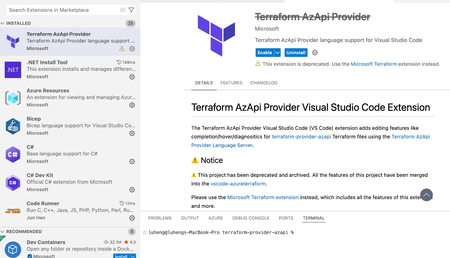
We are thrilled to announce two exciting developments in the Microsoft ecosystem for Terraform infrastructure-as-code (IaC) practitioners: the public preview of the Terraform Microsoft Graph (MSGraph) provider and the release of the Microsoft Terraform Visual Studio Code (VSCode) extension. These innovations are designed to streamline your workflow, empower your automation, and make managing Microsoft cloud resources easier than ever. Public Preview: Terraform Microsoft Graph (MSGraph) Provider The Terraform MSGraph provider empowers you to manage Entra APIs like privileged identity management as well as M365 Graph APIs like SharePoint sites from day 0 by leveraging the power and flexibility of HashiCorp Configuration Language (HCL) in Terraform. resource "msgraph_resource" "application" { url = "applications" body = { displayName = "My Application" } response_export_values = { all = "@" app_id = "appId" } } output "app_id" { value = msgraph_resource.application.output.app_id } output "all" { // it will output the whole response value = msgraph_resource.application.output.all } Historically, Terraform users could utilize the `azuread` provider to manage Entra features like users, groups, service principals, and applications. The new `msgraph` provider also supports these features and extends functionality to all beta and v1 Microsoft Graph endpoints. Querying role assignments for a service principal The below example shows how to use the `msgraph` provider to grant app permissions to a service principal: locals { MicrosoftGraphAppId = "00000003-0000-0000-c000-000000000000" # AppRoleAssignment userReadAllAppRoleId = one([for role in data.msgraph_resource.servicePrincipal_msgraph.output.all.value[0].appRoles : role.id if role.value == "User.Read.All"]) userReadWriteRoleId = one([for role in data.msgraph_resource.servicePrincipal_msgraph.output.all.value[0].oauth2PermissionScopes : role.id if role.value == "User.ReadWrite"]) # ServicePrincipal MSGraphServicePrincipalId = data.msgraph_resource.servicePrincipal_msgraph.output.all.value[0].id TestApplicationServicePrincipalId = msgraph_resource.servicePrincipal_application.output.all.id } data "msgraph_resource" "servicePrincipal_msgraph" { url = "servicePrincipals" query_parameters = { "$filter" = ["appId eq '${local.MicrosoftGraphAppId}'"] } response_export_values = { all = "@" } } resource "msgraph_resource" "application" { url = "applications" body = { displayName = "My Application" requiredResourceAccess = [ { resourceAppId = local.MicrosoftGraphAppId resourceAccess = [ { id = local.userReadAllAppRoleId type = "Scope" }, { id = local.userReadWriteRoleId type = "Scope" } ] } ] } response_export_values = { appId = "appId" } } resource "msgraph_resource" "servicePrincipal_application" { url = "servicePrincipals" body = { appId = msgraph_resource.application.output.appId } response_export_values = { all = "@" } } resource "msgraph_resource" "appRoleAssignment" { url = "servicePrincipals/${local.MSGraphServicePrincipalId}/appRoleAssignments" body = { appRoleId = local.userReadAllAppRoleId principalId = local.TestApplicationServicePrincipalId resourceId = local.MSGraphServicePrincipalId } } SharePoint & Outlook Notifications With your service principals properly configured, you can set up M365 endpoint workflows such an outlook notification template list as shown below. The actual service principal setup has been omitted from this code sample for the sake of brevity, but you will need Sites.Manage.All, Sites.ReadWrite.All, User.Read, and User.Read.All permissions for this example to work: data "msgraph_resource" "sharepoint_site_by_path" { url = "sites/microsoft.sharepoint.com:/sites/msgraphtest:" response_export_values = { full_response = "@" site_id = "id || ''" } } resource "msgraph_resource" "notification_templates_list" { url = "sites/${msgraph_resource.sharepoint_site_by_path.output.site_id}/lists" body = { displayName = "DevOps Notification Templates" description = "Centrally managed email templates for DevOps automation" template = "genericList" columns = [ { name = "TemplateName" text = { allowMultipleLines = false appendChangesToExistingText = false linesForEditing = 1 maxLength = 255 } }, { name = "Subject" text = { allowMultipleLines = false appendChangesToExistingText = false linesForEditing = 1 maxLength = 500 } }, { name = "HtmlBody" text = { allowMultipleLines = true appendChangesToExistingText = false linesForEditing = 10 maxLength = 10000 } }, { name = "Recipients" text = { allowMultipleLines = true appendChangesToExistingText = false linesForEditing = 3 maxLength = 1000 } }, { name = "TriggerConditions" text = { allowMultipleLines = true appendChangesToExistingText = false linesForEditing = 5 maxLength = 2000 } } ] } response_export_values = { list_id = "id" list_name = "displayName" web_url = "webUrl" } } The MSGraph provider is to AzureAD as the AzAPI provider is to AzureRM. Since support for resource types is automatic, you can access the latest features and functionality as soon as they're released via the provider. AzureAD will continue to serve as the convenience layer implementation of a subset of Entra APIs. We invite you to try the new provider today: - Deploy your first msgraph resources - Check out the registry page - Visit the provider GitHub Introducing the Microsoft Terraform VSCode Extension The new official Microsoft Terraform extension for Visual Studio Code consolidates AzureRM, AzAPI, and MSGraph VSCode support into a single powerful extension. The extension supports exporting Azure resources as Terraform code, as well as IntelliSense, syntax highlighting, and code sample generation. It replaces the Azure Terraform and AzAPI VSCode extensions and adds some new features. Installation & Migration New users can install the extension by searching “Microsoft Terraform” within Visual Studio Marketplace or their “Extensions” tab. Users can also click this link to the Visual Studio marketplace. Users of the “Azure Terraform” extension can navigate to “Extensions” tab and selecting the old extension. Select the “Migrate” button to move to the new extension. Users of the “Terraform AzAPI Provider” extension will be directed to the new extension: New Features Export Azure Resources As Terraform This feature allows you to export existing Azure resources as Terraform configuration blocks using Azure Export for Terraform. This helps you migrate existing Azure resources to Terraform-managed infrastructure. Open the Command Palette (Command+Shift+P on macOS and Ctrl+Shift+P on Windows/Linux). Search for and select the command Microsoft Terraform: Export Azure Resource as Terraform. Follow the prompts to select the Azure subscription and resource group containing the resources you want to export. Select the azurerm provider or the azapi provider to export the resources. The extension will generate the Terraform configuration blocks for the selected resources and display them in a new editor tab. Support for MSGraph The new extension comes fully equipped with intellisense, code completion, and code samples just like the AzAPI provider. See the next section for recorded examples of these features within the AzureRM & AzAPI providers. Preexisting Features Intelligent Code Completion: Benefit from context-aware suggestions, like property names or resource types. Code Samples: Quickly insert code samples for your resources: Paste as AzAPI: Copy your existing resource JSON or ARM Templates into VSCode with the Microsoft Terraform extension, and it will automatically convert your code into AzAPI. The below example takes a resource JSON from the Azure Portal and pastes it into VSCode as AzAPI: Migrate AzureRM to AzAPI: Move existing AzureRM code to the AzAPI provider whenever you wish to. Read more in the Guide to migrate AzureRM resources to AzAPI Feedback We value your feedback! You can share your experience with the Microsoft Terraform extension by running the command Microsoft Terraform: Show Survey from the Command Palette. Your input helps us improve the extension and better serve your needs. Conclusion Whether you are managing traditional Azure resources, modern Microsoft Graph environments, or a combination of both, the new MSGraph provider and Microsoft Terraform VS Code extension are designed to help you deliver robust, reliable infrastructure—faster and with greater confidence. Stay tuned for further updates, workshops, and community events as we continue to evolve these offerings. Your feedback and participation are invaluable as we build the next generation of infrastructure automation together.5.4KViews5likes2CommentsAzure Verified Modules: Support Statement & Target Response Times Update
We are announcing an update to the Azure Verified Modules (AVM) support statement. This change reflects our commitment to providing clarity alongside timely and effective support for our community and AVM module consumers. These changes are in preparation to allow us to enable AVM modules to be published as V1.X.X modules (future announcement on this soon 🥳 sign up to the next AVM Community Call on July 1st 2025 to learn more). What is the new support statement? You can find the support statement on the AVM website here: https://azure.github.io/Azure-Verified-Modules/help-support/module-support/#support-statements For bugs/security issues 5 business days for a triage, meaningful response, and ETA to be provided for fix/resolution by module owner (which could be past the 5 days) For issues that breach the 5 business days, the AVM core team will be notified and will attempt to respond to the issue within an additional 5 business days to assist in triage. For security issues, the Bicep or Terraform Product Groups may step in to resolve security issues, if unresolved, after a further additional 5 business days. For feature requests 15 business days for a meaningful response and initial triage to understand the feature request. An ETA may be provided by the module owner if possible. Key changes from the previous support statement In short its two items: Increasing response time targets from: 3 to 5 business days for issues And from 3 to 5 business days for AVM core team escalation Handling bugs/security issues separately from feature requests Feature requests now have a 15 business day target response time The previous support statement outlined a more rigid structure for issue triage and resolution. It required module owners/contributors to respond within 3 business days, with the AVM core team stepping in if there was no response within a further 24 hours. In the event of a security issue being unaddressed after 5 business days, escalation to the product group (Bicep/Terraform) would occur to assist the AVM core team. There was also no differentiation between bugs/security issues and feature requests, which there now is. You can view the git diff of the support statement here Why the changes? Being honest, we weren't meeting the previous support statement 100% of the time, which we are striving for, across all the AVM modules. And we heard from you that, that wasn't ideal and we agree whole heartedly. Therefore, we took a step back, reflected, looked at the data available and huddled together to redefine what the new AVM support statement and targets should be. "Yeah, but why can't you just meet the previous support statement and targets?" This is a very valid question that you may have or be wondering. And we want to be honest with you so here are the reasons why this isn't possible today: Module owners are not 100% dedicated to only supporting their AVM modules; they also have other daily roles and responsibilities in their jobs at Microsoft. Sometimes this also means conflicting priorities for module owners and they have to make a priority call. We underestimated the impact of holidays, annual leave, public holidays etc. The AVM core teams responsibility is not to resolve all module issues/requests as they are smaller team driving the AVM framework, specs, tooling and tests. They will of course step in when needed, as they have done so far today 👍 We don't get as many contributions from the open-source community as we expected and would still love to see 😉 For clarity we always love to see a Pull Request to help us add new features or resolve bugs and issues, even for simple things like typos. It really does help us go faster 🏃➡️ "How are you going to try and avoid changing (increasing) the support statement and targets in the future?" Again another very valid ask! And we reflected upon this when making these changes to the support statement we are announcing here. To avoid this potential risk we are also taking the following actions today: Building new internal tooling and dashboards for module owners to discover, track and monitor their issues and pull requests across various modules they may own, across multiple languages. (already complete and published 👍) This tooling will also help the AVM core team track issues and report on them more easily to help module owners avoid non-compliance with the targets. Continue to push for, promote, and encourage open-source community contributions Prevent AVM modules being published as V1.X.X if they are unable to prove compliance with the new support statement and targets (sneak peek into V1.X.X requirements) Looking further into the future we are also investigating the following: Building a dedicated AVM team, separate from the AVM core team, that will triage, work on, and fix/resolve issues that are nearing or breaching the support statement and targets. Also they will look into feature requests as and where time allows or are popular/upvoted heavily where module owners are unable to prioritize in the near future due to other priorities. Seeing where AI and other automation tooling can assist with issue triage and resolution to reduce module owner workload. Summary We hope that this provides you with a clear understanding of the changes to the AVM support statement and targets and why we are making these. We also hope you appreciate our honesty on the situation and can see we are taking action to make things better while also reflecting and amending our support statements to be more realistic based on the past 2 years of launching and running AVM to date. Finally we just want to reassure everyone that we remain committed to AVM and have big plans for the rest of the calendar year and beyond! 😎 And with this in mind we want to remind you to sign up to the next AVM Community Call on July 1st 2025 to learn more and ask any questions on this topic or anything else AVM related with the rest of the community 👍 Thanks The AVM Core Team2.2KViews4likes0CommentsUnlocking the Best of Azure with AzureRM and AzAPI Providers
With the recent release of AzAPI 2.0, Azure offers two powerful Terraform providers to meet your infrastructure needs: AzureRM and AzAPI. The key question is, when should you use each one? This article offers a clear guide for Terraform users, particularly those familiar with the AzureRM provider, on some ideal scenarios for each. The recommendations provided within this post are jointly provided between HashiCorp and Microsoft; click here for HashiCorp's blogpost.11KViews7likes0CommentsTerraform on Azure February 2024 Update
Welcome to our February Terraform on Azure bimonthly update! Sorry that this one took so long; moving forward, we plan to return the planned bimonthly cadence. We’ll once again open with updates in our major investment areas, then close with upcoming goals or plans. We will be aiming for the next update in April!6.2KViews4likes1Comment