Authors: Gabriel Sze and Weixian Zhang
1. Engineering an Agentic Scheduler
Scheduling looks deceptively simple until multiple constraints, shared resources, and partial commitments start interacting.
This post walks through how we built an agentic scheduler that lets an LLM reason about placements while keeping the actual scheduling process deterministic and inspectable.
Imagine scheduling a training program for a sports team. It needs four hours in total, split into two-hour sessions, with at least two days between them. Other activities already occupy parts of the week.
Where should those sessions go? At first glance, this looks like a simple calendar problem. Find four free hours and place the session.
So the engineering question is not simply:
How do we ask an agent to generate a schedule?
It is:
How do we give an agent enough freedom to reason about scheduling, while keeping the resulting schedule deterministic, inspectable, and correct?
Our application does not ask a model to produce a finished spreadsheet in one call. Instead, we decompose this into small steps.
The agent gets a much smaller responsibility: choose candidate dates, inspect available slots through tools, and propose placements.
1.1 Defining the scheduling problem
Imagine planning mixed martial arts training for Team Red, Team Blue, and Team Yellow in a shared training facility.
We call each martial arts activity a program, and each continuous training block a scheduled session.
For example, a Muay Thai program for Team Red might run over three mornings in the same week, with each morning counted as a separate scheduled session.
A program typically requires a certain number of hours, divided into sessions of an allowed duration. Team Red might train in striking and pad work, Team Blue in wrestling and submissions, and Team Yellow in conditioning and mobility.
Some programs may need scarce evening slots. Others compete for the same mat, ring, or instructor. Programs may also require rest days between sessions.
We will follow one fictional example throughout this post.
Muay Thai Sparring requires four daytime hours for Team Red, split into two two-hour sessions at least two days apart.
Team Blue and Team Yellow already have wrestling and conditioning sessions elsewhere in the shared calendar. Finding four empty hours is therefore not enough: the scheduler must place two valid sparring sessions without creating team, facility, or recovery conflicts.
Before scheduling starts, the application converts source data and user-provided requirements into explicit, typed scheduling constraints. An optional review step allows a person to provide additional guidance.
The important boundary is that the scheduler operates on structured input rather than interpreting raw source material directly.
1.2 Why involve an agent at all?
Not every scheduling preference is naturally expressed as a hard constraint.
Historical patterns may suggest preferred timings, while users may provide intent such as to keep Friday relatively light, or try to keep related activities in the same half of the week.
These preferences require interpretation rather than simple constraint checking.
We therefore use the model where reasoning is useful: interpreting intent, exploring candidate placements, and deciding what to try next.
We keep explicit rules: session duration, required hours, spacing, conflicts, and other conditions that can be evaluated deterministically.
It gives us a concrete contract: the agent proposes allocations against explicit requirements; the application owns the resulting state and the checks used to assess it.
2. Designing the Software Architecture
Code snippets are simplified from the source to show the shape of each component, not exact signatures.
2.1 Components
Frontend: a React 19 single-page app (Vite, MUI), authenticated with Entra ID.
- Talks to the backend through two channels only: REST calls to start or steer a run (program scheduling), and one long-lived SSE stream for everything coming back.
- Holds no run state of its own. Run status, progress, the live calendar and the finished workbook all arrive as replies on the stream, so a reload rebuilds the view from what the backend sends.
Everything from the Gateway onwards is the backend: one Node.js service on Azure Container Apps that the frontend reaches only through REST and SSE.
Gateway: a Fastify API, the backend's only entry point.
- Ingress is REST: POST /api/schedule starts a run; POST /api/steer resumes a paused one with the user's instructions.
- Egress is SSE: GET /api/events holds one stream per browser tab.
- Never runs agent code. It authenticates the request, writes the upload to the session's folder,
enqueues a command that references that folder and returns at once:
Mailroom: the asynchronous boundary between the gateway and the agents, made of two Postgres-backed queues, each drained by its own polling loop.
Agents: two LangGraph graphs for Program IQ Agent and Scheduling Agent
Session: one scheduling run for one user. Each last cycle training program .xlsx upload starts a new session with its own ID, so a user running three schedules at once has three sessions. Each session has its own dedicated workspace folder structure:
/sessions/{username}/{sessionId}/

  input/    ← the uploaded last cycle training program .xlsx
  work/     ← agent scratchpad: extracted-demand-profile.json, raw rows, traces
  output/   → the scheduled training programs .xlsx
A session can hold several agent commands, such as a run plus the user's later answer through /api/steer. Every reply carries a sessionId and a commandId, so the frontend can tell which run and which command it belongs to.
Storage:
- Postgres: the Mailroom's two queue tables, plus LangGraph checkpoints, so a run's graph state survives a restart. Using one database for queues and state removes the need for a separate message broker.
- Azure Files: On Azure, /sessions lives on an Azure Files share mounted into the container at /mnt /.agent, so session files are present in multiple replicas of Azure Container Apps and can survive a restart .
Azure AI Foundry: hosts the model the agents call.
Agent Tracer: records every model call and tool call as OpenTelemetry traces in Azure Application Insights, plus a per-session trace file in work/.
Identity: Entra ID covers user sign-in and the backend's access to Postgres and Foundry, through managed identity.
2.2 Key Design Considerations
Why REST in and SSE out, instead of WebSockets?
Our communication pattern is asymmetric: clients submit scheduling requests, while agents produce asynchronous updates over several minutes.
We chose REST for incoming requests because it handles multipart Excel uploads, authentication, and request validation through standard HTTP mechanisms.
For outgoing updates, Server-Sent Events (SSE) was a better fit than WebSockets. The browser only needs to receive progress and agent responses, not maintain a bidirectional conversation. SSE also avoids the overhead of repeatedly polling for updates that arrive at unpredictable intervals.
To handle disconnections, agent replies are persisted in reply_message, allowing the client to retrieve missed updates when it reconnects. The implementation is described further in this post.
Why a command queue instead of executing agents directly within HTTP requests?
Scheduling runs can take several minutes, making it impractical to execute agents directly within an HTTP request.
Instead, we introduced a Postgres-backed command queue to separate request handling from agent execution. When a request arrives, the gateway persists the command and immediately returns 202 Accepted, allowing the agents to continue working independently of the HTTP connection.
This separation also improves reliability and gives us greater control over execution. Commands are persisted before processing begins, so they are not silently lost if a worker crashes or restarts. Interrupted runs can be identified, marked as failed, and surfaced to the user.
- Command loop (inbound): claims the next command from agent_command, runs the agents on it, and settles it as completed, paused or failed. Claims use row locking, so several replicas can drain one queue without running a command twice.
// domain/mailroom/command-loop.ts while (!stop.stopping) { if ((await pickAndExecuteCommand(helper)) !== 'idle') { idleWait = IDLE_WAIT_MS; // work arrived: drain greedily continue; } await stop.sleep(idleWait); idleWait = nextIdleWait(idleWait); // empty queue: back off } - Reply loop (outbound): delivers rows from reply_message to the SSE streams that its own replica holds. Each replica serves only the users connected to it, so there's no broker and no sticky sessions. Undelivered replies stay queued until the user reconnects.
The loops never call each other. Commands flow in, replies flow out, and the agents write their own replies.const users = sse.streamingUsernames(); // who is connected to THIS replica for (const reply of await queue.getReplies(users)) { if (sse.send(reply.username, reply) > 0) await queue.clearDelivered(reply); }
The command loop processes one command at a time, limiting concurrent scheduling runs and preventing too many requests from hitting the model at once. Additional commands simply wait in the queue until capacity becomes available.
By keeping the execution loop separate from the agent graph, we can replace the real agents with a mock implementation and test the entire flow, from the gateway through the command queue to SSE responses, without making any model calls.
// domain/mailroom/agent-run.ts — the one seam: swap the import (and its call)
import { runAgentStream } from '../agent/agent-graph.ts';
// import { runMockAgentStream } from '../agent/mock-agent-graph.ts';

// domain/agent/mock-agent-graph.ts — same state, same checkpointer, one node that only talks
const graph = new StateGraph(AgentState)
    .addNode(MOCK_REPLIER, createMockReplier())
    .addEdge(START, MOCK_REPLIER)
    .addEdge(MOCK_REPLIER, END)
    .compile({ checkpointer: await checkpointer() });
Why Postgres instead of Azure Service Bus or another broker?
Rather than introducing a dedicated message broker, we chose to build our command queue on Postgres, which was already serving as the application's primary database.
Beyond storing application data, Postgres also manages the command queue, agent replies, execution history, and LangGraph checkpoints.
This allows us to consolidate several responsibilities into a single service, reducing the operational overhead of managing, securing, and monitoring additional Azure resources.
We also kept the queue implementation behind a light interface (pickNext, complete, pause, fail), allowing us to swap Postgres to a dedicated broker such as Azure Service Bus if throughput requirements grow.
Ultimately, we chose to optimize for simplicity at our current scale, while keeping the architecture flexible enough to evolve.
3. From historical schedules to structured demand
3.1 Uploading past programs
The workflow begins when the user uploads reference programme workbooks from previous cycles, along with any relevant contextual information that can help ground the scheduler when planning future programmes.
Each uploaded .xlsx file is saved to a new session folder, after which the gateway places a lightweight command on the queue containing the user, session Id, and plan start date.
The files themselves are not included in the command, keeping the queue payload small.
This allows the HTTP request to return immediately while the ingestion process runs asynchronously, without tying up the web server.
An optional review: true flag allows users to pause the workflow after ingestion to review the extracted information before proceeding with scheduling. We'll cover this further in the Human-in-the-loop section.
// api/rest-api.ts
for (const upload of uploads) await writeFile(join(input, upload.filename), upload.content);
const command: AgentCommand = {
    commandId: nextUlid(), username, sessionId, type: 'file-upload', planStart, files, review,
};
3.2 Program IQ: extracting the demand profile and insights
Program IQ serves as an intelligence layer that uses historical programmes to understand the scheduling requirements for the upcoming cycle.
It starts by analysing the Excel workbooks (or whatever additional context) uploaded by the user, which contain the programmes conducted in previous cycles.
Rather than relying entirely on an LLM, we separate interpretation from computation.
The LLM interprets the varying structures and layouts of the workbooks, while deterministic code processes the extracted information to build a demand profile for each programme and team.
This captures details such as the number of sessions required, their duration, recurrence patterns, preferred time slots, and spacing between sessions.
// domain/agent/program-iq/program-iq-agent-graph.ts
new StateGraph(IQState)
    .addNode(NODES.phaseFilesPairing, createPhaseFilesPairing())          // filename → phase
    .addNode(NODES.extractRawPrograms, createExtractRawProgramsAgent())   // LLM: grid → rows
    .addNode(NODES.normalizeRawPrograms, extractProgramIQ())              // code: rows → demand
    .addEdge(START, NODES.phaseFilesPairing)
    .addEdge(NODES.phaseFilesPairing, NODES.extractRawPrograms)
    .addEdge(NODES.extractRawPrograms, NODES.normalizeRawPrograms)
One pi-agent-core agent per sheet, up to 6 at once. Each agent gets a system prompt (how past programs are laid out, the day's periods, what to ignore), one sheet name and two tools.
It loops until every activity on the sheet is reported.
Two tools
The Program IQ agent has two tools: one to read the spreadsheet and another to report the extracted information.
Rather than following a hardcoded sequence, we chose to introduce an LLM that sits between these tools, deciding when to read the workbook and how to interpret and report its contents.
- read_sheet tool uses exceljs to turn a sheet into text – understands layout, merged cells, colors, column positions, and flattens that layout into plain lines the model can read.
- report_activities tool records what the model found. The model reports each activity as one line: date, team, program, location, colour, periods, kind.
2024-06-17 Team Red Striking · FF92D050 1,2 training
From activities to demand profiles (code)
Plain code counts the reported activities into a demand profile per program and team. No LLM is involved, so every number is traceable back to the source files but meant to softly guide future planning.
|
Demand profile |
What it holds |
|
Volume |
Total day and night periods |
|
Session length |
Shortest and longest session |
|
Rhythm |
How often it recurs, e.g. weekly on Fridays |
|
Slot pattern |
Which periods of the day it used |
|
Spacing |
Fewest days between two sessions |
The demand profile is the signature. Teams with identical demand profiles are grouped together to avoid duplicating the same scheduling requirements.
For example, if Team Red and Team Blue require the same number of sessions, durations, recurrence patterns, and spacing, they can share a single demand profile.
This grouping is purely for representation – each team still needs its own sessions scheduled independently.
The output: One row per program and matching group of teams:
Open Mat   [Team Red, Team Blue]   4 hours a week · 4-hour sessions · weekly on Fri · ≥ 7 days apart
Sparring   [Team Red]              6 hours a week · 2–3-hour sessions · Tue and Thu · ≥ 2 days apart
demand profile .xlsx as input to Scheduler Agent
Nobody types this demand in; it is read back from what the teams previously trained. It is what the Scheduling Agent places onto next cycle's calendar, and shared rows become shared batches.
4. Human-in-the-loop: review, steer and resume
Historical activity tells us what happened before, but not necessarily what should happen next. Users may want lighter Fridays, prefer certain activities earlier in the week, or restrict specific programmes to specific days.
Before scheduling begins, users can review the extracted requirements and provide additional instructions through a separate steer command.
This command incorporates their preferences into the existing requirements and resumes the scheduling workflow.
We currently support two types of steering guides:
- Overall preferences apply to the scheduling run as a whole: Prefer lighter Friday afternoons where possible.
- Program-specific apply to a particular programme in “User Steering” column
These instructions are propagated to the relevant scheduling agents, with programme-specific instructions attached to the corresponding activities across the scheduling tiers.
Where user instructions conflict with historical patterns, current user intent takes precedence.
However, steering an LLM is not the same as enforcing a constraint.
Natural-language instructions can influence how agents propose and evaluate placements, but only constraints explicitly implemented in code can be deterministically enforced.
For example, "Prefer lighter Friday afternoons" may influence which slots an agent considers, while "Sessions must be at least two days apart" can be validated after every placement.
4.1 Extracted Program IQ: pause for human steering and approval
Rather than keeping an agent running while waiting for user input, the system persists the paused state in the store and sends a steer-request containing the extracted programmes for review.
This allows the agent to process other requests in the meantime.
The user can then review the extracted demand profile and choose to either approve it as-is or provide additional instructions:
- Approve as-is: submit a steer command without steering guides.
- Steer and approve: submit a steer command with steering guides to influence the scheduling process.
In both cases, the steer command resumes the workflow and initiates scheduling using the approved requirements.
// domain/agent/agent-graph.ts
await writeExtractedPrograms(session, { plan, programs });
if (command.review === true) {
    await enqueueReply(newSteerRequest(command, steerableProgrammes({ plan, programs })));
    return 'paused';
}
4.2 Steer and Resume
As shared, steering can take two forms: program-specific (guides[]) and an overall preference that applies to the entire scheduling run.
Both are optional and serve as guidance for the scheduling agents rather than automatically enforced constraints.
The request creates a new steer command associated with the existing session.
Instead of reprocessing the original Excel workbooks, the workflow reloads the saved demand-profile.json, attaches any programme-specific instructions to their corresponding records, and proceeds directly to scheduling.
if (command.type === 'steer') {
    const steered = withSteeringGuides(await readExtractedPrograms(session), command.guides);
    yield* schedulePhases(command, session, steered, command.brief ?? '', onProgress);
}
5. Inside the Scheduling Agent and Harness Engineering
Before we dive in, let's establish a few key terms and how they relate to one another:
- Slot (or Period): A single unit of time, typically 1 hour, but configurable to other durations.
- Session: A scheduled training instance consisting of one or more slots.
- Program: A type of training, such as Muay Thai Clinching or Pad Work. Each program can have multiple sessions.
- Grid (or Calendar): The scheduling interface where slots and sessions are organized and displayed.
In short, a program contains sessions, each session occupies one or more slots, and everything is represented on a calendar grid.
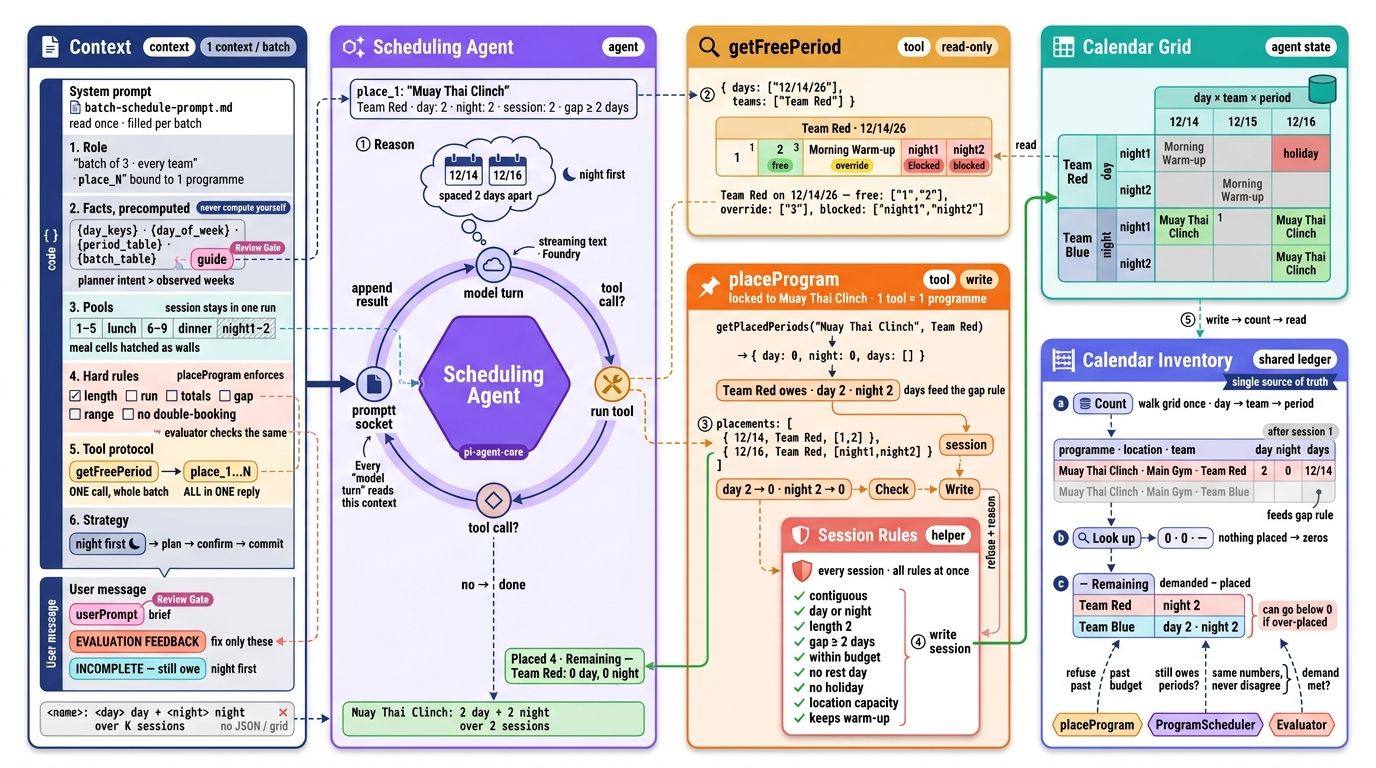
The LLM's reasoning and tool-calling loop is only one part of the scheduling system.
Around it, we need to manage what context the agent receives, which tools it can access, how scheduling state is maintained, how proposed changes are applied, and what happens when the schedule remains incomplete.
In our implementation, LangGraph orchestrates the overall scheduling workflow, while pi-agent-core manages the LLM's reasoning and tool-calling interactions within individual stages.
Other stages, such as deterministic seeding and schedule evaluation, run entirely through code without invoking an LLM.
new StateGraph(AgentState)
    .addEdge(START, 'HolidaySeeder')            // code
    .addEdge('HolidaySeeder', 'RoutineSeeder')  // code
    .addEdge('RoutineSeeder', 'EventScheduler') // LLM
    .addEdge('EventScheduler', 'ProgramScheduler')
    .addEdge('ProgramScheduler', 'Evaluator')   // code
    .addConditionalEdges('Evaluator', (s) => failed(s) && s.round <= 3 ? 'ProgramScheduler' : 'FillerScheduler')
    .addEdge('FillerScheduler', END)
    .compile({ checkpointer: new PostgresSaver(pool) });
Before each agentic scheduling phase, the harness prepares the context relevant to the current batch and provides tools scoped to that task.
The agent can inspect availability and propose placements, but it does not maintain its own separate version of the schedule.
Instead, its tools interact with the same calendar state used by the application, ensuring that scheduling decisions are based on a consistent view.
The process begins deterministically. Existing routines, breaks, and recurring activities that can be reliably identified are placed onto the calendar before the agent begins scheduling.
The agent then works with this partially populated calendar to find suitable slots for the remaining activities.
Once placements are made, deterministic evaluators check the updated schedule for completeness and constraint violations, rather than relying on the LLM to assess its own work.
5.1 What the agent works with (context engineering)
An important part of building the scheduling agent is deciding what information the LLM needs, what it can retrieve through tools, and what should remain in application state.
Rather than asking the model to work out information the application already knows, we provide stable facts such as available dates, their corresponding weekdays, and the ordering of scheduling periods directly in its context.
Our approach to context engineering follows a simple principle: provide stable facts upfront, retrieve changing calendar information through tools, and keep the authoritative scheduling state outside the conversation.
Calendar grid (agent state) - The calendar is a nested dictionary held in memory, schedule[day][team][period], where each entry holds what is scheduled in that slot.
The agent tools and calendar inventory work on this one object directly, so a write is visible to the next read at once, with no database in between.
System prompt - The system prompt is a Markdown template, batch-schedule-prompt.md, read from disk once. Before the first turn, code fills its {placeholders} with this run's values:
// domain/training/scheduler.ts
systemPrompt: fillPromptTemplate(template, {
    day_keys: phase.dayKeysJson,       // the dates the model may use
    day_of_week: phase.dayReference,  // each date whether is it a weekday so model knows the weekdays
    period_table: PERIOD_TABLE,        // the slots in a day
    // …
}),
The filled prompt tells the model:
- Role: which program to place, and the one write tool bound to it.
- Facts: dates, weekdays and slot layout, worked out in advance. The prompt says "never compute these yourself", because models get calendar arithmetic wrong.
- Rules: what a valid session looks like, stated so the model can plan without trial and error.
- Tool protocol: read once, then send every placement in one reply.
- Strategy: plan → confirm → commit.
User prompt holds what changes from run to run: the user’s steering guide and, on a retry, only the sessions that failed.
5.2 What the scheduling agent does
An important part of designing the scheduling agent is deciding what it can read and what it is allowed to change.
Rather than giving the agent unrestricted access to the calendar, we expose a set of tools with clearly defined boundaries.
Read tools provide the information needed to make scheduling decisions, while write tools constrain how placements can be made.
A query specifies candidate days, teams, and an optional slot window. The response distinguishes between:
- empty slots
- commitments that may be overridden
- hard blocks that cannot be changed
To minimise unnecessary context, the response is compressed. For example, if an entire day is unavailable, the tool returns a short marker rather than listing every blocked period individually.
The prompt encourages a simple search pattern:
choose candidate dates → query free slots in candidate dates → propose a placement → inspect alternatives if necessary
Agent loop
The agent runs a plain loop: model turn → tool call[]? → run each tool → append result → model turn. Each result is the model's only view of the calendar. The loop ends when there is no tool call.
1. Plan - The model chooses candidate days from the facts in its prompt, without calling a tool.
The planning is cheap reasoning, so the tools only confirm and commit.
2. Read with getFreePeriod
The model pass in the dates as tool parameter for every team it needs, in one call:
{ "days": ["12/14/26", "12/16/26"], "teams": ["Red"] } It gets back one answer per day and team:
{ "day": "12/14/26", "team": "Red", "free": ["1", "2"], "override": ["3"], "blocked": ["night1", "night2"] } free is empty, override holds an overridable routine activity (e.g resting) the program may replace, and blocked is off limits. The model picks from these lists rather than reading the calendar, so the context window stays small.
3. Write with placeProgram - The model sends all the program's sessions in one call.
The tool runs two checks:
- 3.1 Work out how many slots the program is left to place - Each programme owes a fixed number of slots per company. The tool subtracts the slots the calendar already holds, and refuses any session that would go over what's left.
// domain/agent/tools/place-program.ts
const inventory = takeCalendarInventory(plan);
for (const team of program.teams) {
    const placed = getPlacedPeriods(inventory, program, team);
    remaining.set(team, program.demand - placed.periods);  // what it may still place
    placedDays.set(team, placed.days);                     // what the spacing rule checks against
}
The count is read from the calendar grid, not kept in the tool. On a retry, a fresh tool is built over the same grid, so sessions placed in earlier rounds still count against the budget and the spacing rule.
3.2 Check every rule at once - Each rule is a small function that returns a reason, or nothing if the session passes. placeProgram runs them all on every session and keeps every reason. Some examples of the rules:- nonContiguousReason() - the slots run back to back with no gaps
- resolveDayOrNight() - all daytime or all night-time, never both
- tooCloseReason() - enough days after the program's last session
- overDayNightPoolBudget() - no more slots than the program still needs
- Reflection pattern: a session that fails any rule is refused, and all its reasons go back to the model. The model fixes them in one resend instead of one retry per rule.
4. Commit - Valid sessions are written to the grid.
The tool replies with placed, refused (with reasons) and still owed.
5. Definition of done - A program is scheduled when it owes zero periods for every team.
The model then makes no tool call, and the loop ends with a one-line summary. Anything still owed → the scheduler re-prompts with INCOMPLETE
5.3 Batches, lanes and the agent loop
The harness doesn't hand every program to one agent. It splits the work into small batches, each running its own agent loop, then uses planLanes() to decide which batches can run at the same time.
const { sharedLane, teamLanes } = planLanes(programs, batchSize=3); Plan Lanes - Plans two kinds of lane by comparing each team's demand profile: rhythm, session length, volume, spacing and slot pattern.
We earlier discussed how the demand profile is the team’s signature – it's basically reusing this concept.
- Several teams with the same demand profile → the shared lane.
- One team, or a demand profile no other team matches → that team's team lane.
The split is by matching demand profile, not by program name, all five parts must be equal.
- Team Red and Team Blue both do Open Mat, 4 hours a week on Fridays → one row - Open Mat [Team Red, Team Blue], in the shared lane.
- Team Red does Sparring 6 hours a week, Team Blue 4 → two rows - Sparring [Team Red] and Sparring [Team Blue], each in its own team lane.
It then cuts each lane's programs into batches of BATCH_SIZE = 3, and returns a LanePlan (example at the end of this section).
1. Shared lane - It holds programmes that several teams need in the same amounts, such as Open Mat.
It runs first, one batch at a time, because its batches write into several teams' calendars and nothing else can safely run alongside them.
2. Team lanes - Each team gets one lane, and a lane runs one agent at a time.
- A lane's batches run in order. Each batch of up to three programmes gets a new agent, which places them and ends before the next batch starts.
- Lanes run in parallel. Up to LANE_WIDTH = 4 lanes run at once, and a fifth team's lane starts when one of the first four finishes. All lanes write into one shared calendar, but each writes only its own team's columns, so parallel lanes can't collide.
interface LanePlan {
    shared: TrainingProgram[][];     // batches → programs, same calendar grid
    lanes:  TrainingProgram[][][];   // lanes → batches → programs, same calendar grid
}

{
  shared: [ [Open Mat] ],
  lanes: [
    [ [Striking, Grappling, Pad Work], [Clinch Work, Footwork] ],   // Team Red: 2 batches
    [ [Wrestling, Takedowns, Submissions], [Guard Passing] ],       // Team Blue: 2 batches
    [ [Conditioning, Mobility] ],                                   // Team Gold: 1 batch
  ],
}

- shared[0] = [Open Mat], the first shared batch, which is one agent.
- lanes[0] = Team Red's lane, a list of 2 batches.
- lanes[0][0] = [Striking, Grappling, Pad Work], Team Red's batch 1, which is one agent conversation.
- lanes[0][1] = [Clinch Work, Footwork], Team Red's batch 2, the next agent.
- lanes[0][0][1] = the Grappling TrainingProgram.
6. How we determine correctness
The two level evaluators checks five rule families:
- exact coverage of day and night requirements
- spacing between scheduled sessions
- session length
- valid day/night pools and meal boundaries
- resource capacity.
It reads the accumulated calendar grid after the main scheduling pass, not a summary written by the model.
Write-time evaluation and whole-grid evaluation serve different purposes.
Two individually acceptable blocks can touch and become one overlong block in the assembled calendar. Likewise, refusing to exceed a budget does not establish that the full budget was placed.
6.1 Whole-grid evaluation
Plain code grades the calendar; the model never judges its own work. Five rules run, and only the failing programs go back, up to 3 times.
The evaluator gives an objective pass or fail. The model never judges its own work.
Five rules.
- coverage: placed equals demanded.
- gap: sessions are spaced far enough apart.
- session-length: each session is the right size.
- pool: day work in day slots, night work in night slots, nothing in meal times.
- resource: no location over capacity.
Failures. Each failure names its program, team and what broke. On a retry, the scheduler re-runs only the failing programs, each with its own list of what to fix.
6.2 Write-time checks
Before a scheduled session is committed, the placeProgram tool checks constraints such as:
- allowed session length
- spacing from existing sessions
- remaining scheduling budget
- resource capacity
If a check fails, the proposed session is rejected before the calendar changes. The tool returns a reason that the agent can use on its next attempt.
Suppose Activity A requires two-hour sessions, but the agent proposes only slot 1.
That one-hour block fails the session-length check. Nothing is written. The agent can then resubmit slots 1–2. If the new proposal passes the checks, those two hours are committed.
The important distinction is that the agent is correcting a rejected proposal, not undoing an already committed placement.
7. Agent's real-time progress
The agents report as they work; the browser never polls. Progress status, calendar snapshots and finished workbooks stream in over SSE.
A run takes minutes per phase, so the user sees agent working instead of a spinner.
Graph nodes post replies onto the reply queue as they go, and the mailroom reply-loop streams them to the browser over SSE.
Three reply kinds
- ephemeral-notice: a progress line, e.g. "Phase 1 — programs to schedule: 42".
- grid: a snapshot of the calendar, so that frontend gets live calendar updates of programmes’ slots.
- file-download: Each workbook is saved to output/ as soon as it's finished, then sent straight to the browser as a download over SSE.
8. Tracing agent trajectory
pi-agent-core exposes an onPayload hook that intercepts requests before they reach the model, allowing us to trace every prompt, tool call, and final answer.
Tool results are also traced but truncated.
Each trace goes to three sinks at once: the console, the session's work/ folder and Azure Application Insights.
We study the conversation logs to identify excessive conversation turns and tool calls, and to trace incorrect schedules back totheir root cause.
const agent = createPiAgent(plan) {
onPayload: (payload) => {
   trace(payload as LLMPayload);
}
} Example. Each agent writes its own conversation as .jsonl files in session's work/ folder.
/sessions/{username}/{sessionId}/work/

  program-iq-Wk-1.jsonl                                  ← one file per sheet
  program-iq-Wk-2.jsonl
  ProgramSchedulerAgent-Striking-Grappling-Pad-Work.jsonl  ← one per batch
Each turn in a conversation is one JSON line.
{"agent":"program-iq-Wk-2","turn":1,"role":"user","content":"Sheet: Wk 2. Report every activity in it."}

{"agent":"program-iq-Wk-2","turn":2,"role":"assistant","tool_calls":[{"name":"read_sheet","arguments":{"sheet":"Wk 2"}}]}

{"agent":"program-iq-Wk-2","turn":3,"role":"assistant","tool_calls":[{"name":"report_activities","arguments":{"activities":["2025-04-01 Team Red Striking Main Gym 4,5 training","2025-04-01 Team Blue Wrestling Mat Room 4,5 training","…"]}}]}

{"agent":"program-iq-Wk-2","turn":3,"role":"tool","content":"24 activities, 24 so far."}
9. Looking forward: the potential applications and improvements
Although this application was designed for training programme scheduling, the underlying engineering tactics and patterns applies to other planning problems that combine structured constraints with less explicit human preferences.
Potential domains include workforce rostering, facility and equipment allocation, maintenance planning, logistics coordination, and project scheduling.
These domains share similar characteristics: multiple parties compete for limited resources, some requirements must always be satisfied, and other preferences require interpretation and trade-offs.
There are also several areas where the scheduler could be improved.
Optimizing beyond correctness
The current implementation primarily determines whether a schedule is complete and valid.
A future version could score multiple valid schedules against objectives such as resource utilization, schedule compactness, adherence to user preferences, or the number of existing activities overridden.
This would allow the system to distinguish between a schedule that simply passes validation and one that is operationally preferable.
Targeted replanning
A user may want to change one programme, unavailable date, or resource constraint after the schedule has been generated.
Rather than regenerating the entire calendar, the scheduler could identify the affected placements and replan only that portion of the schedule.
Supporting targeted replanning would require the system to preserve dependencies between scheduling decisions so that it can determine which programmes and resources are affected by a change.
Clearer explanations for scheduling decisions
The current traces make the agent's execution inspectable to developers.
A future version could expose model’s reasoning and turn traces into user-facing explanations, such as why a programme was placed on a particular date or which preference could not be satisfied.
These explanations should be derived from tool results and evaluator outcomes rather than relying on the model to reconstruct its reasoning after the schedule has been completed.
This boundary is what makes the pattern reusable: give the agent room to reason, while keeping the resulting system deterministic, inspectable, and operationally manageable.
Libraries and Resources
pi-agent-core - https://github.com/earendil-works/pi/tree/main/packages/agent
LangGraph - https://github.com/langchain-ai/langgraph
exceljs - https://github.com/exceljs/exceljs
zod - https://zod.dev/#introduction
Azure Database for PostgreSQL - https://learn.microsoft.com/en-us/azure/postgresql/
Azure Container Apps - https://learn.microsoft.com/en-us/azure/container-apps/overview
Microsoft Foundry - https://azure.microsoft.com/en-us/products/ai-foundry/models/

 Microsoft