llm
72 TopicsFrom Jev to Your Laptop: Building "System One" Decision Models in ONNX with Mobius
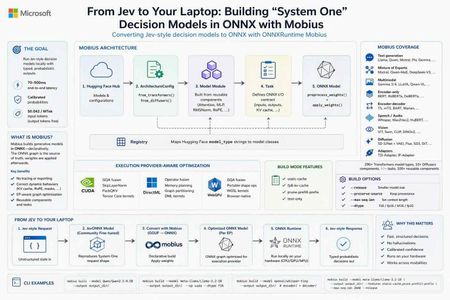
0. Why I'm writing this now Two things landed on my radar in the same week. First, TypeSafe AI published "Introducing System One Models & Jev" (Sep 15, 2026) and the developer community immediately started arguing about it. The pitch is unusual: instead of another chat model, Jev is described as "a new class of frontier models built to make fast, structured decisions that software can use directly." The post frames Jev as "a frontier-intelligence function call: unstructured state in, typed probabilistic decisions out" — and notes that while "Jev gives up string generation, it's optimized for structured outputs and can't hallucinate." The numbers in that post are what got everyone's attention: end-to-end response times of 70ms–500ms versus 3–329 seconds for frontier LLMs, input tokens at $0.042/MTok with output tokens free, and a claim that every answer arrives with a calibrated probability — "higher confidence means higher accuracy." The name itself is a thesis: TypeSafe named Jev after William Stanley Jevons, expecting that "every order of magnitude drop in the cost of intelligence unlocks orders of magnitude more use cases." Second — and this is the part that matters for anyone who builds on Microsoft's AI stack — onnxruntime/mobius has been quietly shipping at a furious pace. It's the piece of infrastructure that makes it realistic to take a model like this, in whatever format it arrives, and run it as an ONNX graph on hardware you control. So I built the bridge. kinfey/JevONNX takes an open, community-fine-tuned model that reproduces the System One request shape, converts it from GGUF to CPU ONNX with Mobius, and serves typed probabilistic decisions locally. This post covers three things: what Mobius is, how it differs from the ONNX Runtime GenAI Model Builder you may already be using, and how the JevONNX sample puts it together. 1. What is Mobius? Mobius builds generative models in ONNX. That preposition is the whole idea. From the repo's own description, Mobius provides "ONNX model definitions for GenAI using the onnxscript.nn API" — model definitions for "LLMs, MoE, multimodal, encoder-only, encoder-decoder, vision, audio, and diffusion models — built directly as ONNX graphs using onnxscript.nn.Module." The key sentence, and the one worth reading twice: "Rather than tracing or exporting PyTorch models, it constructs the ONNX graph declaratively, then applies pretrained HuggingFace weights." Why "declarative construction" is a big deal If you've ever exported a model to ONNX the traditional way, you know the failure modes. You run torch.onnx.export, the tracer executes one concrete path through Python control flow, and anything dynamic — a KV cache branch, a rotary embedding computed with a Python if, a sliding-window mask — either silently bakes in a constant or explodes into an unreadable subgraph. You then spend a week diffing graphs. Mobius inverts this. The graph is the source of truth, written as composable modules, and the weights are applied afterwards. The architecture in the README is four clean layers: HuggingFace Hub │ ▼ ArchitectureConfig ◄── from_transformers() / from_diffusers() │ ▼ Model Module ◄── Reusable Components (Attention, MLP, RMSNorm, RoPE, …) │ ▼ Task ◄── CausalLMTask, VisionLanguageTask, VAETask, DenoisingTask, … │ ▼ ONNX Model ◄── preprocess_weights() + apply_weights() Components — onnxscript.nn.Module building blocks (Attention, MLP, DecoderLayer, RoPE, VisionEncoder, MoELayer…) Models — full architectures composed from those components Tasks — define the ONNX graph's I/O contract (inputs, outputs, KV cache) Registry — maps HuggingFace model_type strings to model classes Adding a new architecture becomes writing a model definition, not debugging an exporter. Mobius even ships developer skills in .agents/skills/ (adding-a-new-model, reusable-components, moe-models, multimodal-models, writing-tests, writing-rewrite-rules) so an AI coding agent can do the legwork with you. Coverage This isn't a toy. The repo claims 290+ Transformers model types and 10 Diffusers component types across 40+ task types and 100+ reusable components, spanning: Category Examples Text generation Llama 2/3/4, Mistral, Qwen 2/2.5/3/3.5/3.6, Phi-3/3.5, Gemma 1/2/3/4, Granite, GPT-2, OPT, OLMo, SmolLM3 Mixture of Experts PhiMoE, GPTOSS, Mixtral, OLMoE, DeepSeek-V2/V3, Qwen2-MoE, Qwen3-MoE, Qwen3-Next, GLM-4-MoE, Arctic, DBRX, Jamba Multimodal Gemma 3/4, Phi-4MM (vision + audio + LoRA), LLaVA, InternVL2, MiniCPM-V 4.6, Qwen2.5-VL, Qwen3-VL, Pixtral Encoder-only BERT, RoBERTa, ALBERT, DeBERTa, DistilBERT, ELECTRA, XLNet Encoder-decoder BART, T5/mT5, Marian, M2M-100, Pegasus, BigBird-Pegasus Speech-to-text Whisper, Moonshine, Moonshine Streaming, FastConformer-RNNT, FunASR, GLM-ASR, Qwen3-ASR, SenseVoice Audio Wav2Vec2, HuBERT, WavLM, SpeechT5 Vision ViT, BEiT, DeiT, DINOv2, Swin, CLIP, SigLIP Diffusion Stable Diffusion (UNet + VAE + ControlNet), Flux, SD3, DiT, QwenImage / Qwen-Image-Edit-2509, HunyuanDiT, CogVideoX Adapters T2I-Adapter, IP-Adapter The five-minute version pip install -e . from mobius import build pkg = build("meta-llama/Llama-3.2-1B") pkg.save("output/llama-3.2-1b/") Static KV cache, when you know your max sequence length up front: from mobius import build, CausalLMTask task = CausalLMTask(static_cache=True, max_seq_len=2048) pkg = build("meta-llama/Llama-3.2-1B", task=task) pkg.save("output/llama-3.2-1b-static/") EP-aware optimization — the graph itself is tuned per execution provider, "each with the right set of fused kernels and lowering passes applied automatically": # CUDA: GQA fusion, SkipLayerNorm, PackQKV pkg = build("meta-llama/Llama-3.2-1B", execution_provider="cuda", dtype="f16") # WebGPU: GQA fusion, Shape ops replaced with portable alternatives pkg = build("meta-llama/Llama-3.2-1B", execution_provider="webgpu", dtype="f16") And the CLI, which is what we'll use later: mobius build --model Qwen/Qwen2.5-0.5B --output output_dir/ mobius build --model meta-llama/Llama-3.2-1B --output output_dir/ --ep cuda --dtype f16 mobius build --model openai/whisper-tiny --output output_dir/ # encoder/ + decoder/ Build-mode toggles use a cargo-style --features flag — available features are static-cache, fp8-kv-cache, prune-prefill-prefix, and text-only: mobius build --model meta-llama/Llama-3.2-1B --output output_dir/ \ --features static-cache,prune-prefill-prefix --max-seq-len 2048 --release strips build-time debug and provenance metadata to reduce saved model size, while preserving functional metadata keyed with the mobius. prefix. 2. Mobius vs. the ONNX Runtime GenAI Model Builder This is the question I get every time I demo Mobius, so let's be precise. Both are Microsoft tools, both produce ONNX, and they are not competitors — they sit at different points on the same pipeline. The ONNX Runtime GenAI Model Builder describes itself as the tool "for quickly creating optimized and quantized ONNX models within a few minutes that run with ONNX Runtime GenAI." Its output is a deployment-ready package: model.onnx plus genai_config.json plus tokenizer files, wired for the onnxruntime-genai runtime. Its architecture list is explicitly curated — AMD OLMo, ChatGLM, DeepSeek, ERNIE 4.5, Gemma, gpt-oss, Granite, Granite MoE Hybrid, HunYuan Dense V1, InternLM2, LFM2, LFM2 MoE, Llama, Mistral, Nemotron, Phi, Qwen, SmolLM3, Whisper — and the README states plainly that "it is intended for supporting the latest, popular state-of-the-art models." Mobius, by contrast, is a model-definition library: a component algebra for describing generative architectures as ONNX graphs, with a registry mapping HuggingFace model_type strings to model classes. Here's how I'd separate them: Dimension ORT GenAI Model Builder Mobius Primary goal Produce a deployment-ready GenAI package, fast Define and construct the ONNX graph itself Output contract model.onnx + genai_config.json + tokenizer, targeted at the ORT GenAI runtime ONNX model package; you choose the runtime (plain ORT sessions included) How the graph is made Per-architecture builder subclasses (LlamaModel, QwenModel, Phi3MiniModel, WhisperModel…) overriding make_layer / make_attention / make_moe Declarative onnxscript.nn.Module composition from reusable Components → Models → Tasks Breadth Curated list of ~19 popular families, text + Whisper 290+ Transformers types, 10 Diffusers component types, 40+ tasks — including vision, audio, and diffusion Extending it Add a builder subclass inside the onnxruntime-genai tree Add a model definition from existing components; shipped .agents/skills/ guide it Tuning surface Rich --extra_options for quantization and runtime behavior (QMoE, paged attention, KV-cache quantization, QDQ, CUDA/WebGPU graph capture…) --features build toggles + execution_provider= EP-aware graph lowering + dtype control Diffusion / multi-component pipelines Not the target First-class (--model Qwen/Qwen-Image-2512 builds all components) When I reach for it "I have a Phi/Llama/Qwen chat model and I want an int4 CPU/CUDA package running under ORT GenAI today" "My architecture is hybrid, unusual, multimodal, diffusion, or I need graph-level control over what gets emitted" Notably, the two overlap on real capabilities. The Model Builder also consumes GGUF and handles Qwen3.5-class features (compact state updates, recurrent-operator selection). Mobius also emits ORT-GenAI-compatible metadata — though the repo is honest about limits: for Mage-VL, "ORT GenAI export is currently rejected because the runtime cannot supply its required patch_positions input or Mage-VL's 1D decoder positions." That single line tells you exactly where the boundary sits: the Model Builder is bounded by what the GenAI runtime can express; Mobius is bounded by what ONNX can express. My rule of thumb as an advocate: if your model is on the Model Builder's supported list and you want the GenAI runtime's generation loop, use the Model Builder — it is faster and gives you a complete package. The moment you're off that list, or you need the graph itself to be a first-class artifact you can reason about and modify, Mobius is the tool. The JevONNX sample is squarely in the second category. Let's look at why. 3. The sample: converting a Jev-style decision model to CPU ONNX Repo: github.com/kinfey/JevONNX 3.1 The honest framing first Jev is TypeSafe's proprietary model. You can't download it and convert it, and this project doesn't pretend otherwise. What the community did do is interesting: n4ze3m/Qwen3.5-4B-Hmm is "an experimental open-model attempt to reproduce the central idea and request shape of the System One workflow introduced with Jev." It works by "fine-tuning Qwen3.5-4B to answer typed questions through option probabilities instead of ordinary generated text." The README of JevONNX is emphatic about the boundaries, and I want to repeat them here rather than bury them: "Hmm is not Jev, is not affiliated with TypeSafe AI, and does not reproduce Jev's proprietary model architecture, parallel sampler, performance, calibration, or type-safety guarantees. The Hmm model card explicitly states that it is less capable than Jev." And: "The reproduction is behavioral rather than architectural." The distinction, straight from the project's comparison table: Property Jev Hmm in this project Model design Native System One Model Qwen3.5-4B fine-tuned to reproduce the typed-decision concept Output mechanism Native typed probabilistic outputs First-token option-letter probabilities Multiple questions Designed for parallel sampling Jev-like request shape, implemented as one model pass per question Output types Schema-constrained structured values noul, choice, and score adapter Runtime here TypeSafe service Local ONNX Runtime CPU Guarantees As documented by TypeSafe No equivalent guarantee is claimed The mechanism is refreshingly legible: the adapter turns each typed question into an exact multiple-choice prompt, then "reads the first generated-token logits for A, B, C, and subsequent option letters and normalizes them into probabilities." No JSON parsing, no retry-on-malformed-output, no regex. The probability distribution is the answer. 3.2 Why this needs Mobius specifically Qwen3.5 is a hybrid architecture, and that's the whole reason this is a Mobius story. The exported model has 32 hybrid decoder layers. Linear-attention layers carry conv_state and recurrent_state; full-attention layers carry key/value caches. In this artifact, full-attention layers sit at indices 3, 7, 11, 15, 19, 23, 27, and 31. The practical consequence, quoted from the README: "The prompt is processed one token at a time while every present.* output is fed back into its corresponding past_key_values.* input. This differs from a conventional decoder-only example that can prefill an entire prompt in one call." That is a graph-shape problem. You cannot handwave it with a config flag — you need the exported graph's state contract to be explicit and inspectable, which is exactly what declarative construction gives you. The implementation "follows the structure of Mobius examples/text_generation.py while adding the hybrid-state handling required by Qwen3.5." 3.3 The conversion pipeline n4ze3m/Qwen3.5-4B-Hmm-Q4_K_M.gguf │ SHA-256 verification ▼ Mobius GGUF reader/importer │ metadata and tensor mapping │ Qwen3.5 hybrid graph construction │ Q4_K_M → packed quantized target storage │ CPU execution-provider optimization ▼ onnx_outputs/ ├── model.onnx ├── model.onnx.data ├── quantization_report.json ├── tokenizer.json ├── tokenizer_config.json ├── chat_template.jinja └── cpu_test_summary.json │ ▼ ONNX Runtime CPUExecutionProvider │ token-by-token hybrid-state prefill │ first-token A/B/C/… probabilities ▼ typed decision JSON response One command does the conversion: mobius build-gguf Qwen3.5-4B-Hmm-Q4_K_M.gguf \ --output onnx_outputs \ --ep cpu \ --dtype f32 \ --release Two details worth internalizing: --dequantize is intentionally not used. Keeping quantized storage "substantially reduc[es] the output size compared with a fully dequantized FP32 model." The external-data file is still ~2.6 GB — imagine it dequantized. Don't trust the preset, read the report. "Q4_K conversion can involve a lossy affine repack; inspect quantization_report.json rather than assuming source-preset fidelity." This is the kind of line that separates a demo from a deployment. 3.4 Reproducibility — the part I actually want you to copy Every pin, in a table, in the README: Component Revision GGUF repository n4ze3m/Qwen3.5-4B-Hmm GGUF revision c27fa3c627dfaced343c6ba9d3a0d00243a3be51 GGUF filename Qwen3.5-4B-Hmm-Q4_K_M.gguf GGUF SHA-256 5e03cb057049c56b421bd3c506d77fd8e0a77996bb8464148a02cfc3caac5229 Mobius revision 6b27a3f08b8b5d08ba9b14b416e3b435942bb0bd Tokenizer repository Qwen/Qwen3.5-4B Tokenizer revision 851bf6e806efd8d0a36b00ddf55e13ccb7b8cd0a The notebook builds a Mobius wheel from the pinned Git source rather than installing a prebuilt package. On a project moving at 500+ commits, that is not paranoia — that is the only way your conversion is still reproducible next month. 3.5 Running it Two files carry the project: Qwen3_5_4B_Hmm_GGUF_to_CPU_ONNX_Mobius_fixed.ipynb (the Colab conversion and validation workflow) and run_hmm_onnx.py (the standalone typed-decision runner). Run the notebook in a high-memory Colab CPU runtime; it writes to /content/onnx_outputs on Colab and .mobius_colab_run/onnx_outputs elsewhere. Then: python run_hmm_onnx.py --model-dir .mobius_colab_run/onnx_outputs python run_hmm_onnx.py --model-dir .mobius_colab_run/onnx_outputs --request request.json A request is state plus typed questions: { "state": "Help! My payouts have failed for 3 days. I need the money today.", "questions": { "is_urgent": { "type": "noul", "instructions": "Does this message convey urgency?" }, "department": { "type": "choice", "instructions": "Which team should handle this?", "criteria": { "billing": "Payments, invoicing, refunds", "technical": "Bugs, outages, integrations", "sales": "Pricing, upgrades, new accounts" } }, "priority": { "type": "score", "instructions": "How urgent is this request?", "criteria": ["Not urgent", "Normal", "Urgent", "Critical"] } } } From Python: from pathlib import Path from run_hmm_onnx import HmmOnnx model = HmmOnnx(Path(".mobius_colab_run/onnx_outputs")) response = model.decide({ "state": "Help! My payouts have failed for 3 days.", "questions": { "is_urgent": { "type": "noul", "instructions": "Does this message convey urgency?", } }, }) print(response) 3.6 The three decision types noul — a nullable-style yes/no probability; the probability of the true option: { "type": "noul", "noul": 0.9745 } choice — the highest-probability key, all normalized option probabilities, and a confidence value measuring how peaked the distribution is: { "type": "choice", "choice": "billing", "probabilities": { "billing": 0.7216, "technical": 0.2759, "sales": 0.0025 }, "confidence": 0.5823 } score — the expected numeric level, the level legend, normalized probabilities, and confidence: { "type": "score", "score": 2.6653, "legend": { "0": "Not urgent", "1": "Normal", "2": "Urgent", "3": "Critical" }, "probabilities": { "0": 0.0061, "1": 0.0361, "2": 0.2443, "3": 0.7135 }, "confidence": 0.618 } Look at that score output for a second. You don't get "this is critical." You get 2.6653 — a distribution leaning hard on Critical but with real mass on Urgent. That's a number your routing code can threshold on, log, and A/B test. It's the difference between an LLM that says it's confident and a distribution you can actually calibrate against. One constraint: Hmm is trained with 26 option letters. Larger option sets are handled by splitting them into groups of 25 and adding a none_of_these option to each group, matching the reference Hmm server strategy. 3.7 Does it actually run? Yes — the README reports the generated model executed directly on an Apple Silicon CPU with ONNX Runtime. A 4B hybrid-architecture model, converted from GGUF, running typed decisions on a laptop CPU with no service dependency. 4. What I'd tell a room of developers The System One idea is portable even where the model isn't. You can't run Jev locally, but the shape — state in, typed decisions with probabilities out — is something you can prototype today with an open model and an ONNX graph. As TypeSafe puts it, structured outputs "slot into ordinary software as fuzzy decision rules: classify, route, score, extract, or branch where hand-written logic is too brittle." That's a pattern, not a product. Probabilities are the actual product. The reason this class of model matters isn't speed alone. TypeSafe's argument is sharp: "If a model can do a task 95% of the time but doesn't say when it's in the 5%, it can't automate that task." Every engineer who has shipped an LLM feature has felt that exact wall. Set expectations honestly. JevONNX is an educational reproduction. It gives you noul/choice/score on a local CPU. It does not give you Jev's calibration, parallel sampler, or type-safety guarantees — and the project says so in its own README. Ship that caveat with your demo. Mobius is the infrastructure bet worth learning. When a new architecture shows up — hybrid attention, a novel MoE routing scheme, a three-model multimodal export — the question stops being "will the exporter support it?" and becomes "which components do I compose?" That is a much better question to be asking. Links Mobius — https://github.com/onnxruntime/mobius (docs: https://onnxruntime.github.io/mobius/) ONNX Runtime GenAI Model Builder — https://github.com/microsoft/onnxruntime-genai/tree/main/src/python/py/models JevONNX sample — https://github.com/kinfey/JevONNX Introducing System One Models & Jev — https://typesafe.ai/blog/introducing-system-one-models-and-jev Hugging face - https://huggingface.co/lokinfey/Qwen3_5_4B_Hmm_ONNX1.1KViews1like0Comments
GenRec Direct Learning: Moving Ranking from Feature Pipelines to Token-Native Sequence Modeling
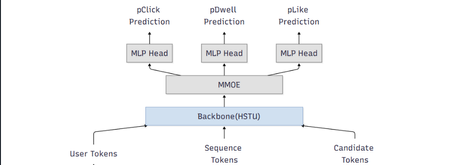
Authors: Chunlong Yu, Han Zheng, Jie Zhu, Neal Zhang, Li Xia, Lin Zhu, Sawyer Shen, Yulan Yan TL;DR Most modern ranking stacks rely on large generative models as feature extractors, flattening their outputs into vectors that are then fed into downstream rankers. While effective, this pattern introduces additional pipeline complexity and often dilutes token‑level semantics. GenRec Direct Learning (DirL) explores a different direction: using a generative, token‑native sequential model as the ranking engine itself. In this formulation, ranking becomes an end‑to‑end sequence modeling problem over user behavior, context, and candidate items—without an explicit feature‑extraction stage. Why revisit the classic L2 ranker design? Large‑scale recommender systems have historically evolved as layered pipelines: more signals lead to more feature plumbing, which in turn introduces more special cases. In our previous L2 ranking architecture, signals were split into dense and sparse branches and merged late in the stack (Fig. 1). As the system matured, three recurring issues became increasingly apparent. Figure 1: traditional ranking DNN 1) Growing pipeline surface area Each new signal expands the surrounding ecosystem—feature definitions, joins, normalization logic, validation, and offline/online parity checks. Over time, this ballooning surface area slows iteration, raises operational overhead, and increases the risk of subtle production inconsistencies. 2) Semantics diluted by flattening Generative models naturally capture rich structure: token‑level interactions, compositional meaning, and contextual dependencies. However, when these representations are flattened into sparse or dense feature vectors, much of that structure is lost—undermining the very semantics that make generative representations powerful. 3) Sequence modeling is treated as an add-on While traditional rankers can ingest history features, modeling long behavioral sequences and fine‑grained temporal interactions typically requires extensive manual feature engineering. As a result, sequence modeling is often bolted on rather than treated as a first‑class concern. DirL goal: treat ranking as native sequence learning, not as “MLP over engineered features.” What “Direct Learning” means in DirL The core shift behind Direct Learning (DirL) is simple but fundamental. Instead of the conventional pipeline: generative model → embeddings → downstream ranker, DirL adopts an end‑to‑end formulation: tokenized sequence → generative sequential model → ranking score(s). In DirL, user context, long‑term behavioral history, and candidate item information are all represented within a single, unified token sequence. Ranking is then performed directly by a generative, token‑native sequential model. This design enables several key capabilities: Long‑term behavior modeling beyond short summary windows The model operates over extended user histories, allowing it to capture long‑range dependencies and evolving interests that are difficult to represent with fixed‑size aggregates. Fine‑grained user–content interaction learning By modeling interactions at the token level, DirL learns detailed behavioral and content patterns rather than relying on coarse, pre‑engineered features. Preserved cross‑token semantics within the ranking model Semantic structure is maintained throughout the ranking process, instead of being collapsed into handcrafted dense or sparse vectors before scoring. Architecture overview (from signals to ranking) 1) Unified Tokenization All inputs in DirL are converted into a shared token embedding space, allowing heterogeneous signals to be modeled within a single sequential backbone. Conceptually, each input sequence consists of three token types: User / context tokens These tokens encode user or request‑level information, such as age or cohort‑like attributes, request or canvas context, temporal signals (e.g., day or time), and user‑level statistics like historical CTR. History tokens These represent prior user interactions over time, including signals such as engaged document IDs, semantic or embedding IDs, and topic‑like attributes. Each interaction is mapped to a token, preserving temporal order and enabling long‑range behavior modeling. Candidate tokens Each candidate item to be scored is represented as a token constructed from document features and user–item interaction features. These features are concatenated and projected into a fixed‑dimensional vector via an MLP, yielding a token compatible with the shared embedding space. Categorical features are embedded directly, while dense numerical signals are passed through MLP layers before being fused into their corresponding tokens. As a result, the model backbone consumes a sequence of the form: [1 user/context token] + [N history tokens] + [1 candidate token] 2) Long-sequence modeling backbone (HSTU) To model long input sequence, DirL adopts a sequential backbone designed to scale beyond naïve full attention. In the current setup, the backbone consists of stacked HSTU layers with multi‑head attention and dropout for regularization. The hidden state of the candidate token from the final HSTU layer is then fed into an MMoE module for scoring. 3) Multi-task prediction head (MMoE) Ranking typically optimizes multiple objectives (e.g., engagement‑related proxies). DirL employs a multi‑gate mixture‑of‑experts (MMoE) layer to support multi‑task prediction while sharing representation learning. The MMoE layer consists of N shared experts and one task‑specific expert per task. For each task, a gating network produces a weighted combination of the shared experts and the task‑specific expert. The aggregated representation is then fed into a task‑specific MLP head to produce the final prediction. Figure 2: DirL structure Early experiments: what worked and what didn’t What looked promising Early results indicate that a token‑native setup improves both inhouse evaluation metrics and online engagement (time spent per UU), suggesting that modeling long behavior sequences in a unified token space is directionally beneficial. The hard part: efficiency and scale The same design choices that improve expressiveness also raise practical hurdles: Training velocity slows down: long-sequence modeling and larger components can turn iteration cycles from hours into days, making ablations expensive. Serving and training costs increase: large sparse embedding tables + deep sequence stacks can dominate memory and compute. Capacity constraints limit rollout speed: Hardware availability and cost ceilings become a gating factor for expanding traffic and experimentation. In short: DirL’s main challenge isn’t “can it learn the right dependencies?”—it’s “can we make it cheap and fast enough to be a production workhorse?” Path to production viability: exploratory directions Our current work focuses on understanding how to keep the semantic benefits of token‑native modeling while exploring options that could help reduce overall cost. 1) Embedding tables consolidate and prune oversized sparse tables rely more on shared token representations where possible 2) Right-size the sequence model reduce backbone depth where marginal gains flatten evaluate minimal effective token sets—identify which tokens actually move metrics. explore sequence length vs. performance curves to find the “knee” 3) Inference and systems optimization dynamic batching tuned for token-native inference kernel fusion and graph optimizations quantization strategies that preserve ranking model behavior Why this direction matters DirL explores a broader shift in recommender systems—from feature‑heavy pipelines with shallow rankers toward foundation‑style sequential models that learn directly from user trajectories. If token‑native ranking can be made efficient, it unlocks several advantages: Simpler modeling interfaces, with fewer feature‑plumbing layers. Stronger semantic utilization, reducing information loss from aggressive flattening. A more natural path to long‑term behavior and intent modeling. Early signals are encouraging. The next phase is about translating this promise into practice—making the approach scalable, cost‑efficient, and fast enough to iterate as a production system. Using Microsoft Services to Enable Token‑Native Ranking Research This work was developed and validated within Microsoft’s internal machine learning and experimentation ecosystem. Training data was derived from seven days of MSN production logs and user behavior labels, encompassing thousands of features, including numerical, ID‑based, cross, and sequential features. Model training was performed using a PyTorch‑based deep learning framework built by the MSN infrastructure team and executed on Azure Machine Learning with a single A100 GPU. For online serving, the trained model was deployed on DLIS, Microsoft’s internal inference platform. Evaluation was conducted through controlled online experiments on the Azure Exp platform, enabling validation of user engagement signals under real production traffic. Although the implementation leverages Microsoft’s internal platforms, the core ideas behind DirL are broadly applicable. Practitioners interested in exploring similar approaches may consider the following high‑level steps: Construct a unified token space that captures user context, long‑term behavior sequences, and candidate items. Apply a long‑sequence modeling backbone to learn directly from extended user trajectories. Formulate ranking as a native sequence modeling problem, scoring candidates from token‑level representations. Evaluate both model effectiveness and system efficiency, balancing gains in expressiveness against training and serving cost. Call to action We encourage practitioners and researchers working on large‑scale recommender systems to experiment with token‑native ranking architectures alongside traditional feature‑heavy pipelines, compare trade‑offs in modeling power and system efficiency, and share insights on when direct sequence learning provides practical advantages in production environments. Acknowledgement: We would like to acknowledge the support and contributions from several colleagues who helped make this work possible. We thank Gaoyuan Jiang and Lightning Huang for their assistance with model deployment, Jianfei Wang for support with the training platform, Gong Cheng for ranker monitoring, Peiyuan Xu for sequential feature logging, and Chunhui Han and Peng Hu for valuable discussions on model design.Introducing Inside Microsoft Foundry: Quickstart 🎬
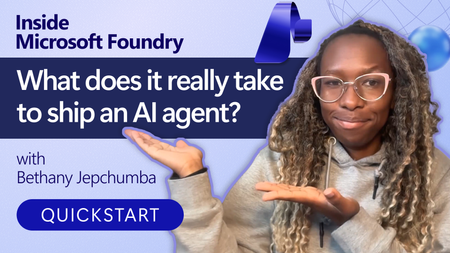
Discover Inside Microsoft Foundry: Quickstart, a new video series for developers building AI agents. Starting with "What does it really take to ship an AI agent?", the series explores real-world challenges such as model selection, grounding agents in data, evaluation, deployment, observability, and governance. Follow along as we show how the Microsoft Foundry ecosystem helps developers move from prototype to production, with new episodes released in the coming weeks.Distributing Agents to Microsoft Teams and Microsoft 365 Copilot Part 4/5
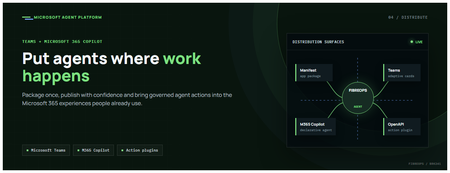
This is the fourth post in our series on the Microsoft agent platform. We cover the Distribute in M365 pillar — publishing your agents to Microsoft Teams and Microsoft 365 Copilot so they reach users where they already work. All examples reference the FibreOps repository, demonstrated at Microsoft Build BRK241. The Distribution Story Building a great agent is only half the challenge. The other half is getting it into the hands of users without asking them to learn a new tool, visit a new URL, or change their workflow. Microsoft 365 Copilot and Microsoft Teams are where enterprise users already spend their day, making them the natural distribution surface for agents. With the GA release, publishing an agent to Teams and M365 Copilot is a single command. No separate app registration portal, no manual manifest assembly, no multi-step approval workflow for development and testing. Publishing to Microsoft 365 Copilot (GA) FibreOps ships as a declarative agent + action plugin ready for sideload. A single CLI command produces the complete package: python -m fibreops.demo publish-m365 --out dist/m365 # Output: # ✓ wrote dist/m365/declarativeAgent.json # ✓ wrote dist/m365/fibreops-action.json # ✓ wrote dist/m365/manifest.json # ✓ wrote dist/m365/color.png (192x192) # ✓ wrote dist/m365/outline.png ( 32x32) # ✓ wrote dist/m365/fibreops-copilot.zip What Gets Generated File Purpose declarativeAgent.json Defines the agent's persona, capabilities, and conversation starters for M365 Copilot fibreops-action.json Action plugin that proxies tool calls to the deployed FastAPI backend via OpenAPI manifest.json Teams app manifest with publisher metadata, permissions, and capabilities color.png / outline.png App icons for Teams and M365 surfaces fibreops-copilot.zip Ready-to-upload package for Teams Admin Center Configuration Set the base URL to your deployed FastAPI app before publishing — the action plugin uses this to resolve the OpenAPI runtime: # Set the public HTTPS hostname of the deployed FastAPI app $env:M365_ACTION_BASE_URL = "https://fibreops-demo.azurewebsites.net" # Optional: customise publisher metadata $env:M365_PUBLISHER_NAME = "Contoso Network Operations" $env:M365_PUBLISHER_WEBSITE = "https://contoso.com/noc" # Generate the package python -m fibreops.demo publish-m365 --out dist/m365 Environment Variable Purpose M365_ACTION_BASE_URL Public HTTPS root for the FastAPI /openapi.json (e.g., Container Apps FQDN) M365_APP_ID Override the generated Teams app GUID (default: deterministic per repo) M365_PUBLISHER_NAME Publisher name shown in M365 Admin Center M365_PUBLISHER_WEBSITE Publisher website link Uploading the Package Upload the generated fibreops-copilot.zip through either path: Teams Admin Center → Manage apps → Upload new app M365 Admin Center → Integrated apps → Upload custom apps Once uploaded, the declarative agent: Inherits the publisher metadata you configured Advertises conversation starters from the FibreOps deck (e.g., "What is the current outage status?", "Dispatch an engineer to FN-LDN-001") Proxies tool calls to the deployed FastAPI app via the action plugin Appears in Microsoft 365 Copilot as a specialised agent users can invoke How Declarative Agents Work A declarative agent in Microsoft 365 Copilot is defined by metadata rather than code running in the M365 surface. The intelligence lives in your backend — Copilot handles the conversational UX, tool orchestration schema, and user authentication. The flow: User invokes the agent in Microsoft 365 Copilot or Teams Copilot renders conversation starters and accepts natural language input When the agent needs to act, Copilot calls the action plugin (your OpenAPI endpoint) Your FastAPI backend processes the request using the full agent pipeline Results return to the user in the Copilot/Teams UX This architecture means your agent logic stays in one place — the backend. The M365 surface is purely a distribution and interaction layer. Action Plugins and OpenAPI The action plugin ( fibreops-action.json ) references your FastAPI app's /openapi.json endpoint. FibreOps exposes a JSON API that the action plugin can call: /api/runs — List and query agent runs /api/optimiser — Get optimizer scores and suggestions /sdk/chat — Natural language interaction with the agent system /healthz — Liveness probe Because FastAPI auto-generates OpenAPI schemas from your typed Python endpoints, the action plugin gets accurate parameter descriptions, response schemas, and error codes without any manual specification work. Publishing as Autopilots (Public Preview) Autopilots take distribution one step further — agents that operate autonomously without requiring a user to initiate each interaction. An Autopilot can: React to events (e.g., a critical telemetry signal) without human initiation Take actions within defined guardrails Notify users only when human intervention is needed Operate continuously across Microsoft 365 surfaces For FibreOps, an Autopilot would monitor the Event Hub stream continuously and only surface to the NOC team when an incident exceeds automated resolution capability — a fully autonomous operations agent. Teams Adaptive Cards FibreOps posts rich Adaptive Card notifications to Microsoft Teams throughout the agent pipeline. This is separate from the declarative agent — it is a push notification channel for real-time operational awareness. # The NetOps agent posts an outage notice via Incoming Webhook def post_outage_notice(incident_id, node_id, severity, summary, engineer=None): card = { "type": "AdaptiveCard", "body": [ {"type": "TextBlock", "text": f"🚨 Outage: {node_id}", "weight": "Bolder", "size": "Large"}, {"type": "FactSet", "facts": [ {"title": "Severity", "value": severity.upper()}, {"title": "Incident", "value": incident_id}, {"title": "Summary", "value": summary}, ]}, ], "actions": [ {"type": "Action.OpenUrl", "title": "View in NOC Console", "url": f"{base_url}/runs/{incident_id}"} ] } # POST to Teams webhook or append to outbox for offline mode ... If TEAMS_WEBHOOK_URL is not configured, cards are appended to state/teams_outbox.jsonl for review in the NOC console's Teams panel. End-to-End: From Code to Copilot Here is the complete flow from development to distribution: Build — Develop agents with Microsoft Agent Framework, test locally with python -m fibreops.demo --backend local Publish agents — python -m fibreops.demo publish creates hosted Prompt Agents in Foundry Deploy infrastructure — azd up provisions App Service, ACR, Event Hub, Key Vault, and Application Insights Deploy hosted agent — azd env set FIBREOPS_DEPLOY_HOSTED true && azd up Generate M365 package — python -m fibreops.demo publish-m365 --out dist/m365 Upload to Teams — Upload fibreops-copilot.zip via Teams Admin Center Users interact — The agent is now available in Microsoft 365 Copilot and Teams Security Considerations Managed Identity — The deployed app uses system-assigned managed identity for all Azure service access. No secrets in code. Least privilege — Each role grant is scoped to the minimum required (Event Hubs Data Owner, Key Vault Secrets User, AcrPull, Azure AI Developer). Authentication — The M365 Copilot surface handles user authentication; your backend receives authenticated requests. Guardrails — Autopilots operate within defined boundaries; human-in-the-loop escalation is built into the Routine and agent decision logic. Key Takeaways Publishing to Teams and M365 Copilot is GA — a single command generates the complete package. Declarative agents separate distribution (M365) from intelligence (your backend). Action plugins leverage your existing FastAPI OpenAPI schema — no manual specification needed. Autopilots (Public Preview) enable fully autonomous operation within guardrails. Adaptive Cards provide real-time push notifications alongside the conversational agent surface. The same backend serves the NOC console, the Copilot SDK, and the M365 declarative agent. Next Steps Explore the FibreOps repository — try python -m fibreops.demo publish-m365 Microsoft 365 Copilot extensibility documentation Next in this series: Voice Live and Observability for Production Agent SystemsBuilding HIPAA-Compliant Medical Transcription with Local AI
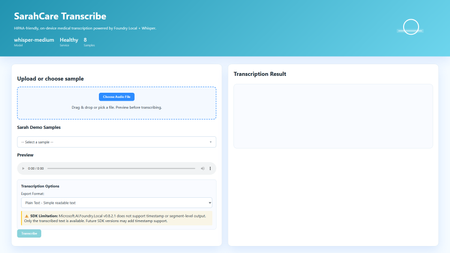
Building HIPAA-Compliant Medical Transcription with Local AI Introduction Healthcare organizations generate vast amounts of spoken content, patient consultations, research interviews, clinical notes, medical conferences. Transcribing these recordings traditionally requires either manual typing (time-consuming and expensive) or cloud transcription services (creating immediate HIPAA compliance concerns). Every audio file sent to external APIs exposes Protected Health Information (PHI), requires Business Associate Agreements, creates audit trails on third-party servers, and introduces potential breach vectors. This sample solution lies in on-premises voice-to-text systems that process audio entirely locally, never sending PHI beyond organizational boundaries. This article demonstrates building a sample medical transcription application using FLWhisper, ASP.NET Core, C#, and Microsoft Foundry Local with OpenAI Whisper models. You'll learn how to build sample HIPAA-compliant audio processing, integrate Whisper models for medical terminology accuracy, design privacy-first API patterns, and build responsive web UIs for healthcare workflows. Whether you're developing electronic health record (EHR) integrations, building clinical research platforms, or implementing dictation systems for medical practices, this sample could be a great starting point for privacy-first speech recognition. Why Local Transcription Is Critical for Healthcare Healthcare data handling is fundamentally different from general business data due to HIPAA regulations, state privacy laws, and professional ethics obligations. Understanding these requirements explains why cloud transcription services, despite their convenience, create unacceptable risks for medical applications. HIPAA compliance mandates strict controls over PHI. Every system that touches patient data must implement administrative, physical, and technical safeguards. Cloud transcription APIs require Business Associate Agreements (BAAs), but even with paperwork, you're entrusting PHI to external systems. Every API call creates logs on vendor servers, potentially in multiple jurisdictions. Data breaches at transcription vendors expose patient information, creating liability for healthcare organizations. On-premises processing eliminates these third-party risks entirely, PHI never leaves your controlled environment. US State laws increasingly add requirements beyond HIPAA. California's CCPA, New York's SHIELD Act, and similar legislation create additional compliance obligations. International regulations like GDPR prohibit transferring health data outside approved jurisdictions. Local processing simplifies compliance by keeping data within organizational boundaries. Research applications face even stricter requirements. Institutional Review Boards (IRBs) often require explicit consent for data sharing with external parties. Cloud transcription may violate study protocols that promise "no third-party data sharing." Clinical trials in pharmaceutical development handle proprietary information alongside PHI, double jeopardy for data exposure. Local transcription maintains research integrity while enabling audio analysis. Cost considerations favor local deployment at scale. Medical organizations generate substantial audio, thousands of patient encounters monthly. Cloud APIs charge per minute of audio, creating significant recurring costs. Local models have fixed infrastructure costs that scale economically. A modest GPU server can process hundreds of hours monthly at predictable expense. Latency matters for clinical workflows. Doctors and nurses need transcriptions available immediately after patient encounters to review and edit while details are fresh. Cloud APIs introduce network delays, especially problematic in rural health facilities with limited connectivity. Local inference provides <1 second turnaround for typical consultation lengths. Application Architecture: ASP.NET Core with Foundry Local The sample FLWhisper application implements clean separation between audio handling, AI inference, and state management using modern .NET patterns: The ASP.NET Core 10 minimal API provides HTTP endpoints for health checks, audio transcription, and sample file streaming. Minimal APIs reduce boilerplate while maintaining full middleware support for error handling, authentication, and CORS. The API design follows OpenAI's transcription endpoint specification, enabling drop-in replacement for existing integrations. The service layer encapsulates business logic: FoundryModelService manages model loading and lifetime, TranscriptionService handles audio processing and AI inference, and SampleAudioService provides demonstration files for testing. This separation enables easy testing, dependency injection, and service swapping. Foundry Local integration uses the Microsoft.AI.Foundry.Local.WinML SDK. Unlike cloud APIs requiring authentication and network calls, this SDK communicates directly with the local Foundry service via in-process calls. Models load once at startup, remaining resident in memory for sub-second inference on subsequent requests. The static file frontend delivers vanilla HTML/CSS/JavaScript, no framework overhead. This simplicity aids healthcare IT security audits and enables deployment on locked-down hospital networks. The UI provides file upload, sample selection, audio preview, transcription requests, and result display with copy-to-clipboard functionality. Here's the architectural flow for transcription requests: Web UI (Upload Audio File) ↓ POST /v1/audio/transcriptions (Multipart Form Data) ↓ ASP.NET Core API Route ↓ TranscriptionService.TranscribeAudio(audioStream) ↓ Foundry Local Model (Whisper Medium locally) ↓ Text Result + Metadata (language, duration) ↓ Return JSON/Text Response ↓ Display in UI This architecture embodies several healthcare system design principles: Data never leaves the device: All processing occurs on-premises, no external API calls No data persistence by default: Audio and transcripts are session-only, never saved unless explicitly configured Comprehensive health checks: System readiness verification before accepting PHI Audit logging support: Structured logging for compliance documentation Graceful degradation: Clear error messages when models unavailable rather than silent failures Setting Up Foundry Local with Whisper Models Foundry Local supports multiple Whisper model sizes, each with different accuracy/speed tradeoffs. For medical transcription, accuracy is paramount—misheard drug names or dosages create patient safety risks: # Install Foundry Local (Windows) winget install Microsoft.FoundryLocal # Verify installation foundry --version # Download Whisper Medium model (optimal for medical accuracy) foundry model add openai-whisper-medium-generic-cpu:1 # Check model availability foundry model list Whisper Medium (769M parameters) provides the best balance for medical use. Smaller models (Tiny, Base) miss medical terminology frequently. Larger models (Large) offer marginal accuracy gains at 3x inference time. Medium handles medical vocabulary well, drug names, anatomical terms, procedure names, while processing typical consultation audio (5-10 minutes) in under 30 seconds. The application detects and loads the model automatically: // Services/FoundryModelService.cs using Microsoft.AI.Foundry.Local.WinML; public class FoundryModelService { private readonly ILogger _logger; private readonly FoundryOptions _options; private ILocalAIModel? _loadedModel; public FoundryModelService( ILogger logger, IOptions options) { _logger = logger; _options = options.Value; } public async Task InitializeModelAsync() { try { _logger.LogInformation( "Loading Foundry model: {ModelAlias}", _options.ModelAlias ); // Load model from Foundry Local _loadedModel = await FoundryClient.LoadModelAsync( modelAlias: _options.ModelAlias, cancellationToken: CancellationToken.None ); if (_loadedModel == null) { _logger.LogWarning("Model loaded but returned null instance"); return false; } _logger.LogInformation( "Successfully loaded model: {ModelAlias}", _options.ModelAlias ); return true; } catch (Exception ex) { _logger.LogError( ex, "Failed to load Foundry model: {ModelAlias}", _options.ModelAlias ); return false; } } public ILocalAIModel? GetLoadedModel() => _loadedModel; public async Task UnloadModelAsync() { if (_loadedModel != null) { await FoundryClient.UnloadModelAsync(_loadedModel); _loadedModel = null; _logger.LogInformation("Model unloaded"); } } } Configuration lives in appsettings.json , enabling easy customization without code changes: { "Foundry": { "ModelAlias": "whisper-medium", "LogLevel": "Information" }, "Transcription": { "MaxAudioDurationSeconds": 300, "SupportedFormats": ["wav", "mp3", "m4a", "flac"], "DefaultLanguage": "en" } } Implementing Privacy-First Transcription Service The transcription service handles audio processing while maintaining strict privacy controls. No audio or transcript persists beyond the HTTP request lifecycle unless explicitly configured: // Services/TranscriptionService.cs public class TranscriptionService { private readonly FoundryModelService _modelService; private readonly ILogger _logger; public async Task TranscribeAudioAsync( Stream audioStream, string originalFileName, TranscriptionOptions? options = null) { options ??= new TranscriptionOptions(); var startTime = DateTime.UtcNow; try { // Validate audio format ValidateAudioFormat(originalFileName); // Get loaded model var model = _modelService.GetLoadedModel(); if (model == null) { throw new InvalidOperationException("Whisper model not loaded"); } // Create temporary file (automatically deleted after transcription) using var tempFile = new TempAudioFile(audioStream); // Execute transcription _logger.LogInformation( "Starting transcription for file: {FileName}", originalFileName ); var transcription = await model.TranscribeAsync( audioFilePath: tempFile.Path, language: options.Language, cancellationToken: CancellationToken.None ); var duration = (DateTime.UtcNow - startTime).TotalSeconds; _logger.LogInformation( "Transcription completed in {Duration:F2}s", duration ); return new TranscriptionResult { Text = transcription.Text, Language = transcription.Language ?? options.Language, Duration = transcription.AudioDuration, ProcessingTimeSeconds = duration, FileName = originalFileName, Timestamp = DateTime.UtcNow }; } catch (Exception ex) { _logger.LogError( ex, "Transcription failed for file: {FileName}", originalFileName ); throw; } } private void ValidateAudioFormat(string fileName) { var extension = Path.GetExtension(fileName).TrimStart('.'); var supportedFormats = new[] { "wav", "mp3", "m4a", "flac", "ogg" }; if (!supportedFormats.Contains(extension.ToLowerInvariant())) { throw new ArgumentException( $"Unsupported audio format: {extension}. " + $"Supported: {string.Join(", ", supportedFormats)}" ); } } } // Temporary file wrapper that auto-deletes internal class TempAudioFile : IDisposable { public string Path { get; } public TempAudioFile(Stream sourceStream) { Path = System.IO.Path.GetTempFileName(); using var fileStream = File.OpenWrite(Path); sourceStream.CopyTo(fileStream); } public void Dispose() { try { if (File.Exists(Path)) { File.Delete(Path); } } catch { // Ignore deletion errors in temp folder } } } This service demonstrates several privacy-first patterns: Temporary file lifecycle management: Audio written to temp storage, automatically deleted after transcription No implicit persistence: Results returned to caller, not saved by service Format validation: Accept only supported audio formats to prevent processing errors Comprehensive logging: Audit trail for compliance without logging PHI content Error isolation: Exceptions contain diagnostic info but no patient data Building the OpenAI-Compatible REST API The API endpoint mirrors OpenAI's transcription API specification, enabling existing integrations to work without modifications: // Program.cs var builder = WebApplication.CreateBuilder(args); // Configure services builder.Services.Configure( builder.Configuration.GetSection("Foundry") ); builder.Services.AddSingleton(); builder.Services.AddScoped(); builder.Services.AddHealthChecks() .AddCheck("foundry-health"); var app = builder.Build(); // Load model at startup var modelService = app.Services.GetRequiredService(); await modelService.InitializeModelAsync(); app.UseHealthChecks("/health"); app.MapHealthChecks("/api/health/status"); // OpenAI-compatible transcription endpoint app.MapPost("/v1/audio/transcriptions", async ( HttpRequest request, TranscriptionService transcriptionService, ILogger logger) => { if (!request.HasFormContentType) { return Results.BadRequest(new { error = "Content-Type must be multipart/form-data" }); } var form = await request.ReadFormAsync(); // Extract audio file var audioFile = form.Files.GetFile("file"); if (audioFile == null || audioFile.Length == 0) { return Results.BadRequest(new { error = "Audio file required in 'file' field" }); } // Parse options var format = form["format"].ToString() ?? "text"; var language = form["language"].ToString() ?? "en"; try { // Process transcription using var stream = audioFile.OpenReadStream(); var result = await transcriptionService.TranscribeAudioAsync( audioStream: stream, originalFileName: audioFile.FileName, options: new TranscriptionOptions { Language = language } ); // Return in requested format if (format == "json") { return Results.Json(new { text = result.Text, language = result.Language, duration = result.Duration }); } else { // Default: plain text return Results.Text(result.Text); } } catch (Exception ex) { logger.LogError(ex, "Transcription request failed"); return Results.StatusCode(500); } }) .DisableAntiforgery() // File uploads need CSRF exemption .WithName("TranscribeAudio") .WithOpenApi(); app.Run(); Example API usage: # PowerShell $audioFile = Get-Item "consultation-recording.wav" $response = Invoke-RestMethod ` -Uri "http://localhost:5192/v1/audio/transcriptions" ` -Method Post ` -Form @{ file = $audioFile; format = "json" } Write-Output $response.text # cURL curl -X POST http://localhost:5192/v1/audio/transcriptions \ -F "file=@consultation-recording.wav" \ -F "format=json" Building the Interactive Web Frontend The web UI provides a user-friendly interface for non-technical medical staff to transcribe recordings: SarahCare Medical Transcription The JavaScript handles file uploads and API interactions: // wwwroot/app.js let selectedFile = null; async function checkHealth() { try { const response = await fetch('/health'); const statusEl = document.getElementById('status'); if (response.ok) { statusEl.className = 'status-badge online'; statusEl.textContent = '✓ System Ready'; } else { statusEl.className = 'status-badge offline'; statusEl.textContent = '✗ System Unavailable'; } } catch (error) { console.error('Health check failed:', error); } } function handleFileSelect(event) { const file = event.target.files[0]; if (!file) return; selectedFile = file; // Show file info const fileInfo = document.getElementById('fileInfo'); fileInfo.textContent = `Selected: ${file.name} (${formatFileSize(file.size)})`; fileInfo.classList.remove('hidden'); // Enable audio preview const preview = document.getElementById('audioPreview'); preview.src = URL.createObjectURL(file); preview.classList.remove('hidden'); // Enable transcribe button document.getElementById('transcribeBtn').disabled = false; } async function transcribeAudio() { if (!selectedFile) return; const loadingEl = document.getElementById('loadingIndicator'); const resultEl = document.getElementById('resultSection'); const transcribeBtn = document.getElementById('transcribeBtn'); // Show loading state loadingEl.classList.remove('hidden'); resultEl.classList.add('hidden'); transcribeBtn.disabled = true; try { const formData = new FormData(); formData.append('file', selectedFile); formData.append('format', 'json'); const startTime = Date.now(); const response = await fetch('/v1/audio/transcriptions', { method: 'POST', body: formData }); if (!response.ok) { throw new Error(`HTTP ${response.status}: ${response.statusText}`); } const result = await response.json(); const processingTime = ((Date.now() - startTime) / 1000).toFixed(1); // Display results document.getElementById('transcriptionText').value = result.text; document.getElementById('resultDuration').textContent = `Duration: ${result.duration.toFixed(1)}s`; document.getElementById('resultLanguage').textContent = `Language: ${result.language}`; resultEl.classList.remove('hidden'); console.log(`Transcription completed in ${processingTime}s`); } catch (error) { console.error('Transcription failed:', error); alert(`Transcription failed: ${error.message}`); } finally { loadingEl.classList.add('hidden'); transcribeBtn.disabled = false; } } function copyToClipboard() { const text = document.getElementById('transcriptionText').value; navigator.clipboard.writeText(text) .then(() => alert('Copied to clipboard')) .catch(err => console.error('Copy failed:', err)); } // Initialize window.addEventListener('load', () => { checkHealth(); loadSamplesList(); }); Key Takeaways and Production Considerations Building HIPAA-compliant voice-to-text systems requires architectural decisions that prioritize data privacy over convenience. The FLWhisper application demonstrates that you can achieve accurate medical transcription, fast processing times, and intuitive user experiences entirely on-premises. Critical lessons for healthcare AI: Privacy by architecture: Design systems where PHI never exists outside controlled environments, not as a configuration option No persistence by default: Audio and transcripts should be ephemeral unless explicitly saved with proper access controls Model selection matters: Whisper Medium provides medical terminology accuracy that smaller models miss Health checks enable reliability: Systems should verify model availability before accepting PHI Audit logging without content logging: Track operations for compliance without storing sensitive data in logs For production deployment in clinical settings, integrate with EHR systems via HL7/FHIR interfaces. Implement role-based access control with Active Directory integration. Add digital signatures for transcript authentication. Configure automatic PHI redaction using clinical NLP models. Deploy on HIPAA-compliant infrastructure with proper physical security. Implement comprehensive audit logging meeting compliance requirements. The complete implementation with ASP.NET Core API, Foundry Local integration, sample audio files, and comprehensive tests is available at github.com/leestott/FLWhisper. Clone the repository and follow the setup guide to experience privacy-first medical transcription. Resources and Further Reading FLWhisper Repository - Complete C# implementation with .NET 10 Quick Start Guide - Installation and usage instructions Microsoft Foundry Local Documentation - SDK reference and model catalog OpenAI Whisper Documentation - Model architecture and capabilities HIPAA Compliance Guidelines - HHS official guidance Testing Guide - Comprehensive test suite documentationBuilding Autonomous Agents with Microsoft Agent Framework and GitHub Copilot SDK Part 2/5
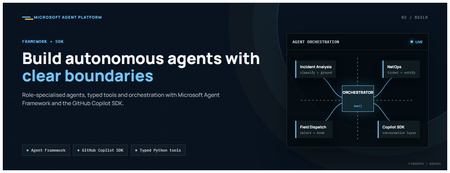
This is the second post in our series on the Microsoft agent platform. Here we dive deep into building autonomous agents, the development experience, the Microsoft Agent Framework, tool design patterns, and how the GitHub Copilot SDK brings conversational AI to your agent system. All examples reference the FibreOps repository, an autonomous fibre outage response system demonstrated at Microsoft Build BRK241. The Microsoft Agent Framework The Microsoft Agent Framework (now GA) provides a unified programming model for building agents. It supports multiple backends through a single .run() contract: Hosted — FoundryAgent connected to a Prompt Agent published to Microsoft Foundry Agent Service. Foundry — Agent + FoundryChatClient with the definition resolved locally (ideal for prompt iteration). Local — Deterministic LocalAgent for offline development and testing. This design means your orchestration code never changes regardless of where the agent runs. The factory pattern in FibreOps selects the backend at startup: # src/fibreops/agents/factory.py — simplified from agent_framework_foundry import FoundryAgent from agent_framework import Agent, FoundryChatClient def build_agent(role: str, backend: str, config: Config): if backend == "hosted": return FoundryAgent(agent_id=config.foundry_agents[role]) elif backend == "foundry": return Agent( instructions=get_instructions(role), chat_client=FoundryChatClient(endpoint=config.endpoint), tools=get_tools(role), ) else: return LocalAgent(role=role) Set FIBREOPS_AGENT_BACKEND to override the backend, or leave it as auto for intelligent detection. Designing Role-Specialised Agents FibreOps demonstrates a key pattern: role specialisation. Rather than one monolithic agent, the system uses three focused agents, each with a clear responsibility boundary: Agent Role Tools Available IncidentAnalysisAgent Classify severity, find root cause, retrieve SOP Knowledge (SOPs + topology), Web IQ, Work IQ NetOpsCoordinatorAgent File D365 incident, post Teams notice Ticketing, Teams, Memory FieldDispatchAgent Select engineer, book resource, update team Dispatch, Teams, Voice Why Role Specialisation? Focused system prompts — Each agent has a tightly scoped instruction set, reducing hallucination and improving reliability. Independent evaluation — You can score each agent separately against role-specific criteria. Parallel development — Teams can iterate on agents independently. Selective upgrade — Swap one agent's model or implementation without touching others. Tool Design: Typed Python Functions Tools in the Microsoft Agent Framework are typed Python functions that the runtime supplies to the hosted agent definition. FibreOps demonstrates several tool categories: Knowledge Tools # src/fibreops/tools/knowledge.py — simplified def sop_lookup(node_id: str, signal_type: str) -> dict: """Retrieve the Standard Operating Procedure for a given signal type. Args: node_id: The fibre node identifier (e.g., FN-LDN-001) signal_type: The type of signal (loss_of_light, high_ber, signal_degradation) Returns: SOP with steps, escalation path, and estimated resolution time. """ # Load from local markdown SOPs or Foundry IQ ... def web_iq_search(query: str, *, limit: int = 5) -> list[dict]: """Search public web for context relevant to the incident. Grounding against roadworks, weather, power outages, splice guidance. Falls back to deterministic fixtures when endpoint is unset. """ ... def work_iq_search(query: str, *, limit: int = 5) -> list[dict]: """Search enterprise knowledge for context relevant to the incident. Site surveys, SLA tiers, competency matrix, MTTR trends. """ ... Integration Tools # src/fibreops/tools/teams.py — simplified def post_outage_notice( incident_id: str, node_id: str, severity: str, summary: str, engineer: str | None = None, ) -> dict: """Post an Adaptive Card outage notice to the configured Teams channel. If TEAMS_WEBHOOK_URL is not set, appends to state/teams_outbox.jsonl for offline review. """ card = build_adaptive_card(incident_id, node_id, severity, summary, engineer) if config.teams_webhook_url: requests.post(config.teams_webhook_url, json=card) else: append_to_outbox(card) return {"status": "posted", "incident_id": incident_id} Design Principles for Agent Tools Typed parameters with docstrings — The runtime uses type hints and docstrings to generate the tool schema for the LLM. Graceful degradation — Every tool works offline by falling back to local fixtures or file-based state. Idempotent where possible — Tools that create resources return existing records if called with the same parameters. Observable — Every tool invocation emits an OpenTelemetry span for tracing and debugging. The Orchestrator Pattern The orchestrator drives signals through the agent pipeline. It is deliberately simple — a linear flow with error handling: # src/fibreops/orchestrator.py — simplified async def handle_signal(signal: TelemetrySignal) -> RunResult: """Process a telemetry signal through the agent pipeline.""" # Stage 1: Incident Analysis analysis = await incident_agent.run( f"Analyse this signal: {signal.model_dump_json()}" ) # Stage 2: NetOps Coordination coordination = await netops_agent.run( f"Coordinate response for: {analysis.summary}" ) # Stage 3: Field Dispatch dispatch = await dispatch_agent.run( f"Dispatch engineer for incident: {coordination.incident_id}" ) return RunResult( signal=signal, analysis=analysis, coordination=coordination, dispatch=dispatch, ) The orchestrator honours the same contract regardless of backend — hosted , foundry , or local — because all backends implement await agent.run(prompt) . GitHub Copilot SDK Integration (GA) The GitHub Copilot SDK enables conversational interaction with your agent system. FibreOps implements FibreOpsCopilotClient with the same interface as github/copilot-sdk : # src/fibreops/sdk/__init__.py — simplified from fibreops.sdk.client import FibreOpsCopilotClient client = FibreOpsCopilotClient() session = client.create_session() # Query agent status response = session.send_and_wait("status") print(response.text) # Human-readable summary print(response.data) # Structured JSON # Inject a telemetry signal via conversation response = session.send_and_wait(json.dumps({ "signal_id": "sig-demo", "node_id": "FN-LDN-001", "signal_type": "loss_of_light", "severity": "critical" })) The adapter routes prompts by shape: JSON signal-shaped dicts — Forwarded to the orchestrator for processing. Free-form text — Answered by a deterministic responder ( help , status , nodes , engineers , optimiser , dispatch ). Drive it from the terminal: python -m fibreops.demo chat "help" python -m fibreops.demo chat "status" python -m fibreops.demo chat '{"signal_id":"sig-demo","node_id":"FN-LDN-001","signal_type":"loss_of_light","severity":"critical"}' Or hit the embedded HTTP endpoint when the NOC console is running: Invoke-RestMethod -Method Post http://127.0.0.1:8800/sdk/chat -Body '{"prompt":"status"}' -ContentType application/json Development Workflow with Foundry Toolkit for VS Code The Foundry Toolkit for VS Code provides an integrated development experience: Author prompts — Edit system instructions with live preview and token counting. Test locally — Run against the foundry backend with FoundryChatClient pointing at your development model. Iterate fast — The foundry backend resolves definitions locally, so prompt changes take effect immediately without republishing. Publish when ready — python -m fibreops.demo publish creates hosted Prompt Agents in Foundry. Multi-Model Support The Microsoft Agent Framework supports multiple models. FibreOps defaults to gpt-4.1-mini (the model available in most demo Foundry accounts), but any chat-completions deployment works: # .env AZURE_AI_MODEL_DEPLOYMENT=gpt-4.1-mini # or gpt-4o-mini, gpt-4o, gpt-4.1 The framework also supports Claude Code connectors and Magentic-One for multi-agent collaboration scenarios. Testing Strategy FibreOps demonstrates a layered testing approach: Unit tests — Test tools in isolation with mocked dependencies. Local backend tests — Run the full pipeline with LocalAgent for deterministic assertions. Integration tests — Run against real Foundry agents with pytest -q . Rubric evaluation — The optimizer scores every run against defined criteria. # Run the test suite .\.venv\Scripts\python.exe -m pytest -q Key Takeaways The Microsoft Agent Framework provides a unified .run() contract across hosted, foundry, and local backends. Role specialisation keeps agents focused, testable, and independently evolvable. Tools are typed Python functions with docstrings — the runtime generates schemas automatically. The GitHub Copilot SDK (GA) enables conversational interaction with any agent system. Graceful degradation means the entire system works offline for development. The factory pattern lets you switch backends without changing orchestration code. Next Steps Clone the FibreOps repository and run python -m fibreops.demo --signals 3 Microsoft Agent Framework documentation Next in this series: Running Hosted Agents in Microsoft Foundry Agent Service
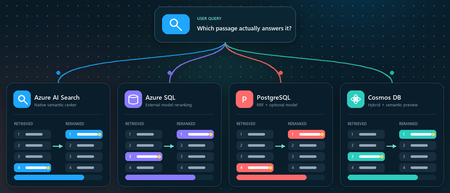
Vector search finds candidates. Reranking decides what your RAG app reads
You ask a retrieval-augmented generation (RAG) application a question. Vector search returns ten passages that are clearly related to the topic. The passage that actually contains the answer, however, is ranked seventh, while the language model receives only the first five. Retrieval did not completely fail. It found the evidence, but ordered it below less useful context. Reranking addresses that gap between a passage that is semantically similar and a passage that is relevant to the user's specific question. This article demonstrates that pattern in four Azure services using the Stanford Question Answering Dataset (SQuAD). The goal is not to declare a winning service or publish a quality benchmark. It is to show where retrieval, rank fusion, and model-based reranking run in each architecture, and to illustrate how the position of a known source passage can change. What this demonstration establishes The examples show rank movement for three selected questions. They do not establish that one reranker or service is universally more accurate. A production decision requires a larger, representative query set and aggregate relevance, latency, and cost measurements. Get the full Python implementation: pauldj54/azure-vector-reranking-squad Retrieval and reranking are different stages A production search pipeline commonly uses two stages: Retrieve for recall. Fast retrieval narrows a large corpus to a bounded candidate set. It can use vector search, keyword search, or both. Rerank for precision. A more expensive model evaluates only those candidates against the original query and produces the final order. Reciprocal Rank Fusion (RRF) belongs between those two ideas. RRF is a model-free rank aggregation method that merges independent result lists, usually vector and keyword results. For a document d, a typical score is: RRF(d) = ∑ r ∈ R 1 k + rank r (d) Here, R is the set of ranked lists and k is commonly 60. RRF works with positions rather than raw scores, so it can combine signals such as cosine distance and BM25 without pretending their score scales are comparable. This gives a clearer three-part vocabulary: Stage Purpose Typical mechanism Retrieve Find broad candidate set Vector search, BM25, filters Fuse Combine independent rankings RRF Rerank Reassess query-document relevance Semantic ranker or cross-encoder RRF often improves hybrid retrieval when exact names, dates, identifiers, or terms matter. A learned reranker can then read the query and each candidate together, capturing interactions that separately generated embeddings can miss. The learned stage costs more, so it should operate on tens of candidates rather than the whole corpus. The following image describes the general process: Why use SQuAD for this demonstration? SQuAD 1.1 contains crowd-written questions over more than 500 Wikipedia articles. Its packaged splits contain 87,599 training rows and 10,570 validation rows. Each row includes a question, a context passage, and one or more answer spans inside that passage. That source-context mapping gives this demonstration a useful label: the context associated with a question is treated as its gold passage. We can then inspect whether each search stage moves that passage up or down. This is convenient, but it is not a perfect passage-ranking benchmark. SQuAD was designed for extractive question answering, and another passage in the corpus might also answer a question. The gold context is therefore a reproducible reference, not proof that every other passage is irrelevant. The results shown here use the 2,067 unique contexts in the SQuAD validation split and 1,536-dimensional embeddings. The repository default should be set to the same corpus size before treating the screenshots or rank transitions as directly reproducible. Three illustrative questions Question Expected answer Gold context According to game stats, which Super Bowl 50 quarterback had his worst year since his first NFL season? Peyton Manning 12, Super Bowl 50 What else did Tesla do for work at this time? Various electrical repair jobs 165, Nikola Tesla Who acts as laborer, paymaster, and design team for a renovation project? The property owner 1306, Construction Each notebook selects a seeded demonstration question when it runs. The three saved examples were collected across separate runs; the current notebooks do not execute all three questions in one pass. A benchmark harness should iterate over a fixed question list and save all stage results in one structured output. Capability boundaries at a glance Service Retrieval and Fusion Learned Reranking Boundary to Keep in Mind Azure AI Search Native keyword and vector retrieval with native RRF Built-in semantic ranker Semantic ranking only reorders the retrieved top 50 Azure SQL Database Exact vector retrieval in the current notebook External Cohere model invoked through native REST procedure SQL issues the HTTPS request; Foundry performs inference PostgreSQL Flexible Server pgvector plus hand-written SQL RRF over full-text search Optional external Cohere call from Python Retrieval primitives are native; this RRF query and Cohere path are application code Azure Cosmos DB for NoSQL Native vector search and native hybrid RRF SDK-integrated Semantic Reranker, currently preview Reranking is a separate inference call over at most 50 supplied documents Azure AI Search: native hybrid retrieval and semantic ranking How it works: Azure AI Search provides the most integrated pipeline in this demonstration. A hybrid query runs keyword and vector retrieval, combines the lists with RRF, and passes up to the top 50 results to the built-in semantic ranker. The semantic ranker assigns @search.rerankerScore values from 0 to 4 and can return extractive captions and answers. The semantic configuration identifies the fields that carry the meaning of each document: semantic_search = SemanticSearch( configurations=[ SemanticConfiguration( name=SEMANTIC_CONFIG, prioritized_fields=SemanticPrioritizedFields( title_field=SemanticField(field_name="title"), content_fields=[SemanticField(field_name="content")], ), ) ] ) This tells the semantic ranker which text fields to evaluate. The query then enables semantic ranking after hybrid retrieval: results = search_client.search( search_text=question, vector_queries=[vector_query], query_type="semantic", semantic_configuration_name=SEMANTIC_CONFIG, top=10, ) The important constraint is candidate recall. Semantic ranking does not search the corpus again. If the correct passage is absent from the hybrid top 50, the semantic stage cannot recover it. See 01_azure_ai_search_reranking.ipynb for the complete setup and query path. Test results for Azure AI Search These examples show that semantic reranking improves relevance selectively, not universally. It strongly helps the construction query, moving the correct passage from rank 4 to rank 1, but slightly degrades the Super Bowl and Tesla queries by one position. This reinforces that semantic ranking should be evaluated across a representative query set using aggregate metrics such as MRR or NDCG, rather than judged from a single result. Azure SQL Database: vector retrieval plus external Cohere reranking How it works. The Azure SQL notebook retrieves 20 candidates with exact cosine distance and sends their text to Cohere Rerank v4.0 Fast through sys.sp_invoke_external_rest_endpoint. The vector column and query vector must have the same dimensions. This repository uses 1,536-dimensional embeddings: SELECT TOP (@ candidate_count) context_id, title, content, 1 - VECTOR_DISTANCE( 'cosine', CAST(@ query_vector AS VECTOR(1536)), embedding ) AS similarity FROM dbo.documents ORDER BY similarity DESC; For reranking, we selected Cohere Rerank v4.0 Fast (Cohere-rerank-v4.0-fast), a fast version of Cohere’s fourth-generation relevance-ranking model. The model is deployed in Microsoft Foundry, where its Azure Direct inference endpoint is available in the deployment details within the Foundry portal. Azure SQL can call REST APIs directly using sp_invoke_external_rest_endpoint. Because Azure SQL allowlists Azure AI’s *.cognitiveservices.azure.com domain, we translate the equivalent Foundry endpoint from *.services.ai.azure.com while preserving the Cohere reranking route. from urllib.parse import urlsplit, urlunsplit def sql_compatible_endpoint(endpoint: str) -> str: """Convert an Azure Direct endpoint to Azure SQL's allowed hostname.""" parts = urlsplit(endpoint) if parts.hostname.endswith(".services.ai.azure.com"): resource = parts.hostname.removesuffix(".services.ai.azure.com") hostname = f"{resource}.cognitiveservices.azure.com" elif parts.hostname.endswith(".cognitiveservices.azure.com"): hostname = parts.hostname else: raise ValueError("Expected an Azure AI Services endpoint.") return urlunsplit( (parts.scheme, hostname, parts.path, parts.query, "") ) Then I defined a re-rank with cohere function, starting by loading the endpoint and setting the authentication: def rerank_with_cohere( cursor, question: str, candidates: list[dict], top_n: int = 10, ) -> list[dict]: """ Rerank candidate documents by calling Cohere through Azure SQL. Each candidate must contain a 'content' field. """ if not candidates: return [] sql_endpoint = sql_compatible_endpoint( os.environ["COHERE_RERANK_ENDPOINT"] ) model = os.environ["COHERE_RERANK_MODEL"] access_token = credential.get_token( "https://cognitiveservices.azure.com/.default" ).token headers = json.dumps({"Authorization": f"Bearer {access_token}"}) payload = json.dumps( { "model": model, "query": question, "documents": [row["content"] for row in candidates], "top_n": min(k, len(candidates)), }, ensure_ascii=False, ) cursor.execute( """ DECLARE @url NVARCHAR(4000) = CAST(? AS NVARCHAR(4000)); DECLARE @headers NVARCHAR(4000) = CAST(? AS NVARCHAR(4000)); DECLARE Payload NVARCHAR(MAX) = CAST(? AS NVARCHAR(MAX)); DECLARE Response NVARCHAR(MAX); DECLARE @status INT; EXEC @status = sys.sp_invoke_external_rest_endpoint @url = @url, @method = 'POST', @headers = @headers, Payload = Payload, @timeout = 60, @retry_count = 2, Response = Response OUTPUT; SELECT @status, Response; """, sql_endpoint, headers, payload, ) status, response_text = cursor.fetchone() if status != 0: raise RuntimeError(f"Reranker endpoint returned HTTP status {status}.") response = json.loads(response_text)["result"] You can see the complete implementation in the 02_azure_sql_reranking.ipynb notebook. Test results for Azure SQL Db Across the three sample questions, Cohere reranking consistently moved the correct SQuAD passage closer to the top: from rank 5 to 1 for the Super Bowl question, 3 to 2 for the Tesla question, and 8 to 1 for the construction question. These examples show how vector search provides a strong candidate set, while reranking applies deeper query-document relevance scoring to improve the final ordering. The results are illustrative rather than a complete quality benchmark, so broader evaluation across many queries is still recommended. Azure Database for PostgreSQL flexible server: pgvector, SQL RRF, and an optional model How it works: PostgreSQL makes the pipeline components explicit. The notebook uses pgvector for vector similarity, PostgreSQL full-text search for keyword retrieval, and SQL to implement RRF. Vector retrieval uses cosine distance: SELECT context_id, title, content, 1 - (embedding <= > % (query_vector) s:: vector) AS similarity FROM squad_docs ORDER BY embedding <= > % (query_vector) s:: vector LIMIT % (candidate_count) s; The hybrid query independently ranks vector and keyword hits, then combines positions rather than raw scores: SELECT d.context_id, COALESCE(1.0 / (60 + v.rank), 0) + COALESCE(1.0 / (60 + k.rank), 0) AS rrf_score FROM squad_docs AS d LEFT JOIN vector_hits AS v USING (context_id) LEFT JOIN keyword_hits AS k USING (context_id) WHERE v.context_id IS NOT NULL OR k.context_id IS NOT NULL ORDER BY rrf_score DESC; This is not a built-in PostgreSQL RRF operator. It is transparent, hand-written SQL over native retrieval primitives, which makes weighting and debugging flexible but leaves implementation and tuning with the application team. The notebook's optional learned stage sends the vector candidates from Python to a Foundry deployment of Cohere Rerank v4.0 Fast. This path was chosen because the tested Flexible Server azure_ai extension version expected the older serverless reranking endpoint contract. Microsoft documentation still describes azure_ai.rank() as a preview function whose default model is Cohere Rerank v3.5, even though that model retired on May 14, 2026. Treat this as a version-specific compatibility issue and verify current extension behavior before selecting an architecture. Azure HorizonDB is a different product path. Its AI Model Management feature can provision Cohere Rerank v4.0 Fast as default-reranker, but that management feature is currently a limited preview. It should not be described as a generally available Flexible Server capability. See 03_azure_postgres_reranking.ipynb for the full SQL and optional external model path. Test results for Azure SQL for PostgreSQL Flexible Server The tests show that PostgreSQL vector search provides a useful candidate set, SQL RRF can substantially improve results when keyword evidence is strong, and the Cohere semantic reranker is the most consistent overall: it moved the correct passage to rank 1 in two tests and from rank 3 to rank 2 in the Tesla test. RRF produced the biggest gain for the construction question, moving the correct passage from outside the vector top five to rank 1, but did not improve every query. The scores across stages are not directly comparable because cosine similarity, RRF score, and Cohere relevance use different scales. Azure Cosmos DB for NoSQL: hybrid search with built-in RRF How it works: Azure Cosmos DB for NoSQL supports native hybrid ranking with VectorDistance, FullTextScore, and RRF inside ORDER BY RANK: SELECT TOP K C.context_id, c.title, c.text FROM c ORDER BY RANK RRF( VectorDistance(c.vector, @query_vector), FullTextScore(c.text, @term1, @term2, @term3) ) The notebook extracts distinct terms from the question before building the full-text part of the query. That token selection is application logic and can materially affect the hybrid ranking, so production evaluation should test analyzers, languages, term extraction, and optional RRF weights. Cosmos DB Semantic Reranker is an SDK-integrated preview feature. The application first runs a query, serializes the resulting documents, and submits those documents with the user's context string: result = container.semantic_rerank( context=question, documents=documents, options={ "return_documents": False, "top_k": min(k, len(documents)), "sort": True, "document_type": "json", "target_paths": "title,text", }, ) The service accepts at most 50 documents per rerank call and returns relevance scores from 0 to 1, plus inference latency and token usage. It uses the Microsoft semantic ranking model also used by Azure AI Search. The reranking call requires Microsoft Entra authentication, the appropriate Semantic Reranker role, and an account-linked inference endpoint. The 04_azure_cosmosdb_reranking.ipynb in the shared repo contains and end-to-end implementation. Test results for Azure Cosmos Db The results show that vector search provides a strong baseline, while hybrid RRF and semantic reranking improve different queries in different ways. Hybrid RRF helps when exact keywords matter, moving the construction answer into the top results, while the semantic reranker delivers the strongest overall ordering, promoting the correct construction passage from hybrid rank 3 to rank 1 and improving the Super Bowl answer from rank 5 to rank 2. However, it does not always place the gold passage first, as seen in the Tesla example, confirming that reranking improves relevance but is query-dependent and should be evaluated across a larger test set. What the examples do and do not show The four services expose different ownership boundaries: • Azure AI Search owns hybrid fusion and learned semantic ranking inside the search service. • Azure SQL owns vector retrieval and outbound REST invocation in this example, while Foundry owns model inference. • PostgreSQL supplies vector and full-text primitives; the application owns the RRF SQL and optional Cohere call. • Cosmos DB provides native hybrid RRF and integrates a separate preview inference call through its SDK. Across three selected questions, the known source passage often moved substantially. That supports the practical value of testing a second-stage ranker. It does not prove that semantic reranking always improves top-1 accuracy, that RRF is universally beneficial, or that scores from different stages can be compared directly. Cosine similarity, RRF score, Azure AI Search reranker score, Cohere relevance, and Cosmos DB semantic relevance all have different definitions and scales. Compare rank positions and task-level metrics, not raw values across systems. Turn the demonstration into an evaluation For a production RAG system, convert the notebook pattern into a repeatable evaluation harness: Build a representative labeled query set from real user tasks. Freeze corpus, chunking, embedding model, dimensions, and candidate counts for each run. Record ranks after retrieval, fusion, and learned reranking. Measure Recall@k or Hit@k to verify that retrieval finds relevant evidence. Measure Mean Reciprocal Rank (MRR) when the position of the first relevant result matters. Use NDCG when judgments include multiple passages or graded relevance. Record latency percentiles, inference usage, request cost, and failure rates. Evaluate the generated answer separately for correctness, citation support, and refusal behavior. Also test the operational cases that a three-question demonstration cannot cover: empty keyword results, missing gold passages, long documents, multilingual text, filters, partial outages, token expiration, throttling, model retirement, and low-confidence scores. Practical guidance Retrieve broadly enough that the correct evidence can reach the learned stage. Use RRF when vector and keyword retrieval provide complementary signals. Rerank a bounded candidate set, commonly 20 to 50 passages, and measure the latency cost. Keep citations and source identifiers through every rank transformation. Version the corpus, embedding model, dimensions, query set, and reranker deployment. Do not hard-code assumptions about model endpoints or lifecycle dates. Verify current service documentation and the deployed extension or SDK version. Add thresholds or fallback behavior only after calibrating scores on your own data. Judge the full RAG chain. Better passage order is valuable only when it improves grounded answers for users. Vector search is built to find plausible candidates quickly. Rank fusion can reconcile retrieval signals, and a learned reranker can decide which candidates best address the question. The right architecture depends on where your data lives, which service boundaries you want to operate, and what your evaluation says about quality, latency, and cost. Resources Companion repository Azure AI Search semantic ranker Azure SQL VECTOR_DISTANCE Azure SQL sp_invoke_external_rest_endpoint Azure Database for PostgreSQL AI functions Microsoft Foundry model retirement schedule Azure Cosmos DB hybrid search Azure Cosmos DB Semantic Reranker SQuAD dataset card Dataset attribution Rajpurkar, P., Zhang, J., Lopyrev, K., and Liang, P. (2016). SQuAD: 100,000+ Questions for Machine Comprehension of Text. EMNLP 2016. SQuAD 1.1 is distributed under CC BY-SA 4.0.MCP Server Authorization with Azure API Management: From Simple to Advanced
Why put API Management in front of your MCP servers The Model Context Protocol (MCP) has quickly become the standard way for AI agents, such as GitHub Copilot in VS Code, to reach external tools and data. As soon as an MCP server does anything meaningful, the same questions that govern any API resurface: who is allowed to call it, what are they allowed to do, and how do you enforce that consistently across many servers without rewriting each one. Azure API Management (APIM) answers those questions for MCP. It sits between the MCP client and the tool backend and applies the controls you already trust for REST APIs: identity validation, OAuth, rate limiting, IP filtering, and observability. Crucially, APIM speaks the MCP authorization specification, which is built on OAuth 2.1 and Protected Resource Metadata (PRM, RFC 9728). That means APIM can do more than block bad requests. It can actively drive an interactive sign-in from the IDE, so the user logs in with their own identity and the agent acts on their behalf. This article walks through a progression of authorization scenarios, each one building on the last: The simple case: validate a token and block everything else. Triggering an interactive sign-in from VS Code for an MCP server that APIM hosts from your own APIs. Going beyond "is this a tenant user" to "does this user have the right attribute" with Entra app roles. Fronting an existing external MCP server and letting it drive its own OAuth flow (GitHub as the example). Governing which tools of an existing MCP server an agent is actually allowed to invoke. APIM MCP capabilities and the basic authorization options API Management exposes MCP servers in two distinct ways, and the authorization story differs slightly for each. Expose a REST API as an MCP server. APIM takes an API it already manages and projects selected operations as MCP tools. You own the operations, so you choose exactly which ones become tools at configuration time. This is the right mode when the capability you want to expose is an API you control. Expose an existing MCP server (passthrough). APIM fronts a remote MCP-compatible server (LangChain, an Azure Function, GitHub's remote MCP server, your own container) and relays the MCP protocol to it. APIM governs access, but the upstream server still owns its tool catalog. On top of either mode, you have a spectrum of authorization options: Subscription keys for simple, machine-to-machine access where a shared secret in a header is acceptable. Token validation with Microsoft Entra ID, where APIM acts as the protected resource and verifies a bearer token on every call. Interactive OAuth 2.1 sign-in, where APIM advertises Protected Resource Metadata so an MCP client can discover the authorization server, log the user in, and retry with a user token. Authorization passthrough, where an external MCP server presents its own authorization challenge and APIM relays it faithfully so the client authenticates directly against the upstream's identity provider. The rest of the article works through these options in increasing order of capability. The example setup The walkthroughs in the first three scenarios all use the same backend so you can reproduce them without standing up anything of your own: the publicly available Star Wars API at Star Wars API. It is a simple, read-friendly REST API (characters, films, planets, starships, and so on) imported into API Management as a normal API and then projected as an MCP server. The reason this single API is enough to illustrate the whole progression is that, in API Management, one underlying API can back several independent MCP servers, each exposing a different slice of its operations. For example, you can create: A read-only MCP server that exposes only the GET operations, for agents that should be able to query data but never change it. A write-capable MCP server that exposes the POST, PUT, or DELETE operations, for trusted automation that is allowed to mutate state. Same backend API, two MCP servers, two different tool surfaces. Each of these servers is an independent resource in APIM, so each one can carry its own authorization. Both can require an authenticated user (Scenarios 1 and 2), and you can go further by protecting only the sensitive one: gate the write-capable server behind an Entra app role so that, even among authenticated users, only those who carry a specific claim can reach the mutating tools. That app-role mechanism is the subject of Scenario 3, and it composes naturally with the multi-server split described here. Registering the MCP API in Microsoft Entra ID Before any of the policies below can validate a token, you need an application registration in Microsoft Entra ID that represents the MCP API. This registration is what defines the audience and scope that tokens are issued for, and it is the source of the mcp-audience, mcp-scope, and (indirectly) mcp-client-id values that the policies reference. Create it once and reuse it across all the MCP servers in this article. In the Azure portal, open Microsoft Entra ID, then App registrations, then New registration. Name it (for example, star-wars-mcp-api), choose single-tenant, and register. Record the Application (client) ID and the Directory (tenant) ID. Open Expose an API and add an Application ID URI. Accept the default api://<app-id>. This URI is your token audience. Still under Expose an API, add a delegated scope named MCP.Access, set its consent display name and description, set the state to Enabled, and save. Authorize the client that will request the scope. Under Expose an API, select Add a client application and enter the client ID of the MCP client. For VS Code, this is the built-in Microsoft authentication client aebc6443-996d-45c2-90f0-388ff96faa56. Check the MCP.Access scope and save. These steps produce the four constants the validation policy needs: Named value Comes from Example entra-tenant-id The Directory (tenant) ID from step 1 11111111-1111-1111-1111-111111111111 mcp-audience The Application ID URI from step 2 api://22222222-2222-2222-2222-222222222222 mcp-scope The scope name from step 3 MCP.Access mcp-client-id The client ID of the calling app from step 4 aebc6443-996d-45c2-90f0-388ff96faa56 [!NOTE] mcp-client-id is the identity of the application calling the MCP server, not the MCP API itself. For VS Code it is the built-in Microsoft authentication client, and its value lands in the token's appid claim, which is why the validation policy lists it under client-application-ids. If your tenant blocks the first-party VS Code client, register your own public client application and use its client ID instead. [!TIP] For the privileged-access feature in Scenario 3, you will also declare an app role on this same registration. You do not need it yet, but it is convenient to know that all identity configuration for these servers lives on this one app registration. With that backend and structure in mind, the scenarios below build up the authorization model one capability at a time. Scenario 1: The simple case, validate the token and block unauthorized access The most basic protection is to require a valid Entra ID token on every MCP request and reject anything that fails validation. No interactive flow, no roles, just a gate. APIM does this with the validate-azure-ad-token policy. The policy checks the issuing tenant, the audience (your MCP API), the calling client application, and the required scope. Anything that does not satisfy all four is rejected with a 401. <policies> <inbound> <base /> <validate-azure-ad-token tenant-id="{{entra-tenant-id}}" header-name="Authorization" failed-validation-httpcode="401" failed-validation-error-message="Unauthorized. Access token is missing or invalid."> <client-application-ids> <application-id>{{mcp-client-id}}</application-id> </client-application-ids> <audiences> <audience>{{mcp-audience}}</audience> </audiences> <required-claims> <claim name="scp" match="any"> <value>{{mcp-scope}}</value> </claim> </required-claims> </validate-azure-ad-token> </inbound> <backend> <base /> </backend> <outbound> <base /> </outbound> <on-error> <base /> </on-error> </policies> The values in double braces are APIM named values: centralized constants, defined once and shared by every MCP server. They map directly to the four values produced by the Entra app registration in the example setup (entra-tenant-id, mcp-audience, mcp-scope, and mcp-client-id). Storing them as named values keeps the policy free of hardcoded identifiers and lets every server reuse the same configuration. This gets you a server that nobody can call without a properly minted token. What it does not do is help a fresh client obtain that token in the first place. That is the next scenario. Scenario 2: Driving an interactive sign-in from VS Code for an APIM-hosted MCP server When you expose one of your own APIs as an MCP server, you usually want a developer to open VS Code, connect to the server, and be prompted to sign in with their Microsoft account. No pre-shared key, no manual token handling. APIM achieves this by behaving as a well-mannered OAuth 2.1 protected resource. Using the Star Wars MCP server from the example setup, each selected operation becomes a tool the agent can call, so an agent can answer "which films featured the character named Leia" by calling the underlying API through APIM. How the sign-in flow works The protocol choreography is what turns a plain 401 into an interactive login: Two ingredients make this work: a 401 challenge that points to a metadata document, and the metadata document itself. The challenge: a 401 that points the client to its metadata Instead of a bare 401, APIM returns a WWW-Authenticate header carrying the URL of the server's Protected Resource Metadata. This is what tells the client "you need a token, and here is where to learn how to get one." Keeping this logic in a shared policy fragment means every MCP server reuses it. Notice the mcpResourceMetadataUrl reference in the fragment below. It is not hardcoded; it is a context variable that each MCP server sets in its own server-level policy before including this fragment (you will see that wiring in the per-server policy later in this scenario). The fragment simply reads whatever value the calling server provided. This indirection is what keeps the fragment pluggable: the same shared challenge-and-validate logic serves every MCP server, while each server supplies its own PRM URL. In most deployments the PRM endpoint is a single, dynamic one (built in the next section) that derives the resource from the request path, so the variable just carries that server's path. But because the URL is configurable per server rather than baked into the fragment, you retain flexibility for the cases that need it. <fragment> <!-- No token: challenge with the per-server PRM URL set by the caller --> <choose> <when condition="@(!context.Request.Headers.ContainsKey("Authorization"))"> <return-response> <set-status code="401" reason="Unauthorized" /> <set-header name="WWW-Authenticate" exists-action="override"> <value>@("Bearer resource_metadata=\"" + (string)context.Variables.GetValueOrDefault("mcpResourceMetadataUrl", "") + "\"")</value> </set-header> </return-response> </when> </choose> <!-- Token present: validate against shared named values --> <validate-azure-ad-token tenant-id="{{entra-tenant-id}}" header-name="Authorization" failed-validation-httpcode="401" failed-validation-error-message="Unauthorized. Access token is missing or invalid."> <client-application-ids> <application-id>{{mcp-client-id}}</application-id> </client-application-ids> <audiences> <audience>{{mcp-audience}}</audience> </audiences> <required-claims> <claim name="scp" match="any"> <value>{{mcp-scope}}</value> </claim> </required-claims> </validate-azure-ad-token> </fragment> Creating the /.well-known PRM endpoint in APIM with a policy This is the part that often surprises people: APIM itself serves the metadata document. There is no separate identity service to stand up. You publish one small anonymous API at the service root that answers GET /.well-known/oauth-protected-resource/*, derives the resource value from the requested path, and returns a JSON document pointing at Microsoft Entra ID as the authorization server. Create a blank HTTP API named well-known with an empty API URL suffix so it resolves at the service root, add a GET operation with the template /.well-known/oauth-protected-resource/*, clear the subscription requirement so it is reachable anonymously, and apply this policy: <policies> <inbound> <base /> <!-- Build the resource URL from the requested PRM sub-path --> <set-variable name="resourceUrl" value="@{ var prefix = "/.well-known/oauth-protected-resource"; var path = context.Request.OriginalUrl.Path; var resourcePath = path.Length > prefix.Length ? path.Substring(prefix.Length) : ""; return "https://" + context.Request.OriginalUrl.Host + resourcePath; }" /> <return-response> <set-status code="200" reason="OK" /> <set-header name="Content-Type" exists-action="override"> <value>application/json</value> </set-header> <set-body>@{ return new JObject( new JProperty("resource", (string)context.Variables["resourceUrl"]), new JProperty("authorization_servers", new JArray( "https://login.microsoftonline.com/{{entra-tenant-id}}/v2.0")), new JProperty("scopes_supported", new JArray("{{mcp-prm-scope}}")), new JProperty("bearer_methods_supported", new JArray("header")) ).ToString(); }</set-body> </return-response> </inbound> <backend> <base /> </backend> <outbound> <base /> </outbound> <on-error> <base /> </on-error> </policies> The {{mcp-prm-scope}} named value populates the scopes_supported array of the metadata document. It tells the client which delegated scope to request when it goes to the authorization server, so it must be the fully qualified scope value: the token audience (the Application ID URI from the app registration) followed by the scope name. With the example values that is api://22222222-2222-2222-2222-222222222222/MCP.Access. In other words, it is the combination of the mcp-audience and mcp-scope values defined in the example setup. Named value Value to set Example mcp-prm-scope <mcp-audience>/<mcp-scope> api://22222222-2222-2222-2222-222222222222/MCP.Access [!NOTE] Keep mcp-prm-scope in sync with the scope the validation fragment requires. The PRM document advertises this scope so the client requests it, and validate-azure-ad-token then checks for it in the scp claim. A mismatch means the client obtains a token without the scope APIM expects, and validation fails. Because the policy builds the resource value from the request path, this single endpoint serves metadata for every MCP server you ever add. The Star Wars server, a future inventory server, and anything else all share it. Wiring it onto the MCP server Each MCP server only needs to declare its own metadata URL and include the shared fragment: <policies> <inbound> <base /> <set-variable name="mcpResourceMetadataUrl" value="https://apim-contoso-mcp.azure-api.net/.well-known/oauth-protected-resource/star-wars-mcp/mcp" /> <include-fragment fragment-id="mcp-entra-auth" /> </inbound> <backend> <base /> </backend> <outbound> <base /> </outbound> <on-error> <base /> <include-fragment fragment-id="mcp-auth-challenge-onerror" /> </on-error> </policies> On the VS Code side, the configuration is deliberately plain. With no subscription-key header present, the client falls straight into the OAuth flow: { "servers": { "star-wars-mcp": { "url": "https://apim-contoso-mcp.azure-api.net/star-wars-mcp/mcp", "type": "http" } } } Restart the server in VS Code, and it detects the 401, reads the metadata, opens a browser sign-in, requests consent on first use, and then loads the tools using the user's token. [!CAUTION] Do not read the response body with context.Response.Body inside MCP server policies. It forces response buffering and breaks the MCP streaming transport. If global diagnostic logging is enabled, set the Frontend Response payload bytes to log to 0 at the All APIs scope. Scenario 3: Beyond tenant membership, authorize on a user attribute with app roles Validating a token confirms the caller is a signed-in user in your tenant with the right scope. That is often not enough. Some MCP servers expose sensitive tools that only a subset of users should reach. You want to express "this user is not only part of the tenant, but has a specific attribute that permits this server." Microsoft Entra app roles are the optimal mechanism for this. You declare a role on the MCP API app registration, assign it to specific users or to a security group, and Entra ID emits a roles claim in the access token whenever your API is the audience. APIM then authorizes on that claim. App roles beat the groups claim here because they avoid the group overage problem, they are scoped to the application, and they travel with the app. Declaring and assigning the role On the MCP API app registration, under App roles, create a role: Setting Value Display name Privileged Access Allowed member types Users/Groups Value Privileged.Access Description Access to privileged MCP servers Then, on the matching enterprise application, under Users and groups, assign the users (or, better, a security group) to the Privileged Access role. The Value field is the exact string that lands in the token roles claim, so it cannot contain spaces. [!TIP] Keep User assignment required set to No on the enterprise application. Unassigned users still obtain a valid token with the MCP.Access scope and keep access to the non-privileged servers. They simply do not carry the roles claim, so the privileged servers reject them. Enforcing the claim in the per-server policy The shared mcp-entra-auth fragment is used by every server, so the role requirement must not live there. Place the check in the privileged server's own policy, right after the fragment include. The token is already validated at that point, so this step is pure authorization. Because the caller is authenticated but not authorized, return 403, not 401, and do not emit a challenge: re-authenticating will not grant a role the user does not have. <policies> <inbound> <base /> <set-variable name="mcpResourceMetadataUrl" value="https://apim-contoso-mcp.azure-api.net/.well-known/oauth-protected-resource/star-wars-mcp/mcp" /> <include-fragment fragment-id="mcp-entra-auth" /> <!-- Privileged guardrail: require the Privileged.Access app role --> <choose> <when condition="@(!context.Request.Headers.GetValueOrDefault("Authorization","").Replace("Bearer ","").AsJwt().Claims.GetValueOrDefault("roles", new string[0]).Contains("Privileged.Access"))"> <return-response> <set-status code="403" reason="Forbidden" /> <set-header name="Content-Type" exists-action="override"> <value>application/json</value> </set-header> <set-body>{"error":"forbidden","message":"You lack the Privileged.Access role required for this MCP server."}</set-body> </return-response> </when> </choose> </inbound> <backend> <base /> </backend> <outbound> <base /> </outbound> <on-error> <base /> <include-fragment fragment-id="mcp-auth-challenge-onerror" /> </on-error> </policies> One operational detail worth calling out: app-role assignments only appear in newly issued tokens. A user who is granted the role after they signed in must obtain a fresh token. In VS Code, run MCP: Reset Cached Tokens (or sign out of the Microsoft account from the Accounts menu), then restart the server and sign in again. You can confirm the result by pasting the access token into https://jwt.ms and checking for "roles": ["Privileged.Access"]. Scenario 4: Fronting an existing external MCP server that drives its own sign-in So far APIM has been the authorization resource. But many valuable MCP servers already exist and run their own identity. GitHub publishes a remote MCP server with dozens of tools, and it authenticates users against GitHub's own OAuth authorization server. You do not want to re-implement that. You want APIM to govern access (rate limits, IP rules, logging, a single managed endpoint) while letting the upstream own the login. This is the "expose an existing MCP server" passthrough mode. When you register GitHub's remote MCP server behind APIM, the gateway relays the upstream's own authorization challenge. The client never authenticates against Entra here. It authenticates directly against GitHub. The flow, confirmed by probing the gateway: A call to the APIM endpoint with no token returns GitHub's own 401 with a WWW-Authenticate header, relayed through APIM. The Protected Resource Metadata that GitHub serves advertises authorization_servers: ["https://github.com/login/oauth"], so the client knows to log in at GitHub. The PRM resource reflects the APIM host, because GitHub builds it from the forwarded Host header. The client trusts the APIM endpoint while still logging in at GitHub. VS Code completes the GitHub sign-in and the full tool catalog loads. In the proof of concept this surfaced all 47 GitHub tools through the single APIM endpoint. The client configuration is again just a URL pointing at APIM: { "servers": { "github-via-apim": { "url": "https://apim-contoso-mcp.azure-api.net/github-mcp/mcp", "type": "http" } } } The key insight is that APIM transparently relays the backend's authentication challenge. GitHub remains the authorization server, GitHub tolerates being fronted by APIM, and you get a governed, centrally managed entry point without owning the identity flow. [!NOTE] Passthrough only relays what the upstream advertises. If the backend's PRM resource value and the actual MCP transport endpoint differ by a path segment, some clients fall back to deriving the metadata location from the server URL and can miss it. When you onboard a custom self-authenticating server, verify that the resource it advertises matches the exact URL the client connects to. Scenario 5: Restricting which tools of an existing MCP server an agent may call Passthrough raises a governance question that token validation alone cannot answer. A developer may legitimately have permission to merge a pull request through GitHub, but you may not want their AI agent to perform that action autonomously. You want to allow the read and discovery tools while blocking the destructive write tools, at the gateway, regardless of what the client tries. What is and is not possible for an external server It is important to be precise here, because the capability differs from the REST-as-MCP mode: For a REST-API-exposed-as-MCP server, you pick which operations become tools at creation time. That is native tool selection and the cleanest possible filter. For an existing/external MCP server, APIM does not enumerate the upstream's tools. The portal Tools blade explicitly states that tools are not visible for external MCP servers, and there is no allow-list property for them. APIM also cannot safely rewrite the tools/list response, because reading the response body breaks the streaming transport and the list may arrive as text/event-stream. What APIM can do reliably, and server-agnostically, is block the invocation. Every tool call arrives as a JSON-RPC tools/call request in the request body, which APIM can inspect safely. The deny-listed tools remain visible in the catalog, but any attempt to invoke one is intercepted at the gateway and returned a JSON-RPC error before it ever reaches the upstream. The reusable deny-list fragment The block is driven by a per-server named value (a comma-separated list of tool names), so the same fragment governs every external server. Only the named value changes. <!-- Fragment: mcp-tool-filter (include after the auth fragment) --> <fragment> <choose> <when condition="@(context.Request.Body != null)"> <set-variable name="mcpMethod" value="@{ try { var body = context.Request.Body.As<JObject>(preserveContent: true); return (string)body?["method"] ?? string.Empty; } catch { return string.Empty; } }" /> <choose> <when condition="@(((string)context.Variables["mcpMethod"]).Equals("tools/call", StringComparison.OrdinalIgnoreCase))"> <set-variable name="mcpToolName" value="@{ var body = context.Request.Body.As<JObject>(preserveContent: true); return (string)body?["params"]?["name"] ?? string.Empty; }" /> <!-- mcpBlockedTools is a comma-separated deny-list set by the per-server policy before this include --> <set-variable name="mcpBlocked" value="@{ var tool = ((string)context.Variables["mcpToolName"]).Trim().ToLowerInvariant(); var deny = ((string)context.Variables.GetValueOrDefault("mcpBlockedTools", "")).ToLowerInvariant().Split(',').Select(t => t.Trim()); return deny.Contains(tool); }" /> <choose> <when condition="@((bool)context.Variables["mcpBlocked"])"> <return-response> <set-status code="200" reason="OK" /> <set-header name="Content-Type" exists-action="override"> <value>application/json</value> </set-header> <set-body>@{ var id = "null"; try { var body = context.Request.Body.As<JObject>(preserveContent: true); id = body?["id"]?.ToString(Newtonsoft.Json.Formatting.None) ?? "null"; } catch {} return "{\"jsonrpc\":\"2.0\",\"id\":" + id + ",\"error\":{\"code\":-32602,\"message\":\"Unknown tool: " + ((string)context.Variables["mcpToolName"]) + "\"}}"; }</set-body> </return-response> </when> </choose> </when> </choose> </when> </choose> </fragment> The deny-list itself lives in a named value, one per server: APIM named value. Comma-separated, case-insensitive. mcp-blocked-tools-github = merge_pull_request,create_repository,delete_repository,push_files,create_or_update_file,issue_write,label_write # <policies> <inbound> <base /> <set-variable name="mcpResourceMetadataUrl" value="https://apim-contoso-mcp.azure-api.net/.well-known/oauth-protected-resource/github-mcp/mcp" /> <include-fragment fragment-id="mcp-entra-auth" /> <set-variable name="mcpBlockedTools" value="{{mcp-blocked-tools-github}}" /> <include-fragment fragment-id="mcp-tool-filter" /> </inbound> <backend> <base /> </backend> <outbound> <base /> </outbound> <on-error> <base /> <include-fragment fragment-id="mcp-auth-challenge-onerror" /> </on-error> </policies> Generic per-server pattern: mcp-blocked-tools-<server> = <comma,separated,tool,names> Wiring it onto the GitHub passthrough server <policies> <inbound> <base /> <set-variable name="mcpResourceMetadataUrl" value="https://apim-contoso-mcp.azure-api.net/.well-known/oauth-protected-resource/github-mcp/mcp" /> <include-fragment fragment-id="mcp-entra-auth" /> <set-variable name="mcpBlockedTools" value="{{mcp-blocked-tools-github}}" /> <include-fragment fragment-id="mcp-tool-filter" /> </inbound> <backend> <base /> </backend> <outbound> <base /> </outbound> <on-error> <base /> <include-fragment fragment-id="mcp-auth-challenge-onerror" /> </on-error> </policies> Now when the agent tries to merge a pull request, the gateway returns a clean -32602 Unknown tool error and the upstream is never touched. Read and discovery tools continue to work. The tool still appears in the client's catalog. Adding governance for another external server is just one more named value plus the same fragment include. No new policy logic. Key takeaways API Management turns MCP servers into governed resources, applying the same identity, traffic, and observability controls you already use for APIs. Start simple with validate-azure-ad-token to gate access, then graduate to a full interactive sign-in by serving Protected Resource Metadata from a single APIM policy. You can publish multiple MCP servers from one underlying API, for example a read-only server and a read-write server, by selecting different operations. App roles let you authorize on a user attribute, not just tenant membership, and the check belongs in the per-server policy so shared logic stays clean. For existing external servers, APIM relays the upstream's own OAuth flow, so a server like GitHub keeps owning its identity while you keep central governance. When an external server's full tool surface is too broad, APIM can block specific tool invocations at the gateway with a reusable, named-value-driven policy, so a user's agent cannot perform actions the user could perform manually. References About MCP servers in Azure API Management Secure access to MCP servers in API Management Expose REST API in API Management as an MCP server Expose and govern an existing MCP server validate-azure-ad-token policy reference Policy fragments in API Management RFC 9728: OAuth 2.0 Protected Resource Metadata MCP authorization specification Star Wars API (example backend) MCP for Beginners1.5KViews3likes2CommentsBuilding AI Agents from Zero to Production
Building AI Agents from Zero to Production Most agent demos stop at "it answered my question." Production doesn't. The gap between a notebook that calls an LLM and a governed, observable, multi-agent system your organisation can actually depend on is where real engineering happens, evaluation, deployment, data sovereignty, tool governance, and cross-team interoperability. Microsoft's open-source course Building AI Agents from Zero to Production walks that entire arc in seven lessons, using one realistic use case and the Microsoft Agent Framework (MAF) plus Microsoft Foundry. This post is a developer-focused tour of what it teaches, the architecture decisions behind each stage, and the code patterns that matter when you move from prototype to production. Who this is for AI engineers building their first or first production, agent system. Backend and full-stack developers integrating agents into real applications and CI/CD. Cloud architects who need data sovereignty, private networking, and governance around agent workloads. Technical leads deciding how to standardise tools and orchestration across multiple teams. The samples are Python 3.12+, served through Microsoft Foundry using GPT-5 series models (for example gpt-5.1 ). Lesson 4 adds a TypeScript/React frontend. You will want an Azure subscription and the Azure CLI. The AI Agent Development Lifecycle The course is organised around a lifecycle rather than a feature list. Each lesson is a stage, and each stage assumes the previous one is solved: # Stage The production question it answers 1 Agent Design What should each agent do, and how do they hand off? 2 Agent Development How do I build and run them with the Agent Framework? 3 Agent Evaluations How do I know they actually work — and keep working? 4 Agent Deployment How do I ship one as a hosted service with a UI and CI gate? 5 Production Hosted Agents How do I meet enterprise data, network, and governance needs? 6 Microsoft Toolbox How do I govern tools once, and reuse them across teams? 7 Multi-Agent & A2A How do agents from different teams interoperate safely? The thread running through all seven is a single scenario: a Developer Onboarding agent system that helps a new hire find the right teammates, get a sensible first task, and pull learning resources and code snippets. It is deliberately mundane, which is exactly why it exposes the production concerns that flashy demos hide. Lesson 1 — Agent Design: three components, one graph The course defines an agent by three parts: an LLM for reasoning, tools to act, and memory to retain context. The design work is context engineering — making sure the right information reaches the model at the right moment, no more and no less. Rather than one monolithic assistant, the onboarding system is split into specialists coordinated by a triage agent using handoff orchestration: Agent Job Tool Employee Search Answer org and people questions Foundry file search over an employee-directory vector store Task Recommendation Suggest 1–3 GitHub issues for the new dev GitHub MCP Server (reads recent commits + open issues) Code Assistant Provide resources and runnable snippets Microsoft Learn MCP + Code Interpreter Architecturally this is a directed graph: User → Triage → [Employee, Learning, Coding] . Splitting responsibilities early pays off later, each agent gets a tightly scoped prompt (less hallucination), can be evaluated independently, and can be upgraded without touching its peers. Lesson 2 — Development: standalone agents with MAF Here the design becomes code. Each specialist is a small, independently runnable service built with the Microsoft Agent Framework, authenticated to Foundry with your Azure CLI login. Setup is deliberately boring: az login az account set --subscription "<your-subscription-id>" cp .env.example .env # Fill FOUNDRY_PROJECT_ENDPOINT and FOUNDRY_MODEL (e.g. gpt-5.1) # Create the employee-directory vector store once; note the printed VECTOR_STORE_ID python lesson-2-agent-development/setup_vector_store.py # Start an agent — serves on http://localhost:8090 python lesson-2-agent-development/employee-search-agent.py The FoundryChatClient auto-reads any FOUNDRY_ -prefixed environment variables and uses AzureCliCredential , so there are no keys in code. The lesson ships six samples, each on its own port, so you can chat with them individually in the local DevUI before wiring them together: Sample Tool Port employee-search-agent.py Foundry file search / vector store 8090 task-recommendation-agent.py GitHub MCP Server 8095 azure-learning-agent.py Microsoft Learn MCP 8092 coding-agent.py Code Interpreter 8093 learning-recommendation-agent.py Learn MCP + reasoning 8091 agent-orchestration.py Multi-agent handoff 8094 Why this matters: keeping each agent as its own process with its own port is a testability decision, not an accident. You can smoke-test one specialist in isolation, then compose them in agent-orchestration.py . Lesson 3 — Evaluation: you can't unit-test a probability distribution This is the lesson that separates a demo from a product. Agents are non-deterministic, so traditional assertions don't fit. The course uses three complementary layers: Observability / tracing — always on, via OpenTelemetry to Application Insights. Smoke tests — fast, run on every deploy. Evaluations — deeper, model-based scoring run on-demand or nightly. Turning on tracing is a single call: from agent_framework.foundry import FoundryChatClient client = FoundryChatClient() client.configure_azure_monitor() # export traces + metrics to Application Insights For quality it uses Foundry's built-in "LLM-as-a-judge" evaluators against real persisted responses (identified by response_id ), not freshly regenerated ones: Evaluator evaluator_name Measures Relevance builtin.relevance Does the response address the request? Groundedness builtin.groundedness Is it supported by retrieved data (no hallucination)? Tool-call accuracy builtin.tool_call_accuracy Were the right tools called with the right arguments? Tool-output utilization builtin.tool_output_utilization Did the agent actually use tool results? The judge model is set independently via AZURE_AI_MODEL_DEPLOYMENT_NAME , so you can evaluate a cheap production model with a stronger one. The run prints a report_url that deep-links into the Foundry portal. Lesson 4 — Deployment: a hosted agent, a UI, and a CI gate Now the agent becomes a managed service. It is deployed as a Foundry Hosted Agent a Microsoft-managed execution environment and fronted by an OpenAI ChatKit React UI talking to a FastAPI backend: ChatKit React (3000) → FastAPI backend (8001) → Foundry Hosted Agent → tools Building the agent is declarative attach tools, name it, serve it: agent = client.as_agent( name="DevOnboardingAgent", instructions="...", tools=[file_search_tool, learn_mcp_tool], ) # served with: from_agent_framework(agent).run() The recommended deploy path is the Azure Developer CLI: cd hosted-agent azd auth login azd agent deploy The genuinely production-minded part is the smoke test as a post-deploy CI gate. Six cases cover reachability, each scenario, off-topic prompt adherence, and multi-turn threading (verifying state via previous_response_id ). The GitHub Action runs them against the freshly deployed agent: export FOUNDRY_TOKEN=$(az account get-access-token \ --resource https://ai.azure.com/ --query accessToken -o tsv) python runner.py \ --project-endpoint "https://<account>.services.ai.azure.com/api/projects/<project>" \ --agent-name dev-onboarding \ --tests-file tests/smoke-tests.json Pitfall to remember: the token audience must be https://ai.azure.com/ . A cognitiveservices.azure.com token is rejected by the Responses API — a mistake that costs many engineers an afternoon. Lesson 5 — Production: separating where an agent runs from where its data lives The pivotal concept for enterprise readiness is the distinction between a Hosted Agent (compute, scaling, identity) and a Capability Host (where conversation history, files, and embeddings actually reside): Concern Hosted Agent Capability Host Compute / scaling / identity ✅ Provided — Conversation history Microsoft-managed default Redirect to your Azure Cosmos DB File uploads Microsoft-managed default Redirect to your Azure Storage Vector embeddings Microsoft-managed default Redirect to your Azure AI Search Required to run the agent? ✅ Yes ❌ Optional Required for data sovereignty? ❌ Not sufficient ✅ Yes "Basic" setup uses Microsoft-managed storage and is perfect for getting started. "Standard" setup redirects each data plane to your own Azure resources through a project-level capability host, this is how you keep customer data in your tenant, inside your network boundary: PUT .../accounts/{account}/projects/{project}/capabilityHosts/{name}?api-version=2025-06-01 { "properties": { "capabilityHostKind": "Agents", "threadStorageConnections": ["my-cosmosdb-connection"], "vectorStoreConnections": ["my-ai-search-connection"], "storageConnections": ["my-storage-connection"] } } Operational constraints worth internalising before you provision: there is one capability host per scope (a second attempt returns 409 Conflict ), configuration is immutable (delete and recreate to change it), deletion is destructive, and the account-level host must exist before the project-level one. Lesson 6 — Toolbox: govern tools once, reuse everywhere Left unchecked, every team re-implements the same tools, scatters credentials, and loses governance visibility. The Microsoft Foundry Toolbox solves this by exposing a curated, versioned set of tools behind a single MCP-compatible endpoint, with credentials held in Foundry connections rather than agent code. You build a toolbox version once: from azure.ai.projects.models import MCPTool, ToolboxSearchPreviewTool, WebSearchTool toolbox_version = project.toolboxes.create_toolbox_version( name="agent-tools", description="Web search + an MCP server + tool search", tools=[ WebSearchTool(), MCPTool( server_label="myserver", server_url="https://your-mcp-server.example.com", require_approval="never", project_connection_id="my-key-auth-connection", # credentials live in Foundry ), ToolboxSearchPreviewTool(), ], ) And every agent consumes it through one endpoint, no per-team tool code: from agent_framework import MCPStreamableHTTPTool mcp_tool = MCPStreamableHTTPTool( name="toolbox", url=TOOLBOX_ENDPOINT, # {project_endpoint}/toolboxes/{name}/mcp?api-version=v1 http_client=http_client, load_prompts=False, ) agent = chat_client.as_agent(name="my-toolbox-agent", instructions="...", tools=[mcp_tool]) Versioning is blue/green: create a new version, test it on its version-specific endpoint, then promote it to default and every consumer picks it up with zero code changes. A Guardrail (RAI) policy can be applied at the toolbox layer, independent of model-level content filters. Note the toolbox management APIs are currently preview; the portal or VS Code Foundry Toolkit are practical alternatives for creation today. Lesson 7 — Multi-Agent & A2A: agents as networked peers The final lesson contrasts two ways agents collaborate: Handoff / Workflow — in-process, same codebase, fastest, tightest coupling. Agent-to-Agent (A2A) — cross-process over an open protocol, so agents from different teams, orgs, or frameworks interoperate. A2A gives each agent a discoverable Agent Card at /.well-known/agent-card.json and a task lifecycle (submitted → working → completed/failed). The elegant part: A2AExecutor wraps an existing MAF agent with no changes to that agent's code. from agent_framework.a2a import A2AExecutor from a2a.server.apps import A2AStarletteApplication from a2a.server.tasks import InMemoryTaskStore agent_card = AgentCard( name="Coding Assistant", url="http://localhost:9000/", version="1.0.0", capabilities=AgentCapabilities(streaming=True), skills=[AgentSkill(id="generate-code", name="Generate code", tags=["code"])], ) request_handler = DefaultRequestHandler( agent_executor=A2AExecutor(agent), # wraps your existing MAF agent unchanged task_store=InMemoryTaskStore(), ) app = A2AStarletteApplication(agent_card=agent_card, http_handler=request_handler).build() Consuming a remote agent then looks exactly like calling a local one: from agent_framework.a2a import A2AAgent remote_agent = A2AAgent(name="remote-coding-assistant", url="http://localhost:9000") result = await remote_agent.run("Write a Python function that reverses a string.") Because an A2AAgent can be a participant inside a HandoffBuilder workflow, you can mix in-process routing with remote services in the same orchestration. For enterprise use, A2AAgent accepts an auth_interceptor for bearer tokens, and the Agent Card carries security_schemes . Responsible and secure by design Production readiness in this course is not just uptime, it is governance: Identity over keys — AzureCliCredential and managed identity throughout; no secrets in code. Least privilege — CI runners get a scoped Azure AI User role assignment on the specific project. Data sovereignty — capability hosts keep conversation history, files, and embeddings in your own Cosmos DB, Storage, and AI Search. Tool approval and guardrails — MCP approval_mode and toolbox-level RAI policy gate what agents can do. Grounded evaluation — groundedness and tool-utilization scoring catch hallucination and unused-tool behaviour before users do. Cost hygiene — the lessons create real Azure resources; delete the resource group when done: az group delete --name <rg> --yes --no-wait . Key takeaways Design as a graph of specialists. Handoff orchestration with tightly scoped agents beats one monolith on reliability and testability. One .run() contract, many backends. The Agent Framework keeps orchestration code stable from local dev to hosted production. Evaluate continuously. Tracing + smoke tests + model-based evaluators are three layers, not alternatives. Separate compute from data. Hosted Agents run the agent; Capability Hosts give you sovereignty — you need both for enterprise. Govern tools centrally. A versioned toolbox behind one MCP endpoint kills tool sprawl and credential duplication. Open protocols for interop. A2A lets agents cross team, org, and framework boundaries without rewrites. Get started Clone the repo (skip the 50+ translations for a faster download) and work through the lessons in order: git clone --filter=blob:none --sparse https://github.com/microsoft/Building-AI-Agents-From-Zero-To-Production.git cd Building-AI-Agents-From-Zero-To-Production git sparse-checkout set --no-cone '/*' '!translations' '!translated_images' References Building AI Agents from Zero to Production — course repo Microsoft Agent Framework Microsoft Foundry documentation Agent-to-Agent (A2A) protocol specification a2a-python SDK AI Agents for Beginners MCP for Beginners Microsoft Foundry DiscordToken Economics: The New FinOps for Agentic AI
In AI applications, tokens are now cost — and token economics deserves architectural attention For a long time, AI application design started with model capability: Can the model write code? Can it reason? Can it use tools? Can it handle long context? Those questions still matter, but in the age of agentic applications, they are no longer sufficient. The more important production question is this: How many tokens does the architecture burn to complete one useful task? A classic chat application often maps one user turn to one model call. An agentic system is different. One user goal can trigger planning, retrieval, tool selection, tool execution, result interpretation, reflection, repair, and summarization. The user sees one instruction; the system may execute dozens of model calls behind the scenes. Tokens are no longer just a measure of text length. They become a measure of system design, runtime behavior, developer workflow, and business cost. GitHub Copilot’s 2026 move to usage-based billing through GitHub AI Credits captures the industry shift clearly. Usage is now aligned with token consumption, including input, output, and cached tokens. That matters because Copilot has evolved from an in-editor assistant into an agentic platform that can handle long, multi-step coding sessions across repositories. In that world, a tiny prompt and a multi-hour autonomous coding workflow should not be treated as the same economic unit. Token economics is therefore not about telling developers to “write shorter prompts.” It is about designing systems where: useful context is preserved, while noise is removed; repeated context is cached or deduplicated; simple tasks do not pay for frontier models; short-term state is managed structurally instead of copied repeatedly; every model call is metered, comparable, and governed. In short: token economics is the practice of making agentic AI economically sustainable. Scenario thinking: GitHub Copilot billing, Copilot SDK, GPT-5.5, Anthropic, and MAI-Code Model The new GitHub Copilot billing model provides a useful framing for developers. Copilot is no longer only autocomplete. It is becoming a programmable agentic platform. It can use models, call tools, work across files, stream responses, and participate in long-running coding workflows. With the GitHub Copilot SDK, developers can embed that agentic runtime into their own applications, services, and developer tools. That is powerful, but it also changes the cost model. Once an agent loop becomes programmable, token cost also needs to become programmable. If a system can plan, call tools, edit files, retry, repair, and summarize, it also needs to meter, route, cache, compress, and evaluate. EvalAgentic gives this idea a concrete playground. The project groups models into cost and capability tiers: Tier Example models Example price / 1K tokens Typical use LARGE claude-opus-4.8, gpt-5.5 $0.030 Agents, code generation, multi-step reasoning MID gpt-5.4-mini $0.012 Dialogue, summarization, extraction TINY gpt-5-mini $0.001 Classification, keyword matching, rule-like tasks This tiering lets us reason about real scenarios: GPT-5.5-class models are valuable for hard reasoning and engineering workflows, but they should not be the default for every step. Using a frontier model for simple classification is like hiring a principal architect to label folders. Anthropic high-capability models can be excellent for complex reasoning and coding, but they benefit from routing discipline. Requirements analysis, test interpretation, deployment explanation, and code generation may not need the same model tier. MAI-Code Model-style coding models should be treated as specialized capability layers. Their value is not just “better code generation”; it is deciding when code-specialized intelligence should be invoked in a larger agent pipeline. The real question is not “Which model is the best?” It is: Which model is the most economical and reliable for this step of this workflow? Four engineering techniques for saving tokens Context Compression: turn long text into executable structure Implementation principle Context Compression converts long natural-language context into the structured information an agent actually needs. Business documents are often verbose: resumes, contracts, product manuals, requirements, and support logs contain narrative text, boilerplate, repeated explanations, and low-value context. The next agent step may only need a few fields. EvalAgentic demonstrates this with a long resume-like input that is compressed into a compact JSON object. Instead of injecting the full original text into every prompt, the system extracts key fields and dynamically injects only the data required by the current task. A practical compression pipeline includes: Redundancy detection — identify long-tail text, repeated descriptions, stale history, and low-value context. Structured extraction — use Copilot or a mid-tier model to transform prose into JSON, tables, or typed schemas. Dynamic injection — inject only the fields needed for the next step. Recoverable references — preserve source pointers so compressed context remains auditable. How to evaluate Prompt token reduction before and after compression. Answer quality and task success rate. Schema fidelity and missing-field rate. Latency improvement. Cost per successful task. Compression is not summarization. Summaries are designed for humans. Structured compression is designed for agents. Prompt Deduplication / Cache: stop paying twice for the same context Implementation principle Many agent systems waste tokens because they repeatedly send the same context. The same resume, contract, repository README, user profile, API documentation, or business rule can be copied across turns and agents. Prompt Deduplication / Cache applies a simple principle: if context has already been processed, do not pay to process it again unless it has changed. A concrete design includes: compute a hash or semantic key for source context; reuse extracted structured results when content is identical or equivalent; apply a TTL for repeated entities, such as the 24-hour cache pattern shown in EvalAgentic; organize stable prompt prefixes to benefit from provider-level prompt caching where available; store shared context in an artifact store or memory layer so multiple agents do not copy the same blob. How to evaluate Cache hit rate. Cached token ratio. Duplicate prompt rate. Cost delta before and after caching. Correctness under cache, especially stale-cache failures. Caching is not “save everything forever.” Good caching knows when to reuse and when to invalidate. On-Demand Model Routing: let task complexity decide model tier Implementation principle On-Demand Model Routing routes each request to the cheapest model that can complete the task reliably. The entry point can use a rule tree, a lightweight classifier, or a hybrid complexity score. EvalAgentic’s routing tree is intentionally easy to explain: INCOMING REQUEST └─ Prompt < 500 tokens? ── YES ─→ TINY: classify / extract └─ NO ──→ multi-step reasoning? ├─ NO ─→ MID: dialogue / summary └─ YES ─→ LARGE: agent / code The engineering logic is straightforward: simple classification and keyword matching go to TINY; summarization and structured conversion go to MID; multi-step reasoning, coding, cross-file changes, and orchestration go to LARGE; code-specialized models such as MAI-Code Model can be placed in the coding phase rather than used across the whole pipeline. How to evaluate Routing accuracy. Cost per route. Quality regression by tier. Escalation rate from small models to larger models. End-to-end success rate. Routing does not mean “always use the smallest model.” It means frontier intelligence is reserved for the steps where it actually changes the outcome. Short-term Memory: preserve state instead of replaying history Implementation principle Short-term Memory controls context growth across multi-turn and multi-agent workflows. Without it, agents often replay the full conversation history, full tool outputs, and full intermediate reasoning on every turn. The context grows; quality may not improve; the bill definitely does. A better design stores state structurally: user goal; current plan; tool outputs and references; failure reasons; next actions; handoff artifacts between agents. In a multi-agent coding pipeline, the Requirements Agent should hand off a structured spec. The Coding Agent should read that spec, not the entire prior conversation. The Testing Agent should consume testable artifacts, not every word produced by the Coding Agent. How to evaluate Context growth curve across turns. Memory retrieval precision. Rework rate caused by missing state. Recovery quality after failed steps. Average input tokens per turn. Short-term memory is not about remembering everything. It is about remembering the next useful thing. EvalAgentic as a concrete evaluation example EvalAgentic is effective as an evangelism project because it turns token economics into an observable before/after system. The architecture has five layers: Frontend — frontend/index.html provides Tabs A / B / C, live SSE logs, and before/after charts. API — backend/server.py exposes FastAPI routes and Server-Sent Events streaming. Orchestration — eval.py handles A/B evaluation; coding_agents.py handles the multi-agent coding scenario. Core — compressor.py, router.py, gh_models.py, and token_meter.py implement compression, routing, Copilot SDK calls, and token metering. Providers — GitHub Copilot SDK and Microsoft Agent Framework provide model access and agent orchestration. Tab A: Compression comparison Tab A compares long-form context before and after structured compression. The key message is that token saving does not come from writing a clever sentence. It comes from converting verbose context into a structured artifact that downstream agents can consume efficiently. Tab B: On-demand model routing Tab B demonstrates that cost is not only about raw token count. If a system routes simple tasks to cheaper tiers and reserves expensive models for complex reasoning, total cost can fall even if some token counts increase. This is a subtle but important point: token economics is not token starvation; it is model portfolio optimization. Tab C: Coding scenario — multi-agent with Agent Framework Tab C is the most persuasive demo. The same deliverable — a Taobao-like goods-list site with HTML + JavaScript frontend, Flask backend, and Docker deployment — is produced twice by a four-agent pipeline: Requirements Agent; Coding Agent; Testing Agent; Deployment Agent. The before pipeline uses no compression and sends every agent to GPT-5.5 / LARGE. The after pipeline injects a compressed JSON spec and uses on-demand routing: requirements can use MID, coding can use LARGE, testing can use MID, and deployment can use TINY. This mirrors real enterprise development. Architecture and complex code generation may deserve frontier models. Test interpretation, deployment packaging, and simple validation often do not. Summary and refinement based on the project diagrams The EvalAgentic README describes three important visuals: the architecture flow, the routing tree, and the token-meter design. Together, they form a governance loop: User Scenario ↓ Context Compression ↓ Prompt Deduplication / Cache ↓ On-Demand Model Routing ↓ Short-term Memory ↓ Token Metering & Budget Actions ↓ Before / After Evaluation Optimize the path, not only the prompt Many teams start token optimization by editing prompt wording. That helps, but the largest waste usually lives in the execution path: how many calls are made, how much context is repeated, how often tools retry, and whether every step uses the same expensive model. EvalAgentic makes the path visible through A/B comparisons. Token Meter is the control plane of cost governance EvalAgentic’s token_meter.py uses a non-invasive interceptor pattern: INTERCEPTOR (@token_meter) ↓ COUNTER CORE: accounting / budget threshold / trigger ↓ ACTION HUB: throttle (>80% budget) / rollback (>budget) This is the right architectural instinct. Production systems need thresholds, throttling, rollback, and traceability. Without those controls, one retry loop can quietly turn a small user request into a budget incident. Cost metrics must be evaluated with quality metrics A system that cuts cost by 80% but drops success rate by 50% is not optimized. It is broken more cheaply. The evaluation matrix should combine cost, quality, latency, and reliability: Dimension Metric Why it matters Cost Cost per successful task Measures the real unit economics Token Input / output / cached tokens Identifies compression and cache opportunities Quality Pass rate / regression rate Ensures cheaper tiers do not break outcomes Efficiency Latency / retry count Prevents cheap models from causing expensive retries Governance Budget breach / rollback count Validates runtime control Narrative A simple three-line narrative works well for demos: Token is no longer a technical detail. It is the bill of your architecture. EvalAgentic shows the same scenario before and after cost-aware design. The goal is not to make models cheaper; the goal is to make agent systems economically governable. For a developer audience, the sharper version is: A good agent does not use the biggest model everywhere. It uses the right intelligence at the right step, with the right context, under the right budget. Practical recommendations for real projects Establish a token baseline first. Measure input, output, retries, tool calls, and cost per scenario before optimizing. Make compression a component, not a prompt habit. Define schemas, cache policies, and fallback behavior. Introduce a model routing matrix. Route by task type, complexity, risk, latency, and cost. Define handoff contracts between agents. Pass structured artifacts, not endless conversation history. Evaluate every optimization with A/B tests. Compare cost, quality, latency, and stability. Add budget actions. Throttle at a threshold, rollback on breach, and add circuit breakers for failed retries. Closing: token economics is the second curve of agent engineering The first phase of AI application development was about calling models. The second phase was about putting models into products. The next phase of agentic AI is about running those systems reliably, affordably, and governably. EvalAgentic matters because it turns Context Compression, Prompt Deduplication / Cache, On-Demand Model Routing, and Short-term Memory into something developers can run, compare, and explain. It moves token economics from opinion to instrumentation. Future AI applications will not only ask: How smart is this agent? They will ask: How many tokens does it spend per completed task? Which model did it use? Did it hit cache? Did retries run away? Did the system reserve frontier intelligence for the steps that deserved it? References kinfey/EvalAgentic GitHub Copilot is moving to usage-based billing Updates to GitHub Copilot billing and plans Copilot SDK - GitHub Docs8.3KViews4likes0Comments