Enables enterprise-grade governance without changing your developer workflow.
The official Microsoft Learn article (Configure Claude Code for Microsoft Foundry) gets you ~80% of the way there. The remaining 20%—VS Code settings shape, tenant mismatches, and configuration conflicts like "baseURL and resource are mutually exclusive"—is where most setups fail in practice.
This guide walks the full path end-to-end, with the exact JSON that validates, working CLI configuration, and a troubleshooting matrix based on real-world failures. This guidance is based on repeated customer deployments and internal testing across both CLI and VS Code scenarios.
TL;DR
Setup - Deploy claude-sonnet-4-6 (optionally Haiku + Opus) in a supported region - Grant Cognitive Services User + Foundry User - az login --tenant <tenant>, then launch VS Code via code .
Config - CLI: - CLAUDE_CODE_USE_FOUNDRY=1 - ANTHROPIC_FOUNDRY_RESOURCE=<name> - Do NOT set ANTHROPIC_FOUNDRY_BASE_URL at the same time - VS Code: - Use [{ "name": "...", "value": "..." }] format
Validate - claude → /status - Expect: API provider: Microsoft Foundry
Why run Claude Code on Foundry?
Anthropic's Claude Code is a top-tier agentic coding assistant. Running it through Microsoft Foundry instead of Anthropic's public API gives you:
- Data residency & compliance: prompts and completions stay inside your Azure tenant.
- Entra ID auth: no API keys to rotate; centralized RBAC.
- Private networking: works behind VNets/Private Endpoints.
- Unified billing & quotas: usage shows up on your Azure invoice and in Foundry monitoring.
Same model, same CLI, enterprise-grade plumbing underneath.
Prerequisites checklist
| Requirement | How to verify |
|---|---|
| Azure subscription with pay-as-you-go billing | az account show |
| Foundry resource in supported regions | Check your region's model availability in Foundry portal |
| Contributor/Owner on the resource group (for deployments) | Azure Portal → IAM |
| Cognitive Services User + Foundry User on the resource (for invoking) | Azure Portal → IAM |
| Azure CLI installed and logged in | az --version, az login |
| Claude Code CLI installed | claude --version |
| VS Code (current) with the Anthropic Claude Code extension | Help → About |
| Windows only: Git Bash (from Git for Windows) or WSL2 — Claude Code's runtime requires a POSIX shell | bash --version in Git Bash / WSL |
⚠️ Claude models in Foundry are currently available in select regions. Check the Foundry portal model catalog for your region's availability (commonly East US 2 and Sweden Central).
Step 1 — Deploy the Claude models
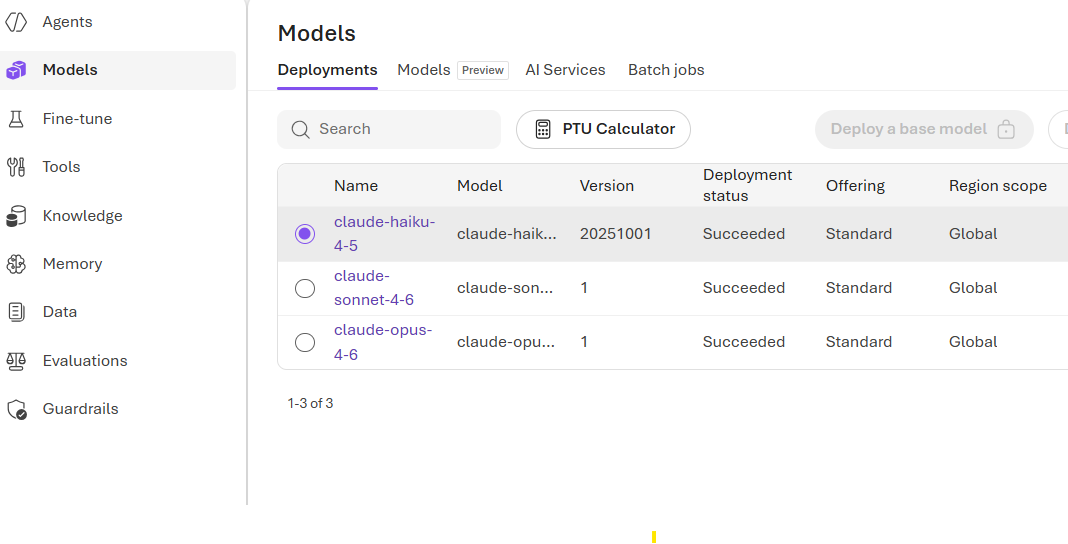
Claude Code uses three model roles, and it expects a deployment for each:
| Role | Default deployment name | Used for |
|---|---|---|
| Primary | claude-sonnet-4-6 | general coding (balanced) |
| Fast | claude-haiku-4-5 | quick edits, file reads |
| Extended thinking | claude-opus-4-6 | complex reasoning |
Deploy at least Sonnet to get started. Add Haiku and Opus when you need them — Claude Code will route automatically. If a role-specific model isn't deployed, Claude Code may fall back or fail depending on the task.
Deployment names in this guide follow the current Claude 4.x naming exposed in Foundry. Exact versions change over time — check the Foundry model catalog in your region for what's currently available.
Foundry Portal: AI Foundry → your project → Build → Models + endpoints → + Deploy model → pick the Anthropic Claude model → Global Standard deployment → name it exactly as above (or remember the name to override later).
To discover the current model version before deploying (replace eastus2 with your Foundry region):
az cognitiveservices model list -l eastus2 `
  --query "[?contains(model.name,'claude')].{name:model.name, version:model.version, format:model.format}" -o table
Azure CLI:
az cognitiveservices account deployment create `
  --name <foundry-resource> `
  --resource-group <rg> `
  --deployment-name claude-sonnet-4-6 `
  --model-name claude-sonnet-4-6 `
  --model-version <version> `
  --model-format Anthropic `
  --sku-name GlobalStandard `
  --sku-capacity 1
✍️ Figure 1: Foundry portal “Models + endpoints” showing the three Claude deployments.

Step 2 — Grant yourself the right roles
This is the #1 source of silent failures. You need both:
| Role | Role ID | Purpose |
|---|---|---|
| Cognitive Services User | a97b65f3-24c7-4388-baec-2e87135dc908 | data-plane invocation |
| Foundry User (formerly Azure AI User) | 53ca6127-db72-4b80-b1b0-d745d6d5456d | Foundry-native permissions |
$me = az ad signed-in-user show --query id -o tsv
$scope = az cognitiveservices account show -n <foundry-resource> -g <rg> --query id -o tsv

# Use role IDs — rename-proof (works whether the display name is "Azure AI User" or "Foundry User")
az role assignment create --assignee $me --role a97b65f3-24c7-4388-baec-2e87135dc908 --scope $scope  # Cognitive Services User
az role assignment create --assignee $me --role 53ca6127-db72-4b80-b1b0-d745d6d5456d --scope $scope  # Foundry User (formerly Azure AI User)
The Foundry RBAC rename (Azure AI User → Foundry User) is rolling out; both role names map to the same role definition (same role ID), depending on tenant rollout state. Use whichever role name your tenant exposes — or use the role IDs above to avoid ambiguity.
Step 3 — Install the Claude Code CLI
Use the official installer from Anthropic (auto-updates in the background):
irm https://claude.ai/install.ps1 | iex
claude --version
If claude isn't on PATH, restart your shell. The installer drops it under %USERPROFILE%\.local\bin.
Step 4 — Sign in to the right tenant
If your Foundry resource lives in a tenant different from your default, an az login to the wrong tenant produces the cryptic error:
ValueError: Unable to get authority configuration for
https://login.microsoftonline.com/<bad-guid>.
Authority would typically be in a format of
https://login.microsoftonline.com/your_tenant
Fix:
az login --tenant <foundry-tenant-guid>
az account set --subscription <foundry-subscription-guid>
az account show   # confirm tenant & subscription
💡 You can list every tenant you have access to with:
az account list --query "[].{name:name, tenantId:tenantId}" -o table
Step 5 — Configure the CLI
Set these in the same PowerShell session you'll launch claude from:
$env:CLAUDE_CODE_USE_FOUNDRY     = "1"
$env:ANTHROPIC_FOUNDRY_RESOURCE  = "<your-foundry-resource-name>"

# Optional: only if your deployment names differ from the defaults
$env:ANTHROPIC_DEFAULT_SONNET_MODEL = "claude-sonnet-4-6"
$env:ANTHROPIC_DEFAULT_HAIKU_MODEL  = "claude-haiku-4-5"
$env:ANTHROPIC_DEFAULT_OPUS_MODEL   = "claude-opus-4-6"
To make them persistent: setx CLAUDE_CODE_USE_FOUNDRY 1 (and so on), then sign out and back in (or restart Explorer). GUI apps like VS Code launched from the Start menu only pick up new user-env vars after the user session refreshes — opening a fresh terminal isn't enough.
🚫 The "mutually exclusive" trap
API Error: baseURL and resource are mutually exclusive
You'll hit this if you set both ANTHROPIC_FOUNDRY_RESOURCE and ANTHROPIC_FOUNDRY_BASE_URL. Pick one:
- Most users →
ANTHROPIC_FOUNDRY_RESOURCE=<name>(Claude Code builds the URL). - Custom subdomain / private endpoint → use
ANTHROPIC_FOUNDRY_BASE_URLinstead.
Step 6 — Verify the CLI
claude
> /status
Expected output:
API provider:                 Microsoft Foundry
Microsoft Foundry base URL:   https://<resource>.services.ai.azure.com/anthropic
Microsoft Foundry resource:   <resource>
Model:                        Default (claude-sonnet-4-6)
✍️ Figure 2: /status output confirming API provider: Microsoft Foundry.

If you instead see "Anthropic" or it prompts for an Anthropic login, CLAUDE_CODE_USE_FOUNDRY isn't being inherited — see troubleshooting below.
Step 7 — Configure the VS Code extension
Install Claude Code from the VS Code Marketplace (publisher: Anthropic).
Open user settings.json (Ctrl+Shift+P → Preferences: Open User Settings (JSON)) and add:
"claudeCode.environmentVariables": [
  { "name": "CLAUDE_CODE_USE_FOUNDRY",    "value": "1" },
  { "name": "ANTHROPIC_FOUNDRY_RESOURCE", "value": "<your-foundry-resource-name>" }
]
🪤 Schema gotcha. The MS Learn doc currently shows this as a plain
{KEY: VALUE}object under the UI label"Claude Code: Environment Variables". In recent extension versions the actual JSON key isclaudeCode.environmentVariablesand the value must be an array of{name, value}objects. If you paste the doc's snippet verbatim, VS Code will flag "Missing property name", "Colon expected", "Unknown configuration setting". Use the array form above.
Make the extension see your az login
The extension inherits environment & credentials from the process that launches VS Code. After az login:
# In the same PowerShell where az login succeeded:
code .
If VS Code was already running, fully quit it (not just close the window) and relaunch from the terminal. Developer: Reload Window is not enough to refresh inherited Azure CLI credentials.
✍️ Figure 3: settings.json with the claudeCode.environmentVariables array form.

Step 8 — Try it
In VS Code, click the Claude Code (Spark) icon in the sidebar to open the panel. Type:
Summarize the structure of this project.
You should get a response within a few seconds, and the panel should indicate it's routing through Microsoft Foundry. Run /status inside the panel to confirm API provider: Microsoft Foundry if you want certainty.
✍️ Figure 4: Claude Code panel in VS Code responding through Microsoft Foundry.

Troubleshooting matrix
| Symptom | Where it shows up | Likely cause | Fix |
|---|---|---|---|
API Error: baseURL and resource are mutually exclusive | claude CLI on first request | Both ANTHROPIC_FOUNDRY_BASE_URL and ANTHROPIC_FOUNDRY_RESOURCE set | Unset one. Prefer ANTHROPIC_FOUNDRY_RESOURCE. |
Unable to get authority configuration for https://login.microsoftonline.com/<guid> | claude CLI startup or VS Code panel | Wrong tenant ID in az login | az login --tenant <correct-guid>; verify with az account show |
Failed to get token from azureADTokenProvider: ChainedTokenCredential authentication failed | VS Code Claude Code panel | Extension didn't inherit az login session | Quit VS Code entirely; relaunch with code . from the authed shell |
Token tenant does not match resource tenant | claude CLI or VS Code panel | CLI logged into a different tenant than the Foundry resource | az login --tenant <foundry-tenant> |
The model <name> is not available on your foundry deployment | claude CLI first use or VS Code model selector | Deployment name mismatch | Either rename the Foundry deployment, or set ANTHROPIC_DEFAULT_*_MODEL to the actual name |
401 / 403 on first request | claude CLI or VS Code panel | Missing RBAC on the resource | Assign Cognitive Services User and Foundry User on the resource scope |
| Claude Code prompts for Anthropic login | VS Code Claude Code panel | CLAUDE_CODE_USE_FOUNDRY not set in the process | Set the env var before launching claude / code . |
VS Code shows "Unknown Configuration Setting" for claudeCode.environmentVariables | VS Code Settings tab | Wrong JSON shape | Use the array of {name,value} objects form |
429 Too Many Requests | claude CLI or VS Code panel | TPM/RPM exhausted | Foundry portal → Operate → Quotas; request increase or reduce parallelism |
| Works in CLI, fails in VS Code extension | VS Code Claude Code panel only | Env vars set per-shell, not visible to GUI VS Code | Use setx (persistent user env) or move them into claudeCode.environmentVariables |
| "Model is not available in region" | Foundry portal model deployment step | Foundry resource not in a supported region | Deploy a new Foundry resource in a supported region, or check model availability |
Best practices
Auth & secrets - Prefer Entra ID over API keys. If you must use a key for CI, store it as a secret (GitHub Actions secret, Key Vault) — never in settings.json (it may sync via Settings Sync). - Scope RBAC at the resource level, not the subscription, for least privilege.
Project context - Create a CLAUDE.md at your repo root with stack, conventions, and entry-point commands. Claude Code reads it automatically and the quality jump is significant. - Use .claude/rules/*.md for per-area rules (e.g., test conventions, security rules).
Cost & latency - Let Claude Code's auto-routing pick the right role (Sonnet/Haiku/Opus). Don't pin everything to Opus. - Cap context with ANTHROPIC_MAX_TOKENS if you have a strict budget. (Note: not honored by every Claude Code version — check the Claude Code docs for your version.) - Watch token spend in Foundry → Operate → Metrics weekly.
Reliability - For team use, deploy all three model roles even if you don't think you need them — silent role-routing failures are confusing. - Tag your Foundry resource (env=dev|prod, team=...) for chargeback.
Reproducibility - Document the exact env vars and az login --tenant GUID in your team README. - Pin Claude Code CLI version in onboarding docs (claude --version) so new joiners hit the same behavior.
A note on the MS Learn doc
The doc is accurate but skips three things that caused the most friction in real-world deployments:
- VS Code extension settings shape — the example uses the UI label as a JSON key and an object instead of the array form the schema actually expects.
- Process inheritance — it says "set the env vars" but doesn't emphasize that the VS Code window must be launched from a shell where both
az loginand the env vars are live. Reloading the window doesn't help. - Mutually exclusive
RESOURCEvsBASE_URL— listed in passing, but the error message only appears at first request, after you think everything is configured.
If the Microsoft Learn page is updated, treat this post as a companion — same destination, fewer dead ends.
What you've got now
- Claude Code running locally on your machine, talking to your Foundry resource.
- Entra ID auth — no API keys to manage.
- Full Foundry telemetry, quotas, and billing.
- VS Code panel + CLI, both backed by the same setup.
Drop a CLAUDE.md in your repo and start shipping.
When to Use RESOURCE vs BASE_URL
Use RESOURCE (default) - Standard public deployments - No custom networking
Use BASE_URL - Private endpoints - Custom DNS / VNet routing
Never set both.

 Microsoft