In today's rapidly evolving AI landscape, we've witnessed the transformation from simple chatbots to sophisticated agent systems. As a developer and technology evangelist, I've observed an emerging trend—it's not about making AI omnipotent, but about enabling each AI Agent to achieve excellence in specific domains.
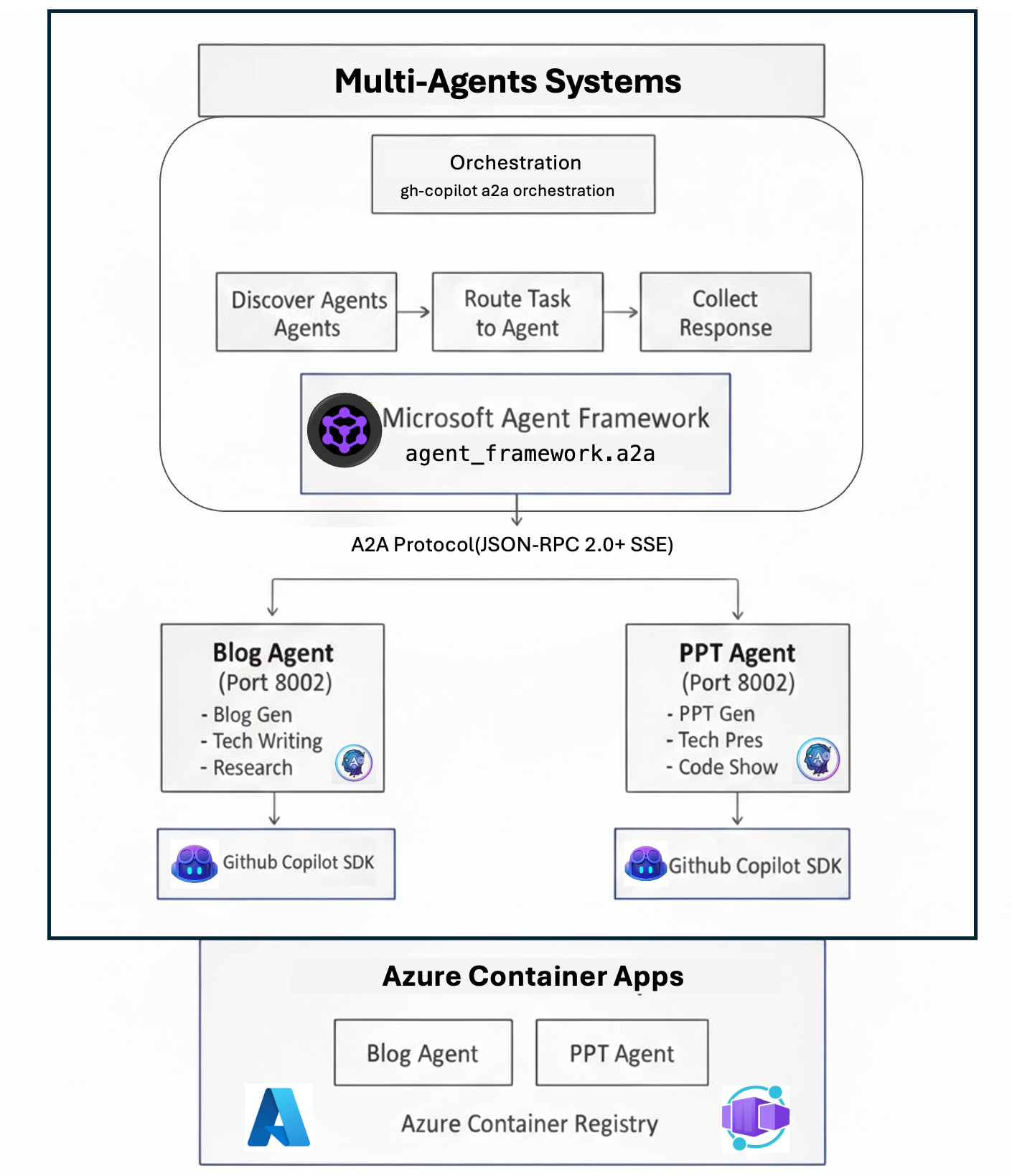
Today, I want to share an exciting technology stack: GitHub Copilot SDK (a development toolkit that embeds production-grade agent engines into any application) + Agent-to-Agent (A2A) Protocol (a communication standard enabling standardized agent collaboration) + Cloud Native Deployment (the infrastructure foundation for production systems). Together, these three components enable us to build truly collaborative multi-agent systems.
1. From AI Assistants to Agent Engines: Redefining Capability Boundaries
Traditional AI assistants often pursue "omnipotence"—attempting to answer any question you throw at them. However, in real production environments, this approach faces serious challenges:
- Inconsistent Quality: A single model trying to write code, perform data analysis, and generate creative content struggles to achieve professional standards in each domain
- Context Pollution: Mixing prompts from different tasks leads to unstable model outputs
- Difficult Optimization: Adjusting prompts for one task type may negatively impact performance on others
- High Development Barrier: Building agents from scratch requires handling planning, tool orchestration, context management, and other complex logic
GitHub proposed a revolutionary approach—instead of forcing developers to build agent frameworks from scratch, provide a production-tested, programmable agent engine. This is the core value of the GitHub Copilot SDK.
Evolution from Copilot CLI to SDK
GitHub Copilot CLI is a powerful command-line tool that can:
- Plan projects and features
- Modify files and execute commands
- Use custom agents
- Delegate tasks to cloud execution
- Integrate with MCP servers
The GitHub Copilot SDK extracts the agentic core behind Copilot CLI and offers it as a programmable layer for any application. This means:
- You're no longer confined to terminal environments
- You can embed this agent engine into GUI applications, web services, and automation scripts
- You gain access to the same execution engine validated by millions of users
Just like in the real world, we don't expect one person to be a doctor, lawyer, and engineer simultaneously. Instead, we provide professional tools and platforms that enable professionals to excel in their respective domains.
2. GitHub Copilot SDK: Embedding Copilot CLI's Agentic Core into Any App
Before diving into multi-agent systems, we need to understand a key technology: GitHub Copilot SDK.
What is GitHub Copilot SDK?
GitHub Copilot SDK (now in technical preview) is a programmable agent execution platform. It allows developers to embed the production-tested agentic core from GitHub Copilot CLI directly into any application.
Simply put, the SDK provides:
- Out-of-the-box Agent Loop: No need to build planners, tool orchestration, or context management from scratch
- Multi-model Support: Choose different AI models (like GPT-4, Claude Sonnet) for different task phases
- Tool and Command Integration: Built-in file editing, command execution, and MCP server integration capabilities
- Streaming Real-time Responses: Support for progress updates on long-running tasks
- Multi-language Support: SDKs available for Node.js, Python, Go, and .NET
Why is the SDK Critical for Building Agents?
Building an agentic workflow from scratch is extremely difficult. You need to handle:
- Context management across multiple conversation turns
- Orchestration of tools and commands
- Routing between different models
- MCP server integration
- Permission control, safety boundaries, and error handling
GitHub Copilot SDK abstracts away all this underlying complexity. You only need to focus on:
- Defining agent professional capabilities (through Skill files)
- Providing domain-specific tools and constraints
- Implementing business logic
SDK Usage Examples
Python Example (from actual project implementation):
from copilot import CopilotClient

# Initialize client
copilot_client = CopilotClient()
await copilot_client.start()

# Create session and load Skill
session = await copilot_client.create_session({
    "model": "claude-sonnet-4.5",
    "streaming": True,
    "skill_directories": ["/path/to/skills/blog/SKILL.md"]
})

# Send task
await session.send_and_wait({
    "prompt": "Write a technical blog about multi-agent systems"
}, timeout=600)
Skill System: Professionalizing Agents
While the SDK provides a powerful execution engine, how do we make agents perform professionally in specific domains? The answer is Skill files.
A Skill file is a standardized capability definition containing:
- Capability Declaration: Explicitly tells the system "what I can do" (e.g., blog generation, PPT creation)
- Domain Knowledge: Preset best practices, standards, and terminology guidelines
- Workflow: Defines the complete execution path from input to output
- Output Standards: Ensures generated content meets format and quality requirements
Through the combination of Skill files + SDK, we can build truly professional agents rather than generic "jack-of-all-trades assistants."
3. A2A Protocol: Enabling Seamless Agent Collaboration
Once we have professional agents, the next challenge is: how do we make them work together? This is the core problem the Agent-to-Agent (A2A) Protocol aims to solve.
Three Core Mechanisms of A2A Protocol
1. Agent Discovery (Service Discovery)
Each agent exposes its capability card through the standardized /.well-known/agent-card.json endpoint, acting like a business card that tells other agents "what I can do":
{
  "name": "blog_agent",
  "description": "Blog generation with DeepSearch",
  "primaryKeywords": ["blog", "article", "write"],
  "skills": [{
    "id": "blog_generation",
    "tags": ["blog", "writing"],
    "examples": ["Write a blog about..."]
  }],
  "capabilities": { "streaming": true }
}
2. Intelligent Routing
The Orchestrator matches tasks with agent capabilities through scoring. The project's routing algorithm implements keyword matching and exclusion detection:
- Positive Matching: If a task contains an agent's primaryKeywords, score +0.5
- Negative Exclusion: If a task contains other agents' keywords, score -0.3
This way, when users say "write a blog about cloud native," the system automatically selects the Blog Agent; when they say "create a tech presentation PPT," it routes to the PPT Agent.
3. SSE Streaming (Real-time Streaming)
For time-consuming tasks (like generating a 5000-word blog), A2A uses Server-Sent Events to push real-time progress, allowing users to see the agent working instead of just waiting. This is crucial for user experience.
4. Cloud Native Deployment: Making Agent Systems Production-Ready
Even the most powerful technology is just a toy if it can't be deployed to production environments. This project demonstrates a complete deployment of a multi-agent system to a cloud-native platform (Azure Container Apps).
Why Choose Cloud Native?
- Elastic Scaling: When blog generation requests surge, the Blog Agent can auto-scale; it scales down to zero during idle times to save costs
- Independent Evolution: Each agent has its own Docker image and deployment pipeline; updating the Blog Agent doesn't affect the PPT Agent
- Fault Isolation: If one agent crashes, it won't bring down the entire system; the Orchestrator automatically degrades
- Global Distribution: Through Azure Container Apps, agents can be deployed across multiple global regions to reduce latency
Container Deployment Essentials
Each agent in the project has a standardized Dockerfile:
FROM python:3.12-slim
WORKDIR /app
COPY requirements.txt .
RUN pip install --no-cache-dir -r requirements.txt
COPY . .
EXPOSE 8001
CMD ["uvicorn", "main:app", "--host", "0.0.0.0", "--port", "8001"]
Combined with the deploy-to-aca.sh script, one-click deployment to Azure:
# Build and push image
az acr build --registry myregistry --image blog-agent:latest .

# Deploy to Container Apps
az containerapp create \
  --name blog-agent \
  --resource-group my-rg \
  --environment my-env \
  --image myregistry.azurecr.io/blog-agent:latest \
  --secrets github-token=$COPILOT_TOKEN \
  --env-vars COPILOT_GITHUB_TOKEN=secretref:github-token
5. Real-World Results: From "Works" to "Works Well"
Let's see how this system performs in real scenarios. Suppose a user initiates a request:
"Write a technical blog about Kubernetes multi-tenancy security, including code examples and best practices"
System Execution Flow:
- Orchestrator receives the request and scans all agents' capability cards
- Keyword matching: "write" + "blog" → Blog Agent scores 1.0, PPT Agent scores 0.0
- Routes to Blog Agent, loads technical writing Skill
- Blog Agent initiates DeepSearch to collect latest K8s security materials
- SSE real-time push: "Collecting materials..." → "Generating outline..." → "Writing content..."
- Returns complete blog after 5 minutes, including code highlighting, citation sources, and best practices summary
Compared to traditional "omnipotent" AI assistants, this system's advantages:
- ✅ Professionalism: Blog Agent trained with technical writing Skills produces content with clear structure, accurate terminology, and executable code
- ✅ Visibility: Users see progress throughout, knowing what the AI is doing
- ✅ Extensibility: Adding new agents (video script, data analysis) in the future requires no changes to existing architecture
6. Key Technical Challenges and Solutions
Challenge 1: Inaccurate Agent Capability Descriptions Leading to Routing Errors
Solution:
- Define clear primaryKeywords and examples in Agent Cards
- Implement exclusion detection mechanism to prevent tasks from being routed to unsuitable agents
Challenge 2: Poor User Experience for Long-Running Tasks
Solution:
- Fully adopt SSE streaming, pushing working/completed/error status in real-time
- Display progress hints in status messages so users know what the system is doing
Challenge 3: Sensitive Information Leakage Risk
Solution:
- Use Azure Key Vault or Container Apps Secrets to manage GitHub Tokens
- Inject via environment variables, never hardcode in code or images
- Check required environment variables in deployment scripts to prevent configuration errors
7. Future Outlook: SDK-Driven Multi-Agent Ecosystem
This project is just the beginning. As GitHub Copilot SDK and A2A Protocol mature, we can build richer agent ecosystems:
Actual SDK Application Scenarios
According to GitHub's official blog, development teams have already used the Copilot SDK to build:
- YouTube Chapter Generator: Automatically generates timestamped chapter markers for videos
- Custom Agent GUIs: Visual agent interfaces for specific business scenarios
- Speech-to-Command Workflows: Control desktop applications through voice
- AI Battle Games: Interactive competitive experiences with AI
- Intelligent Summary Tools: Automatic extraction and summarization of key information
Multi-Agent System Evolution Directions
- 🏪 Agent Marketplace: Developers can publish specialized agents (legal documents, medical reports, etc.) that plug-and-play via A2A protocol
- 🔗 Cascade Orchestration: Orchestrator automatically breaks down complex tasks, calling multiple agents collaboratively (e.g., "write blog + generate images + create PPT")
- 🌐 Cross-Platform Interoperability: Based on A2A standards, agents developed by different companies can call each other, breaking down data silos
- ⚙️ Automated Workflows: Delegate routine repetitive work to agent chains, letting humans focus on creative work
- 🎯 Vertical Domain Specialization: Combined with Skill files, build high-precision agents in professional fields like finance, healthcare, and legal
Core Value of the SDK
The significance of GitHub Copilot SDK lies in: it empowers every developer to become a builder of agent systems.
You don't need deep learning experts, you don't need to implement agent frameworks yourself, and you don't even need to manage GPU clusters. You only need to:
- Install the SDK (npm install github/copilot-sdk)
- Define your business logic and tools
- Write Skill files describing professional capabilities
- Call the SDK's execution engine
And you can build production-grade intelligent agent applications.
Summary: From Demo to Production
GitHub Copilot SDK + A2A + Cloud Native isn't three independent technology stacks, but a complete methodology:
- GitHub Copilot SDK provides an out-of-the-box agent execution engine—handling planning, tool orchestration, context management, and other underlying complexity
- Skill files enable agents with domain-specific professional capabilities—defining best practices, workflows, and output standards
- A2A Protocol enables standardized communication and collaboration between agents—implementing service discovery, intelligent routing, and streaming
- Cloud Native makes the entire system production-ready—containerization, elastic scaling, fault isolation
For developers, this means we no longer need to build agent frameworks from scratch or struggle with the black magic of prompt engineering. We only need to:
- Use GitHub Copilot SDK to obtain a production-grade agent execution engine
- Write domain-specific Skill files to define professional capabilities
- Follow A2A protocol to implement standard interfaces between agents
- Deploy to cloud platforms through containerization
And we can build AI Agent systems that are truly usable, well-designed, and production-ready.
🚀 Start Building
Complete project code is open source:
https://github.com/kinfey/Multi-AI-Agents-Cloud-Native/tree/main/code/GitHubCopilotAgents_A2A
Follow the README guide and deploy your first Multi-Agent system in 30 minutes!
References
- GitHub Copilot SDK Official Announcement - Build an agent into any app with the GitHub Copilot SDK
- GitHub Copilot SDK Repository - github.com/github/copilot-sdk
- A2A Protocol Official Specification - a2a-protocol.org/latest/
- Project Source Code - Multi-AI-Agents-Cloud-Native
- Azure Container Apps Documentation - learn.microsoft.com/azure/container-apps

 Microsoft