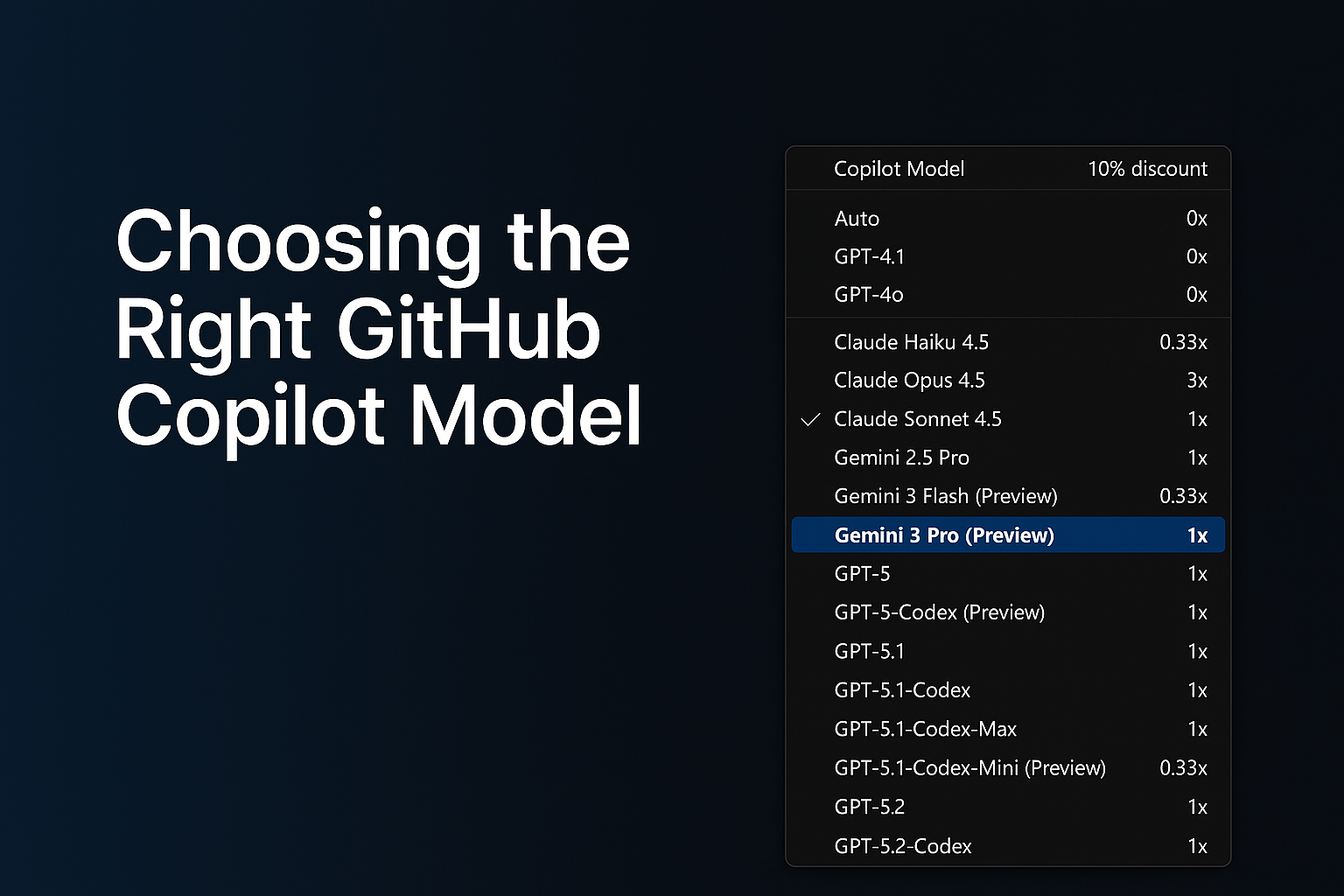
AI-assisted development has grown far beyond simple code suggestions. GitHub Copilot now supports multiple AI models, each optimized for different workflows, from quick edits to deep debugging to multi-step agentic tasks that generate or modify code across your entire repository.
As developers, this flexibility is powerful… but only if we know how to choose the right model at the right time.
In this guide, I’ll break down:
- Why model selection matters
- The four major categories of development tasks
- A simplified, developer-friendly model comparison table
- Enterprise considerations and practical tips
This is written from the perspective of real-world customer conversations, GitHub Copilot demos, and enterprise adoption journeys
Why Model Selection Matters
GitHub Copilot isn’t tied to a single model. Instead, it offers a range of models, each with different strengths:
- Some are optimized for speed
- Others are optimized for reasoning depth
- Some are built for agentic workflows
Choosing the right model can dramatically improve:
- The quality of the output
- The speed of your workflow
- The accuracy of Copilot’s reasoning
- The effectiveness of Agents and Plan Mode
- Your usage efficiency under enterprise quotas
Model selection is now a core part of modern software development, just like choosing the right library, framework, or cloud service.
The Four Task Categories (and which Model Fits)
To simplify model selection, I group tasks into four categories.
Each category aligns naturally with specific types of models.
1. Everyday Development Tasks
Examples:
- Writing new functions
- Improving readability
- Generating tests
- Creating documentation
Best fit:
General-purpose coding models (e.g., GPT‑4.1, GPT‑5‑mini, Claude Sonnet)
These models offer the best balance between speed and quality.
2. Fast, Lightweight Edits
Examples:
- Quick explanations
- JSON/YAML transformations
- Small refactors
- Regex generation
- Short Q&A tasks
Best fit:
Lightweight models (e.g., Claude Haiku 4.5)
These models give near-instant responses and keep you “in flow.”
3. Complex Debugging & Deep Reasoning
Examples:
- Analyzing unfamiliar code
- Debugging tricky production issues
- Architecture decisions
- Multi-step reasoning
- Performance analysis
Best fit:
Deep reasoning models (e.g., GPT‑5, GPT‑5.1, GPT‑5.2, Claude Opus)
These models handle large context, produce structured reasoning, and give the most reliable insights for complex engineering tasks.
4. Multi-step Agentic Development
Examples:
- Repo-wide refactors
- Migrating a codebase
- Scaffolding entire features
- Implementing multi-file plans in Agent Mode
- Automated workflows (Plan → Execute → Modify)
Best fit:
Agent-capable models (e.g., GPT‑5.1‑Codex‑Max, GPT‑5.2‑Codex)
These models are ideal when you need Copilot to execute multi-step tasks across your repository.
GitHub Copilot Models - Developer Friendly Comparison
The set of models you can choose from depends on your Copilot subscription, and the available options may evolve over time. Each model also has its own premium request multiplier, which reflects the compute resources it requires. If you're using a paid Copilot plan, the multiplier determines how many premium requests are deducted whenever that model is used.
| Model Category | Example Models (Premium request Multiplier for paid plans) | What they’re best at | When to Use Them |
|---|---|---|---|
| Fast Lightweight Models |
Claude Haiku 4.5, Gemini 3 Flash (0.33x) Grok Code Fast 1 (0.25x) | Low latency, quick responses | Small edits, Q&A, simple code tasks |
| General-Purpose Coding Models |
GPT‑4.1, GPT‑5‑mini (0x) GPT-5-Codex, Claude Sonnet 4.5 (1x) | Reliable day‑to‑day development | Writing functions, small tests, documentation |
| Deep Reasoning Models |
GPT-5.1 Codex Mini (0.33x) GPT‑5, GPT‑5.1, GPT-5.1 Codex, GPT‑5.2, Claude Sonnet 4.0, Gemini 2.5 Pro, Gemini 3 Pro (1x) Claude Opus 4.5 (3x) | Complex reasoning and debugging | Architecture work, deep bug diagnosis |
| Agentic / Multi-step Models | GPT‑5.1‑Codex‑Max, GPT‑5.2‑Codex (1x) | Planning + execution workflows | Repo-wide changes, feature scaffolding |
Enterprise Considerations
For organizations using Copilot Enterprise or Business:
- Admins can control which models employees can use
- Model selection may be restricted due to security, regulation, or data governance
- You may see fewer available models depending on your organization’s Copilot policies
Using "Auto" Model selection in GitHub Copilot
GitHub Copilot’s Auto model selection automatically chooses the best available model for your prompts, reducing the mental load of picking a model and helping you avoid rate‑limiting. When enabled, Copilot prioritizes model availability and selects from a rotating set of eligible models such as GPT‑4.1, GPT‑5 mini, GPT‑5.2‑Codex, Claude Haiku 4.5, and Claude Sonnet 4.5 while respecting your subscription level and any administrator‑imposed restrictions. Auto also excludes models blocked by policies, models with premium multipliers greater than 1, and models unavailable in your plan. For paid plans, Auto provides an additional benefit: a 10% discount on premium request multipliers when used in Copilot Chat. Overall, Auto offers a balanced, optimized experience by dynamically selecting a performant and cost‑efficient model without requiring developers to switch models manually. Read more about the 'Auto' Model selection here - About Copilot auto model selection - GitHub Docs
Final Thoughts
GitHub Copilot is becoming a core part of the developer workflows.
Choosing the right model can dramatically improve your productivity, the accuracy of Copilot’s responses, your experience with multi-step agentic tasks, your ability to navigate complex codebases
Whether you’re building features, debugging complex issues, or orchestrating repo-wide changes, picking the right model helps you get the best out of GitHub Copilot.
References and Further Reading
To explore each model further, visit the GitHub Copilot model comparison documentation or try switching models in Copilot Chat to see how they impact your workflow.
AI model comparison - GitHub Docs
Requests in GitHub Copilot - GitHub Docs
About Copilot auto model selection - GitHub Docs

 Microsoft