wsus
85 Topics
Delivery Optimization breaking Windows 11 update downloads?
We started seeing Delivery Optimization–related issues with Windows updates after upgrading devices to Windows 11 24H2. In our SCCM environment, Windows updates begin downloading but consistently fail or stall partway through the download. In many cases, the download restarts multiple times and eventually errors out. This behavior is consistent across multiple devices and different boundaries. These same devices were patching normally prior to the 24H2 upgrade. Since moving to 24H2, patching has become unreliable, especially for larger updates. From what we’re seeing, this doesn’t look like a traditional content or boundary issue. It feels like Delivery Optimization is failing mid-transfer or not resuming downloads correctly after the OS upgrade. So far we’ve checked the following: - Boundaries and boundary groups are unchanged - Content is available and distributed correctly on DPs - No recent SCCM site or infrastructure changes - Network connectivity looks normal On the client side, we’ve been reviewing: - DataTransferService.log (downloads start but fail or restart mid-way) - DeliveryOptimization logs (showing repeated retries / stalled transfers) - CAS.log and LocationServices.log (content location looks normal) - WUAHandler.log (update detection looks fine) Overall, detection and policy seem healthy — the issue appears during the actual download phase. Has anyone else seen Delivery Optimization downloads stall or fail during Windows patching after upgrading to Windows 11 24H2? If so, did you find a specific DO setting, policy change, or workaround that stabilized patching?2.2KViews0likes3CommentsDelivery Optimization breaking Windows 11 update downloads?
We started seeing Delivery Optimization–related issues with Windows updates after upgrading devices to Windows 11 24H2. In our SCCM environment, Windows updates begin downloading but consistently fail or stall partway through the download. In many cases, the download restarts multiple times and eventually errors out. This behavior is consistent across multiple devices and different boundaries. These same devices were patching normally prior to the 24H2 upgrade. Since moving to 24H2, patching has become unreliable, especially for larger updates. From what we’re seeing, this doesn’t look like a traditional content or boundary issue. It feels like Delivery Optimization is failing mid-transfer or not resuming downloads correctly after the OS upgrade. So far we’ve checked the following: - Boundaries and boundary groups are unchanged - Content is available and distributed correctly on DPs - No recent SCCM site or infrastructure changes - Network connectivity looks normal On the client side, we’ve been reviewing: - DataTransferService.log (downloads start but fail or restart mid-way) - DeliveryOptimization logs (showing repeated retries / stalled transfers) - CAS.log and LocationServices.log (content location looks normal) - WUAHandler.log (update detection looks fine) Overall, detection and policy seem healthy — the issue appears during the actual download phase. Has anyone else seen Delivery Optimization downloads stall or fail during Windows patching after upgrading to Windows 11 24H2? If so, did you find a specific DO setting, policy change, or workaround that stabilized patching?920Views0likes1Comment
Windows 11 automatically restarting after install security Update — With GPO and WSUS.
Hi everyone, I’m facing a strange behavior with Windows 11 devices that receive updates through WSUS and are fully managed via Group Policy. Here’s the scenario: We have a GPO configured as follows: -Configure Automatic Updates → 4 (Auto download and schedule the install) -Scheduled installation every day at 10:00 -Install during automatic maintenance → disabled -Active Hours configured -Turn off auto-restart for updates during active hours → Enabled -Update deadlines set to 0 (to avoid any forced restart) -No other restart-related policies set in the domain Even with this configuration, after updates are installed, Windows 11 shows the following message: “Your organization manages update settings. We will restart and install this update at X minutes.” And then the device automatically restarts, even when: -a user is logged in -it is outside Active Hours -deadlines are disabled -no-auto-restart is enabled This behavior does not happen on Windows 10 — only on Windows 11.3.4KViews1like1CommentWorkstations stopped sending reports to WSUS
A month ago, domain WU-clients stopped sending reports to the WSUS server. However, the search/receipt of updates by clients is performed normally (both manually and scheduled). So, if an update is approved on WSUS, it is installed on the workstation. Re-registering the WU-client (cleaning "SoftwareDistribution" folder and "WindowsUpdate" registry branch) didn't help. The problem is only with workstations (MS Windows 10), servers continue to send reports regularly.1.3KViews0likes2CommentsThrottle Downstream WSUS Update Pull from upstream
Is it possible to throttle the download of updates on a downstream WSUS server i.e. when it is pulling it's updates from an upstream WSUS server? We have some downstream WSUS servers on low bandwidth links and whilst we generally schedule the pull of updates during an out-of-hours window this is problematic for us for several reasons. I'd rather they pull during the day but with throttling. I’m aware the WSUS clients can do this in Windows 10 BITS etc. but wondering can the WSUS server do this on the synchronisation cycles.253Views0likes0Comments
WSUS - Why Windows target version GPO / registry setting is not working?
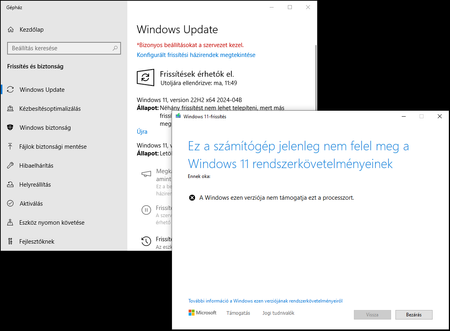
Hi, I would like to set my Windows 10 PC's target version to 22H2 and disable Windows 11 upgrade. I set a GPO to disable the upgrade, but it is not working, my test PC's still get the Windows 11 upgrade (and it fails with unsupported processor error). The registry settings set correctly on the Windows 10 PC, but it is still try to get the update from my WSUS server. What do I miss? How could I tell these PC's to not try this update? According to https://answers.microsoft.com/en-us/windows/forum/all/how-to-stop-or-block-windows-11-update/9f271456-51dd-4716-b69d-0834d552ca83, I did everything correctly, but still I face this problem.1.2KViews0likes2CommentsWSUS PS sync script
Hello, We are trying to build a powershell script which will be executed on any client which should be able to search/install windows updates from a wsus server which resides in our network but it is not the default option in the clients configuration. The severs are configured with let's say wsus server X and we are trying to sync with wsus server Z and very important, we should not modify the client configuration. We tried to find a module/option to achive what we described without any luck. Did anyone tried something similar ? if yes, any hints ?391Views0likes0CommentsProblems with updates reports
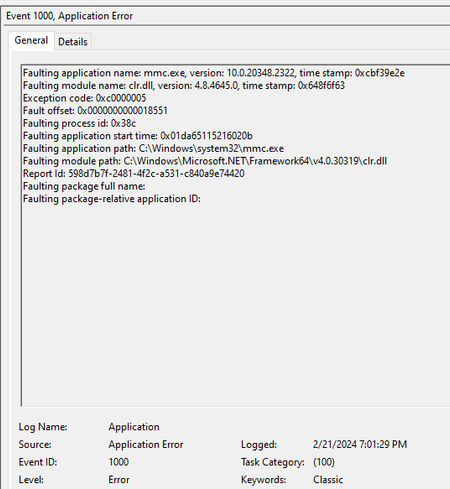
Hi everyone. I have a problem with WSUS reports. Recently I update my Windows Server 2022 and that is my WSUS Server. After that, I can´t generate reports of my computers and updates, the console simply quit with no errors. In my Event Viewer I can see this: When I uninstall the “Update for Microsoft Windows (KB5034613)”, the reports work again but I want to now if anyone had the same problem.1.3KViews0likes1CommentKeeping PowerShell up-to-date via WSUS.
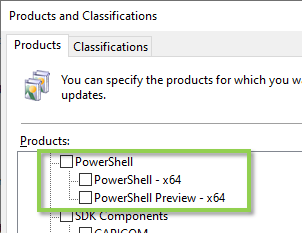
Hi, folks. This is a quick one to let any fellow hybrid operators know that PowerShell (as distinct from Windows PowerShell) can be kept up-to-date via WSUS these days. Product and Classifications You can find the PowerShell products listed as shown below, while within the Classifications tab, you want to have the "Updates" category checked. After WSUS synchronisation You'll see it's now aware of the various 7.x branches. After client synchronisation to WSUS You'll see the various updates pending approval for deployment. (Yes, my PowerShell's very old now!) A nice little win for the keeping the small things in (my) life current for zero extra effort. Cheers, Lain551Views2likes0Comments