workflow
56 TopicsModel Mondays S2E11: Exploring Speech AI in Azure AI Foundry
1. Weekly Highlights This week’s top news in the Azure AI ecosystem included: Lakuna — Copilot Studio Agent for Product Teams: A hackathon project built with Copilot Studio and Azure AI Foundry, Lakuna analyzes your requirements and docs to surface hidden assumptions, helping teams reflect, test, and reduce bias in product planning. Azure ND H200 v5 VMs for AI: Azure Machine Learning introduced ND H200 v5 VMs, featuring NVIDIA H200 GPUs (over 1TB GPU memory per VM!) for massive models, bigger context windows, and ultra-fast throughput. Agent Factory Blog Series: The next wave of agentic AI is about extensibility: plug your agents into hundreds of APIs and services using Model Connector Protocol (MCP) for portable, reusable tool integrations. GPT-5 Tool Calling on Azure AI Foundry: GPT-5 models now support free-form tool calling—no more rigid JSON! Output SQL, Python, configs, and more in your preferred format for natural, flexible workflows. Microsoft a Leader in 2025 Gartner Magic Quadrant: Azure was again named a leader for Cloud Native Application Platforms—validating its end-to-end runway for AI, microservices, DevOps, and more. 2. Spotlight On: Azure AI Foundry Speech Playground The main segment featured a live demo of the new Azure AI Speech Playground (now part of Foundry), showing how developers can experiment with and deploy cutting-edge voice, transcription, and avatar capabilities. Key Features & Demos: Speech Recognition (Speech-to-Text): Try real-time transcription directly in the playground—recognizing natural speech, pauses, accents, and domain terms. Batch and Fast transcription options for large files and blob storage. Custom Speech: Fine-tune models for your industry, vocabulary, and noise conditions. Text to Speech (TTS): Instantly convert text into natural, expressive audio in 150+ languages with 600+ neural voices. Demo: Listen to pre-built voices, explore whispering, cheerful, angry, and more styles. Custom Neural Voice: Clone and train your own professional or personal voice (with strict Responsible AI controls). Avatars & Video Translation: Bring your apps to life with prebuilt avatars and video translation, which syncs voice-overs to speakers in multilingual videos. Voice Live API: Voice Live API (Preview) integrates all premium speech capabilities with large language models, enabling real-time, proactive voice agents and chatbots. Demo: Language learning agent with voice, avatars, and proactive engagement. One-click code export for deployment in your IDE. 3. Customer Story: Hilo Health This week’s customer spotlight featured Helo Health—a healthcare technology company using Azure AI to boost efficiency for doctors, staff, and patients. How Hilo Uses Azure AI: Document Management: Automates fax/document filing, splits multi-page faxes by patient, reduces staff effort and errors using Azure Computer Vision and Document Intelligence. Ambient Listening: Ambient clinical note transcription captures doctor-patient conversations and summarizes them for easy EHR documentation. Genie AI Contact Center: Agentic voice assistants handle patient calls, book appointments, answer billing/refill questions, escalate to humans, and assist human agents—using Azure Communication Services, Azure Functions, FastAPI (community), and Azure OpenAI. Conversational Campaigns: Outbound reminders, procedure preps, and follow-ups all handled by voice AI—freeing up human staff. Impact: Hilo reaches 16,000+ physician practices and 180,000 providers, automates millions of communications, and processes $2B+ in payments annually—demonstrating how multimodal AI transforms patient journeys from first call to post-visit care. 4. Key Takeaways Here’s what you need to know from S2E11: Speech AI is Accessible: The Azure AI Foundry Speech Playground makes experimenting with voice recognition, TTS, and avatars easy for everyone. From Playground to Production: Fine-tune, export code, and deploy speech models in your own apps with Azure Speech Service. Responsible AI Built-In: Custom Neural Voice and avatars require application and approval, ensuring ethical, secure use. Agentic AI Everywhere: Voice Live API brings real-time, multimodal voice agents to any workflow. Healthcare Example: Hilo’s use of Azure AI shows the real-world impact of speech and agentic AI, from patient intake to after-visit care. Join the Community: Keep learning and building—join the Discord and Forum. Sharda's Tips: How I Wrote This Blog I organize key moments from each episode, highlight product demos and customer stories, and use GitHub Copilot for structure. For this recap, I tested the Speech Playground myself, explored the docs, and summarized answers to common developer questions on security, dialects, and deployment. Here’s my favorite Copilot prompt this week: "Generate a technical blog post for Model Mondays S2E11 based on the transcript and episode details. Focus on Azure Speech Playground, TTS, avatars, Voice Live API, and healthcare use cases. Add practical links for developers and students!" Coming Up Next Week Next week: Observability! Learn how to monitor, evaluate, and debug your AI models and workflows using Azure and OpenAI tools. Register For The Livestream – Sep 1, 2025 Register For The AMA – Sep 5, 2025 Ask Questions & View Recaps – Discussion Forum About Model Mondays Model Mondays is your weekly Azure AI learning series: 5-Minute Highlights: Latest AI news and product updates 15-Minute Spotlight: Demos and deep dives with product teams 30-Minute AMA Fridays: Ask anything in Discord or the forum Start building: Register For Livestreams Watch Past Replays Register For AMA Recap Past AMAs Join The Community Don’t build alone! The Azure AI Developer Community is here for real-time chats, events, and support: Join the Discord Explore the Forum About Me I'm Sharda, a Gold Microsoft Learn Student Ambassador focused on cloud and AI. Find me on GitHub, Dev.to, Tech Community, and LinkedIn. In this blog series, I share takeaways from each week’s Model Mondays livestream.495Views0likes0CommentsModel Mondays S2E12: Models & Observability
1. Weekly Highlights This week’s top news in the Azure AI ecosystem included: GPT Real Time (GA): Azure AI Foundry now offers GPT Real Time (GA)—lifelike voices, improved instruction following, audio fidelity, and function calling, with support for image context and lower pricing. Read the announcement and check out the model card for more details. Azure AI Translator API (Public Preview): Choose between fast Neural Machine Translation (NMT) or nuanced LLM-powered translations, with real-time flexibility for multilingual workflows. Read the announcement then check out the Azure AI Translator documentation for more details. Azure AI Foundry Agents Learning Plan: Build agents with autonomous goal pursuit, memory, collaboration, and deep fine-tuning (SFT, RFT, DPO) - on Azure AI Foundry. Read the announcement what Agentic AI involves - then follow this comprehensive learning plan with step-by-step guidance. CalcLM Agent Grid (Azure AI Foundry Labs): Project CalcLM: Agent Grid is a prototype and open-source experiment that illustrates how agents might live in a grid-like surface (like Excel). It's formula-first and lightweight - defining agentic workflows like calculations. Try the prototype and visit Foundry Labs to learn more. Agent Factory Blog: Observability in Agentic AI: Agentic AI tools and workflows are gaining rapid adoption in the enterprise. But delivering safe, reliable and performant agents requires foundation support for Observability. Read the 6-part Agent Factory series and check out the Top 5 agent observability best practices for reliable AI blog post for more details. 2. Spotlight On: Observability in Azure AI Foundry This week’s spotlight featured a deep dive and demo by Han Che (Senior PM, Core AI/ Microsoft ), showing observability end-to-end for agent workflows. Why Observability? Ensures AI quality, performance, and safety throughout the development lifecycle. Enables monitoring, root cause analysis, optimization, and governance for agents and models. Key Features & Demos: Development Lifecycle: Leaderboard: Pick the best model for your agent with real-time evaluation. Playground: Chat and prototype agents, view instant quality and safety metrics. Evaluators: Assess quality, risk, safety, intent resolution, tool accuracy, code vulnerability, and custom metrics. Governance: Integrate with partners like Cradle AI and SideDot for policy mapping and evidence archiving. Red Teaming Agent: Automatically test for vulnerabilities and unsafe behavior. CI/CD Integration: Automate evaluation in GitHub Actions and Azure DevOps pipelines. Azure DevOps GitHub Actions Monitoring Dashboard: Resource usage, application analytics, input/output tokens, request latency, cost breakdown, and evaluation scores. Azure Cost Management SDKs & Local Evaluation: Run evaluations locally or in the cloud with the Azure AI Evaluation SDK. Demo Highlights: Chat with a travel planning agent, view run metrics and tool usage. Drill into run details, debugging, and real-time safety/quality scores. Configure and run large-scale agent evaluations in CI/CD pipelines. Compare agents, review statistical analysis, and monitor in production dashboards 3. Customer Story: Saifr Saifr is a RegTech company that uses artificial intelligence to streamline compliance for marketing, communications, and creative teams in regulated industries. Incubated at Fidelity Labs (Fidelity Investments’ innovation arm), Saifr helps enterprises create, review, and approve content that meets regulatory standards—faster and with less manual effort. What Saifr Offers AI-Powered Compliance: Saifr’s platform leverages proprietary AI models trained on decades of regulatory expertise to automatically detect potential compliance risks in text, images, audio, and video. Automated Guardrails: The solution flags risky or non-compliant language, suggests compliant alternatives, and provides explanations—all in real time. Workflow Integration: Saifr seamlessly integrates with enterprise content creation and approval workflows, including cloud platforms and agentic AI systems like Azure AI Foundry. Multimodal Support: Goes beyond text to check images, videos, and audio for compliance risks, supporting modern marketing and communications teams. 4. Key Takeaways Observability is Essential: Azure AI Foundry offers complete monitoring, evaluation, tracing, and governance for agentic AI—making production safe, reliable, and compliant. Built-In Evaluation and Red Teaming: Use leaderboards, evaluators, and red teaming agents to assess and continuously improve model safety and quality. CI/CD and Dashboard Integration: Automate evaluations in GitHub Actions or Azure DevOps, then monitor and optimize agents in production with detailed dashboards. Compliance Made Easy: Safer’s agents and models help financial services and regulated industries proactively meet compliance standards for content and communications. Sharda's Tips: How I Wrote This Blog I focus on organizing highlights, summarizing customer stories, and linking to official Microsoft docs and real working resources. For this recap, I explored the Azure AI Foundry Observability docs, tested CI/CD pipeline integration, and watched the customer demo to share best practices for regulated industries. Here’s my Copilot prompt for this episode: "Generate a technical blog post for Model Mondays S2E12 based on the transcript and episode details. Focus on observability, agent dashboards, CI/CD, compliance, and customer stories. Add correct, working Microsoft links!" Coming Up Next Week Next week: Open Source Models! Join us for the final episode with Hugging Face VP of Product, live demos, and open model workflows. Register For The Livestream – Sep 15, 2025 About Model Mondays Model Mondays is your weekly Azure AI learning series: 5-Minute Highlights: Latest AI news and product updates 15-Minute Spotlight: Demos and deep dives with product teams 30-Minute AMA Fridays: Ask anything in Discord or the forum Start building: Watch Past Replays Register For AMA Recap Past AMAs Join The Community Don’t build alone! The Azure AI Developer Community is here for real-time chats, events, and support: Join the Discord Explore the Forum About Me I'm Sharda, a Gold Microsoft Learn Student Ambassador focused on cloud and AI. Find me on GitHub, Dev.to, Tech Community, and LinkedIn. In this blog series, I share takeaways from each week’s Model Mondays livestream.371Views0likes0CommentsModel Mondays S2E13: Open Source Models (Hugging Face)
1. Weekly Highlights 1. Weekly Highlights Here are the key updates we covered in the Season 2 finale: O1 Mini Reinforcement Fine-Tuning (GA): Fine-tune models with as few as ~100 samples using built-in Python code graders. Azure Live Interpreter API (Preview): Real-time speech-to-speech translation supporting 76 input languages and 143 locales with near human-level latency. Agent Factory – Part 5: Connecting agents using open standards like MCP (Model Context Protocol) and A2A (Agent-to-Agent protocol). Ask Ralph by Ralph Lauren: A retail example of agentic AI for conversational styling assistance, built on Azure OpenAI and Foundry’s agentic toolset. VS Code August Release: Brings auto-model selection, stronger safety guards for sensitive edits, and improved agent workflows through new agents.md support. 2. Spotlight – Open Source Models in Azure AI Foundry Guest: Jeff Boudier, VP of Product at Hugging Face Jeff showcased the deep integration between the Hugging Face community and Azure AI Foundry, where developers can access over 10 000 open-source models across multiple modalities—LLMs, speech recognition, computer vision, and even specialized domains like protein modeling and robotics. Demo Highlights Discover models through Azure AI Foundry’s task-based catalog filters. Deploy directly from Hugging Face Hub to Azure with one-click deployment. Explore Use Cases such as multilingual speech recognition and vision-language-action models for robotics. Jeff also highlighted notable models, including: SmoLM3 – a 3 B-parameter model with hybrid reasoning capabilities Qwen 3 Coder – a mixture-of-experts model optimized for coding tasks Parakeet ASR – multilingual speech recognition Microsoft Research protein-modeling collection MAGMA – a vision-language-action model for robotics Integration extends beyond deployment to programmatic access through the Azure CLI and Python SDKs, plus local development via new VS Code extensions. 3. Customer Story – DraftWise (BUILD 2025 Segment) The finale featured a customer spotlight on DraftWise, where CEO James Ding shared how the company accelerates contract drafting with Azure AI Foundry. Problem Legal contract drafting is time-consuming and error-prone. Solution DraftWise uses Azure AI Foundry to fine-tune Hugging Face language models on legal data, generating contract drafts and redline suggestions. Impact Faster drafting cycles and higher consistency Easy model management and deployment with Foundry’s secure workflows Transparent evaluation for legal compliance 4. Community Story – Hugging Face & Microsoft The episode also celebrated the ongoing collaboration between Hugging Face and Microsoft and the impact of open-source AI on the global developer ecosystem. Community Benefits Access to State-of-the-Art Models without licensing barriers Transparent Performance through public leaderboards and benchmarks Rapid Innovation as improvements and bug fixes spread quickly Education & Empowerment via tutorials, docs, and active forums Responsible AI Practices encouraged through community oversight 5. Key Takeaways Open Source AI Is Here to Stay Azure AI Foundry and Hugging Face make deploying, fine-tuning, and benchmarking open models easier than ever. Community Drives Innovation: Collaboration accelerates progress, improves transparency, and makes AI accessible to everyone. Responsible AI and Transparency: Open-source models come with clear documentation, licensing, and community-driven best practices. Easy Deployment & Customization: Azure AI Foundry lets you deploy, automate, and customize open models from a single, unified platform. Learn, Build, Share: The open-model ecosystem is a great place for students, developers, and researchers to learn, build, and share their work. Sharda's Tips: How I Wrote This Blog For this final recap, I focused on capturing the energy of the open source AI movement and the practical impact of Hugging Face and Azure AI Foundry collaboration. I watched the livestream, took notes on the demos and interviews, and linked directly to official resources for models, docs, and community sites. Here’s my Copilot prompt for this episode: "Generate a technical blog post for Model Mondays S2E13 based on the transcript and episode details. Focus on open source models, Hugging Face, Azure AI Foundry, and community workflows. Include practical links and actionable insights for developers and students! Learn & Connect Explore Open Models in Azure AI Foundry Hugging Face Leaderboard Responsible AI in Azure Machine Learning Llama-3 by Meta Hugging Face Community Azure AI Documentation About Model Mondays Model Mondays is your weekly Azure AI learning series: 5-Minute Highlights: Latest AI news and product updates 15-Minute Spotlight: Demos and deep dives with product teams 30-Minute AMA Fridays: Ask anything in Discord or the forum Start building: Watch Past Replays Register For AMA Recap Past AMAs Join The Community Don’t build alone! The Azure AI Developer Community is here for real-time chats, events, and support: Join the Discord Explore the Forum About Me I'm Sharda, a Gold Microsoft Learn Student Ambassador focused on cloud and AI. Find me on GitHub, Dev.to, Tech Community, and LinkedIn. In this blog series, I share takeaways from each week’s Model Mondays livestream.482Views0likes0CommentsAgent vs. Workflow in Copilot Studio - Which One Do I Actually Need?
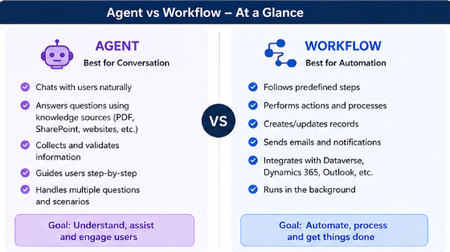
Hey everyone! 👋 Raise your hand if this has happened to you... You open Copilot Studio for the first time, you're excited, you're ready to build and then the very first screen asks you: "What would you like to build?" [ Agent ] [ Workflow ] And your brain just goes blank. 😅 Which one? What's the difference? Does it even matter which I pick? I've been there. I picked randomly, built halfway through, and then realized I probably chose the wrong one. So I put together this quick breakdown to save you that frustration! The One-Line Answer Agent = Conversation. Workflow = Automation. That's the core of it. But let me unpack what that actually means in practice. Here's a Visual That Makes It Click Let's Break It Down Simply 🤖 Choose an Agent when... Your tool needs to talk to people and actually understand what they're saying. An Agent is like a smart assistant that: Chats with users in a natural, back-and-forth way Pulls answers from your knowledge sources like PDFs, SharePoint, or websites Asks follow-up questions to collect and validate information Guides users through a process step by step Handles all kinds of different questions without breaking Its whole goal? Understand, assist, and engage the person in front of it. Real example: A customer types "I need help with my invoice" - the Agent reads that, asks the right follow-up questions, and helps them resolve it without any human stepping in. ⚙️ Choose a Workflow when... You need something to run in the background and get things done - no conversation needed. A Workflow is like a reliable robot that: Follows a fixed set of predefined steps every single time Performs actions and processes automatically Creates or updates records in your systems Sends emails and notifications at the right moment Connects with Dataverse, Dynamics 365, Outlook, and more Just runs — quietly, consistently, without anyone needing to interact with it Its whole goal? Automate, process, and get things done. Real example: When a new employee is added to the system → automatically create their accounts, send a welcome email, and notify their manager. No one has to lift a finger. The Simplest Way to Decide Ask yourself just one question: Does someone need to have a conversation with it? Yes → Build an Agent No → Build a Workflow That single question will get you to the right answer 90% of the time. The Mistake Most Beginners Make A lot of us (myself included!) jump straight to building an Agent because it sounds more exciting and powerful. But if your process is just a series of fixed steps with no real conversation involved, a Workflow will do the job faster, cleaner, and more reliably. You don't have to choose just one forever. A really powerful pattern is having your Agent handle the conversation and then trigger a Workflow to do the heavy lifting in the background. Best of both worlds! 🙌 Quick Recap Agent Workflow Best for Conversation Automation Talks to users? Yes No Follows fixed steps? Not always Always Runs in background? No Yes Connects to systems? Can Yes, natively Hope this clears things up! Drop your questions below especially if you have a specific use case you're trying to figure out. Happy to help you work out which one fits. 😊1.1KViews2likes1Comment
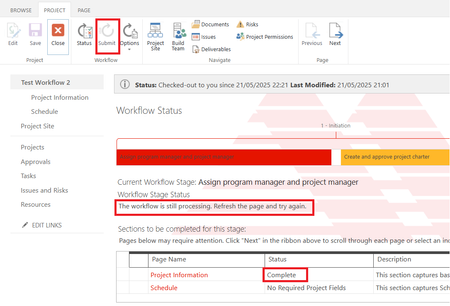
Project Online 'Submit' button is greyed out and the workflow is stuck at processing stage.
I created Project Online workflow using SharePoint Designer 2013 and published it. The workflow contains no errors as validated on SP Designer 2013. I create a project using the EPT that is linked to the published workflow, and updated all the mandatory fields. However the workflow submit button is greyed out even after I saved, published and checked in the project. the workflow is stuck at processing stage and it still the same even after I restarted it few times. Please advise how to make Submit button to active.511Views0likes9Commentsoptional suggestion: new menu bar app for mac
i wish i could launch one of my edge profile (no matter from which edge) directly in the menu bar. so you create a profile launcher.app and then i can search a profile installed on my 4 browser, without need to launch a browser. at the moment we can do similar things once the browser is launched using the dock icon or using the sync icon or using the menu bar option inside edge. but there is still the limit that we can do it for one browser. we cannot search profiles installed on all 4 browser. plus every time you launch the browser, you open the last used profile. so we first need to close and then switch (which requires time). profile switching is slower in edge compared to google. now with this new app you would simply launch a profile inside an edge app, without launching the previous profile.5KViews2likes10Comments
Workflow-webhook not tied to user
Hello! We are developing applications in AWS (sorry, guys), and some workloads require posting to Teams channels using webhooks via Workflows (the new webhook way). We are also using webhooks to notify in Teams when Github actions finish or need interactions. However, when creating the webhook in Workflows it only seems possible to tie the webhook to a regular user. Are there any ways to use a Service Account / Service principal as the webhook/workflow owner? Using a regular user account as the webhook owner is a major drawback, eg. the need to rewrite all webhooks if the user quits the company and is disabled in Entra ID. Regards globus68324Views0likes0CommentsUpdate: Cost-effective genomics analysis with Sentieon on Azure
Sentieon pipelines allow researchers and clinicians to process and analyze genomic data quickly, accurately, and efficiently with a low total cost of ownership. Here we have an update to the previous results for new version of the software.
Can you edit a posted message in a channel that was made by Workflow?
Trying to edit a posted message a few weeks back that was done via Workflow (Recurrence > Post message in a chat or channel) and unable to see an way to modify it. I know you can edit the message in the Workflow, but not after it is published to my knowledge445Views0likes0CommentsUsing PowerShell to Post Channel Messages with Teams Workflows
The incoming webhook connector is a popular method to post information to Teams channels, but Microsoft seems set on retiring the Office connectors. The Teams post to channel workflow when a webhook request is received seems like is a possible replacement, but it’s not just a matter of switching mechanisms. Some PowerShell magic is needed to create a suitable adaptive card to post to the channel, which is exactly what we explain how to do here. https://office365itpros.com/2024/06/17/teams-post-to-channel-workflow/6.4KViews1like0Comments