workflow
56 TopicsAgent vs. Workflow in Copilot Studio - Which One Do I Actually Need?
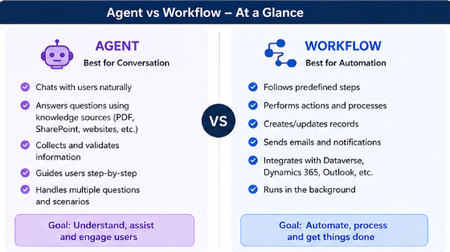
Hey everyone! 👋 Raise your hand if this has happened to you... You open Copilot Studio for the first time, you're excited, you're ready to build and then the very first screen asks you: "What would you like to build?" [ Agent ] [ Workflow ] And your brain just goes blank. 😅 Which one? What's the difference? Does it even matter which I pick? I've been there. I picked randomly, built halfway through, and then realized I probably chose the wrong one. So I put together this quick breakdown to save you that frustration! The One-Line Answer Agent = Conversation. Workflow = Automation. That's the core of it. But let me unpack what that actually means in practice. Here's a Visual That Makes It Click Let's Break It Down Simply 🤖 Choose an Agent when... Your tool needs to talk to people and actually understand what they're saying. An Agent is like a smart assistant that: Chats with users in a natural, back-and-forth way Pulls answers from your knowledge sources like PDFs, SharePoint, or websites Asks follow-up questions to collect and validate information Guides users through a process step by step Handles all kinds of different questions without breaking Its whole goal? Understand, assist, and engage the person in front of it. Real example: A customer types "I need help with my invoice" - the Agent reads that, asks the right follow-up questions, and helps them resolve it without any human stepping in. ⚙️ Choose a Workflow when... You need something to run in the background and get things done - no conversation needed. A Workflow is like a reliable robot that: Follows a fixed set of predefined steps every single time Performs actions and processes automatically Creates or updates records in your systems Sends emails and notifications at the right moment Connects with Dataverse, Dynamics 365, Outlook, and more Just runs — quietly, consistently, without anyone needing to interact with it Its whole goal? Automate, process, and get things done. Real example: When a new employee is added to the system → automatically create their accounts, send a welcome email, and notify their manager. No one has to lift a finger. The Simplest Way to Decide Ask yourself just one question: Does someone need to have a conversation with it? Yes → Build an Agent No → Build a Workflow That single question will get you to the right answer 90% of the time. The Mistake Most Beginners Make A lot of us (myself included!) jump straight to building an Agent because it sounds more exciting and powerful. But if your process is just a series of fixed steps with no real conversation involved, a Workflow will do the job faster, cleaner, and more reliably. You don't have to choose just one forever. A really powerful pattern is having your Agent handle the conversation and then trigger a Workflow to do the heavy lifting in the background. Best of both worlds! 🙌 Quick Recap Agent Workflow Best for Conversation Automation Talks to users? Yes No Follows fixed steps? Not always Always Runs in background? No Yes Connects to systems? Can Yes, natively Hope this clears things up! Drop your questions below especially if you have a specific use case you're trying to figure out. Happy to help you work out which one fits. 😊1.1KViews2likes1CommentSentieon pipelines on Azure – An overview
Sentieon specializes in developing software tools for analyzing genomic data. Sentieon pipelines are software tools that allow researchers and clinicians to process and analyze genomic data quickly, accurately, and efficiently. Sentieon develops and supplies a suite of highly optimized bioinformatics algorithms for secondary analysis, providing accurate, efficient, performant, and robust tools for studying genomic data obtained from DNA sequencing. Sentieon DNAseq and TNseq enable germline and somatic variant calling, providing improved performance and accuracy compared to comparable pipelines.3.3KViews2likes0Commentsoptional suggestion: new menu bar app for mac
i wish i could launch one of my edge profile (no matter from which edge) directly in the menu bar. so you create a profile launcher.app and then i can search a profile installed on my 4 browser, without need to launch a browser. at the moment we can do similar things once the browser is launched using the dock icon or using the sync icon or using the menu bar option inside edge. but there is still the limit that we can do it for one browser. we cannot search profiles installed on all 4 browser. plus every time you launch the browser, you open the last used profile. so we first need to close and then switch (which requires time). profile switching is slower in edge compared to google. now with this new app you would simply launch a profile inside an edge app, without launching the previous profile.5KViews2likes10CommentsUsing PowerShell to Post Channel Messages with Teams Workflows
The incoming webhook connector is a popular method to post information to Teams channels, but Microsoft seems set on retiring the Office connectors. The Teams post to channel workflow when a webhook request is received seems like is a possible replacement, but it’s not just a matter of switching mechanisms. Some PowerShell magic is needed to create a suitable adaptive card to post to the channel, which is exactly what we explain how to do here. https://office365itpros.com/2024/06/17/teams-post-to-channel-workflow/6.4KViews1like0Comments