windows
8 TopicsSecure Boot Q&A opportunities continue in July
If you're still working through Secure Boot certificate update rollouts, Microsoft is continuing the conversation throughout July with three opportunities to get your questions answered by the people closest to the technology. Whether you're focused on Windows Server deployments, virtualization platforms, or OEM updates, these upcoming events are designed to help you navigate planning, validation, troubleshooting, and implementation questions in a live, interactive format. Microsoft engineers and subject matter experts will be available to respond directly to questions from the community. Coming up in July: July 1 - Windows Server Secure Boot AMA Ask Microsoft engineers about Secure Boot certificate updates in Windows Server environments, including deployment planning, monitoring, troubleshooting, and more. July 8 - Secure Boot Office Hours for virtualized environments Bring your questions about Hyper-V, Azure offerings, Windows 365, VMware, and other virtualization scenarios. July 15 - OEM Secure Boot Office Hours Connect with experts to discuss OEM-specific questions, such as firmware considerations, as you prepare for or validate Secure Boot certificate updates. Questions don't have to wait until the events start. With community events, you can post your questions and comments ahead of time, then join the discussion live or catch up when it's convenient for you. Hope you find these events helpful. You can also catch up on demand with the series of Secure Boot AMAs that have taken place over the past several months. Here are the three most recent editions: Ask Microsoft Anything: Secure Boot - June 2026 Ask Microsoft Anything: Secure Boot - May 2026 Ask Microsoft Anything: Secure Boot - April 2026169Views1like0CommentsWhy Windows Should Adopt ReFS as a Bootable Filesystem
ReFS could become a bootable filesystem — it only needs a few missing layers. No need to copy NTFS, just implement what the Windows boot process requires. Key missing pieces: System‑level journaling (not only metadata) Full hardlink + extended attribute support EFS, ACLs, USN Journal for security + Windows Update Boot‑critical atomicity for safe system file updates Bootloader‑compatible APIs (BCD, BitLocker pre‑boot, WinRE, Secure Boot) Goals: Use NTFS as a reference map, add the missing capabilities to ReFS, and optimize them using ReFS features (copy‑on‑write, integrity streams, block cloning). Result: A modern, resilient filesystem that can finally boot Windows - without losing its benefits.320Views1like7CommentsWhen the audio pipeline decides to act up 😂🤌
Ever since build 2820.x.x.x, I’ve been keeping an eye on one specific process — Audio Graph Isolation. And this little troublemaker 😂 sometimes decides it wants to “spice up your day.” Not by taking a few MB of RAM… Oh no, no — it goes straight for several gigabytes 😂 So you’re just sitting there, wondering why your system suddenly starts lagging, why the audio sounds like a corrupted Star Trek transmission after a virus attack 🙈😂 You open Task Manager, sort by RAM usage… And there it is, grinning at you, Audio Graph Isolation, quietly turning your system into its personal victim 🙈 How to deal with it until Microsoft finally fixes this regression? Honestly — the only thing that works is: 👉 force‑killing Audio Graph Isolation in Task Manager And boom, your system instantly gets its speed back. Unfortunately, because of this regression, you have to keep an eye on this process regularly, since the RAM leak can happen anytime during idle — whether you’re watching a movie, listening to music, or the system is just running with no user input.349Views0likes2Comments
Windows 11 Insider Preview Update Progress Issue
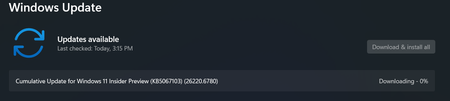
I tried to update and install one Windows update, but it keeps on showing as 0% or 8% and it is not progressing after 8%. I tried necessary trouble shooting steps like pausing the update for some time and then trying again. But it didn't work out. The update that I trying to update and install is "Cumulative Update for Windows 11 Insider Preview (KB5067103) (26220.6780)" It shall be great if anyone respective person can assist me with this issue.247Views1like3Comments
WDAC: Unable to deploy Vulnerable driver blocklist
Hello, I tried to deploy the Microsoft Vulnerable driver blocklist with an Intune WDAC policy but i always faced an error using the XML provided by Microsoft : https://aka.ms/VulnerableDriverBlockList MS doc: https://learn.microsoft.com/en-us/windows/security/application-security/application-control/app-control-for-business/design/microsoft-recommended-driver-block-rules Thanks and regards493Views0likes2CommentsHow to recover files from corrupted USB drive on Windows 10?
Recently, I ran into a frustrating issue with my USB flash drive that left me feeling completely stuck. I plugged it into my Windows 10 PC, and while the drive did show up in File Explorer, I couldn’t open it. Instead, I got an error that said: "E:\ is not accessible. The file or directory is corrupted and unreadable." One day the USB was working fine, and the next day, I couldn’t access anything. The worst part is that this drive holds a lot of important family photos. So, formatting the USB drive (as many people suggest online) isn’t really an option for me right now. I’ve seen some people suggest using data recovery tools, but I’m not sure which ones actually work, or if I should go to a professional. Has anyone successfully recovered files from a corrupted USB like this? Any advice would be greatly appreciated.511Views0likes3Comments
AppCompat with MSIX
Hi, I'm repackaging some (very) old apps in MSIX, and I'm facing a situation where I need to enable some app compatibility shims. I've tried doing this with the `registry.dat` registry hive, but it doesn't seem to work. I think I've heard something about using SDB in a MSIX package once, but I might be imagining things. Right now I've resorted to using an ImportRedirectionTable and a redirection DLL, but this only works for simple cases like Windows version lie. It would be amazing if there was a way to use an SDB inside a MSIX, but if the registry option could work, that'll do too. Did anybody manage to make this work? Thanks!287Views0likes1Comment