windows virtual desktop
55 TopicsLive AMA: Microsoft Agent 365
Learn more about the capabilities of Agent 365 in this live 'Ask Microsoft Anything' with product and engineering team experts! Get your questions answered about capabilities for agent observability, security, and governance, developer resources, and how to get started as you confidently scale agents in your organization. How to Participate Register for the Microsoft Tech Community using your email if you haven’t already. This allows you to post comments and ask questions. Visit this page during its scheduled time to join the conversation. You can post your questions in the comments, and product team members will respond live during the AMA. Watch the session live or catch the recording on demand after the event. Keep the conversation going in the Agent 365 discussion space after the sessions conclude. It’s a great place to follow up, share what’s working, and connect with others exploring similar topics. Hope to see you there! Come ready to learn and ask our experts all of your burning questions!7.4KViews7likes88Comments
WVD - Intune Auto enrolment for AAD only organisation
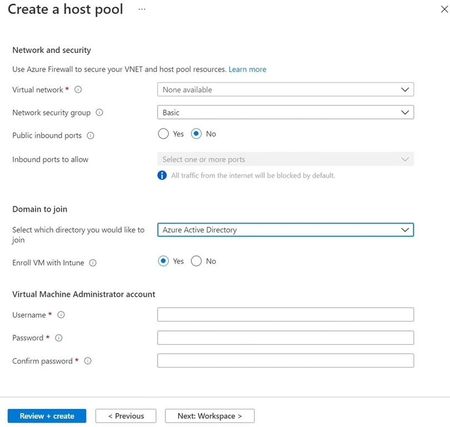
Hi All, been going round in circles... since we are completely Azure AD organisation, been told that we cannot do Intune Auto-enrolment for our WVD devices? Been pointed to articles that devices need to be hybrid AAD joined and since we don't have on-prem AD its not possible. Any thoughts on how we can achieve Intune Auto-enrolment pls?3.5KViews0likes8CommentsAzure Virtual Desktop: The flexible cloud VDI platform for the hybrid workplace
When we launched Windows Virtual Desktop nearly two years ago, no one predicted a global pandemic would force millions of workers to leave the office and work from home. Organizations around the world migrated important apps and data to the cloud to gain business resilience and agility. And to support the newly remote workforce, many of you turned to Windows Virtual Desktop to give remote users a secure, easy to manage, productive personal computing experience with Windows 10 from the cloud. It has been humbling to work alongside you as you pivoted your operations to meet new challenges – from supporting frontline healthcare workers at NHS to engineers at Petrofac to educators and students. Going forward, organizations will need to support an evolving set of remote and hybrid work scenarios. To help our customers and partners meet these new hybrid work demands, we are expanding our vision to become a flexible cloud VDI platform for nearly any use case – accessible from virtually anywhere. A modern VDI platform needs to be secure, scalable, and easy to manage, while delivering a seamless, high-performance experience to end users. It should also empower organizations with the flexibility to customize and build solutions with its core technology. To support this broader vision and the changing needs of our customers, today we are announcing new capabilities, new pricing for app streaming, and changing the name of the Windows Virtual Desktop service to Azure Virtual Desktop. New platform capabilities for security and management We are continually adding new capabilities to the core Azure Virtual Desktop platform. Today we are also pleased to announce the public preview of new features that will help you onboard and better manage your Azure Virtual Desktop deployment. Enhanced support for Azure Active Directory (coming soon in public preview): Azure Active Directory is a critical service used by organizations around the world to manage user access to important apps and data and maintain strong security controls. We are pleased to announce that you’ll soon be able to join your Azure Virtual Desktop virtual machines directly to Azure Active Directory (AAD) and connect to the virtual machine from any device with basic credentials. You’ll also be able to automatically enroll the virtual machines with Microsoft Endpoint Manager. For certain scenarios, this will help eliminate the need for a domain controller, help reduce cost, and streamline your deployment. While this is a major milestone, it’s just the beginning of the journey towards full integration with Azure Active Directory. We will continue adding new capabilities such as support for single sign-on, additional credential types like FIDO2, and Azure Files for cloud users. Manage Windows 10 Enterprise multi-session VMs with Microsoft Endpoint Manager (available now in public preview) - Microsoft Endpoint Manager allows you to manage policies and distribute applications across devices. You can now enroll Windows 10 Enterprise multi-session Azure Virtual Desktop virtual machines in Microsoft Endpoint Manager and manage them in the Microsoft Endpoint Manager admin center the same way you manage shared physical devices. This simplifies management and provides a centralized view across both physical devices and virtual desktops. Read the Windows 10 Enterprise multi-session documentation to learn more. Deploy in minutes with new Quickstart experience (coming soon in public preview): We are pleased to offer a streamlined onboarding experience for Azure Virtual Desktop in the Azure portal. This new experience will validate requirements, kick off an automated deployment, and will also implement best practices. With only a few clicks, you can set up a full Azure Virtual Desktop environment in your Azure subscription. You will find this new experience under “Quickstart” in the Azure Virtual Desktop blade in the Azure portal. New pricing option for remote app streaming Many organizations are using Azure Virtual Desktop to stream apps to their own employees who are covered by existing license entitlements. But many organizations also want to use Azure Virtual Desktop to deliver applications “as-a-service” to customers and business partners as well. Today we are pleased to announce a monthly per-user access pricing option for organizations to use Azure Virtual Desktop to deliver apps from the cloud to external (non-employee) users. For example, this would enable software vendors to deliver their app as a SaaS solution that can be accessed by their customers. In addition to the monthly user price for Azure Virtual Desktop, organizations also pay for Azure infrastructure services based on usage. Here's what one ISV had to say about the new pricing option: “Sage is trusted by millions of customers worldwide to deliver innovative business solutions to manage finances, operations and people. Streaming applications with Azure Virtual Desktop makes it easy to streamline user access to our solutions on the Azure cloud for a great online customer experience.” James Westlake, Director of Product Management, Sage Try it during our promotional period The new per-user access pricing option will be effective on January 1, 2022. To help organizations get started now, we are pleased to offer a special promotion with no charge to access Azure Virtual Desktop for streaming first-party or third-party applications to external users. This promotion is effective from July 14, 2021 to December 31, 2021. Pricing for monthly user access rights effective on January 1, 2022 will be: $5.50 per user per month (Apps) $10 per user per month (Apps + Desktops) This promotion only applies to external user access rights. Organizations would continue to pay for the underlying Azure infrastructure. Organizations should continue to use existing Windows license entitlements, such as Microsoft 365 E3 or Windows E3 and higher, for app streaming to their employees. Visit our web page for more details. Expanding partner ecosystem As a cloud VDI platform, we work closely with our partners and empower them to build solutions that meet your needs. For example, Citrix and VMware provide desktop and app virtualization solutions that leverage the Azure Virtual Desktop platform capabilities, such as Windows 10 Enterprise multi-session, and allow you to maximize your existing investments and use the tools and solutions with which you are already familiar. We are also proud of our ecosystem of hundreds of partners who build custom solutions and provide technical consulting to help you deploy with confidence. Visit Azure Marketplace for more information on partner solutions, and Advanced Specialization page for certified deployment partners. Getting started My team and I look forward to partnering with you to take full advantage of our flexible VDI platform in the cloud and unlock new end user computing possibilities. We appreciate your ongoing support and welcome your feedback. Join us on our Tech Community to connect with my team and other customers and partners to share your feedback and suggestions. To learn more about these announcements, please sign up for our upcoming webinar.7.1KViews6likes10CommentsCustom Template for WVD - "Add computer to AD Group" upon joining the domain
Hello All, We have a tricky scenario with our WVD deployments wrt GPO's that are being applied to session hosts upon joining the domain and OU. We deployed a DNS Server in Azure with Conditional forwarders for our ON-Prem Domain and a forwarder for Public DNS and configured this Azure hosted DNS IP on our WVD-VNet. This ensures that all domain requests and internet access in handled locally by this Az-hosted DNS server. However, the GPO with DNS Settings - updates the VNet inherited DNS IP to On-Prem DNS server on WVD SessionHosts once they are joined to domain in a specific OU. The On-prem DNS server doesn't resolve any WVD URL's due to security policies in place. This is blocking WVD Agent from updating to 1.0.2990.1500 version (not sure why the previous version - 1.0.2800.2800 is first chosen and upgraded to latest) and getting stuck as On-prem DNS / FW doesn't allow any internet traffic. Now we got further info from our AD team. A scheduled script is executed that adds the computers added to our WVD-OU to a unique WVD-Computer group on which DNS-GPO is disabled/not applied. The issue here is, once the machine is added to domain-OU and reboot is done, by the time script is executed to add these computers to WVD-computer group, DNS policy is getting applied and machines are assigned with On-Prem DNS IP's. Even is the script is run and session host is added to WVD-group, a gpupdate isn't reverting the DNS on session hosts. We are being forced to manully update the adapter settings / change the nic in portal to make the sessionhost use Azure hosted VM --> complete upgrade process --> become healthy/available. Seeking few solutions here 1) to get a custom template (if any) to add the computers to WVD-group directly while joining the domain 2) any workaround/automation to update VM nic Any suggestions would be greatly appreciated. Thanks, PK933Views0likes0Comments
WVD Scaling Script: Doesn't Logoff user sessions and stop VMs during off-peak hours
Hi, We have experienced that during the off-peak hours the scaling script doesn't logoff user sessions and stop VMs when there are active or disconnected sessions. Minimum number of running session host threshold is set to 1 Findings: Script recognize it as off-peak hours but doesn't logoff any user sessions. But we have noticed following log not sure if there is any relation. Number of user sessions is more than 90 % of the max number of sessions allowed with minimum number of running session hosts required (10). Adjusted minimum number of running session hosts required to 2 Any advice or a solution for this ? Thank You! BR, Romero Silva3.9KViews0likes2CommentsAzure Monitor for Windows Virtual Desktop is generally available!
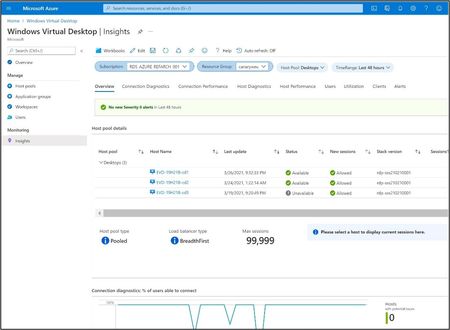
Today, we are thrilled to announce that Azure Monitor for Windows Virtual Desktop is now generally available! Building on top of Azure Monitor, Windows Virtual Desktop Insights provides IT administrators with a 360° view of their environment’s health. With Azure Monitor for Windows Virtual Desktop, you can find and troubleshoot problems in the deployment, view the status and health of host pools, diagnose user feedback and understand resource utilization. General availability comes with many improvements, including the following: Improved data collection and new guidance to help you optimize for cost Updated setup experience with easier UI, expanded support for VM set-up, automated Windows Event Log setup, and more Relocated Windows Virtual Desktop agent warnings and errors at the top of the Host Diagnostics page to help you prioritize issues with the highest impact Accessibility enhancements Workbook versioning: GA release is Version 1.0.0 For our existing users- if you used Azure Monitor for Windows Virtual Desktop in public preview, we have made some updates to our guidance and default configuration to help reduce your Azure Monitor Log Analytics cost in GA. If you haven’t already, you must take action to implement these revised recommendations. See our blog post for instructions. We are incredibly excited about this major milestone and are looking forward to continuing to provide updates and expand scenario support in our monitoring journey. As always, we welcome your comments and feedback below! Best, Logan Silliman Learn more about Azure Monitor for Windows Virtual Desktop: Get started with Using Azure Monitor for Windows Virtual Desktop Estimate and manage your Log Analytics storage costs with Estimate Azure Monitor costs Review terms and concepts in our glossary If you encounter a problem, check out our troubleshooting guide for help27KViews6likes0Comments
Cannot Sign in Remote Desktop app on a Chromebook
I have the Microsoft Remote Desktop app (aka RD client) on a Chromebook. I click to add a Remote Resource Feed (aka Workspace). I enter this URL: https://rdweb.wvd.microsoft.com/api/arm/feeddiscovery It takes me to my AAD sign-in page. I do password and MFA. After that, a fleeting message appears in the lower-left: Sign-in was cancelled. And I am back to the home page with nothing. "It's lonely here". What is going wrong on this Chromebook? I have already used the PC Remote Desktop app successfully. On the PC, I have two WVD desktops (application groups). In the AzureAD logs, I have this message: The app needs access to a service ('{name}') that your organization '{organization}' has not subscribed to or enabled. Contact your IT Admin to review the configuration of your service subscriptions. How do I get past this problem on a Chromebook?1.7KViews1like0CommentsWindows Virtual Desktop Announcements at Microsoft Ignite
We hope you are all enjoying the Microsoft Ignite conference. Here are some announcements on Windows Virtual Desktop that you will be hearing during the event. Azure Monitor for Windows Virtual Desktop - Provides a centralized view with all the monitoring telemetry and visualizations you need to debug and troubleshoot issues. We have received amazing feedback during the public preview and have made several updates to this capability including: A designated report page for your Azure Alerts A prioritized view of Windows Virtual Desktop agent errors and warnings in Host Diagnostics Consistent coloring and default health thresholds Export to Excel option across all relevant reports Accuracy and user experience improvements Thank you for the support during the public preview. We expect to make Azure Monitor for Windows Virtual Desktop generally available in next few weeks, with additional updates in store. Learn more about Azure Monitor for Windows Virtual Desktop In case you had missed, here’re some recent announcements we made leading up to Microsoft Ignite. EU metadata storage now in public preview - We have a public preview of the Europe (EU) geography as a storage option for service metadata in Windows Virtual Desktop. Customers can choose between West or North Europe when they create their service objects. The service objects and metadata for the host pools will be stored in the Azure geography associated with each region. To learn more, read our blog post announcing the public preview Windows Virtual Desktop Specialty certification - We announced a new Windows Virtual Desktop Specialty Certification for professionals planning, delivering, and managing virtual desktop experiences and remote apps on Azure. The related Exam AZ-140: Configuring and operating Windows Virtual Desktop on Microsoft Azure will be available soon in beta version. Smartcard authentication – You can now use smartcard authentication (available in public preview) with the Windows client from outside the corporate network without requiring line-of-sight to the Domain Controller. Learn more about supported authentication methods. You can keep track of these and other news about Windows Virtual Desktop in our what’s new page.19KViews0likes27CommentsMicrosoft is committed to ensuring all biz-critical apps work on the latest versions our tech
Welcome to the App Assure discussion board on Tech Community. For those of you getting to know App Assure for the first time, the FastTrack App Assure program was launched in 2018 to fulfill Microsoft’s promise on application compatibility: we are committed to ensuring all business-critical apps work on the latest versions of our technology. While most apps will continue to work following deployment on the latest Microsoft products, App Assure engineers are available to help resolve any issues you might experience. App Assure supports application compatibility on: Windows 10 Microsoft 365 Apps (previously Office 365 ProPlus) Windows Virtual Desktop (WVD) Microsoft Edge Windows 10 on ARM64 PCs App Assure remediates issues for: Customer Developed Line of Business (LOB) Applications Independent Software Vendor (ISV) Applications Microsoft First-Party Products App Assure is part of the FastTrack benefit, which comes at no additional cost with eligible Microsoft 365 and Windows 10 plans of 150+ licenses. Since launching, App Assure has received and evaluated nearly 750,000 applications, allowing our engineers to study and learn from customer experiences. Only a small group (approximately 0.31%) reported having any compatibility issues at all after upgrading to the latest Microsoft products, and certain questions and concerns appeared frequently. Be sure to reach out to us here on the discussion board, where our subject matter experts from our engineering and program teams will answer your questions. You can also contact us: Submit a Request for Assistance for valid app compat issues Questions? Email: achelp@microsoft.com For more information visit: aka.ms/appassure We are here for you. Seriously...reach out! Oh, and we support multiple global languages: English Japanese Chinese - simplified and traditional German French Spanish Korean Portuguese (BR) Italian914Views5likes0CommentsAnnouncements at Windows Virtual Desktop Master Class
Windows Virtual Desktop Master Class is a virtual event where Windows Virtual Desktop experts from Microsoft as well as members of our community come together to share tips and best practices for deploying and scaling virtual desktops and remote applications on Azure. We are making several exciting announcements at the event: Promotion for new customers through March 31, 2021 - New customers save 30% on Windows Virtual Desktop computing costs for D-series and Bs-series virtual machines for up to 90 days. You can learn more about the offer here. Skilling - We are announcing a new Windows Virtual Desktop Specialty certification for professionals planning, delivering, and managing virtual desktop experiences and remote apps on Azure. The related Exam AZ-140: Configuring and operating Windows Virtual Desktop on Microsoft Azure will be available soon in beta version. If you are looking for a certified partner to help with you deployment, you can continue to leverage the advanced specialization program which complements the Azure MSP program. Product announcements – The features that we had pre-announced at Microsoft Ignite in September are now in public preview: Azure Monitor for Windows Virtual Desktop -Provides a centralized view with all the monitoring telemetry and visualizations you need to debug and troubleshoot issues. Learn More MSIX app attach in the Azure portal - MSIX app attach is an application delivery solution that allows you to dynamically attach an application in MSIX format to a user session. Previously, you had to use PowerShell scripts, but now the MSIX app attach capability is available in public preview in the Azure portal and is integrated with Azure Resource Manager. Learn More. Screen capture protection – Disables screen capture for your remote apps and desktop on all the supported Windows Virtual Desktop clients RDP short path – Establishes a direct peer-to-peer UDP connection to the session host rather than over the internal Windows Virtual Desktop gateways taking into account the type of network from which you are connecting. This provides a secure experience with less connection latency and better performance. Learn More Microsoft Defender for Endpoint integration (Generally Available) – With this integration, you get the full investigation experience you have with Windows 10 machines, now for Windows Virtual Desktop VMs. If you are using Windows 10 Enterprise multi-session, Microsoft Defender for Endpoint will support up to 50 concurrent user connections – so you get the cost savings of Windows 10 Enterprise multi-session and the confidence of Microsoft Defender for Endpoint. Learn More For a deep dive into these announcements and to learn more about security, cost optimization, and other topics, tune into the Windows Virtual Desktop Master Class!5.9KViews6likes4Comments