windows virtual deskop
16 Topics
Need Help: Shortpath Drops & RDstack error in AVD
I’m seeing persistent AVD connection issues and would appreciate guidance. Frequent ShortpathTransportNetworkDrop (68) and ShortpathNetworkDrop (16644) errors GetInputDeviceHandlesError (4463) US based users and hostpool/sessionhost Users experience instability and degraded performance633Views0likes2Comments
Mouse Click Offset Issue in Azure Virtual Desktop App on Windows 11 with Dual Monitors
We are experiencing a recurring mouse misalignment issue when using the Azure Virtual Desktop (AVD) Windows App on several Windows 11 clients. The problem occurs on devices with two external monitors and affects multiple users. Environment Windows version: 10.0.26200.6899 (Windows 11, 25H2) AVD Windows App: mainly version 2.0.757.0, some clients are on slightly different versions Hardware: Windows 11 PCs with two external monitors Display settings: both monitors at 1920x1080, 100% scaling Mac users (using the AVD app) report no issues Issue description The visual mouse pointer and the actual click position become misaligned inside the AVD RemoteApp session. For example, clicking on one item may select the item below it. This appears to be a rendering or coordinate-mapping issue within AVD when running inside the Windows App. Temporary workaround Minimizing the AVD window and then maximizing it immediately resolves the issue. This refresh/redraw action realigns the pointer and click coordinates. Questions Has anyone else seen mouse click offset issues in the AVD Windows App on Windows 11 25H2 with dual-monitor configurations? Are there known fixes, configuration adjustments, or recommended workarounds beyond the minimize/maximize redraw?1.1KViews0likes3Comments
Function app script stopped working
I have a simple function app that uses https://github.com/tsrob50/WVD-Public/blob/master/StopSH-MultiHostPools.ps1 to shut down inactive AVD VMs that had worked for about two years simply stopped working. Instead, it produce this error: ERROR: Error stopping the VM: GenericArguments[0], 'Microsoft.Azure.Management.Compute.Models.VirtualMachine', on 'System.Nullable`1[T] MaxInteger[T](System.Collections.Generic.IEnumerable`1[System.Nullable`1[T]])' violates the constraint of type 'T'. After much troubleshooting and searching for something relevant, I discovered that the function app's host.json file was set to: { "version":"2.0", "managedDependency": { "Enabled": true }, "extensionBundle": { "id": "Microsoft.Azure.Functions.ExtensionBundle", "version": "[2.*, 3.0.0]" } } Since v.2 and v.3 are [no longer supported](http://learn.microsoft.com/en-us/azure/azure-functions/functions-versions?tabs=isolated-process%2Cv4&pivots=programming-language-powershell), I changed it to { "version":"2.0", "managedDependency": { "Enabled": true }, "extensionBundle": { "id": "Microsoft.Azure.Functions.ExtensionBundle", "version": "[4.0.0, 5.0.0]" } } ``` I also noticed that the `requirements.psd1` file was set to # This file enables modules to be automatically managed by the Functions service. # See https://aka.ms/functionsmanageddependency for additional information. # @{ # For latest supported version, go to 'https://www.powershellgallery.com/packages/Az'. # To use the Az module in your function app, please uncomment the line below. 'Az' = '8.*' } So I changed it to # This file enables modules to be automatically managed by the Functions service. # See https://aka.ms/functionsmanageddependency for additional information. # @{ # For latest supported version, go to 'https://www.powershellgallery.com/packages/Az'. # To use the Az module in your function app, please uncomment the line below. 'Az' = '13.*' } None of this helped. The same error was generated. I then realized I might need to restart the app, which I did. After this, I see this warning and error: 2025-03-03T21:42:45Z [Warning] The first managed dependency download is in progress, function execution will continue when it's done. Depending on the content of requirements.psd1, this can take a few minutes. Subsequent function executions will not block and updates will be performed in the background. 2025-03-03T21:42:45Z [Error] Executed 'Functions.TwelveMinuteTimerTrigger' (Failed, Id=58b46678-c1d2-4ca8-8083-fab1e657c608, Duration=95ms) After waiting a while for the download to finish, I get this error: [Error] ERROR: Error getting a list of user sessions: The term 'Get-AzWvdUserSession' is not recognized as a name of a cmdlet, function, script file, or executable program. Check the spelling of the name, or if a path was included, verify that the path is correct and try again. The line "Get-AzWvdUserSession is not recognized" seems to indicate that the download of the Az modules has failed. Does anyone know what would cause the download to fail and how to fix it?332Views0likes2Comments
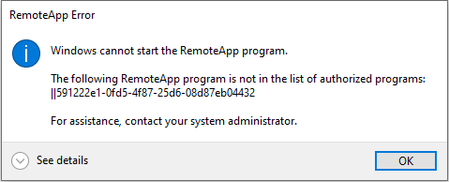
Problem - Default file association with Remote app in WVD
We are experiencing an issue with WVD Remote apps where default file associations are not working, even though if we configure via GPO using a .xml file. Note that we are only using remote apps and not the full desktop. Any advice on how to resolve this problem? or if not would like to know if it's in the road map to address this problem. Thank You! BR, Romero Silva6.4KViews1like4CommentsProblem - Access Desktop and the remoteapps simultaneously in WVD
Hi We have published a desktop and multiple applications using the same host pool but when we try to access published app and the desktop simultaneously follow error occurs. Sequence: 1st opened up the published app and then try to open the desktop. Other question is, what is the recommend method to publish apps and desktop? Can we do it using one single host pool or do we have use two different host pools with different FSLogix profile shares. Thanks, RomeroSolved4.7KViews0likes1CommentMac RD Client 10.3.12 Broken for WVD - no workspaces found for email address
Hi all, I've deployed several WVD using Powershell in different tenants. I have a few mac users and the latest Mac RD client does not work - it broke after an update a few months back and hasn't been fixed. If you go to workspaces, add workspace, type in the user's email address, it throws an error: No workspace is associated with this email address. The Windows client still works, as does the web client. I can't find any info online - I guess there aren't many mac users logging in to Azure hosted WVDs! Has anybody else out there experienced the same? I wonder whether this coincides with the new GUI tools in Azure which don't appear to work with WVD hostpools previously deployed via Powershell. Original post: https://docs.microsoft.com/en-us/answers/questions/55329/index.html6.5KViews0likes4CommentsClient and Microsoft Store
Is the current client going to be added to the Store or is the Remote Desktop App in the Store going to be updated to support WVD? As it is we have to keep updating the MSI in Intune manually. Doc: https://docs.microsoft.com/en-us/azure/virtual-desktop/connect-windows-7-10 Original post: https://github.com/MicrosoftDocs/azure-docs/issues/599301.4KViews0likes0CommentsHow to add previous session host back to WVD
I have setup WVD with host pool and new WVD is running and I am able to access both the whole RDP and remote app. but I did mistake to remove session hosts under host pool configuration. How to add previous WVD(vm) back to session host under host pool. Thanks Fang zhiyong Original post here.1.1KViews0likes0Comments